This release is a canary release intended to be used for testing.
Changes in this versions
This version now runs on .NET10! Apart from some speedup, the transition should not be noticeable.
This version also adds initial support for MacOS Photos, where it can now read photos, even if they are stored in iCloud.
Previous versions would back up the folder, which might not include all photos.
Use the option --photos-handling to disable or tweak this feature.
When using advanced options, the human-readable description is now displayed with the option name, and you can search for either.
Detailed list of changes:
Fixed an issue with SyncTool and retries that would fail on some backends
Improved support for OEM injection
Return status of backup in ServerUtil, thanks @greyxr
Updated to run on .NET10
Improved deadlock detection for restore with fewer false positives
Updated Uplink.NET to v2.14.3623 (for Storj backend)
Added support for MacOS Photos
Disabled internal timeout in AzureBlobStorage
Updated localizations, thanks to all translators!
ngclient changes:
Updated to latest ShipUI
Preload modules for better desktop performance
Fixed some issues with localization not being applied
Updates to the options list
Updated localizations, thanks to all translators!
Fixed an issue with Rclone not maintaining letter-case for remote
Simplified the schedule setup page
Improved AuthID picking
Improved integration with console
Cleaned the sidebar slightly
Fixed an issue with styling in settings
Restore flow will now default to not overwrite existing files
Added both option name and short description to advanced options
Fixed not showing “Verifying” at the start of the backup operation
I favor ngclient now allowing typing of times (like ngax) for its custom schedule, however requesting such a schedule seems to prevent Continue or Submit, and browser console is spitting various errors.
Left bar rearrangement dropped “Use old UI”. Seems a bit early. Maybe a bug?
To set the schedule, I got into ngax through URL and entered my schedule in it.
EDIT 1:
and ngclient displayed it incorrectly. Schedule was set for 11/21. ngax shows as
ngclient new UI incorrectly shows as
EDIT 2:
After the actual run at 7:20 AM Nov 20, new UI remains confused about next run:
I took the opportunity to test something I noticed a while ago, and it happened again. In this case my Fedora server.
Job is scheduled for 09:00, paused Duplicati in the GUI at 08.58 then manually stopped the service - it’s also set to wait 10min on start before resuming. I then upgraded to this release and started the service again, finishing at dead on 09:00 then checked the GUI. Duplicati was still paused, but the job at 09:00 started and began to run. I don’t think the job should be started in this case.
It looked to me like this broke in 2.1.0.118_canary_2025-05-12 and so also got into Stable release. I was testing jobs that already missed their run time, and yours was maybe slightly different timing (although “dead on 9:00” vs schedule is a close call).
Thanks for the report, and please add any additional information that might inform.
Back button on Schedule screen does not go to previous screen (Source data).
It acts like it’s ignored, but Edge console shows this:
Workaround is to click the Source Data screen in the row of buttons up top.
Another scheduling oddity I noticed when editing an existing job is it offers schedule, say 13:00 daily, but runs it prematurely on Continue, during edit. Watching browser developer tools, Continue scheduled run for day before, presumably causing scheduler to think it’s past due (it is…) and run it then.
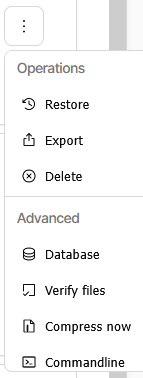
On better news, Details view is one line, and List view three-dot menu isn’t extending off the bottom or the right side of the screen any more, it seems.
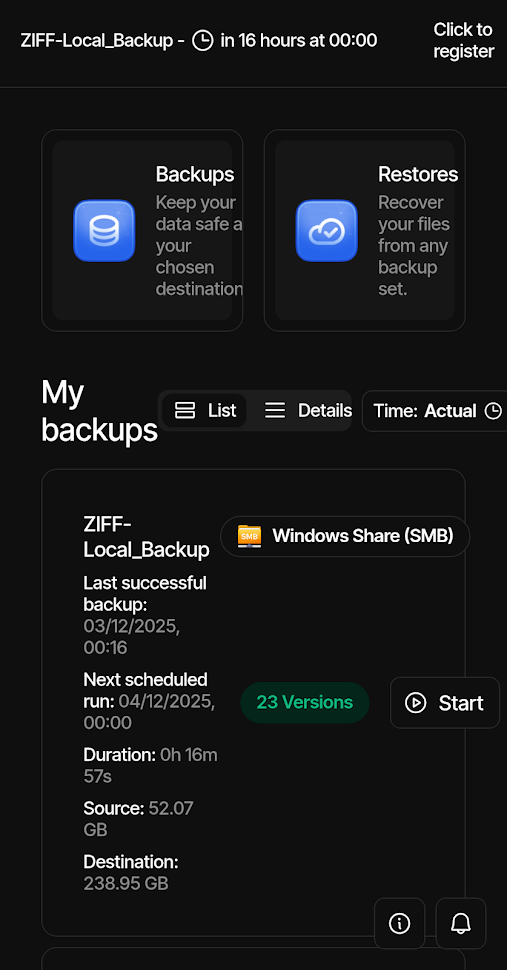
Adding my own experiences trying to us the new UI on my phone, I use Brave on Android. An example being trying to run a repair, and you can forget trying to run a purge as even when I think I get it right, it fails stating errors in the command.
It’s almost impossible to use with elements not showing unless I rotate the phone, and the left menu getting severely truncated.
If I switch the tab to “Desktop” it’s more usable as everything is there, but you have to pinch-zoom and scroll about all over the place.
I used to be able to just switch back to the old UI which worked, but since that was moved to settings it no longer works and just stays in the new UI - this does work on my desktop browsers though.
I think this may be some character that is encoded incorrectly.
Without sharing your password (obviously), can you share the most likely non-standard character that could cause it? I tried test#% as the password, and tried setting it with both ngclient and ngax, and both methods allowed login from either.
Thanks, I subscribed to the issue, but may I suggest that the mobile version defaults to the old UI until it’s fixed or make it a separate option, at least for me the new UI is almost useless on my phone and even worse now that I cannot even revert to the old UI unless I switch to desktop-mode and then that’s not great.
Eastern Standard Time so at UTC-5 since Sunday Nov 2 at 2 A.M. (after which Duplicati ran my 7:20 job at 6:20, just as if that half of the DST fix wasn’t done).
EDIT 1:
If I try setting 7:20 AM on Dec 4 in ngax, it looks right. Edit in ngclient receives
Regaring NGClient UI not recognizing my password, I just logged into NGAX with no problem. I still cannot login to the NGClient UI.
Sorry my previous reply didn’t post: My password consists of upper- and lower-case letters and numbers, like “H3ll0”. No special characters involved.
MacBook Pro M2, MacOS Tahoe, Firefox
UPDATE: I was reading in the UI Password help about the temporary token that the header-bar ICON uses to launch the UI without a password, but which can create an unknown password situation:
I tried launching the UI from the header-bar ICON, which brought up NGAX,
then clicked on “Use new UI", which brought up the NGClient UI without prompting for a password.
I then went back to my bookmarked NGClient and was then able to login with my password.
This may explain it? I usually launch Duplicati UI from bookmarks.
I’m still having the issue where some backups fail because of “remote files that are not recorded in local storage” errors. A database repair always fixes the problem as a re-run works fine, yet the next day even though it ran fine the previous time, it throws the error.
I’ve been running one of these jobs with profile level logging so I’m hoping someone can explain why - it’s run daily after 2 jobs on this server, the first to SMB which is scheduled, the next to Wasabi S3 which gets run by the completion of the first job, and then this final job started at the end of the second job, and only it’s the only one that fails. Both SMB destinations are on the same Windows server share but different subfolders and I could find no evidence of the share being unavailable.
This could perhaps help get option name from short help were it not for the search being unwilling to find options that are already in use – which sometimes serves as a terribly awkward way to figure out if an option is already in option list somewhere.
This came up from a user who was having trouble here handling advanced options, even somehow getting into the translated short help case I’ve been fretting about…
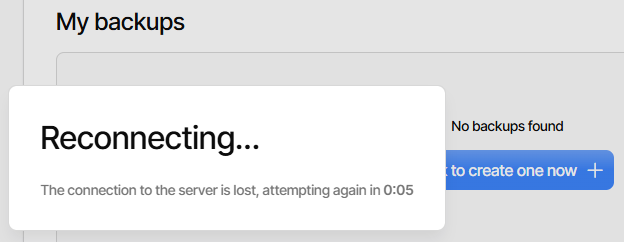
New sort of reconnect failure just showed up. I restarted Windows due to update,
started TrayIcon, and started Chrome. It didn’t connect (usual) but log is different:
2025-12-12 07:46:40 -05 - [Verbose-Duplicati.WebserverCore.Notifications.WebsocketAuthenticator-WebsocketInvalidToken]: WebSocket connection with invalid token
Microsoft.IdentityModel.Tokens.SecurityTokenMalformedException: IDX12741: JWT must have three segments (JWS) or five segments (JWE).
   at System.IdentityModel.Tokens.Jwt.JwtSecurityTokenHandler.ValidateToken(String token, TokenValidationParameters validationParameters, SecurityToken& validatedToken)
   at Duplicati.WebserverCore.Middlewares.JWTTokenProvider.ParseAndValidateToken(String token, TokenType tokenType)
   at Duplicati.WebserverCore.Middlewares.JWTTokenProvider.ReadAccessToken(String token)
   at Duplicati.WebserverCore.Notifications.WebsocketAuthenticator.HandleClientMessage(WebSocket socket, String messagestr)
2025-12-12 07:46:45 -05 - [Verbose-Duplicati.WebserverCore.Notifications.WebsocketAuthenticator-WebsocketInvalidToken]: WebSocket connection with invalid token
Microsoft.IdentityModel.Tokens.SecurityTokenMalformedException: IDX12741: JWT must have three segments (JWS) or five segments (JWE).
   at System.IdentityModel.Tokens.Jwt.JwtSecurityTokenHandler.ValidateToken(String token, TokenValidationParameters validationParameters, SecurityToken& validatedToken)
   at Duplicati.WebserverCore.Middlewares.JWTTokenProvider.ParseAndValidateToken(String token, TokenType tokenType)
   at Duplicati.WebserverCore.Middlewares.JWTTokenProvider.ReadAccessToken(String token)
   at Duplicati.WebserverCore.Notifications.WebsocketAuthenticator.HandleClientMessage(WebSocket socket, String messagestr)
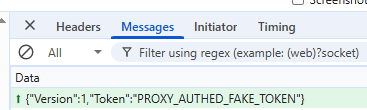
Developer tools has a new look too, although oddly I can’t find this with Wireshark: