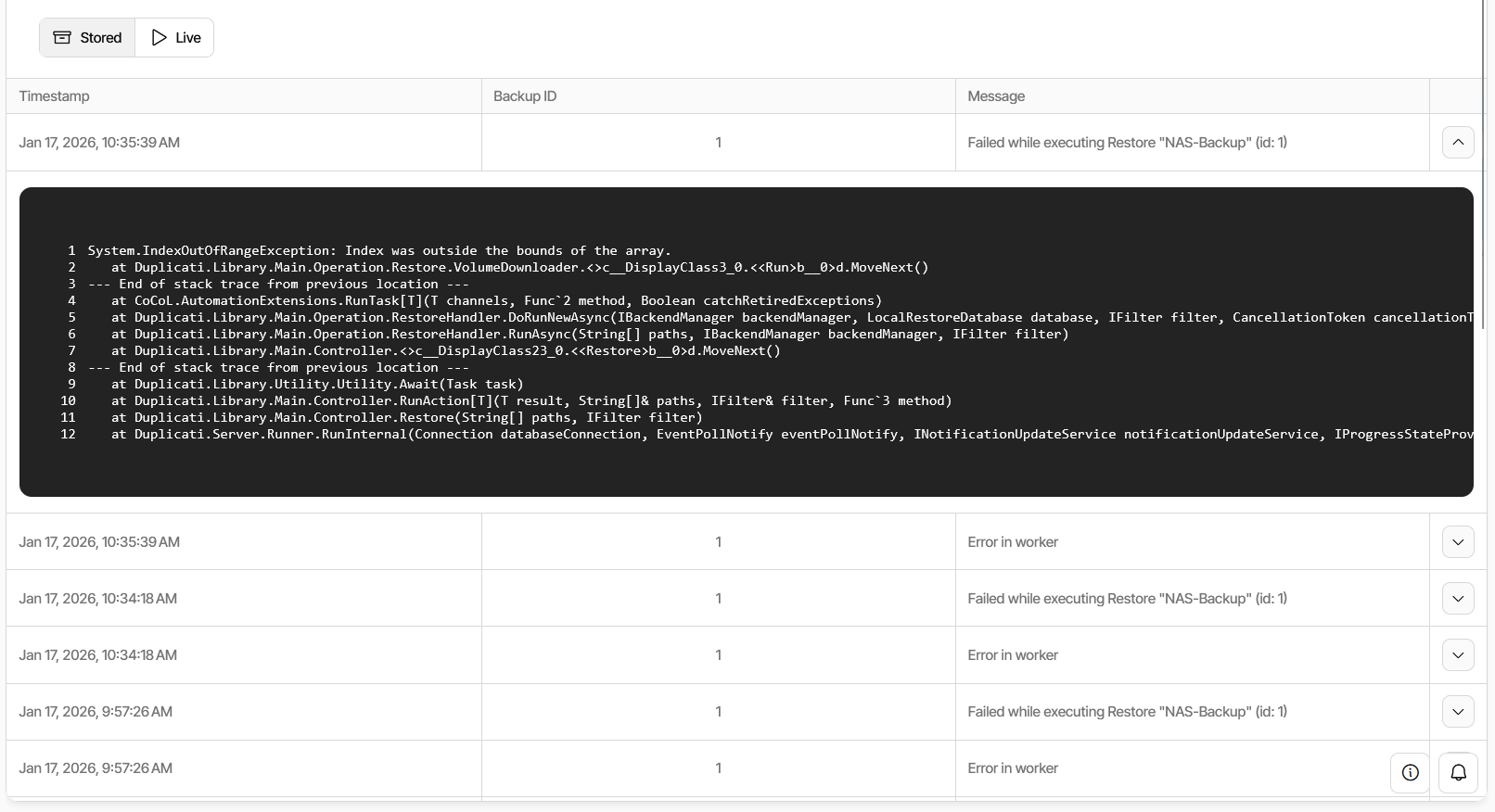
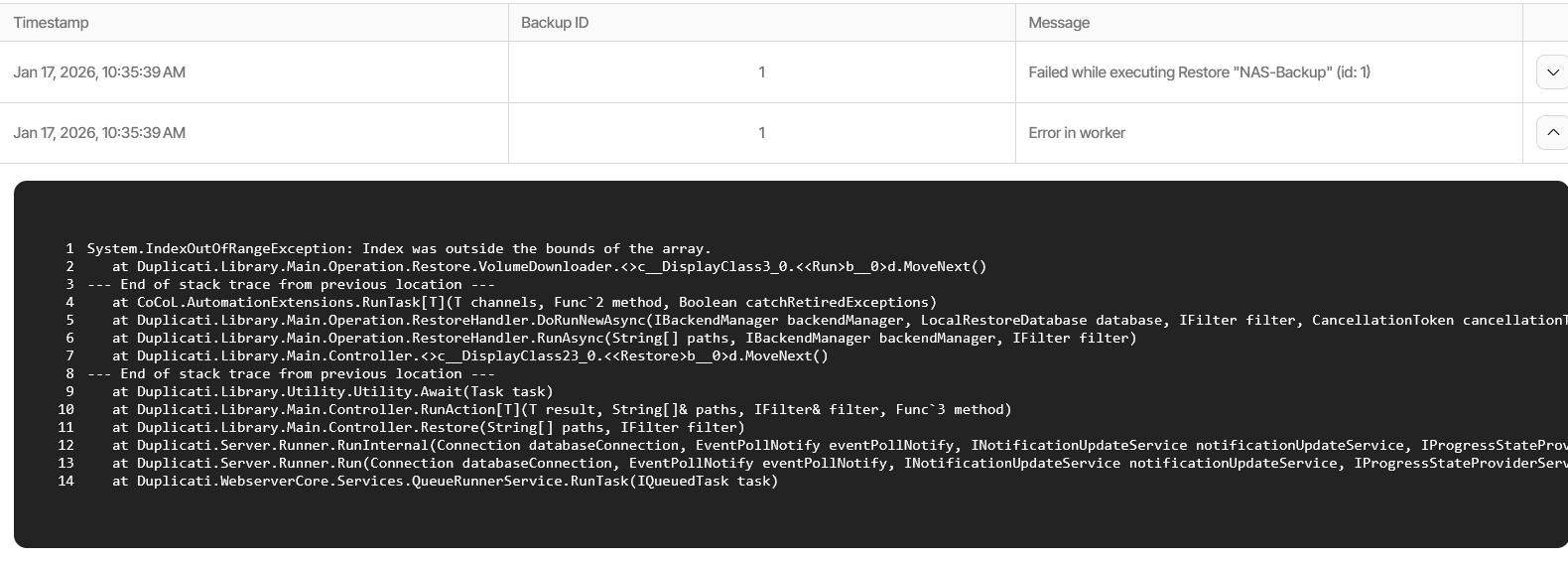
Thanks @kenkendk
The resulting logfile was huge, but these are the last few lines:
2026-03-03 16:29:11 +00 - [ExplicitOnly-Duplicati.Library.Main.Operation.Restore.BlockManager-CheckCounts]: Trying to acquire m_blockcount_lock for block 32811
2026-03-03 16:29:11 +00 - [ExplicitOnly-Duplicati.Library.Main.Operation.Restore.BlockManager-CheckCounts]: Released m_blockcount_lock for block 32811
2026-03-03 16:29:11 +00 - [ExplicitOnly-Duplicati.Library.Main.Operation.Restore.BlockManager-BlockHandler]: Decremented counts for block 32811 and volume 255
2026-03-03 16:29:11 +00 - [ExplicitOnly-Duplicati.Library.Main.Operation.Restore.BlockManager-BlockHandler]: Received block request: Download
2026-03-03 16:29:11 +00 - [ExplicitOnly-Duplicati.Library.Main.Operation.Restore.BlockManager-BlockCacheGet]: Getting block 5661 from cache
2026-03-03 16:29:11 +00 - [ExplicitOnly-Duplicati.Library.Main.Operation.Restore.BlockManager-BlockCacheGet]: Requesting block 5661 from volume 110
2026-03-03 16:29:11 +00 - [ExplicitOnly-Duplicati.Library.Main.Operation.Restore.VolumeManager-VolumeRequest]: Got a request for block 5661 from volume 110
2026-03-03 16:29:11 +00 - [ExplicitOnly-Duplicati.Library.Main.Operation.Restore.VolumeManager-VolumeRequest]: Block 5661 not found in cache, requesting volume 110
2026-03-03 16:29:11 +00 - [ExplicitOnly-Duplicati.Library.Main.Operation.Restore.BlockManager-BlockHandler]: Retrieved data for block 5661 and volume 110
2026-03-03 16:29:11 +00 - [ExplicitOnly-Duplicati.Library.Main.Operation.Restore.BlockManager-BlockHandler]: Passed data for block 5661 and volume 110 to FileProcessor
2026-03-03 16:29:11 +00 - [ExplicitOnly-Duplicati.Library.Main.Operation.Restore.VolumeManager-VolumeRequest]: Waiting for volume request or response
2026-03-03 16:29:21 +00 - [Profiling-Duplicati.Library.Main.Backend.GetOperation-DownloadSpeed]: Downloaded duplicati-b2e71749897404bbf862726ba42772251.dblock.zip.aes to C:\WINDOWS\SystemTemp\dup-72410025-4b15-499e-a560-e8949afb839f (49.65 MiB) in 00:00:11.2631643, 4.41 MiB/s
2026-03-03 16:29:21 +00 - [Information-Duplicati.Library.Main.BasicResults-BackendEvent]: Backend event: Get - Completed: duplicati-b2e71749897404bbf862726ba42772251.dblock.zip.aes (49.65 MiB)
2026-03-03 16:29:21 +00 - [Profiling-Timer.Finished-Duplicati.Library.Main.Backend.Handler-RemoteOperationGet]: RemoteOperationGet took 0:00:00:11.264
2026-03-03 16:29:21 +00 - [Error-Duplicati.Library.Main.Operation.Restore.VolumeDownloader-DownloadError]: Error during download
System.IndexOutOfRangeException: Index was outside the bounds of the array.
   at Duplicati.Library.Main.Operation.Restore.VolumeDownloader.<>c__DisplayClass3_0.<<Run>b__0>d.MoveNext()
2026-03-03 16:29:21 +00 - [Verbose-Duplicati.Library.Main.Operation.Restore.VolumeDecryptor-RetiredProcess]: Volume decryptor retired
2026-03-03 16:29:21 +00 - [Verbose-Duplicati.Library.Main.Operation.Restore.VolumeDecryptor-RetiredProcess]: Volume decryptor retired
2026-03-03 16:29:21 +00 - [Profiling-Duplicati.Library.Main.Operation.Restore.VolumeDecryptor-InternalTimings]: Read: 12929ms, Decrypt: 0ms, BlockVolumeReader: 0ms, VolumeWrapper: 0ms, Write: 0ms
2026-03-03 16:29:21 +00 - [Profiling-Duplicati.Library.Main.Operation.Restore.VolumeDecryptor-InternalTimings]: Read: 12929ms, Decrypt: 0ms, BlockVolumeReader: 0ms, VolumeWrapper: 0ms, Write: 0ms
2026-03-03 16:29:21 +00 - [Verbose-Duplicati.Library.Main.Operation.Restore.VolumeManager-RetiredProcess]: Volume manager retired
2026-03-03 16:29:21 +00 - [Profiling-Duplicati.Library.Main.Operation.Restore.VolumeManager-InternalTimings]: CacheSet: 0ms, CacheEvict: 0ms, Query: 0ms, Backend: 0ms, Request: 0ms, Wakeup: 0ms
2026-03-03 16:29:21 +00 - [Verbose-Duplicati.Library.Main.Operation.Restore.VolumeDecompressor-RetiredProcess]: Volume decompressor retired
2026-03-03 16:29:21 +00 - [Profiling-Duplicati.Library.Main.Operation.Restore.VolumeDecompressor-InternalTimings]: Read: 12930ms, Write: 0ms, Decompress allocate: 0ms, Decompress instantiate: 0ms, Decompress lock: 0ms, Decompress read: 0ms, Verify: 0ms
2026-03-03 16:29:21 +00 - [Verbose-Duplicati.Library.Main.Operation.Restore.VolumeDecompressor-RetiredProcess]: Volume decompressor retired
2026-03-03 16:29:21 +00 - [Profiling-Duplicati.Library.Main.Operation.Restore.VolumeDecompressor-InternalTimings]: Read: 12930ms, Write: 0ms, Decompress allocate: 0ms, Decompress instantiate: 0ms, Decompress lock: 0ms, Decompress read: 0ms, Verify: 0ms
2026-03-03 16:29:21 +00 - [Verbose-Duplicati.Library.Main.Operation.Restore.BlockManager-RetiredProcess]: BlockManager Volume consumer retired
2026-03-03 16:29:21 +00 - [Profiling-Duplicati.Library.Main.Operation.Restore.BlockManager-InternalTimings]: Volume consumer - Read: 12930ms, Set: 0ms
2026-03-03 16:29:21 +00 - [Verbose-Duplicati.Library.Main.Operation.Restore.BlockManager-RetiredProcess]: BlockManager Block handler retired
2026-03-03 16:29:21 +00 - [Profiling-Duplicati.Library.Main.Operation.Restore.BlockManager-InternalTimings]: Block handler - Req: 12909ms, Resp: 0ms, Cache: 10ms, Get: 3ms
2026-03-03 16:29:21 +00 - [Verbose-Duplicati.Library.Main.Operation.Restore.FileProcessor-RetiredProcess]: File processor retired
2026-03-03 16:29:21 +00 - [Profiling-Duplicati.Library.Main.Operation.Restore.FileProcessor-InternalTimings]: File: 0ms, Block: 18ms, Meta: 0ms, Req: 29ms, Resp: 9003ms, Work: 0ms, VerifyTarget: 2931ms, Retarget: 0ms, NotifyLocal: 29ms, VerifyLocal: 0ms, EmptyFile: 0ms, Hash: 1039ms, Read: 126ms, Write: 0ms, Results: 0ms, Meta: 0ms
2026-03-03 16:29:21 +00 - [Verbose-Duplicati.Library.Main.Operation.Restore.FileProcessor-RetiredProcess]: File processor retired
2026-03-03 16:29:21 +00 - [Profiling-Duplicati.Library.Main.Operation.Restore.FileProcessor-InternalTimings]: File: 0ms, Block: 4ms, Meta: 0ms, Req: 20ms, Resp: 10251ms, Work: 0ms, VerifyTarget: 1835ms, Retarget: 0ms, NotifyLocal: 20ms, VerifyLocal: 0ms, EmptyFile: 0ms, Hash: 906ms, Read: 111ms, Write: 0ms, Results: 0ms, Meta: 0ms
2026-03-03 16:29:21 +00 - [Verbose-Duplicati.Library.Main.Operation.Restore.BlockManager-RetiredProcess]: BlockManager Block handler retired
2026-03-03 16:29:21 +00 - [Profiling-Duplicati.Library.Main.Operation.Restore.BlockManager-InternalTimings]: Block handler - Req: 12903ms, Resp: 0ms, Cache: 14ms, Get: 0ms
2026-03-03 16:29:21 +00 - [Error-Duplicati.Library.Main.Operation.Restore.FileLister-FileListerError]: Error during file listing
CoCoL.RetiredException: The channel "" is retired
   at CoCoL.Channel`1.WriteAsync(T value, ITwoPhaseOffer offer)
   at Duplicati.Library.Main.Operation.Restore.FileLister.<>c__DisplayClass1_0.<<Run>b__0>d.MoveNext()
2026-03-03 16:29:21 +00 - [Error-Duplicati.Library.Main.Operation.Restore.BlockManager-BlockCountError]: Block count in SleepableDictionarys block table is not zero: 59414
First 10 blocks: 16759, 6358, 23249, 23247, 23244, 23241, 23239, 23237, 23235, 23233
2026-03-03 16:29:21 +00 - [Profiling-Duplicati.Library.Main.Operation.Restore.FileLister-InternalTimings]: Get files: 83ms, Write files: 13151ms, Get folders: 0ms, Write folders: 0ms
2026-03-03 16:29:21 +00 - [Error-Duplicati.Library.Main.Operation.Restore.BlockManager-VolumeCountError]: Volume count in SleepableDictionarys volume table is not zero: 59414
First 10 volumes: 239, 119, 114, -1, 171, 215, 203, 214, 226, 56
2026-03-03 16:29:21 +00 - [Profiling-Duplicati.Library.Main.Operation.Restore.BlockManager-InternalTimings]: Sleepable dictionary - CheckCounts: 0ms, Get wait: 0ms, Get write: 0ms, Set set: 0ms, Set wake get: 0ms, Set wake set: 0ms, Cache evict: 0ms
2026-03-03 16:29:21 +00 - [Profiling-Timer.Finished-Duplicati.Library.Main.Operation.RestoreHandler-RestoreNetworkWait]: RestoreNetworkWait took 0:00:00:12.936
2026-03-03 16:29:21 +00 - [Profiling-Timer.Begin-Duplicati.Library.Main.Database.ExtensionMethods-ExecuteNonQuery]: Starting - ExecuteNonQuery: DROP TABLE IF EXISTS "Fileset-F8BD5C4ADD37924DB266AD18CCD962CE"
2026-03-03 16:29:21 +00 - [Profiling-Timer.Finished-Duplicati.Library.Main.Database.ExtensionMethods-ExecuteNonQuery]: ExecuteNonQuery: DROP TABLE IF EXISTS "Fileset-F8BD5C4ADD37924DB266AD18CCD962CE" took 0:00:00:00.003
2026-03-03 16:29:21 +00 - [Profiling-Timer.Begin-Duplicati.Library.Main.Database.ExtensionMethods-ExecuteNonQuery]: Starting - ExecuteNonQuery: DROP TABLE IF EXISTS "Blocks-F8BD5C4ADD37924DB266AD18CCD962CE"
2026-03-03 16:29:21 +00 - [Profiling-Timer.Finished-Duplicati.Library.Main.Database.ExtensionMethods-ExecuteNonQuery]: ExecuteNonQuery: DROP TABLE IF EXISTS "Blocks-F8BD5C4ADD37924DB266AD18CCD962CE" took 0:00:00:00.003
2026-03-03 16:29:21 +00 - [Profiling-Timer.Begin-Duplicati.Library.Main.Database.ExtensionMethods-ExecuteNonQuery]: Starting - ExecuteNonQuery: DROP TABLE IF EXISTS "FileProgress-F8BD5C4ADD37924DB266AD18CCD962CE"
2026-03-03 16:29:21 +00 - [Profiling-Timer.Finished-Duplicati.Library.Main.Database.ExtensionMethods-ExecuteNonQuery]: ExecuteNonQuery: DROP TABLE IF EXISTS "FileProgress-F8BD5C4ADD37924DB266AD18CCD962CE" took 0:00:00:00.000
2026-03-03 16:29:21 +00 - [Profiling-Timer.Begin-Duplicati.Library.Main.Database.ExtensionMethods-ExecuteNonQuery]: Starting - ExecuteNonQuery: DROP TABLE IF EXISTS "TotalProgress-F8BD5C4ADD37924DB266AD18CCD962CE"
2026-03-03 16:29:21 +00 - [Profiling-Timer.Finished-Duplicati.Library.Main.Database.ExtensionMethods-ExecuteNonQuery]: ExecuteNonQuery: DROP TABLE IF EXISTS "TotalProgress-F8BD5C4ADD37924DB266AD18CCD962CE" took 0:00:00:00.000
2026-03-03 16:29:21 +00 - [Profiling-Timer.Begin-Duplicati.Library.Main.Database.ExtensionMethods-ExecuteNonQuery]: Starting - ExecuteNonQuery: PRAGMA optimize
2026-03-03 16:29:21 +00 - [Profiling-Timer.Finished-Duplicati.Library.Main.Database.ExtensionMethods-ExecuteNonQuery]: ExecuteNonQuery: PRAGMA optimize took 0:00:00:00.263
2026-03-03 16:29:21 +00 - [Profiling-Timer.Finished-Duplicati.Library.Main.Controller-RunRestore]: Running Restore took 0:00:01:51.063
2026-03-03 16:29:21 +00 - [Error-Duplicati.Library.Main.Controller-FailedOperation]: The operation Restore has failed
System.IndexOutOfRangeException: Index was outside the bounds of the array.
   at Duplicati.Library.Main.Operation.Restore.VolumeDownloader.<>c__DisplayClass3_0.<<Run>b__0>d.MoveNext()
--- End of stack trace from previous location ---
   at CoCoL.AutomationExtensions.RunTask[T](T channels, Func`2 method, Boolean catchRetiredExceptions)
   at Duplicati.Library.Main.Operation.RestoreHandler.DoRunNewAsync(IBackendManager backendManager, LocalRestoreDatabase database, IFilter filter, CancellationToken cancellationToken)
   at Duplicati.Library.Main.Operation.RestoreHandler.RunAsync(String[] paths, IBackendManager backendManager, IFilter filter)
   at Duplicati.Library.Main.Controller.<>c__DisplayClass23_0.<<Restore>b__0>d.MoveNext()
--- End of stack trace from previous location ---
   at Duplicati.Library.Utility.Utility.Await(Task task)
   at Duplicati.Library.Main.Controller.RunAction[T](T result, String[]& paths, IFilter& filter, Func`3 method)