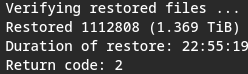
Restore failing on every attempt

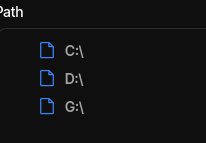
Hi, i am very tired and just switched from one O.S. to another (W10 > Linux). And i really want to leave my files restoring while i sleep. Problem is, after regenerating the database, my attempts at restoring my files have always ended in failure. Even worse, i can’t actually dive into the folders, i can only see the “root” folders (in this case, the driver letters). This was not the case before i switched to another O.S. I’m currently trying to generate a bug report database.

Here are some errors from my latest attempt. "2026-01-10 14:11:49 -03 - [Error-Duplicati.Library.Main.Operation.Restore.VolumeDownloader-DownloadError]: Error during download\nIndexOutOfRangeException: Index was outside the bounds of the array.""2026-01-10 14:11:49 -03 - [Error-Duplicati.Library.Main.Operation.Restore.FileLister-FileListerError]: Error during file listing\nRetiredException: The channel \"\" is retired""2026-01-10 14:11:49 -03 - [Error-Duplicati.Library.Main.Operation.Restore.BlockManager-BlockCountError]: Block count in SleepableDictionarys block table is not zero: 150456\nFirst 10 blocks: 3013140, 3219863, 3219837, 3219834, 3219825, 3219833, 3219841, 3219845, 3219849, 3219803""2026-01-10 14:11:49 -03 - [Error-Duplicati.Library.Main.Operation.Restore.BlockManager-VolumeCountError]: Volume count in SleepableDictionarys volume table is not zero: 150456\nFirst 10 volumes: 338, 419, 195, 88, 493, 142, 414, -1, 215, 368""2026-01-10 14:12:02 -03 - [Error-Duplicati.Library.Main.Operation.Restore.VolumeDownloader-DownloadError]: Error during download\nIndexOutOfRangeException: Index was outside the bounds of the array.""2026-01-10 14:12:02 -03 - [Error-Duplicati.Library.Main.Operation.Restore.VolumeDownloader-DownloadError]: Error during download\nIndexOutOfRangeException: Index was outside the bounds of the array.""2026-01-10 14:12:04 -03 - [Error-Duplicati.Library.Main.Operation.Restore.VolumeDownloader-DownloadError]: Error during download\nIndexOutOfRangeException: Index was outside the bounds of the array.""2026-01-10 14:12:04 -03 - [Error-Duplicati.Library.Main.Operation.Restore.VolumeDownloader-DownloadError]: Error during download\nIndexOutOfRangeException: Index was outside the bounds of the array.""2026-01-10 14:12:04 -03 - [Error-Duplicati.Library.Main.Controller-FailedOperation]: The operation Restore has failed\nIndexOutOfRangeException: Index was outside the bounds of the array."

For context, the backup files are being hosted on B2 Backblaze. Is it possible to download all the files from there to my computer, and do the uncompressing job locally? Though that would be a massive pain…

Some more errors, these are the ones that actually matter i think
"2026-01-10 14:29:30 -03 - [ErrorDuplicati.Library.Main.Operation.Restore.VolumeDecryptor-DecryptionError]: Error during decryption\nCryptographicException: Disk quota exceeded : '/tmp/dup-c4fbfcfb-ccf5-43f4-bfd1-7fdce775caa7'""2026-01-10 14:29:30 -03 - [Error-Duplicati.Library.Main.Operation.Restore.VolumeDecryptor-DecryptionError]: Error during decryption\nCryptographicException: Disk quota exceeded : '/tmp/dup-5a0f6046-d5dc-4e88-95d8-1eabe1903970'""2026-01-10 14:29:30 -03 - [Error-Duplicati.Library.Main.Operation.Restore.FileLister-FileListerError]: Error during file listing\nRetiredException: The channel \"\" is retired""2026-01-10 14:29:30 -03 - [Error-Duplicati.Library.Main.Operation.Restore.BlockManager-BlockCountError]: Block count in SleepableDictionarys block table is not zero: 149600\nFirst 10 blocks: 3013140, 3219863, 3219837, 3219834, 3219825, 3219833, 3219841, 3219845, 3219849, 3219803""2026-01-10 14:29:30 -03 - [Error-Duplicati.Library.Main.Operation.Restore.BlockManager-VolumeCountError]: Volume count in SleepableDictionarys volume table is not zero: 149600\nFirst 10 volumes: 338, 419, 195, 88, 493, 142, 414, -1, 215, 368""2026-01-10 14:29:30 -03 - [Error-Duplicati.Library.Main.Operation.Restore.VolumeDecryptor-DecryptionError]: Error during decryption\nCryptographicException: Disk quota exceeded : '/tmp/dup-22d2bc01-05fb-4688-aa47-1ce8bf019471'""2026-01-10 14:29:30 -03 - [Error-Duplicati.Library.Main.Controller-FailedOperation]: The operation Restore has failed\nCryptographicException: Disk quota exceeded : '/tmp/dup-c4fbfcfb-ccf5-43f4-bfd1-7fdce775caa7'"

  1. System.IndexOutOfRangeException: Index was outside the bounds of the array.

  2. at Duplicati.Library.Main.Operation.Restore.VolumeDownloader.<>c__DisplayClass3_0.<<Run>b__0>d.MoveNext()

  3. --- End of stack trace from previous location ---

  4. at CoCoL.AutomationExtensions.RunTask[T](T channels, Func`2 method, Boolean catchRetiredExceptions)

Hi @Mirahno, welcome to the forum :waving_hand:

With the current stable release, we have introduced a more efficient restore algorithm, but I think you have discovered that cross-OS restores has an error.

You can set the advanced option --restore-legacy which will switch back to the previous restore algorithm, and I assume that will work better.

I think this means that the decrypt process fails to write the decrypted file because there is not enough space of the disk? Alternatively, this happens because the system has put some limits on usage.

This article explains how to deal with that problem:

Thanks for the reply!

I didn’t update the thread, but to circumvent that i made a file for temporary Duplicati files on my drive, since it it downloads all the (necessary) blocks while it’s running a restore. I managed to restore some of my backup after using that and after running a test with the -full-remote-verification option. Still working on getting most of it back. Worth noting that while i did restore files, all restore jobs ended in failure near the end. Here are some more error logs:
Block count in SleepableDictionarys block table is not zero: 624876

First 10 blocks: 1501147, 1501143, 1501145, 1501142, 3013146, 3013145, 1501139, 2054219, 1501129, 1657974

Volume count in SleepableDictionarys volume table is not zero: 624876

First 10 volumes: 55, 338, 397, 413, 286, -1, 355, 239, 21, 40

Internal Block cache is not empty: 1672

First 10 block counts in cache (505508): 1, 1, 1, 1, 1, 1, 1, 1, 1, 2

And finally, the failed restore error
System.ArgumentException: Invalid File or Directory attributes value. (Parameter 'Attributes')at System.IO.FileStatus.SetAttributes(SafeFileHandle handle, String path, FileAttributes attributes, Boolean asDirectory)at Duplicati.Library.Main.Operation.RestoreHandler.ApplyMetadata(String path, Stream stream, Boolean restorePermissions, Boolean restoreSymlinkMetadata, Boolean dryrun)at Duplicati.Library.Main.Operation.Restore.FileProcessor.RestoreMetadata(LocalRestoreDatabase db, FileRequest file, IChannel`1 block_request, IChannel`1 block_response, Options options, Stopwatch sw_meta, Stopwatch sw_work, Stopwatch sw_req, Stopwatch sw_resp, CancellationToken cancellationToken)at Duplicati.Library.Main.Operation.Restore.FileProcessor.<>c__DisplayClass5_0.<<Run>b__0>d.MoveNext()--- End of stack trace from previous location ---at CoCoL.AutomationExtensions.RunTask[T](T channels, Func`2 method, Boolean catchRetiredExceptions)at Duplicati.Library.Main.Operation.RestoreHandler.DoRunNewAsync(IBackendManager backendManager, LocalRestoreDatabase database, IFilter filter, CancellationToken cancellationToken)at Duplicati.Library.Main.Operation.RestoreHandler.RunAsync(String[] paths, IBackendManager backendManager, IFilter filter)at Duplicati.Library.Main.Controller.<>c__DisplayClass23_0.<<Restore>b__0>d.MoveNext()--- End of stack trace from previous location ---at Duplicati.Library.Utility.Utility.Await(Task task)at Duplicati.Library.Main.Controller.RunAction[T](T result, String[]& paths, IFilter& filter, Func`3 method)at Duplicati.Library.Main.Controller.Restore(String[] paths, IFilter filter)at Duplicati.Server.Runner.RunInternal(Connection databaseConnection, EventPollNotify eventPollNotify, INotificationUpdateService notificationUpdateService, IProgressStateProviderService progressStateProviderService, IApplicationSettings applicationSettings, IRunnerData data, Boolean fromQueue)at Duplicati.Server.Runner.Run(Connection databaseConnection, EventPollNotify eventPollNotify, INotificationUpdateService notificationUpdateService, IProgressStateProviderService progressStateProviderService, IApplicationSettings applicationSettings, IQueuedTask data, Boolean fromQueue)at Duplicati.WebserverCore.Services.QueueRunnerService.RunTask(IQueuedTask task)

I’ll check it out. Anything on the whole “not being able to see anything but the root folders of the backup” thing? For reference, this is how the restore menu looks like.

For the record, the test reported no errors, but things only started sorta moving after that. I wonder why.

Using --tempdir to point to it? I especially worry about Linux systems’ /tmp.

Unlike Windows, it’s reportedly often a separate partition, or even uses tmpfs.

Yes, i used --tempdir to set a directory for the downloaded blocks while i was testing things out. It worked as i thought it would.

Anyways, i just finished getting all my stuff back. This run had --restore-legacy on, and while it was slower, the process went by smoothly and didn’t really shoot out any errors. It failed to recover some metadata while downloading the last blocks, but aside from that it was clean, and the file integrity checks didn’t return anything. Thanks for the help, @kenkendk !

image