Release: 2.4.0.0 (Stable) 2026-09-03

2.4.0.0_stable_2026-09-03

This release is a stable release that supersedes the 2.3.0.4 stable release. It contains all changes from the 2.3.1.0 and 2.3.1.1 beta releases.

Breaking change: Locked-down data folder permissions

This release hardens security around the data folder and is a breaking change for some setups.

For most users, this should not be a problem as the folders should already have the correct permissions.

Duplicati now requires that the data folder has the exact expected permissions, or it will refuse to use it. Previously, Duplicati would silently lock down the folder if it was not already locked.

To opt out of the permission check, you need to either pass --allow-insecure-datafolder, set the environment variable DUPLICATI__ALLOW_INSECURE_DATAFOLDER=true, or place a file named insecure-permissions.txt in the installation folder.

Note that the previous method of placing insecure-permissions.txt in the data folder is no longer supported.

This change also applies to preload.json, such that it will only be loaded if the folder is trusted, or one of the opt-out methods are activated. Additionally, the previous trusted paths /usr/local/share/Duplicati/preload.json and C:\ProgramData\Duplicati\preload.json are no longer supported as they cannot be guaranteed to be locked down.

A preload.json inside the data folder is still supported, provided the folder passes the permission check.

The ConfigureTool has a new secure-datafolder command that can be used to force the correct permissions on the data folder.

For most users this should not cause any problems, as Duplicati has been locking down the folder already, but if you rely on lax folder permissions the setup needs to change. Some Docker setups may not be able to set the permissions and will need to apply DUPLICATI__ALLOW_INSECURE_DATAFOLDER=true in the image to run without the protections.

Sync copy mode

This release adds an often requested feature that enables simple copying of files from source to destination.
Where the regular backups are deduplicated, compressed, encrypted and versioned, the new sync mode will instead simply copy from source to destination.

The copy is currently a one-way sync, where the source is replicated on the destination. Files can be deleted on the destination during sync (use --sync-then-delete), but destination folders will not be deleted.

The option --sync-remote-state is by default set to UseRemoteState which will list the destination and figure out what to upload. The setting UseLocalState uses a local database, similar to how backups work, to keep track of known remote files, and reduce the amount of remote listings done. Finally, the BlindlyUpload setting will just copy everything as-is to the remote.

The sync jobs support remote sources, snapshots, and multiple destinations. If snapshots are enabled, the copy is done from the snapshot, ensuring reliable reads.

Configuration of such a sync job is done the same way as with backup, but using a toggle option in the first step of the UI. Note that backup and sync jobs are not compatible as they use very different storage logic, so it is not possible to change the job mode after creating a job.

CLI mode also supports sync.

Improved Windows installer

This change brings a major update to the Windows installers, which now integrates the ability to run as a service, as well as generate and use TLS (https). The service feature has been present for a while in the WindowsService.exe tool and the TLS certificates were added as part of the Duplicati.CommandLine.ConfigureTool.exe. With this update these things are now integrated into the installer, and exposed as simple checkboxes to toggle the features. Installing the service from a regular user account, will also auto-generate a secure password and configure the TrayIcon to connect to the service (only for the current user).

If you have installed the service manually, do not activate the new checkbox as it only works if there is no pre-existing service. The installer-driven service does not support commandline arguments directly, but instead prefers preload.json files to configure it. The MSI supports the property INSTALL_PRELOAD=true which will cause it to pick up a preload.json file from the same folder the MSI is located in.

The Windows service is now also configured as delay-start service to avoid startup issues on boot.

Live reporting module

This release adds a new live-reporting module that sends the current progress of backups to a user-specified URL. The intention is that this can be used for dashboards that want to show the current progress for backups. By default, the module is not configured and has no impact.

The module supports multiple activity targets and includes metadata in the activity report, as well as a console-provided activity URL.

PAR2 parity / error-correction for remote volumes

This release adds a pluggable parity module that produces error-correction data for remote data volumes, so they can be repaired after bit-rot or corruption on the backend, thanks @JamBalaya56562.

To enable this, ensure that par2 is installed on the machine and set --parity-module=par2. Setting this will cause additional .par2 files to be uploaded.

Store configuration with backup

This release revives the store-task-config option and makes it enabled by default for encrypted backups. The backup configuration is stored with the backup data, making it easier to restore a configuration later.

For unencrypted backups, no secrets are stored by default. The behavior can be customized with options to store none, self, or all configurations, with or without secrets. The UI has been updated to allow restoring from the destination config. If multiple configurations are found, the user can select one or more backup configurations to restore.

MS365 subsites and shared mailboxes

This release improves the Microsoft 365 backup support with two additions.
Support for backing up SharePoint subsites has been added, making it possible to include sub-sites beneath a site collection in a backup.

The handling of shared mailboxes has also been improved, with better detection and enumeration of shared mailboxes within a tenant.

The license counting has been simplified. A Duplicati license is now required if an MS365 license is assigned, without needing per-user lookups. The same logic applies to both users and sites, and personal sites of users without a license are not counted. Filtering based on classification is still supported.

Full disk backup support (Windows, Linux, MacOS)

This release extends the full disk backup feature to support Linux and MacOS, in addition to Windows.

The Linux support allows backup and restore of entire disks on Linux, including partition tables. The MacOS support adds basic backup and restore of entire disks, including partition tables.

Partition-level backup and restore is now supported, making it possible to select individual partitions as backup sources, or restore a single partition from a full disk backup to a different partition.

Like the Office 365 / Google Workspace backup features, this is a proprietary module (source available).

Full disk backup requires administrative privileges to access the disk directly.
Full disk restore requires administrative privileges and requires that the disk is unmounted and not write-protected.

Desktop notifications on all platforms

Desktop notifications are now supported on all platforms. Windows toast notifications have been implemented with click-to-open support, and native notification support has been added for macOS and Linux (via DBus), thanks @JamBalaya56562 for the Windows implementation.

Restore reliability improvements

Several issues with the restore process have been fixed. Restores now properly respond to stop/abort requests, file reads and writes can be interrupted, and a critical bug with wrong seek offsets for partial blocks has been fixed, which could cause restores to fail, thanks @JamBalaya56562.

An index has been added on the restore file table join columns for better restore performance, thanks @JamBalaya56562.

Misconfigured filter detection

A new warning system detects when filters are configured to unconditionally exclude everything. A post-backup check also warns if no files were examined during backup, which helps catch misconfigurations that would otherwise silently produce empty backups.

New backends

Added support for Drime Cloud as a new storage backend.

Added a new backend for the Spanish provider Movistar, thanks @redmars27. The backend is marked as “untested” as it can only be used (and tested) by Movistar customers.

Deprecated backends

The previous “SharePoint” and “OneDrive for Business” backends have been marked as deprecated, as Microsoft shut down the API they were calling. The migration step is to use the “SharePoint v2” backend (renamed to just “SharePoint” in this version) which uses the Microsoft Graph API.

Duplicati Storage

This release includes Duplicati Storage which is integrated with the Duplicati console. Once a machine is connected to the console it can use the account’s storage allocations with zero configuration required.

SharpAESCrypt v3

Updated the SharpAESCrypt encryption library to support “AES Crypt Stream Format v3”, which has a number of improvements over the v2 format.
For this release, the default written format remains v2, but we encourage you to set the environment variable DUPLICATI__AES_VERSION=3 to test the new format.
Note: if you set this version to 3, the new remote volumes cannot be read by Duplicati versions older than 2.3.0.101.

Support for MacOS ACLs

This release adds support for reading MacOS attributes and ACL strings during backup, and restoring them when permission restores are selected.

Support for Windows Alternate Data Streams

This release implements support for reading and writing alternate data streams (ADS) on Windows. This feature is disabled by default and can be enabled with the advanced option --enable-ads-backup. If ADS content is found in the source, this is restored by default but can be disabled with --disable-ads-restore.

Fixed MSSQL backups

Since 2.1 the MSSQL backups would produce errors if attempting to back up an MSSQL server that was running as the default instance, but would work with a named instance. This release fixes the issue and now handles both default- and named instances.

Improved missing source handling

The default behavior when sources are missing has changed. Previously, a missing source would abort the backup. Now, a missing source will only trigger a warning unless the option --abort-if-source-missing is set. The option --allow-missing-source can still be used to suppress warnings entirely. If no sources are found at all, the backup will still abort.

Relative database paths

Database paths are now stored relative to the data folder by default. This makes it simpler to move the data folder as the paths are not stored in full. Existing backups retain their full paths, but manually updating a database path will make it relative if it is within the data folder.

Improved TLS certificate validation

The TLS certificate validation has been improved, and Duplicati now falls back to using the OS-default certificate validator. This should resolve issues with custom certificate chains and improve compatibility with various TLS setups.

Improved source tree and filter accuracy

The source tree now shows the content of remote sources, including Microsoft 365 tenants, Google Workspace subscriptions and full-disk content. Filter evaluation is performed server-side for non-trivial filters, ensuring the same code is used for display and actual backup operations.

Helper entries like “My Documents” are now shown in all picker situations and resolve to the full path. The destination configuration supports browsing the remote file system.

New welcome page and start

The UI will now show a welcome page showing how to connect to the console with an option to continue without.
This can be suppressed with the option --webservice-suppress-welcome-page=true or environment variable DUPLICATI__WEBSERVICE_SUPPRESS_WELCOME_PAGE=true.

If the connection is made from the TrayIcon, the initial dialog asking to set a password is no longer shown, as the intention is to use the TrayIcon to connect.
It is still possible to change the password from the Settings page if needed.

Other notable changes

  • AutoTune tool: A new Duplicati.CommandLine.AutoTuneTool / duplicati-autotune tool to help evaluate and optimize performance-related settings.
  • Read-only backend testing: Backends now support read-only context-aware testing, safe for testing restore destinations without risking unintended changes.
  • Remote synchronization improvements: Integrated remote synchronization (3-2-1 backups) into the Main library with quota checks and improved error handling.
  • Multi-version restore: New --restore-all-files option to restore files matching a filter from multiple versions.
  • Performance improvements: ArrayPool-based allocations reduce memory pressure during backups. Faster delete queries for large backups.
  • Post-backup scripts: The RunScript module now supports running scripts when a backup has finished, but before checks and compaction.
  • Database tool commands: Added verify and cleanup commands to the database tool. Added wipe-encryption command for recovering encrypted databases.
  • Slow query monitor: Added tracking of long-running database queries to help diagnose performance issues.
  • Crash dialog: Added a crash dialog window that appears when the application encounters an unhandled exception.
  • Updated LibSecret support for KDE Plasma 5+6, fixing issues with the default collection.
  • More robust server connection: The remote server connection has been hardened with a watchdog that restarts unresponsive connections.
  • Auto-configure database metadata: The --store-metadata-content-in-database option is automatically applied when needed by the source provider.
  • MS365/Google permission testing: Added ability to verify that granted permissions match what is required for backup or restore.

Thanks to contributors

This release is a collaboration effort from the Duplicati community. Thanks to the many contributors who report issues, test new releases, request features, write documentation, maintain translations, and contribute to the codebase.

Congrats on this new release. That’s quite a list of improvements!

Hi,

I don’t think I understand the versioning yet—could you explain it again?

So Canary 2.3.0.105 uses database version 20,
and Stable 2.4.0.0 uses database version 19.

So is the Canary version more advanced than the Stable version? Based on the version numbers, I had assumed that the Stable version would replace the Canary version in this case.

Best regards,
Oliver

The latest canary will always be further along than the stable.

At some point, when we have enough features and stability, we branch off for a stable release.
This is similar to a “feature freeze” in that we generally do not add new features to the pending stable release, but instead release a beta for more testing.

But we do not go on vacation during the “feature freeze” so the code based continues to evolve and new canaries are released independent of the beta/stable branch. We do pick fixes and minor improvements from the canaries into the beta/stable branch so the stable is a good (and stable) as possible.

The version numbers are a little wonky in this period because we try to increment the minor number (2.x.0.0) for the stable release. In this case we went from 2.3 → 2.4. The goal of this is to make it as straightforward for the regular user as possible, they can ignore anything but the stable release and see increasing numbers.

The canary does not increment the minor number, but instead uses the base with +100 for the build (2.3.0.100) and then we increment the build number. in this particular iteration we managed to get 10 canary builds out, so we are at 2.3.0.110. This version number is a bit arbitrary as we just continue counting, and do not signify major changes with the numbers.

Now that 2.4 is out, the next canary will be 2.4.0.100 and versions will make more logical sense again.

In general, you can compare beta and stable version numbers, but the canary number is just reflecting what stable was out when it was created.

Thank you, @kenkendk :slight_smile:

Hi Ken!

There is an issue with the new version: for users on the latest stable version (2.3.0.4) who update to 2.4, all backup settings are wiped out.

This happens precisely because the backup folder location changed to `C:\ProgramData` and the database version changed from 19 to 20, yet there was no database upgrade process.

Hi,

i just had a horrible upgrade experience on Win 11, coming from v2.3.0.4 stable.

I installed the update into the existing folder as i always did, don’t know if that is recommended, but that’s how i always did it.

After this, Duplicati would stall at the end of my backup job, during the “deleting unwanted files” operation. The job usually takes about 25 mins, but after 45 minutes it still wasn’t done and i started to get system freezes, so i checked on the Duplicati tray icon process and it had taken up all of the RAM. Then something within Windows crashed, monitor lost signal, then came back up and i got logged out of my account.

I restarted my machine and ran the job again, but the same thing happened, Duplicati would stall and take up all RAM during the “deleting unwanted files” operation.

So i tried a completely fresh installation: deleted the old one and installed again.

This time Duplicati crashed right on startup, i couldn’t copy the error message from the error reporter and wasn’t able to read it, because the reporter closed itself quickly. Eventually i found the crash log and it said the encryption key for the server database wasn’t found.

Well shit, what encryption key? Then i remembered that i had to set one with one of the last updates.

Where did i put it? No idea.

Then i remembered i put it in preload.json, ok, where did i put that again? In the data directory where the .SQLite databases reside? Nope. I remembered again: this hadn’t worked and i had to put it in the installation directory. But uninstalling the previous version wiped it from there, don’t know if by design or not, but gone it was.

Since i didn’t seem to have secured that key anywhere else (for good reasons that i very much hope i had), i tried first to remove encryption from the server database, but that didn’t help and it crashed again. This time with another error message that i don’t remember.

I am not sure anymore how i got the server to start, at that point i was 4 h in and my brain was kinda out of it. I think i had to start it with an additional parameter so it would not use encryption.

Once i was able to get in the UI, my job didn’t show up and i threw in the towel. I did another clean install and forced Duplicati to create a new server database by moving the existing data folder somewhere else before installing.

I recreated the job manually and then pointed it to the existing database for the job (my understanding was, that this would be the correct approach for my case) and wanted to run repair on it, to make sure it was in sync.

But after clicking “repair”, Duplicati again took up all available RAM, causing me to give up on it. There seems to be a major memory issue, rendering this version of Duplicati unusable for me.

Additionally, some versions ago the backup job started to slow down my system by exhausting read/write operations on c: to 100 %, which has gotten better (with v2.3.0.4 stable i think), but it’s still a thing.

I understand that Duplicati is open source, with a lot of volunteer work behind it, and I really like it for its UI and functionality. Despite the issues every now and then, I’ve always been a fan. I’ve also never had an issue restoring a file, so I trust the backups themselves.

But in the 6-7 years i have been using it, this is now the 4th time i have to tinker with Duplicati because something isn’t right. I had to rebuild the job database several times and run repair on it a few times as well. Ok, to be fair Duplicati was in beta most of that time and i am not sure what is causing the RAM and drive exhaustion issues now, buuuuut i would suspect it has to do with the database…the approach just seems to be a bit brittle. So, with the current version of Duplicati now being effectively unusable for me, i’m seriously considering using something else for the first time.

Anyway…TLDR: Unusable due to Duplicati filling up RAM at end of backup operation.

Hi, thanks for reporting this.

Could you elaborate a bit on this? The data folder is never touched as part of the install/update/uninstall so there should be zero risk for the update itself.

The backup folder location has not changed between 2.3 and 2.4, so not sure what you are seeing there.

The current stable release has server database version 19. The version 20 is only in the canary (add support for version labels). The databases will be auto-upgraded, and this happens on the first start, and always creates a backup.

Thanks for reporting this. I am not sure how this can happen, so if you can let me know how to replicate it, I would appreciate it. I assume you are using the MSI, which keeps track of files it installs for exactly this purpose. If you add files to the target folder and uninstall the application, it will only remove what it installed itself, and should leave behind preload.json.

If you have lost the encryption key for the database, the database tool now has a function that strips all encrypted content from the database, such that Duplicati will start again. You then need to go in and fill out the encryption passphrase and connection strings to get back up.

That is not something that has been reported by other users, but happy to look into it.

Could you try to set --log-file=C:\path\logfile.txt and --log-file-log-level=verbose and then run the backup (or other operation that causes excess memory usage) ?

The log file then keeps a detailed log on everything that Duplicati does, and if you then note the time when the memory usage goes up, we can look in the log file around that time to narrow down what Duplicati is working on so we can find the problematic place.

My memory is no 100% on that, but i remember trying to put preload.json in the data directory and it didn’t work. So if there was no other way Duplicati could have set the key, i must have put it in preload.json and put that in the installation directory. And yes, i used the MSI.

That’s what i did (–wipe-encryption or sth. like that), but it would crash on startup after that. I even inspected the server database and it did reference the job database with the correct name, but the path to it and the other columns (meta data etc.) were empty.

I did that with a repair operation on my original job database (it failed), where can i send you the log? Also eventhough I am on a completely fresh installation, Duplicati logs “The database appears to be encrypted, but no key was specified. Opening the database will likely fail. Use the environment variable SETTINGS_ENCRYPTION_KEY to specify the key.” I also confirmed that there is a Duplicati encryption key in the Windows Credential Manager, which wasn’t there before I did the clean install. I do not use preload.json anymore.

Edit: Starting Duplicati with --log-file-log-level didn’t work “[Warning-Duplicati.Library.Utility.CommandLineArgumentValidator-UnknownOption]: Unknown option supplied: log-file-log-level” So the log i have is not with verbose logging…

If you can upload it somewhere (Google Drive, Dropbox, etc) then send me a PM with the link.

That is very odd, I double checked and that is the exact option name: --log-file-log-level=Profiling.

Maybe there are some hints even if the log only has information level logging.

The warning message appears if the database has the marker setting “encrypted-fields” set to “true”. It should not exist if the database is clean, so you should not see the warning, but I will investigate.

The key in WCM is most likely created by Duplicati and used to encrypt the database, which happens after the warning.

I don’t seem to be allowed to PM you yet

I have problems upgrading from 2.3.0.4 - 2.3.0.4_stable_2026-07-09 on my Win10 PC. Previously I install it manually as a service. Now with the new 2.4 installer, no matter the service is running or not, I got “Another installation is in progress”. I have checked/unchecked “install as a service”. Same error. Rebooted my PC same error. Even when I tried to uninstalled 2.3, I also got “Another installation is in progress”. I am really stuck.

What conditions are the installer checking?

“Another installation is in progress” is a standard error that occurs when Windows thinks that another MSI-based installation is already running. If you try to run a non-Duplicati MSI file, does it also throw the same error message?

Thank you for your hint. The culprit was “UniGetUI” that ran in the system tray.

Possible memory regression / OOM after upgrade from 2.3.0.4 to 2.4.0.0 on Linux/Docker

Hello. I have some additional information about Ram usage issue.

My setup is Linux/Docker using the LinuxServer image. The affected jobs were working normally on:

Duplicati 2.3.0.4 Stable (2026-07-09)

The last successful runs were:

Job 1: 2026-09-02, duration 00:26:50
Job 2: 2026-09-03, duration 00:40:38

On 2026-09-04 my linuxserver/duplicati:latest image was updated to Duplicati 2.4.0.0 Stable.

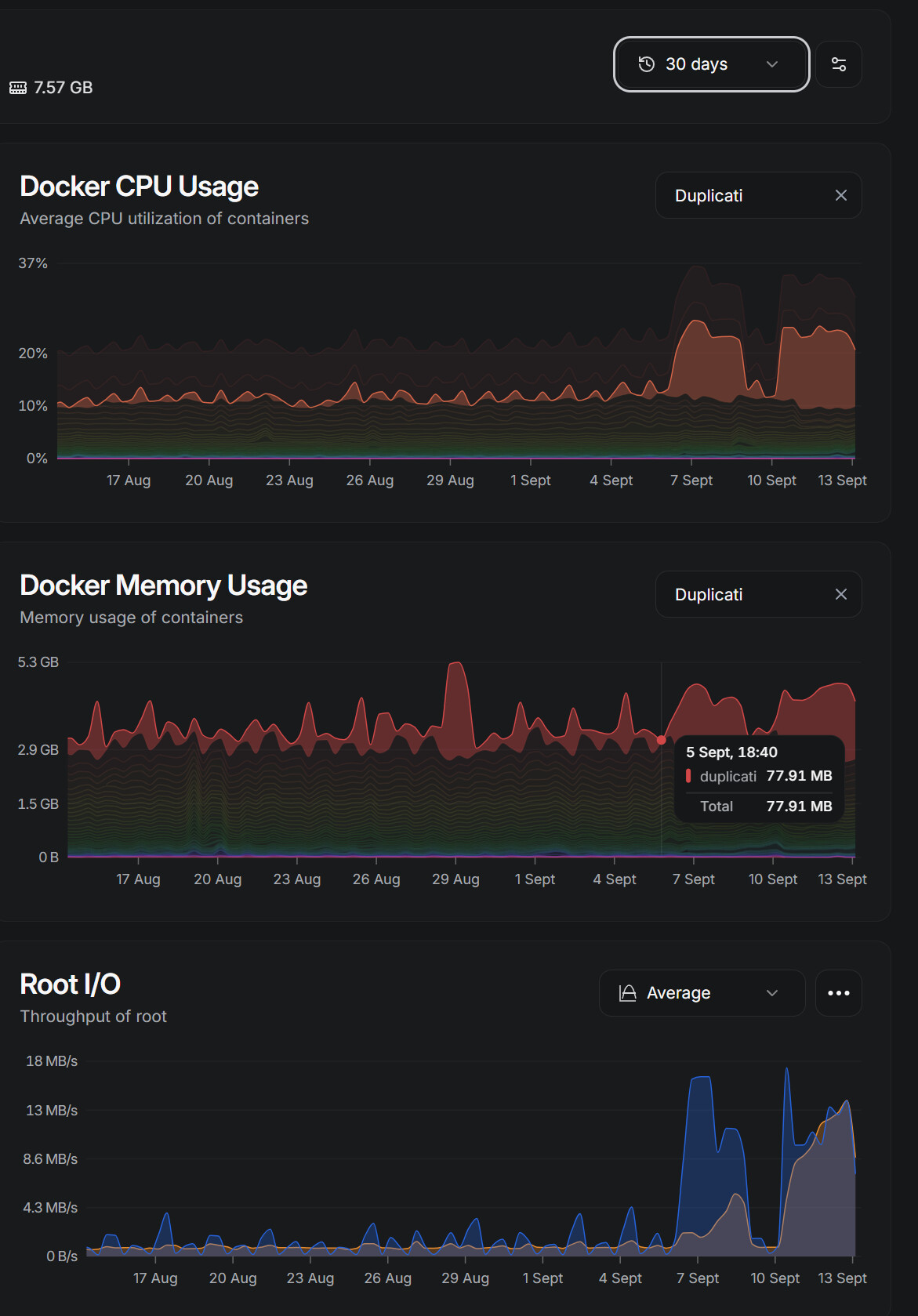
The monitoring graph shows a clear change in Duplicati CPU and memory behaviour starting immediately after that update. The affected jobs run roughly every two days, which also matches the timing.

During the affected large jobs, Duplicati reaches the delete/cleanup phase and memory keeps growing until it hits my Docker limit:

mem_limit: 3g
mem_reservation: 1g

The Linux kernel then kills duplicati-server because of the cgroup memory limit.

Between 2026-09-12 20:00 and 2026-09-13 05:21 I recorded 12 confirmed OOM kills.

Examples:

Sep 13 04:37:26 Memory cgroup out of memory:
Killed process 3628974 (duplicati-serve)
anon-rss:3053600kB

Sep 13 05:21:12 Memory cgroup out of memory:
Killed process 3694360 (duplicati-serve)
anon-rss:3047476kB

When this happens there is usually no failed backup entry or useful error in the Duplicati Web UI.

The Web UI changes to “Reconnecting”, then comes back after the server process is restarted inside the container, often in a Paused state. The same operation then appears to continue/retry, memory grows back to ~3 GiB, another OOM kill happens, and the cycle repeats.

This is also clearly visible in the memory graph as a repeating saw-tooth pattern.

The two affected repositories are approximately:

~610 GiB / 195 versions
~659 GiB / 14 versions

while a smaller repository:

~42 GiB / 19 versions

completes normally.

I also tried rolling back to:

Duplicati 2.3.0.4 Stable
linuxserver/duplicati:v2.3.0.4_stable_2026-07-09-ls306

using the automatically created pre-upgrade Duplicati-server.sqlite.

The rollback did not make the problem disappear. The same large job still enters the same OOM/restart cycle on 2.3.0.4.

So at this point I cannot say that simply running the 2.4.0.0 code is the direct cause. However, the issue clearly started immediately after the 2.4.0.0 upgrade and persists after reverting the application version.

One possibility I am considering is that the upgrade may have changed some persistent state in the local job database or repository that survives the downgrade, although I have no evidence for that yet.

My next test will probably be to rebuild the local database for one affected backup job from the remote repository and see whether the behaviour changes.

Has anyone seen something similar, especially repeated OOM kills during delete/cleanup on larger repositories after upgrading to 2.4.0.0?

I am not running in Docker, but Duplicati is gradually filling up RAM during the “Deleting unwanted files” operation, until i have to kill it manually. Interestingly the log states there are no files to delete.

Update: temp_store=FILE appears to be an effective workaround

I did some more testing and have a much clearer picture now.

Rolling back from 2.4.0.0 to 2.3.0.4 did not solve the problem. The same large jobs still reached the delete/cleanup phase, memory kept increasing, and duplicati-server was repeatedly killed by the Linux cgroup OOM killer.

Increasing the Docker memory limit from 3 GiB to 4 GiB and increasing host swap also did not solve it. Duplicati simply consumed more memory and eventually hit the new limit as well.

I also tried rebuilding the local database, but the rebuild itself hit the same memory problem.

I then tried the workaround mentioned in this thread:

Need recovery advice after 2.3.0.0 issue: recreate found 36 broken filelists, purge dry-run fails

In that case, a large database repair was getting stuck on a very large SQLite query over FilesetEntry / File, consuming a huge amount of memory. The workaround was:

CUSTOMSQLITEOPTIONS_DUPLICATI=temp_store=FILE

I applied the same setting and also explicitly configured a disk-backed SQLite temp directory:

CUSTOMSQLITEOPTIONS_DUPLICATI=temp_store=FILE
SQLITE_TMPDIR=/sqlite_cache

/sqlite_cache is a normal ext4 bind mount, not tmpfs.

Since this change, both of my previously failing large jobs have completed successfully:

Job 1:
source: 21.804 GiB
repository: 611.781 GiB / 189 versions
duration: 01:21:10

Job 2:
source: 18.658 GiB
repository: 737.384 GiB / 14 versions
duration: 01:05:35

One of the runs spent about 38 minutes deleting old versions, deleted 228 versions, and completed with:

Warnings: 0
Errors:   0

Before changing SQLite temp storage, I recorded 16 OOM kills of duplicati-server.

Since enabling temp_store=FILE, I have recorded 0 new OOM kills.

The memory profile also changed significantly.

Before the workaround, the kernel OOM messages showed roughly 3 GiB of anonymous RSS in duplicati-server before it was killed.

With temp_store=FILE, while a large job is running I now see something closer to:

anon :   ~244 MiB
file :  ~1.9 GiB
shmem:    ~58 MiB

So instead of several GiB accumulating as anonymous process memory, much more of the working set is now file-backed and reclaimable by the kernel.

I also confirmed that SQLite is actually using the configured temp directory. The directory itself appears empty because SQLite opens the temp files and then unlinks them, but they are still visible through the process file descriptors, for example:

/sqlite_cache/etilqs_... (deleted)   ~18 MiB
/sqlite_cache/etilqs_... (deleted)  ~148 MiB

Disk I/O is clearly higher now, which is expected, but memory usage is much healthier and the large jobs are completing normally.

I cannot say whether this is exactly the same SQLite query/problem as in the linked repair thread, because my failures mainly happened during delete/cleanup and also during a database rebuild. However, the fact that the same temp_store=FILE setting changes the memory behaviour so dramatically in both cases makes this look like the same general class of large-database SQLite temp-storage problem.

For now:

CUSTOMSQLITEOPTIONS_DUPLICATI=temp_store=FILE

looks like a reliable workaround in my case.

I do not yet know how much the extra disk I/O affects total backup duration. I will keep this configuration running for the next few days and compare backup times once I have a few more normal runs.

Thanks for sharing this!

That means we are looking at an SQLite query that is now running wild and consuming too much memory. Since it appears to also be a problem with 2.3, it could be related to the switch to a new SQLite package.

Based on the input here, I was able to find a performance issue with the deletion of old versions:

This should fix the issue reported by @mr-flibble.

Still not sure why it started with the 2.4 release and repeats on 2.3, but maybe the datasets have just crept over some threshold now :person_shrugging:

@random_user: you stated that there were no filesets slated for deletion, so this fix will not do anything different. From what I can see, this leaves the compact report, but I cannot see that it grows in memory usage when I increase the dataset size.

Could you try to edit the backup that is causing problems, and then adding --log-file and --log-file-log-level=profiling to the advanced settings? That should give us the exact query/ies that are running when you see the memory issue.