Release: 2.3.0.107 (Canary) 2026-07-13

2.3.0.107_canary_2026-07-13

This release is a canary release intended to be used for testing.

If no major faults are found, this release is intended to be the basis of the next beta release.

Breaking change: Locked-down data folder permissions

This release hardens security around the data folder and is a breaking change for some setups.

Duplicati now requires that the data folder has the exact expected permissions, or it will refuse to use it. Previously, Duplicati would silently lock down the folder if it was not already locked. The previous insecure-permissions.txt opt-out file is no longer supported.

The only way to opt out of the permission check is to pass --allow-insecure-datafolder or set the environment variable DUPLICATI__ALLOW_INSECURE_DATAFOLDER=true. This setting can be placed in preload.json, but only if that file is in a trusted location (the directory with the binaries, or the path pointed to by DUPLICATI_PRELOAD_SETTINGS). The previous trusted paths /usr/local/share/Duplicati/preload.json and C:\ProgramData\Duplicati\preload.json are no longer supported as they cannot be guaranteed to be locked down.

A preload.json inside the data folder is still supported, provided the folder passes the permission check.

The ConfigureTool has a new secure-datafolder command that can be used to force the correct permissions on the data folder.

For most users this should not cause any problems, as Duplicati has been locking down the folder already, but if you rely on lax folder permissions the setup needs to change. Some Docker setups may not be able to set the permissions and will need to apply DUPLICATI__ALLOW_INSECURE_DATAFOLDER=true in the image to run without the protections.

Feedback requested

We are grateful for any feedback on changes or hints for how we can lessen the impact before the next stable release.

Live reporting module

This release adds a new live-reporting module that sends the current progress of backups to a user-specified URL. The intention is that this can be used for dashboards that want to show the current progress for backups. By default, the module is not configured and has no impact.

The module supports multiple activity targets and includes metadata in the activity report, as well as a server-provided activity URL.

PAR2 parity / error-correction for remote volumes

This release adds a pluggable parity module that produces error-correction data for remote data volumes, so they can be repaired after bit-rot or corruption on the backend, thanks @JamBalaya56562.

A pluggable IParity module system is introduced, mirroring the existing compression/encryption modules. The default Par2Parity implementation shells out to the par2 (par2cmdline) program. If the par2 command is installed this will transparently handle creating and using parity files to guard against flipped bits.

Improved TLS certificate validation

The TLS certificate validation has been improved, and Duplicati now falls back to using the OS-default certificate validator. This should resolve issues with custom certificate chains and improve compatibility with various TLS setups.

Detailed list of changes

  • Locked down data folder permissions and require exact permissions, with opt-out via --allow-insecure-datafolder
  • Added secure-datafolder command to the ConfigureTool
  • Added a live reporting module for sending backup progress to a URL
  • Added pluggable PAR2 parity module for error-correction of remote volumes, thanks @JamBalaya56562
  • Improved TLS certificate validation and fallback to OS-default validator
  • Locked the server database with a busy timeout to prevent concurrent access issues
  • Improved metadata update handling to better show remote versions
  • Guarded the compact operation against race conditions
  • Fixed database inconsistency after shared metadata delete
  • Avoid secondary transaction errors after repair failure, thanks @JamBalaya56562
  • Delete the incomplete recreate database when the remote is empty, thanks @JamBalaya56562
  • Stabilized ZipFallback database cleanup on Windows, thanks @JamBalaya56562
  • Reset restore rendezvous barriers per operation, thanks @JamBalaya56562
  • Fixed test-filters ignoring --source from a parameters file, thanks @JamBalaya56562
  • Removed redundant cancel button from restore progress, thanks @JamBalaya56562
  • Do not attach stack traces to known-problem path warnings, thanks @JamBalaya56562
  • Made CLI find search all backup versions by default, thanks @JamBalaya56562
  • Use effective dbpath for show-log and delete-db endpoints, thanks @JamBalaya56562
  • Reporte script execution in operation status, thanks @JamBalaya56562
  • Added commandline target URL done action, thanks @JamBalaya56562
  • Returned non-zero exit code from server-util run on backup failures, thanks @JamBalaya56562
  • Added DfsrPrivate to default excludes, thanks @JamBalaya56562
  • Escaped Windows commandline percent expansion, thanks @JamBalaya56562
  • Updated SQLitePCLRaw e_sqlite3 library, thanks @JamBalaya56562
  • Stabilized Windows ACL restore test, thanks @JamBalaya56562
  • Updated Swashbuckle to patched OpenApi, thanks @JamBalaya56562
  • Delayed Windows service startup, thanks @JamBalaya56562
  • Validated retention-policy format instead of crashing on missing colon, thanks @TowyTowy
  • Allowed machine-id override to fix mismatched ids for console connection and backup reports
  • Added endpoints for removal of versions and purge-broken files
  • Reported number of zero-length metadata entries
  • Fixed uninstall issue with delay-start service
  • Updated all localizations, thanks to all translators

UI updates

  • Option to start a managed backup from the home page.
  • Support for deleting versions from the actions menu.
  • Support for invoking purge-broken-files from the actions menu.
  • Moved the database compact action from the main menu to the database page.
  • Resolved websocket reconnect race conditions and timer mismatch
  • Aligned the disconnected dialog countdown with the actual reconnect delay (5s)
  • Renamed the “System settings” panel heading to “Server settings” for consistency with the tab name
  • Fixed a search issue with advanced options
  • Resolved the schedule page next-time off-by-one day issue
  • Updated localizations, thansk to all translators
FWIW, I want to sincerely thank all Canary users for their courage and diligence which appreciatively helps hold Duplicati in my most favorite utility software service of which I’ve leveraged over several decades. I’m a GNU/Linux and Windows user and the ‘next stable release’ always excites me because the Canary user tested updates, their experienced feedback, @kenkendk timely efforts, along with the forum user feedback helping assure the next Stable update. Love & Light

Ok, sorry, already hating the new locked down folder.


I see nothing wrong so why won’t it start? This is Windows Server 2025 (domain joined).

Forgot to add, the tray icon was complaining first, so when that ran after the command I thought it was done, but the service won’t, which runs a local system.

FYI As I wanted to see if my broken backup was any better I bypassed the check with the service parameter and it started. However the problem persists with the delete+create database command:

"Messages": [
    "2026-07-16 17:44:33 +02 - [Information-Duplicati.Library.Main.Controller-StartingOperation]: The operation Repair has started",
    "2026-07-16 17:44:33 +02 - [Information-Duplicati.Library.Main.BasicResults-BackendEvent]: Backend event: List - Started:  ()",
    "2026-07-16 17:44:34 +02 - [Information-Duplicati.Library.Main.BasicResults-BackendEvent]: Backend event: List - Completed:  (3.598 KiB)",
    "2026-07-16 17:44:34 +02 - [Information-Duplicati.Library.Main.Operation.RecreateDatabaseHandler-RebuildStarted]: Rebuild database started, downloading 32 filelists",
    "2026-07-16 17:44:34 +02 - [Information-Duplicati.Library.Main.BasicResults-BackendEvent]: Backend event: Get - Started: duplicati-20240614T040021Z.dlist.zip.aes (3.520 MiB)",
    "2026-07-16 17:44:34 +02 - [Information-Duplicati.Library.Main.BasicResults-BackendEvent]: Backend event: Get - Completed: duplicati-20240614T040021Z.dlist.zip.aes (3.520 MiB)",
    "2026-07-16 17:44:34 +02 - [Information-Duplicati.Library.Main.BasicResults-BackendEvent]: Backend event: Get - Started: duplicati-20240717T040010Z.dlist.zip.aes (3.723 MiB)",
    "2026-07-16 17:44:34 +02 - [Information-Duplicati.Library.Compression.ZipCompression.FileArchiveZip-CompressionReadErrorFallback]: Failed to open file with built-in ZIP archive, falling back to SharpCompress\r\nInvalidDataException: The archive entry was compressed using LZMA and is not supported.",
    "2026-07-16 17:44:34 +02 - [Information-Duplicati.Library.Main.BasicResults-BackendEvent]: Backend event: Get - Completed: duplicati-20240717T040010Z.dlist.zip.aes (3.723 MiB)",
    "2026-07-16 17:44:39 +02 - [Information-Duplicati.Library.Main.BasicResults-BackendEvent]: Backend event: Get - Started: duplicati-20240818T040007Z.dlist.zip.aes (3.350 MiB)",
    "2026-07-16 17:44:39 +02 - [Information-Duplicati.Library.Compression.ZipCompression.FileArchiveZip-CompressionReadErrorFallback]: Failed to open file with built-in ZIP archive, falling back to SharpCompress\r\nInvalidDataException: The archive entry was compressed using LZMA and is not supported.",
    "2026-07-16 17:44:39 +02 - [Information-Duplicati.Library.Main.BasicResults-BackendEvent]: Backend event: Get - Completed: duplicati-20240818T040007Z.dlist.zip.aes (3.350 MiB)",
    "2026-07-16 17:44:42 +02 - [Information-Duplicati.Library.Main.BasicResults-BackendEvent]: Backend event: Get - Started: duplicati-20240924T120341Z.dlist.zip.aes (3.496 MiB)",
    "2026-07-16 17:44:42 +02 - [Information-Duplicati.Library.Compression.ZipCompression.FileArchiveZip-CompressionReadErrorFallback]: Failed to open file with built-in ZIP archive, falling back to SharpCompress\r\nInvalidDataException: The archive entry was compressed using LZMA and is not supported.",
    "2026-07-16 17:44:42 +02 - [Information-Duplicati.Library.Main.BasicResults-BackendEvent]: Backend event: Get - Completed: duplicati-20240924T120341Z.dlist.zip.aes (3.496 MiB)",
    "2026-07-16 17:44:45 +02 - [Information-Duplicati.Library.Main.BasicResults-BackendEvent]: Backend event: Get - Started: duplicati-20241101T050001Z.dlist.zip.aes (3.111 MiB)",
    "2026-07-16 17:44:45 +02 - [Information-Duplicati.Library.Compression.ZipCompression.FileArchiveZip-CompressionReadErrorFallback]: Failed to open file with built-in ZIP archive, falling back to SharpCompress\r\nInvalidDataException: The archive entry was compressed using LZMA and is not supported.",
    "2026-07-16 17:44:45 +02 - [Information-Duplicati.Library.Main.BasicResults-BackendEvent]: Backend event: Get - Completed: duplicati-20241101T050001Z.dlist.zip.aes (3.111 MiB)",
    "2026-07-16 17:44:48 +02 - [Information-Duplicati.Library.Main.BasicResults-BackendEvent]: Backend event: Get - Started: duplicati-20241208T020001Z.dlist.zip.aes (4.048 MiB)",
    "2026-07-16 17:44:48 +02 - [Information-Duplicati.Library.Main.BasicResults-BackendEvent]: Backend event: Get - Completed: duplicati-20241208T020001Z.dlist.zip.aes (4.048 MiB)"
  ],
  "Warnings": [
    "2026-07-16 17:46:54 +02 - [Warning-Duplicati.Library.Main.Operation.RecreateDatabaseHandler-MissingFileDetected]: Remote file referenced as duplicati-b64453779588246e39e271e650b085228.dblock.zip.aes by duplicati-i836147d0459948d4a5d7663528f26aab.dindex.zip.aes, but not found in list, registering a missing remote file",
    "2026-07-16 17:47:29 +02 - [Warning-Duplicati.Library.Main.Operation.RecreateDatabaseHandler-MissingFileDetected]: Remote file referenced as duplicati-bf8a849d0b03543a683c0eed123f95a0b.dblock.zip.aes by duplicati-ic6525ccb791744ec9078123e24f4896f.dindex.zip.aes, but not found in list, registering a missing remote file",
    "2026-07-16 17:48:03 +02 - [Warning-Duplicati.Library.Main.Database.Local.LocalRecreateDatabase-MissingVolumesDetected]: Replaced blocks for 2 missing volumes; there are now 2 missing volumes",
    "2026-07-16 17:48:44 +02 - [Warning-Duplicati.Library.Main.Database.Local.LocalRecreateDatabase-MissingVolumesDetected]: Replaced blocks for 2 missing volumes; there are now 0 missing volumes"
  ],
  "Errors": [
    "2026-07-16 17:49:10 +02 - [Error-Duplicati.Library.Main.Controller-FailedOperation]: The operation Repair has failed\r\nUserInformationException: 1 zero-length metadata entries could not be repaired."
  ],

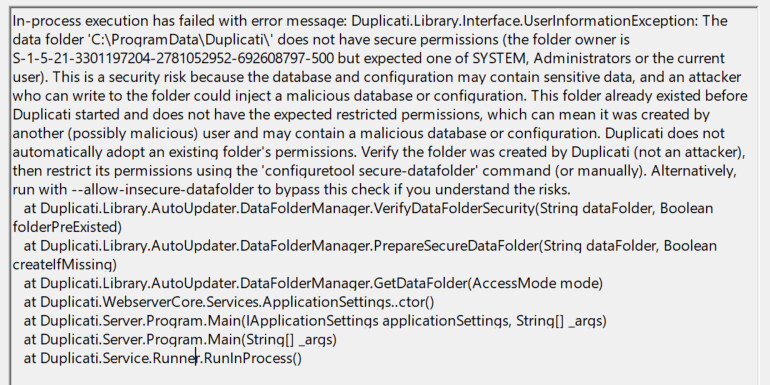
Thanks for reporting this. I think it is a logic bug, that happens when you run the configure tool with elevated permissions. It assigns the current user (an administrator account) as the owner, and then the check fails because that owner is not in the permitted set (Administrator (group) or SYSTEM) once the service starts.

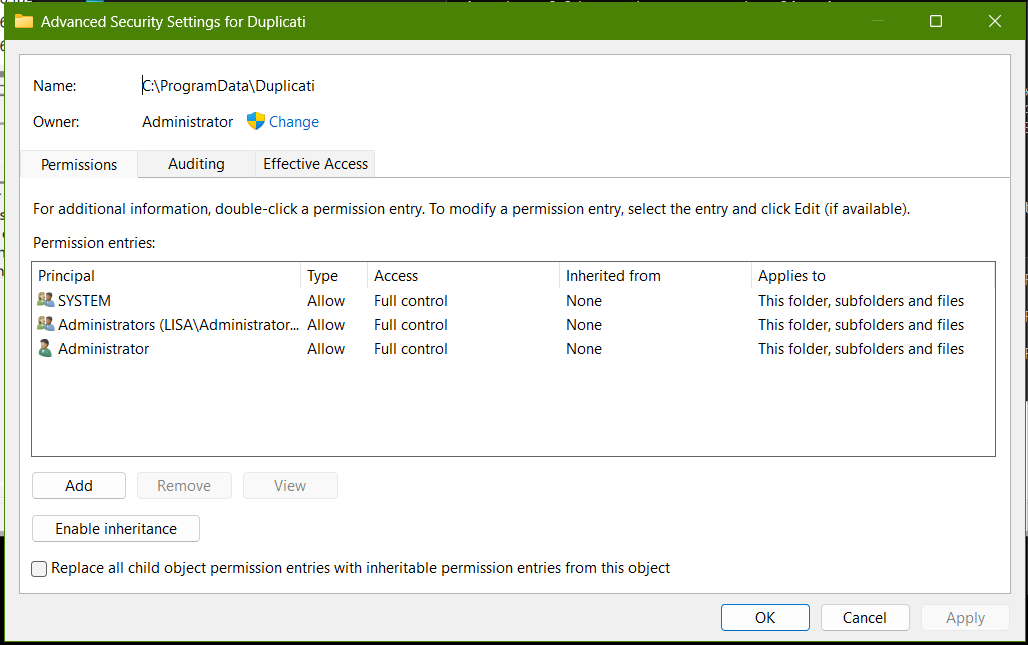
The screenshot does say “Owner: Administrator”, but that is not the SID that Duplicati finds as the folder owner. The SID that Duplicati reports looks like a local administrator SID.

I will update the configure tool to handle this with a --for-service option. For a fix, there are two ways to do it.

The simple fix is to run

Duplicati.WindowsService.exe secure-datafolder

This will restart the service and ask it to set the permissions. Since this runs in the service context, it will set the correct permissions.

Alternative is to edit the setup, remove the “Administrator” entry from the permission entries so it only has “SYSTEM” and “Administrators” (note the trailing s). Then change the Owner to be “SYSTEM” (or Administrators).

The problem is that inside the backup, there is 1 file where the metadata does not match up. You should be able to use the new “Purge broken files” UI to list and remove/fix the entry that cannot be mapped.

Thanks, using Duplicati.WindowsService.exe secure-datafolder the problem was sorted.

As for the backup issue, I’ll try the purge shortly, but it reminded me about something else - pausing pauses everything? As I was going to run the purge I remembered the backups were paused for some time, so I therefore cannot run anything unless I resume and then the missed jobs all run. It’s quite annoying that through the UI I cannot run anything while paused and have to resume which can mean waiting a long time for something to fail just to be able to try and fix it, potentially making things worse. I think the “pause” should be more granular e.g. add a separate pause button to each job

I ran the new purge and I get the feeling I’m in some kind of loop:

  "Messages": [
    "2026-07-18 16:12:48 +02 - [Information-Duplicati.Library.Main.Controller-StartingOperation]: The operation ListBrokenFiles has started",
    "2026-07-18 16:12:57 +02 - [Information-Duplicati.Library.Main.Operation.ListBrokenFilesHandler-NoBrokenFilesetsInDatabase]: No broken filesets found in database, checking for missing remote files",
    "2026-07-18 16:12:57 +02 - [Information-Duplicati.Library.Main.BasicResults-BackendEvent]: Backend event: List - Started:  ()",
    "2026-07-18 16:12:57 +02 - [Information-Duplicati.Library.Main.BasicResults-BackendEvent]: Backend event: List - Completed:  (3.609 KiB)",
    "2026-07-18 16:12:57 +02 - [Information-Duplicati.Library.Main.BasicResults-BackendEvent]: Backend event: QuotaInfo - Started:  ()",
    "2026-07-18 16:12:57 +02 - [Information-Duplicati.Library.Main.Operation.FilelistProcessor-RemoteUnwantedMissingFile]: Removing file listed as Temporary: duplicati-20260718T140331Z.dlist.zip.aes",
    "2026-07-18 16:12:57 +02 - [Information-Duplicati.Library.Main.Operation.ListBrokenFilesHandler-NoMissingFilesFound]: Skipping operation because no files were found to be missing, and no filesets were recorded as broken."
  ],
  "Warnings": [
    "2026-07-18 16:12:57 +02 - [Warning-Duplicati.Library.Main.Operation.FilelistProcessor-ActiveUploadsDetected]: Active uploads detected, but no cleanup was performed. Run the \"repair\" command to clean up the incomplete files",
    "2026-07-18 16:12:57 +02 - [Warning-Duplicati.Library.Main.Operation.FilelistProcessor-MissingRemoteHash]: Remote file duplicati-b6e98f23fbdd2469eb0f9f16f5ba216d3.dblock.zip.aes is listed as Verified with size 2695261 but should be 0, please verify the sha256 hash \"\""
  ],

So I ran a repair:

  "Messages": [
    "2026-07-18 16:13:39 +02 - [Information-Duplicati.Library.Main.Controller-StartingOperation]: The operation Repair has started",
    "2026-07-18 16:13:42 +02 - [Information-Duplicati.Library.Main.Database.Local.LocalRepairDatabase-ZeroLengthMetadata]: Found 1 zero-length metadata entries",
    "2026-07-18 16:13:44 +02 - [Information-Duplicati.Library.Main.Database.Local.LocalRepairDatabase-ZeroLengthMetadataRepaired]: Zero length metadata entries repaired successfully"
  ],
  "Warnings": [],
  "Errors": [
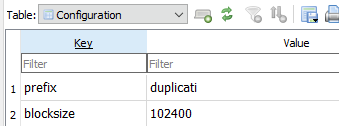
    "2026-07-18 16:13:45 +02 - [Error-Duplicati.Library.Main.Controller-FailedOperation]: The operation Repair has failed\r\nDatabaseInconsistencyException: Found inconsistency in the following files while validating database: \r\nC:\\ProgramData\\BraveSoftware\\BraveVpnService\\Crashpad\\metadata, actual size 0, dbsize 102400, blocksetid: 6486\r\nC:\\ProgramData\\Intel\\Logs\\IntelCPHS.log, actual size 0, dbsize 102400, blocksetid: 6486\r\nC:\\ProgramData\\Mozilla-1de4eec8-1241-4177-a864-e594e8d1fb38\\UpdateLock-308046B0AF4A39CB, actual size 0, dbsize 102400, blocksetid: 6486\r\nC:\\ProgramData\\Packages\\Microsoft.WindowsTerminal_8wekyb3d8bbwe\\S-1-5-21-3301197204-2781052952-692608797-500\\SystemAppData\\Helium\\Cache\\1e7d2dc91f14a48_COM15.dat.LOG2, actual size 0, dbsize 102400, blocksetid: 6486\r\nC:\\ProgramData\\Packages\\MicrosoftCorporationII.WinAppRuntime.Singleton_8wekyb3d8bbwe\\S-1-5-21-3301197204-2781052952-692608797-500\\SystemAppData\\Helium\\Cache\\dbda3473e8dab9bc_COM15.dat.LOG2, actual size 0, dbsize 102400, blocksetid: 6486\r\n... and 4384 more. Run repair to fix it."
  ],

It usually made sense to do the added lockdown by setting explicit permissions.
I’m unconvinced inherited secure permissions should be rejected by new check:

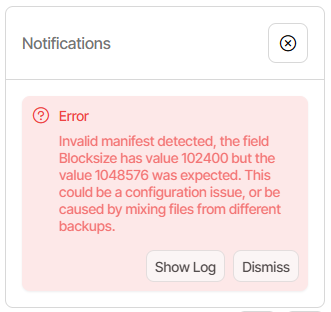
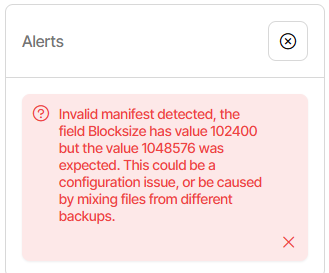
Duplicati.Library.Interface.UserInformationException: The data folder 'C:\Duplicati\duplicati-2.3.0.107_canary_2026-07-13-win-x64-gui\RUN' does not have secure permissions (the folder inherits permissions from its parent). This is a security risk because the database and configuration may contain sensitive data, and an attacker who can write to the folder could inject a malicious database or configuration. This folder already existed before Duplicati started and does not have the expected restricted permissions, which can mean it was created by another (possibly malicious) user and may contain a malicious database or configuration. Duplicati does not automatically adopt an existing folder’s permissions. Verify the folder was created by Duplicati (not an attacker), then restrict its permissions using the ‘configuretool secure-datafolder’ command (or manually). Alternatively, run with --allow-insecure-datafolder to bypass this check if you understand the risks.

I have a weird multiple-Duplicati install using a RUN.bat in a RUN folder I make, which is also the server-datafolder. If I could secure the parent C:\Duplicati, allowing inherited secure permissions may make it easier to zip-install Duplicati.

That was kind of a weak claim, as not trusting pre-populated folders hits as well.

EDIT 1:

The directions to run configuretool are likely wrong for Windows, where tool is
Duplicati.CommandLine.ConfigureTool. Can command directions vary by OS?

EDIT 2:

Since RUN.bat adds options, for now I also add --allow-insecure-datafolder.
The script not only lives there, but also does a cd to it before launching Duplicati, allowing using simple filenames (e.g. for logs), instead of ever-relocated full paths.

EDIT 3:

“Duplicati does not automatically adopt an existing folder’s permissions.” was hard to understand, and I wondered if “permissions” meant “contents” (per words before it). Maybe “adopt” meant “accept” if it truly refers to folder permissions and not content.

I’m willing to change permissions (even explicit ones if inherited remains forbidden), however I’m not sure if there’s an option to say that the new folder contents are OK.

Running configuretool from script might be possible. I haven’t tested it that way yet.

EDIT 4:

Tested without --allow-insecure-datafolder on Duplicati start. Noisy but works.

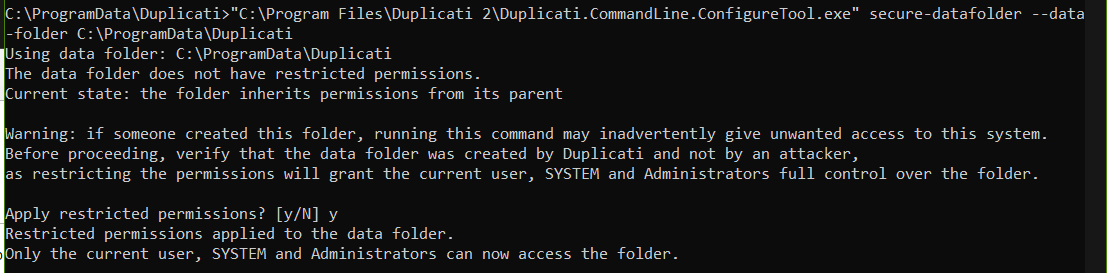
Using data folder: C:\Duplicati\duplicati-2.3.0.107_canary_2026-07-13-win-x64-gui\RUN
The data folder does not have restricted permissions.
Current state: the folder inherits permissions from its parent

Warning: if someone created this folder, running this command may inadvertently give unwanted access to this system.
Before proceeding, verify that the data folder was created by Duplicati and not by an attacker,
as restricting the permissions will grant the current user, SYSTEM and Administrators full control over the folder.

Restricted permissions applied to the data folder.
Only the current user, SYSTEM and Administrators can now access the folder.

As an option quibble, notice inconsistent spelling of datafolder and data-folder.

start /b ..\Duplicati.CommandLine.ConfigureTool secure-datafolder --data-folder %CD% --apply
start /b ..\Duplicati.GUI.TrayIcon.exe --server-datafolder="%CD%"

EDIT 5:

Inconsistency as seen in the help. Environment variables favor DATAFOLDER.

Usage:
  Duplicati.CommandLine.ConfigureTool secure-datafolder [options]

Options:
  --data-folder <data-folder>  Path to the Duplicati data folder (defaults to standard location)

New behavior is the old behavior plus inability to manually correct it:

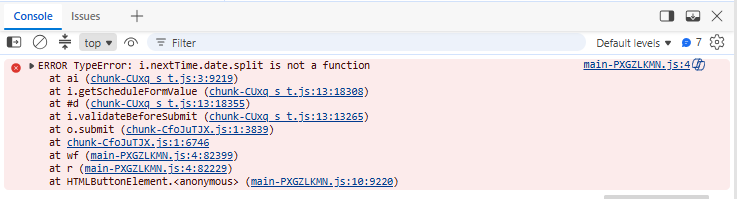
Basically, I can’t Submit. Nothing on net. Haven’t played with it much.

EDIT 1:

EDIT 2:

Workaround is to use old UI via Settings to do import. It gets July 19.
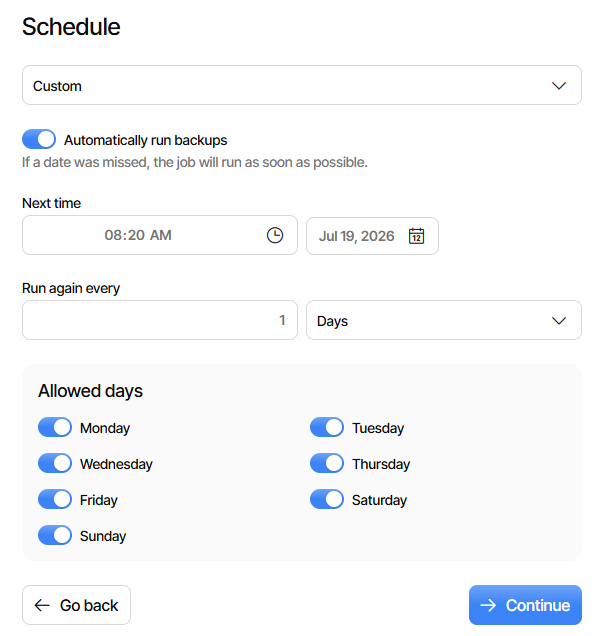
Go back to new UI and look at what job got for Schedule. It’s July 18.

What came from the server to show that:

        "Time": "2026-07-19T12:20:00Z",
        "Repeat": "1D",
        "LastRun": "2026-07-18T12:20:00Z",

Good news is it seems less prone to run due to a past-due schedule.
Bad news is trying to set a further future date (July 20) is rejected too.

EDIT 3:

Also rejects older past dates. Changing to 1 hour repeat, same result.
Visual appearance is Submit button is ignored (so check in dev tools).

EDIT 4:

Bug seems new for this Canary. 2.3.0.106 lets me schedule a backup.
2.3.0.107 new UI basically doesn’t, though it did let me do 13:00 Daily.