Issues reconfiguring backups after Windows -> Linux OS migration

Hello,

I have made an effort to search the web and this forum for answers before registering. If there are threads that contain actionable instructions on how to get past this, please direct me to them.

EDIT: Currently running 2.2.0.0_stable_2025-10-23 in Docker. *

TLDR: I am migrating from an old Windows machine to a Linux server after the Windows system died. Restoring works but reconfiguring the backups is not.*

I have restored from config file successfully. After this, I have attempted to set up the backup also using the config file in “Add backup” → “Import from file” and attaching the JSON config. Going through the wizard, I change the directory path from Windows path to the new restored directory and this seems to work. The UI gives no visual indication that backups will not work. However, I notice this in the logs:

Error while running <backup-name>

The backup contains files that belong to another operating system. Proceeding with a backup would cause the database to contain paths from two different operation systems, which is not supported. To proceed without losing remote data, delete all filesets and make sure the --no-auto-compact option is set, then run the backup again to re-use the existing data on the remote store.

I can see this flag as an option in the UI, but I don’t really understand why it is needed. The documentation doesn’t provide a clear explanation (to me, at least). According to the CLI docs I found, the flag ”Performs a compact process after purging files”, which does not seem to do what the name implies. In fact, it seems like the opposite of what I am looking for. Any explanation here would be appreciated.

I have read Changing source OS - #4 by John . This a long and confusing thread that goes into directly editing database files - is this process still necessary? Is the process documented somewhere?

I have also looked into setting up a new backup from scratch, using the same source. But I cannot do this because

The remote destination already contains a backup. Please use a different folder for each backup.

Unsure how to progress from here. Any advice is appreciated.
Welcome to the forum @noodle

This path should be super simple, right? The question is whether it’s what you want to have.
You can do cross-platform restore from your old backup if you have space to keep it around.

If you mean CLI docs for purge, I think you found a bug from 2016 on a secondary reference.
Primary references are usually better, but sometimes built-in help is more current than manual.

--no-auto-compact = false If a large number of small files are detected during a backup, or wasted space is found after deleting backups, the remote data will be compacted. Use this option to disable such automatic compacting and only compact when running the compact command.

looks about right to me, or at least not backwards. The reason the suggestion is suggesting a

delete all filesets and make sure the --no-auto-compact option is set

is if you don’t, data in the destination gets deleted because it suddenly became wasted space.
What this plan is trying to do is to let you reuse your existing destination data in a new backup. Situations where the goal is to avoid big uploads might appreciate that. Others might not care.

You still wind up with current version. Converting history is harder (thus the awful procedures)
because things like file permissions are different between OS, so are best obtained at backup.

Change of Duplicati server (+ OS) without losing the remote data was a 2023 dev explanation, question the wording. The raw data blocks are at destination for awhile, but old backups aren’t.

proves that some level of conversion is possible, but further comment would need developer. Possibly it boils down to a question of priority. Things that are rarely asked might be deferred.

Hi,

Thanks for the links.

Unless I am misinterpreting, it seems I can use them to restore, but the backups themselves are finished and need to be set up again as I’m not going to run out and buy another Windows machine.

Thanks for taking the time to respond @ts678

I didn’t write the quoted text, but I think (and you had tested) that it can restore old backups.

Restores to Linux should make you restore to a different folder without Windows drive letter.

Windows backup versions can’t continue backup on Linux AFAIK, without some weird doings.

A backup version is represented by a dlist file, and it has the real OS path names inside it.

Understanding Backup

Starting a fresh backup in Linux would be the safest and most supportable way to go forward.

Since your raw files are the same, reusing them (reducing upload) may be possible, but could possibly have unwanted aftereffects or not work, although I did do a little test that seemed OK.

You can keep your Windows backups around somehow until they become too old to be useful.

The Windows backups are already too old to be useful since they cannot be used without a Windows machine.

I will restore the backups, test they are not corrupted, and then continue to backup with an alternative to Duplicati.

Thanks for your time.

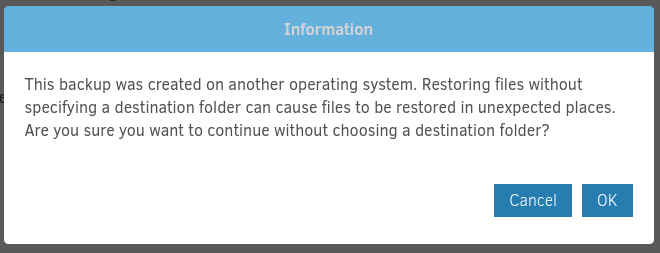
Did you test? It used to say “This backup was created on another operating system. Restoring files without specifying a destination folder can cause files to be restored in unexpected places. Are you sure you want to continue without choosing a destination folder?”

EDIT 1:

That’s been there since 2017, however it would have been in what’s now considered the old UI. Question would be whether it got put in the new UI…

EDIT 2:

It wasn’t a great test (feel free to do your own), but I edited a Windows database into Linux path.
Windows Restore popped the question I quoted in the old UI. The new UI went ahead and did it, logging Windows slashes. Maybe Windows to Linux works similarly, but what of the drive letter?

You’re in an ideal position to try small restore, but if you don’t care to, then I certainly won’t push.

Just passed a more realistic test of restore to Linux using Windows backup and databases.
I had some trouble with the new restore code, so turned on the --restore-legacy option.

I did also have to give it a valid Linux path to restore to instead of its original Windows path.
It didn’t warn me to do so, but it concatenated current directory, drive letter, and rest of path.
Just the kind of (wrong) thing one might expect if it thinks it’s a relative path (not rooted at /).

EDIT 1:

Tried to reproduce initial trouble, and couldn’t, but in case someone knows it, error log said:

"2025-10-30 11:05:25 -04 - [Error-Duplicati.Library.Main.Controller-FailedOperation]: The operation Restore has failed\nIOException: Protocol error : '/media/sf_VirtualBox_shared_folder/duplicati/C:'"

which is the shared path to this VM – with a Windows drive letter added. Not sure what’s up.

Regardless, I’m showing that old Windows backup should be restorable on new Linux setup.

EDIT 2:

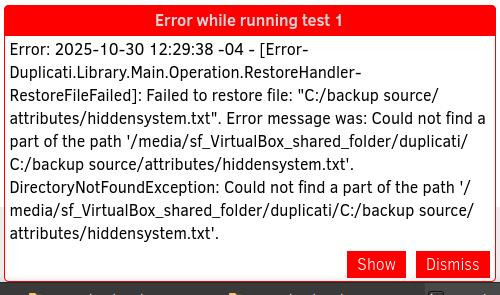
Using “Original location” can cause the error I showed. restore-legacy errors more clearly:

"2025-10-30 12:25:20 -04 - [Error-Duplicati.Library.Main.Operation.RestoreHandler-RestoreFileFailed]: Failed to restore file: \"C:/backup source/attributes/hiddensystem.txt\". Error message was: Could not find a part of the path '/media/sf_VirtualBox_shared_folder/duplicati/C:/backup source/attributes/hiddensystem.txt'.\nDirectoryNotFoundException: Could not find a part of the path '/media/sf_VirtualBox_shared_folder/duplicati/C:/backup source/attributes/hiddensystem.txt'."

EDIT 3:

ngax pops up

and if I decide to OK anyway, pops up

which is what I get for ignoring “unexpected places” note that ngax gives and ngclient doesn’t.

Sorry, I appreciate the effort you’ve gone to here but what is the relevance of this?

Restoring is not an issue from what I’ve seen. As long as I provide a valid path to restore to, the files are recreated in the new location. I haven’t yet verified the files are all uncorrupted (TB of audio files is not quick to check), but it appears to work.

Reconfiguring the backup is the issue. The backup cannot continue from the new location, which is what my thread is about. Based on the quote from the linked thread above, the backups are effectively useless after I have restored as they cannot continue to be backed up to anymore.

I think this thread can be closed.