I have been using Duplicati for quite long time for making backup. Few weeks back, my PC crashed and now I needed it for the first time to restore my backup. It is giving me fileset not found error, while spending hours on the internet, I found that a file named dlist.zip is required in the backup folder which in my case is missing. I am 100% sure that last backup was successful and even never opened the backup folder after setting up the backup in duplicati because all are encrypted files and useless to see them directly. I don’t know how the dlist file is deleted.
How can I recreate that dlist file as all other files are present there. There must be a way to restore the backup. I tried duplicati-recovery-tool but it gives error “Valid range for version is 0 to -1” which might be due to missing dlist file as I read in this forum.
Please help me recover my backup. Now is the time for which I had been making backups but I am stuck on this which feels like I have been wasting time backing up data.
The name is complex, for example my latest-of-27 is duplicati-20251013T143532Z.dlist.zip.aes.
You can try sorting by name to see if you have any, but if not, I don’t know how that would occur, especially if you had several versions. Going from 1 to 0 would be more plausible, but still weird.
Duplicati checks for expected files every backup, so disappearing files “should” be noticed fast…
Thanks a lot for a detailed reply @ts678. I have sorted by date and last backups files (dblock and dindex) are present there. And I use computer a lot and user of both Windows and macOS and I am 100% positive that dlist file is not there. Verified by several methods like search, sorting by name, checked on Windows, copied whole backup to macOS and verified there too but same everywhere. Same errors. Only possible solution is if there is a way to recreate dlist file as all files are present. And if there isn’t any way, I’m afraid that I’m in trouble.
As the computer was crashed and I had to reinstall Windows so no database. Repair isn’t working too possibly due to to dlist not being present.
I have the job config, I had exported it and used it to add the backup again. From the older source OS/Disk, I don’t have logs or anything else other than Duplicati backup (that is not working).
Please don’t tell me that there is not way to recover from this backup.
Then you can look at the Options screen to check Retention policy and advanced options.
Duplicati has an allow-full-removal option to use if one really wants to delete ever dlist file.
It would be interesting to guess at how many dlist files there were before dropping to zero.
That won’t bring them back though. That would take other methods, maybe extreme ones.
Even if you didn’t get what you want in C:\Windows.old, files might still be hidden on drive.
You would need to stop using drive and get (or hire) recovery or undelete software to try it.
Reportedly, Windows install doesn’t take the extra time to wipe out all the data, just the file references. As such, data can sometimes be undeleted, but I’m not sure of a success rate.
The more you use Windows, the greater the chance it overwrites data that you want back.
Similar undelete might be possible on destination. We need either database or some dlist.
The Duplicati backup is kind of the same way. You have data, but no dlist info to make files.
As mentioned, there’s a way to reassemble raw data to files, but you’d need to pick names.
If devs or anyone experienced with data recovery would like to chime in, please feel free to.
It is stored on external hard disk. I check restoring from it initially then tried copying it to mac and both failed.
My pc crashed due to hard disk failure, I had to perform a clean install of Windows so there is no Windows.old folder.
I tried that now, I reimported the backup from the config file, and set ‘allow-full-removal’ option to true and then tried database repair but received same error. Also restore option was not working too and didn’t show any version or file to restore.
From the discussion above, I deduce there is no option, not even by disaster recovery, to recreate or dlist file. Is there?
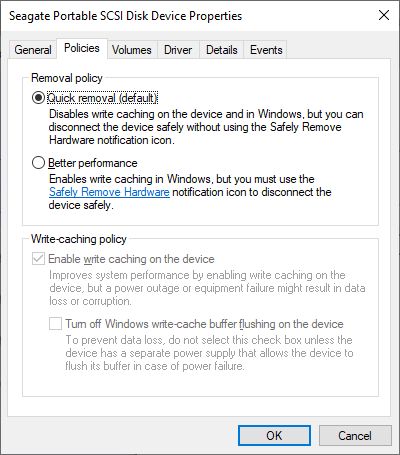
That might be bad and good. USB hard disks have risk of file loss if removed at bad time.
Although its value depends on some settings, there’s a Safely Remove Hardware button.
Good news is there’s another place to try to recover some dlist file, even slightly old ones.
Concern, as usual, is what might have overwritten it, but dlist as last file has best chance.
Windows File Recovery describes that concept without a sales pitch, but many tools exist.
Is even latest dblock the full size of the earlier? That can be a sign that newer got lost.
You can check the pattern on earlier backups too. Chances are last dblock is smaller.
Between that and the next backup is the dlist, or if retention is low, where it once was.
Then there should be a defective hard drive around. Sometimes these are recoverable.
This may take a special service or software. I recovered most of a drive with ddrescue.
That is free, but prices and effectiveness vary. You might want to consult a repair shop.
They might be able to attach it to a USB adapter then plug it in, but then so could you.
If you have drive encryption on, that will add another hurdle that may need expert help.
If was a head crash that’s damaged the surface, it’s very specialized – and very costly.
There was nothing to try. You misread my statement that Duplicati should not be able to delete every last dlist file, even if one asks for it or severely misconfigures retention (still not reported).
Basically, that’s the safety mechanism that I hope you didn’t defeat while doing actual backups.
It sounds, though, like you added it thinking it would fix things after-the-fact. It just avoids harm.
Where harm came from is unknown given the lack of any logs, and no details on backup config.
I gave you many options, and just gave you more. None of them are pretty, but they’re there.
Try data recovery on the USB drive. This hopes lost dlist file can be software-recovered.
Try data recovery on the failed drive. Might be easy, might be hard, depending on failure.
Decide if you want to try to recover nameless files and look through them for importance.
Files are not entirely nameless. Common file types are identified by TrID - File Identifier, however you’d have to add the first part of the name. Reassembly is by my Python script. Using recovery tool with missing dlist files has the software bundle and more description.
A repair shop will probably have an opinion on data recovery. I’m not sure I trust all the stuff the Internet sellers have for sale. All of this is researchable, but a trusted expert might be best way.
There are different levels of disaster. Loss of system plus loss of key backup data is a big deal, requiring a lower level of disaster recovery, but “maybe” only enough to run the backup restore.
I don’t know how recovery work gets priced, but I’m guessing less costs less. The dlist is named duplicati-YYYYMMDD (etc.) so you should have a good rough idea. The database is letters.sqlite which means name can’t be forecast, but you know the rough time, and location is in user profile similarly to your new set up if you add a job (don’t overwrite USB if you run that) and check path.
If write caching got enabled, but Safely Remove Hardware isn’t used, late data can be lost.
This can be guessed at by seeing small dblock as newest, and dlist after it may be missing.
if used (and I don’t know if it was) would then delete older dlist files. If latest is lost, that’s bad.
Data recovery expert has no chance of recovering a file off the USB if the file never got there.
Possibly the previous one could be undeleted, because version deletes happen after backup, meaning there would be a chance that the next-to-last version dlist file would still have data…
Basically you’re fishing for some way to get back a job database or some dlist file that’s intact.
Thanks a lot for the links and detailed explanation. I will try to get the dlist files recovered/undeleted. If that failed then nameless method. thanks a lot. But the backup/restore process seems highly unreliable or we should also make backup of duplicati backup by some other tool to keep its dlist file. From the link you shared, it seems I am not the only one that encountered this problem. There should be some ways to get this issue sorted out as like me I had been making backup and when I needed it, it is useless as it misses one file. Means 8gb of data backup becomes is of no use now without one specific file.
The original post looked like an initial backup. They can take a long time, with dlist at end.
This is a different usage (presumably) from yours which was probably an ongoing backup.
Sometimes I advise people to do initial backup in small chunks, or one might hit this issue.
Situation is not very clear on original post, and second poster looks maybe it wasn’t initial. Mysterious file loss or non-write on Google Drive. Didn’t press for a cause analysis, sadly.
Logs would probably have been obtainable then. Regardless, it’s not a common problem.
Normally the backup after an interrupted backup gets a “synthetic file list” uploaded for the interrupted backup, which is the one before it plus whatever it got done before interruption, however if there was no backup before it, it used to not do that. Not sure of current design.
Word in singular is a clue that you configured only one. There’s little point, and it’s dangerous.
Having even two versions (each additional one is usually little extra space) would reduce risk. Multiple version backup also makes it easier to restore after damage not immediately noticed.
Can’t agree with that. It’s also only as reliable as its backup storage, which is not in its control.
Unless advanced option such as no-backend-verification is set, it checks files repeatedly.
If we had the old database, we could look at the list after backup to see if it saw the dlist.
If it did, and if it gets lost later, there’s not much to do. Odd thing is if was a bad USB removal, problem seems likely to be noticed on some previous backup, with missing file error message.
That might not help if the dlist wasn’t written (e.g. unsafe removal) or was lost before copy. Probably depends on ordering though, e.g. copy (to where?) before saying done might do.
One can set this up oneself using a run-script-after which will run before the job ends, however where to store it is a good question which one can choose as desired, I suppose.
The dlist file can be pretty big, and something like copying to the database folder may fill up, breaking database use (so Duplicati in general). People already manage to fill up that space.
Clue shows up again. Another option might be to pop up GUI warning if someone picks that.
The developer doesn’t like being able to lose backups from losing one file, which is why the encryption password doesn’t do something like obtain the true key from a file in the backup. Inability to change the encryption password is itself a limitation from a security point of view.
This is all up to the developer, of course. I’m speaking mostly from seeing what goes wrong.
Allow targeting multiple destinations #234 is a superset of just copying a dlist, or all dlist.
SyncTool doesn’t look like it has a way to limit to dlist files, but maybe I’m wrong on that.
Even a Windows copy command of all of the dlist files might work, but lacks a cleanup. robocopy might work, and rclone sync might work. Both would need right tested options.
Both of those can delete files that no longer exist in source side, but is that good or bad?
Regardless, you want to make sure not to delete anything important in destination folder. Filtering, includes and excludes in the rclone site::
Do not use with --delete-excluded, as this could delete unselected files.
which is the general concern with anything that does a sync. Test. BTW also test backup,
although if this was a one-time issue of losing last few files, even test might not catch it…
Thank you so much for detailed replies. I will first try to get the dlist by recovering then will use these suggested syncing tools. I will try the recovery on weekends.