Found 1 faulty index files, repairing now

Could someone please help with this issue? Multiple backups a day are getting the following warning in the logs: Found 1 faulty index files, repairing now

To troubleshoot, I run the test command with --backup-test-percentage=100 and --full-remote-verification.

When I run the command I get:

  Listing remote folder ...
  Downloading file duplicati-20250404T030000Z.dlist.zip.aes (1.329 MiB) ...
  Downloading file duplicati-i1e3f08af0c3d449e83bd7af29d3fb5aa.dindex.zip.aes (3.888 KiB) ...
  Downloading file duplicati-b5f8fd22a91eb417aa3ebf0c165af1d07.dblock.zip.aes (49.132 MiB) ...
Found 1 faulty index files, repairing now
  Uploading file duplicati-ie6da025072014007a0efe5532af55a34.dindex.zip.aes (6.216 KiB) ...
  Deleting file duplicati-i1e3f08af0c3d449e83bd7af29d3fb5aa.dindex.zip.aes  (3.888 KiB) ...
Examined 2 files and found no errors
Return code: 0

Which is good. However if I run it exactly after it finishes, I get the same exact output so it looks like the faulty index is not being repaired.

This sounds a bit mismatched. If you meant to test all files, see test directions below, and if objective is only the index files (which are smaller, if download time is an issue), ask that way:

Usage: Duplicati.CommandLine.exe test <storage-URL> <samples>
[<options>]

  Verifies integrity of a backup. A random sample of dlist, dindex,
  dblock files is downloaded, decrypted and the content is checked
  against recorded size values and data hashes. <samples> specifies the
  number of samples to be tested. If "all" is specified, all files in
  the backup will be tested. This is a rolling check, i.e. when
  executed another time different samples are verified than in the
  first run. A sample consists of 1 dlist, 1 dindex, 1 dblock.

  --time=<time>
    Checks samples from a specific time.
  --version=<int>
    Checks samples from specific versions. Delimiters are , -
  --full-remote-verification
    Checks the internal structure of each file instead of just verifying
    the file hash
  --full-remote-verification (Enumeration): Activate in-depth
    verification of files
    After a backup is completed, some (dblock, dindex, dlist) files from
    the remote backend are selected for verification. Use this option
    to turn on full verification, which will decrypt the files and
    examine the insides of each volume, instead of simply verifying the
    external hash. If the option --no-backend-verification is set, no
    remote files are verified. This option is automatically set when
    then verification is performed directly. ListAndIndexes is like
    True but only dlist and index volumes are handled.
    * values: True, False, ListAndIndexes, IndexesOnly, IndexOnly
    * default value: False
  --backup-test-percentage (Decimal): The percentage of samples to test
    after a backup
    After a backup is completed, some samples (one sample is 1 dblock, 1
    dindex, and 1 dlist) files from the remote backend are selected for
    verification. Use this option to specify the percentage (between 0
    and 100) of samples to test. If the option --backup-test-samples is
    also provided, the number of samples tested is the maximum implied
    by the two options. If the option --no-backend-verification is
    provided, no remote files are verified.
    * default value: 0.1

Odd if it deletes duplicati-i1e3f08af0c3d449e83bd7af29d3fb5aa.dindex.zip.aes again without failing due to missing file, however similar output could be due to fixing one at a time.

The new manual only documents a few commands itself, but one can search to find old docs:

The TEST command

The other reason the exact same output shouldn’t happen is because sample should change.

Please check the test output carefully to see whether the exactly same files are mentioned.

If you just want a fast and full dindex fix, test all and use IndexesOnly.
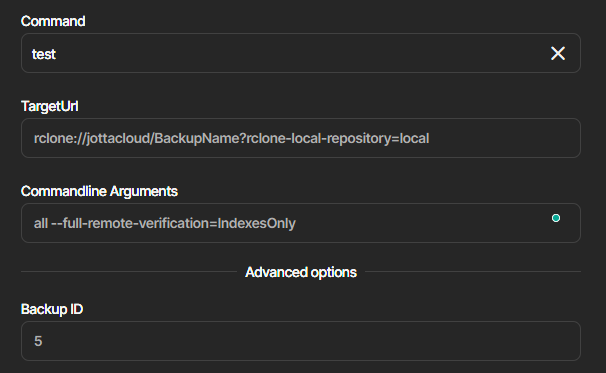
Where do you find that IndexesOnly option? I have 2.2.0.1, and yet all I get for test is

& ‘C:\Program Files\Duplicati 2\Duplicati.CommandLine.exe’ help test all

Usage: Duplicati.CommandLine.exe test <storage-URL> <samples> [<options>]

Verifies integrity of a backup. A random sample of dlist, dindex, dblock files is downloaded, decrypted and the content is checked against recorded size values and data hashes.  specifies the number of samples to be tested. If “all” is specified, all files
in the backup will be tested. This is a rolling check, i.e. when executed another time different samples are verified than in the first run. A sample consists of 1 dlist, 1 dindex, 1 dblock.

–time=
Checks samples from a specific time.
–version=
Checks samples from specific versions. Delimiters are , -
–full-remote-verification
Checks the internal structure of each file instead of just verifying the file hash

Nowhere a word about IndexesOnly, ListsAndIndexes, etc. I want to check all non-dblocks, as I’m getting indexes warning every run of that backup, but I’m not clear how to actually do it, because neither online

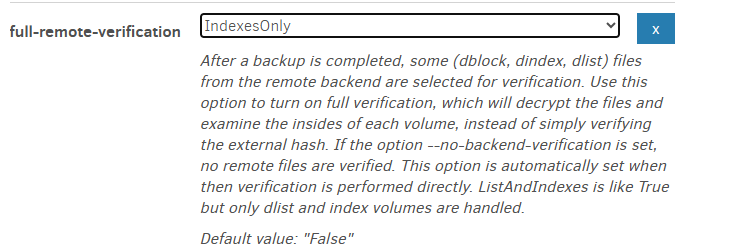
Nor does the above offline documentation mention how. Like this in UI?

I don’t want to just test it to find out, it will now download and test the full 300GB backup.

  --full-remote-verification (Enumeration): Activate in-depth
    verification of files
    After a backup is completed, some (dblock, dindex, dlist)
    files from the remote backend are selected for
    verification. Use this option to turn on full verification,
    which will decrypt the files and examine the insides of
    each volume, instead of simply verifying the external hash.
    If the option --no-backend-verification is set, no remote
    files are verified. This option is automatically set when
    then verification is performed directly. ListAndIndexes is
    like True but only dlist and index volumes are handled.
    * values: True, False, ListAndIndexes, IndexesOnly,
    IndexOnly
    * default value: False

It’s newer than old prev-docs.duplicati.com, but is available in GUI:

You could put a 1 instead of all in Commandline Arguments to test behavior.

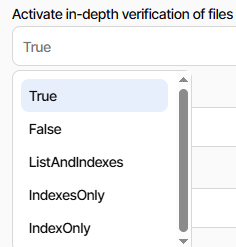
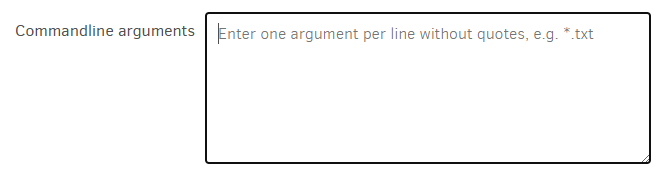
I’d suggest using the UI (see my image) to pick options. In particular, using the
Commandline Arguments usually has one option per line, which avoids typical
command line problem of needing quoting to handle option values with spaces.

Old docs and UI are more helpful on this.

Using the Command line tools from within the Graphical User Interface

New docs don’t really describe the GUI Commandline use, and UI has:

image

1 Like

I meant, at what place you found it - new documentation, old documentation, command line help option, none of that describes the options (“values: True, False, ListAndIndexes, IndexesOnly,
IndexOnly”) like the screenshot you have.
The only place I was able to find that text is here on the forums. Even Googling for that exact phrase only finds it here in the forum, not even github. It must be some secret documentation :slight_smile:

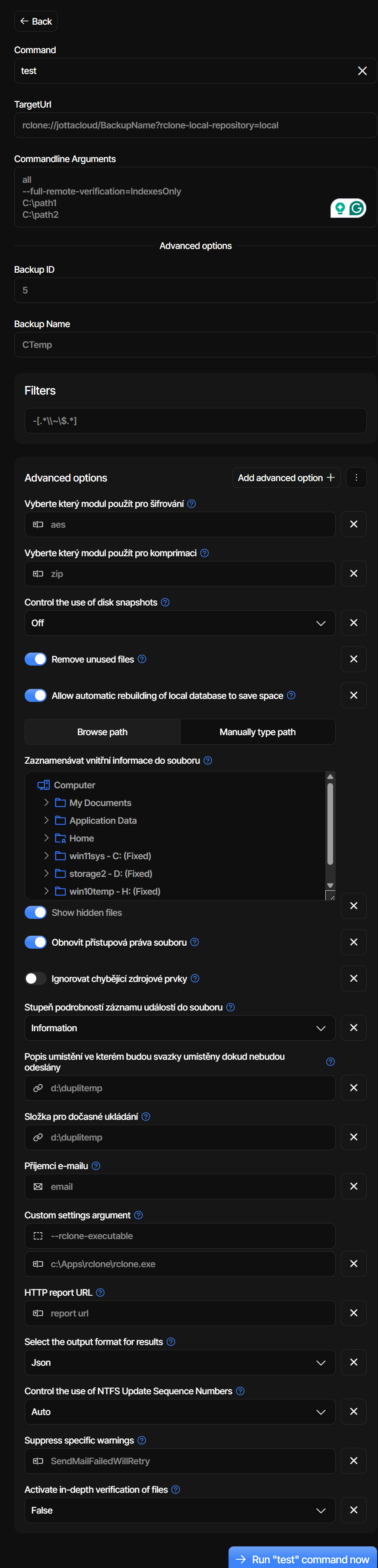
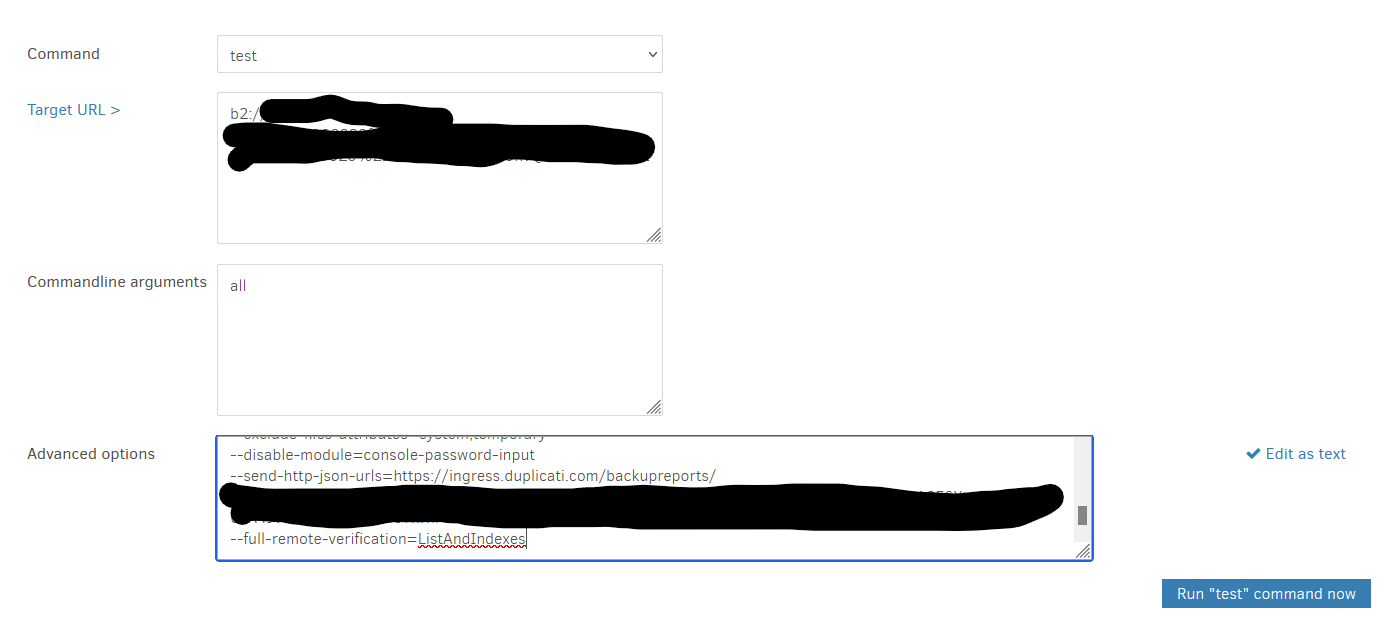
The new UI has multi-line too, it just fills all the commands and options for “backup” command and doesn’t remove those unnecessary when I switch it to “test”, so I was removing it manually. I could do

I was not able to find the “full-remote-verification” in the advanced options, because

  • It’s buried at the end of all other options I’m using (19)
  • It’s called “Activate in-depth verification of files” and not full-remote-verification
  • Half the options are in the Czech language, which I have no idea why is happening, it’s leaking in UI, logs,… even when my system is in English. I don’t know if the app is trying to outsmart me by second language in browser, my IP geolocation, or otherwise, but I really hate that and failed to find any language option to override it :\

When I keep in arguments all the prefilled fields, it fails as it expects only one argument. Removing unnecessary fields for commands like test could be a UX improvement for future versions, as prefilling everything doesn’t help in those cases.

And when I hit “back” to fix the failed command, it removed all information (test, full-remote-verification extra option added at the end), and I had to start from zero.

But eventually, after fixing that (only value 1 for the test and then all for execution and returning the full-remote-verification extra option via “add advanced option” worked and indexes are being downloaded and checked, so my immediate need is resolved, thanks :slight_smile:

I posted a Duplicati.CommandLine.exe help full-remote-verification.
I posted image of the option dropdown menu from new UI GUI Commandline.
I did not post the hover-help because it somehow crashes its page in Chrome.
Old UI (increasingly hard to get to) doesn’t need hover. It just shows help like:

I’m noticing it has a typo (then) and doesn’t explicitly explain IndexesOnly.

I have complained repeatedly about this. The developer did open an issue on it.

Show the option name in advanced options #380

This still-in Canary change

helps slightly, but does not help to reverse to option name if already used.
Even worse – the short help now shown is translated, so gets even worse.
When someone posts non-English to forum, one must search through the
message translation files (in a language one may not know) to find option.

Maybe the developer has a comment, but you see the challenge I’m seeing.
I’m not commenting on the other UX things, as those are also for developer.

Oh, I didn’t know you can also ask help directly for arguments (not just commands, which in other apps also type out their arguments). I do get the full description like you when used this way.

Yup. And when I try to translate into English, it could be something different than the app uses and confuse everybody even more.

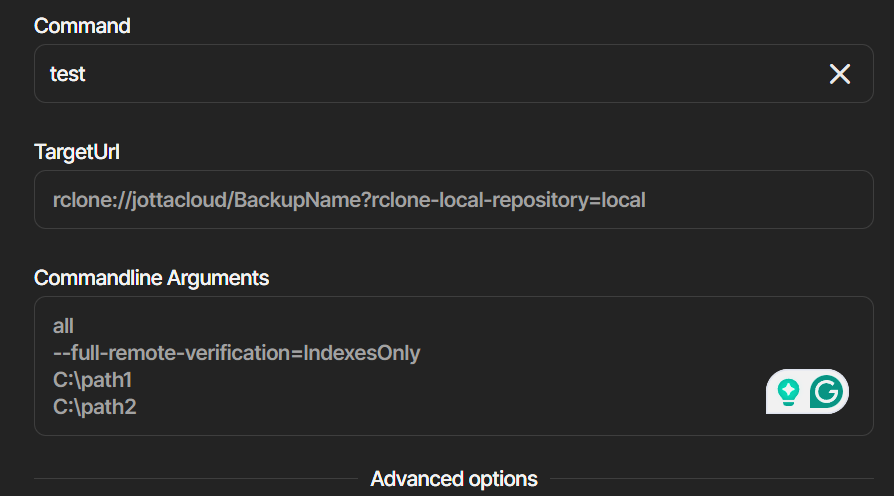
I had the same issue, it kept reporting 1 faulty index file. It took me about 30min to figure out that I had to run it like this to scan all my remote indexes

It found and repaired 99 faulty index files :anxious_face_with_sweat:This is rather concerning.

Shouldn’t “Verify files” button perform this kind of scan, and if not, it would be nice if there was some sort of preset command to do this kind of scan/repair

1 Like