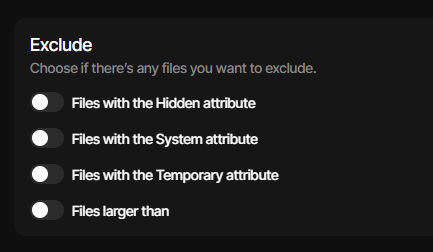
Just updated to version 2.2.0 and in general looks great. I will suggest a couple of things with the UI later.
When I edit a backup job, just created on 2.2 or created in the previous stable version 1.x
And I go to Sources
And I scroll to Exclude
And I tick any of the options for System/Hidden/Temporary or define a maximum file size
And I save (by going to the last step and click Submit)
When I go back to editing
These options are all disabled
I have a set of backup jobs since more than a year which excluded hidden and temporary files.
Since updating to 2.2.0.0 those exculions are no longer respected. In the new gui they are switched of and I cannot store the changes. When I switch back to the old gui they are still ticked on, but not working.
I am a bit sad that sacp mentioned this bug since 4 days and noone cares.
Not true. It was opened as an issue here 4 days before this topic was posted.
There are ample issues and limited developers. Code changes aren’t instant.
A second non-GUI part in this area did just get a fix about 6 hours ago here.
The developer has seemingly been busy elsewhere, but just put out a burst.
is IMO better than “not saved” in title. The new UI saves, but read-back is bad.
The old UI saves and reads back, but then hits multi-attributes bug in C# code.
That’s the one with the documented fix. Presumably it will be in another Stable.
For now, single attribute works, but I don’t know how much that helps your use.
I haven’t been using Duplicati for long, and usually for some document folders.
I don’t think I used before any of these options and to be frank I don’t even remember where they appeared in the previous UI.
So, not knowing if it’s indeed saved or not (and if just a visual bug), for me I assumed “not saving”.
2.2.0 Stable: exclude-files-attributes settings not sticking has some pictures if you want them.
Important thing is not the wording in the title, although a read-back error can be easy to miss.
There has been lots of work trying to understand it better, to report what works – and doesn’t.
Your writeup was a little unclear, so if it differs from what I’m claiming, please post the details.
Thank you for your reply.
I only saw two post with this issue for some days and 0 replies in the forum.
As the developers are aware of this bug and they are working on it, I appriciate their work and thank them all for that super piece of software.