Hi,
I just wanted to put in a request for zstd level 9 compression.
borg backup now has this, and doing a test I found it performed better than deflate zip level 9 in duplicati.
thanks
Hi,
I just wanted to put in a request for zstd level 9 compression.
borg backup now has this, and doing a test I found it performed better than deflate zip level 9 in duplicati.
thanks
Me too!..well any level is good for me 
If you need highest possible compression ratio, then 7z (LZMA2) is the way to go. It’s still better in compressing than Zstd. Yet of course consumes also more CPU cycles. There are good comparisons about that.
I would prefer 7-zip compression, but one time it was mortally broken with Duplicati and nobody has confirmed since that, if it’s fixed. So I’m really afraid to use it unless someone confirms that it doesn’t corrupt data anymore.
It looks like it is being tracked here: Zstandard as default compression method, replacing deflate · Issue #4333 · duplicati/duplicati · GitHub
It also looks like a “free” win-win situation where zstd outperforms zip on every aspect
I noticed that lz4 was also proposed: lz4 as compression method · Issue #2575 · duplicati/duplicati · GitHub
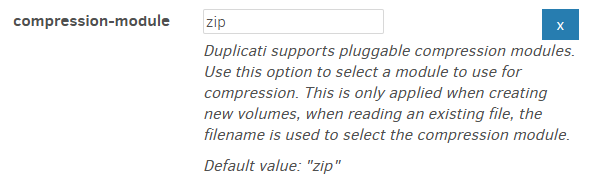
From the json File we have today already ZIP:
"Name": "compression-module",
"Value": "zip",
No Option for others or Zstd as the new Standard.
Duplicati has pluggable modules. There used to be 7z archives too (gone now).
Wikipedia explains how archive file format and compression algorithms relate:
ZIP is an archive file format that supports lossless data compression. A ZIP file may contain one or more files or directories that may have been compressed. The ZIP file format permits a number of compression algorithms, though DEFLATE is the most common.
Exported config is far from an exhaustive list of options. Most have their default.
You can also get a more current status idea by clicking on above GitHub issues.
  --zip-compression-library (Enumeration): Toggles the zip library to use
    This option changes the compression library used to read and write
    files. The SharpCompress library has more features and is more
    resilient where the built-in library is faster. When Auto is chosen,
    the built-in library will be used unless an option is added that
    requires SharpCompress.
    * values: Auto, SharpCompress, BuiltIn
    * default value: Auto
Interestingly, it looks like SharpCompress added this, and Duplicati is about to.
  --zip-compression-method (Enumeration): Set the ZIP compression method
    Use this option to set an alternative compressor method, such as
    LZMA. Note that using another value than Deflate will cause the
    option --zip-compression-level to be ignored.
    * values: None, Deflate, BZip2, LZMA, PPMd, GZip, Xz, Deflate64
    * default value: Deflate
will probably have a new option when and if this comes out in a Canary release.
zip-compression-method impact on zip-compression-library isn’t said yet.
Hopefully it won’t require coordinating multiple different options to get it working.
Working with non-Duplicati .zip programs of course depends on what it allows.
On important detail is that Zstd (and other compression formats) are best when they compress a larger stream. With the zip file format, each stream (meaning a block in the case of Duplicati) will be compressed individually so there is less opportunity to compress better.
Yes, and the 7z module also had the issue that it needed to compress the whole archive instead of just a single stream. Right now, there is no container format for Zstd, so we would have to do something like tar + zstd = .tar.zstd.
But tar files do not allow random access, which is sometimes used in Duplicati, so we would need to use .zip.zstd, where the inner zip file has no compression applied (simple container), so that zstd can compress the full file.
This would have the downside that we need to fully decompress the archive before accessing any of the streams (aka blocks) inside the archive.
Not impossible, but not a simple “add zstd to the list” task either.
This is the “easy” way to do it, it simply uses zstd on each stream (aka block), so the zip file format is the same, but the compressors are different. I am not sure if there is any measurable benefit from this, but it is relatively simple to do, and seamlessly makes the archives readable with any standard Zip application.
The zip-compression-library is used to toggle between .Net Zip and SharpCompress.
The .Net Zip library is much faster than SharpCompress but only support a few setting, and mostly only supports Deflate compression.
The SharpCompress library has a wide range of options supported, and not all are exposed.
The default for zip-compression-library is auto which chooses .Net Zip unless an unsupported compression setting is picked. If an archive cannot be read by .Net Zip, Duplicati will fall back to SharpCompress and see if it is readable there, such that files with unsupported compression methods can be read without any additional user interaction.
In short, simply setting zip-compression-method=ZStandard will auto-switch to use SharpCompress (once the library update is included).
Also have the new 2.3 Stable Version Zstd as the new Default or as Option to Save more Space on the Remote Storage without any Negative Consequence in Summary of the Default ZIP Option?
This was closed/implemented: lz4 as compression method · Issue #2575 · duplicati/duplicati · GitHub
This was needed? Why Zstd was implemented: lz4 as compression method · Issue #2575 · duplicati/duplicati · GitHub
cited above only got put into the master branch on April 16, so it wouldn’t be in
v2.3.0.0_stable_2026-04-14 which says it’s roughly v2.2.1.0_beta_2026-03-05 which says it’s got changes through v2.2.0.105_canary_2026-02-20.
The lz4 comments aren’t clear, but neither cited GitHub issue has been closed.
LZ4 (compression algorithm) is a different compression algorithm than zstd.
Any plans to support LZ4? #633 is the open issue for SharpCompress to add it.
Whether or not Duplicati would want it if it is added isn’t my call. Wikipedia says:
The LZ4 algorithm provides a good trade-off between speed and compression ratio. Typically, it has a smaller (i.e., worse) compression ratio than the similar LZO algorithm, which in turn is worse than algorithms like DEFLATE.
which seems a “Negative Consequence” if the goal is saving space on remote.
OTOH it sounds fast, and issues were not rejected, so maybe it might be done.
Since the topic here is “Zstd compression”, that’s different, and presumably will appear in next Canary, then eventually go through Beta and wind up in a Stable.
LZ4
Quite hard to see how LZ4 would be relevant. But maybe in some special niche cases. Yet in those cases I would generally also probably use something else than Duplicati, because my assumption is that the other parts of Duplicati stack limit the speed much more than lz4 / zstd (fast) mode…
One of the strengths of Zstd is that it’s highly tunabe. Yet lz4 and lzma2 (with ultra) modes are the edges outside Zstd tuning range. But those also fall often outside the generic backup tool useful compression range.
Just my personal opinion, you can always find some edges where it matters. As example while backing up to RamDisk. Or super fast m.2 SSD with some Atom CPU. Or at the other edge, using threadripper to backup to C64 casette.
There’s a reason why gzip shouldn’t be used at all… This is real data set, it’s my full blog dump.
If you pay any attention to compression time, or ratio… Yeah… Just yeah…
sl@bbones /t/test> time zstd -k sami-lehtinen.net.tar
sami-lehtinen.net.tar:  2.95%   (   147 MiB =>   4.34 MiB, x.zst)

Executed in  161.62 millis    fish           external
usr time  165.78 millis    0.00 micros  165.78 millis
sys time   49.96 millis  650.00 micros   49.31 millis

sl@bbones /t/test> time gzip -k sami-lehtinen.net.tar

Executed in    3.40 secs    fish           external
usr time    3.37 secs    0.00 micros    3.37 secs
sys time    0.03 secs  758.00 micros    0.03 secs

sl@bbones /t/test> ls -la
-rw-rw-r--  1 sl   sl   153999360 huhti  20 19:49 sami-lehtinen.net.tar
-rw-rw-r--  1 sl   sl    40891805 huhti  20 19:49 sami-lehtinen.net.tar.gz
-rw-rw-r--  1 sl   sl     4545929 huhti  20 19:49 sami-lehtinen.net.tar.zst
When I said highly tunable, I did mean it. These both are Zstandard (zstd).
sl@sys ~> zstd -b --fast=15
-15#Synthetic 50% : 10000000 → 6446146 (x1.551), 4276.2 MB/s, 16698.1 MB/s
sl@sys ~> zstd -b -22 --ultra
22#Synthetic 50% : 10000000 → 3141945 (x3.183), 2.35 MB/s, 3059.1 MB/s
For those whom might not be familiar with the output, first bolded value is compression ratio, before that are bytes as compressed and then the next rate values are compression speed and decompression speed.
With current Zstandard those are the edges I talked earlier to give you guys some factual numbers.