I don’t understand why these warnings appear every time the backup is completed. I’ve already tried applying filters and even some regular expressions, but nothing works. The file in question doesn’t even exist in the directory. I don’t know what to do! If anyone knows and can help me, I’d be grateful.
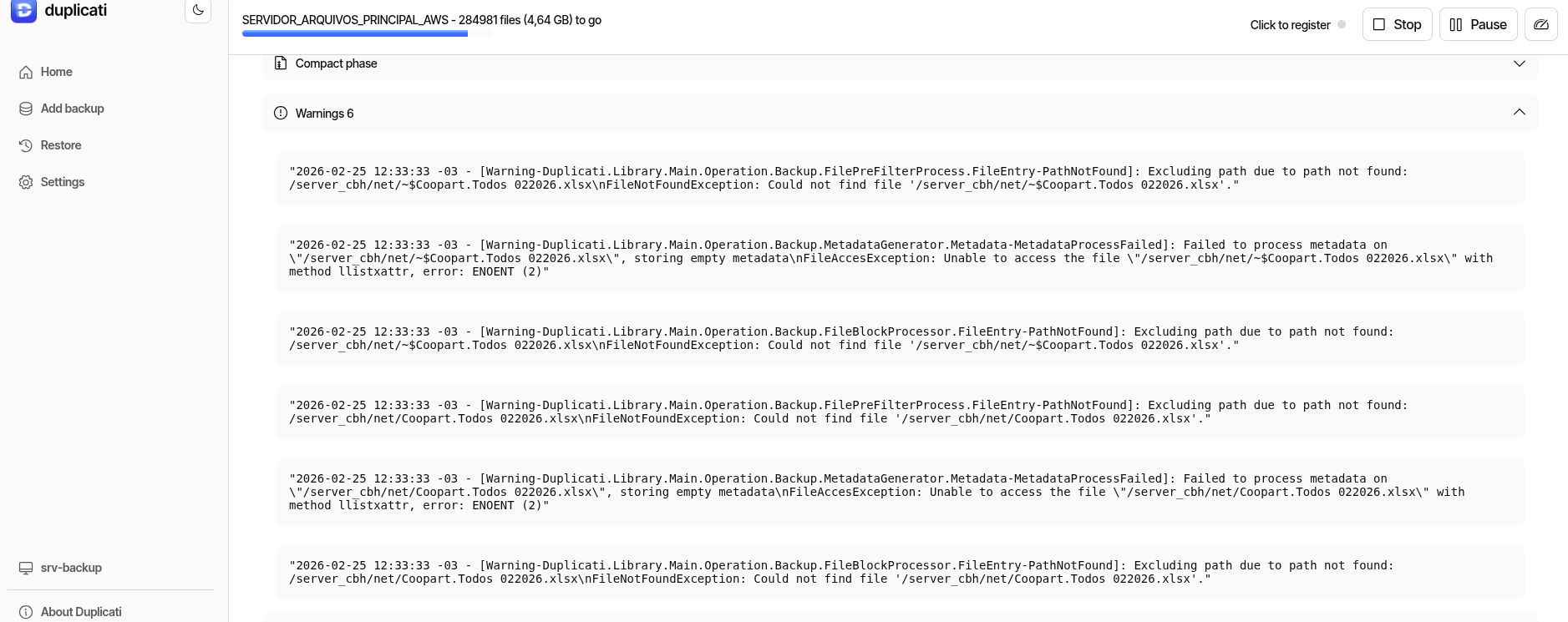
The warnings typically happen because the file is briefly there and then not.
When Duplicati enters a directory, it will get a list of files, and then process each file in turn.
If the file is removed in between listing the files and actually processing the file, then you get the warning you see.
Looking at the path, could this perhaps be a network mounted folder? If so there could be some oddness where the listing returns files that are no longer there.
@kenkendk Exactly, it’s a shared network file server! I’m pointing the backup source from there and the destination to Amazon S3. Within the directory in question, this file doesn’t even exist to generate such an error, as it’s a document that’s possibly in use; it’s not even part of the pointed directory. I believe it’s an anomaly, but I’d like to ignore it somehow.
I thought about leaving the backup that will be performed today at 7 PM without pointing to the directory in question, just for testing purposes. However, I’d like to address these warnings.
Not sure if this adds any extra information, but I believe that filename matches the format that Excel uses for a temporary file that it creates, when it opens the corresponding spreadsheet. Excel then deletes the file when the spreadsheet is closed. It’s “expected behavior” for Excel, it’s not an anomaly that you need to worry about.
I’m not sure why your filters aren’t working, though. What’s the filter that you use?
Hello!
Correct! But the file itself doesn’t exist in the directory in question, that’s where it gets strange… In fact, it’s not in any directory on the file server. This path /server_cbh/net/ is a “Free” but hidden share in Samba, meaning only those who know the absolute path can access it! There are no spreadsheets there, and the warning messages stopped appearing without any intervention. The filters I tested didn’t work, and I even removed them from the configuration.