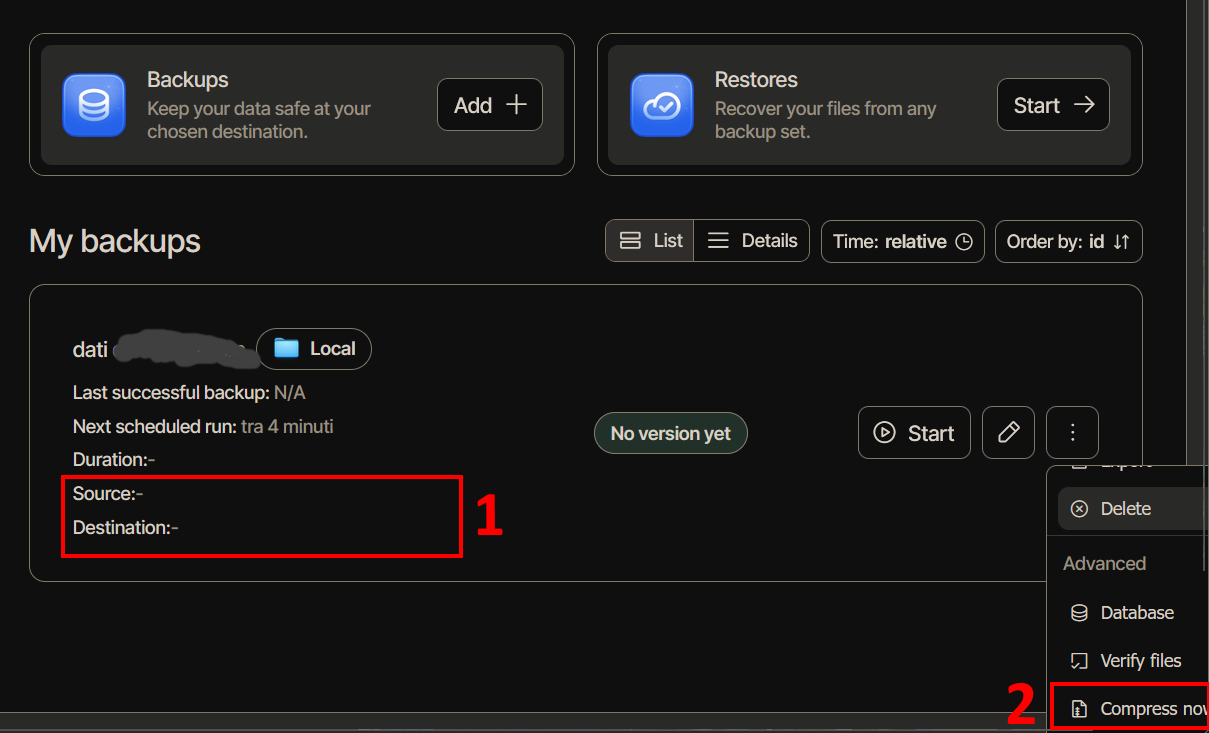
Six months ago my PC broke down, and I’ve spent the past months relying on a makeshift replacement solution. Now I finally have a new PC available, I’ve just reinstalled Duplicati, but I find myself completely disoriented. Forgive my blunt tone as well, but I find the new graphical interface awfully frustrating.
I’ll list just a few of the issues I’ve encountered:
-
New backup jobs are listed without specifying the source and destination paths (see screenshot).
-
The context menu that appears when clicking the three dots opens to the right, off‑screen, instead of to the left (see screenshot).
-
The (local) File System destination path of the backup at step two (Backup destination) is shown in full only if you click “manually type path”; otherwise, only the first folder from the root is displayed.
-
Editing a job, for me it is bad to have an inner frame in a step screen (second step, Destination) and anyway it’s inconsistent with other step screens with no inner frame (fourth, Schedule).
-
Editing a job, it’s inconsistent that the layout is single‑column in some steps and sometimes two‑columns in other ones (third step, Source data). Moreover, in the third step, the “Continue” button is on the left rather than on the right!
-
When editing a job, entering certain Advanced options is rejected without any warning (I’ll open a separate discussion on this point).