Duplicati has worked really well for me. Thanks. I recently ditched an old windows 10 machine and put everything on another newer machine running windows 11. It seems to backing up but duplicati keeps telling me it has found an update. I thought I would get everything up to speed on this new machine and my renewed enthusiasm lol but the 2 1 0 2 upgrade just keeps downloading and then when I click on install it downloads again!! It is maybe that I have slipped behind in previous upgrades and its trying to do something like find an upgrade that is so out of date now!! I am not sure. Could you please suggest the best route forward for me. Thanks
Upgrade problem to 2.1 from 2.0.6.3_beta probably fits, except 2.2 is now the latest Stable.
That’s pretty much it. 2.0.8.1 did upgrades to 2.1 OK, but no point installing 2.0.8.1 manually.
Upgrade 2.0.7.1_beta_2023-05-25 to 2.1.0.2 gives the very long version of the updater story.
Download Duplicati Today will offer the latest Duplicati which you would then manually install.
Thanks for the information. This upgrade has caused me lots of issues. I wish I had left it as it was working fine! I have a Dell PC with C Drive 512 SSD. The backups seem to hang and the drive fills. C: drive is not the destination for the back up.. So to make space I have installed Duplicati to another drive. But during backup I notice that drive C: is losing space. The backup is heading to a local external drive F: I am guessing that database Duplicati makes as it backs up is going to Drive C: Can I change where this data goes when I install or by some other method? Or is there another way of doing this? To reduce size and length of time the backup takes I have made two different backups to target different folders. I am hoping to set these to work at different times/days. Any thoughts on this? I am retired and run a local wildlife conservation group. Most of the files relate to images and designs relating to this voluntary work. Any help would be greatly appreciated. Thanks
No need to guess. Look at Database screen, although I wouldn’t expect huge DB.
You only mentioned C: so far, then F: as destination. It’s possible to run Duplicati from removable drive (and keep database there too) but I don’t know if that’s the kind of moving you have in mind.
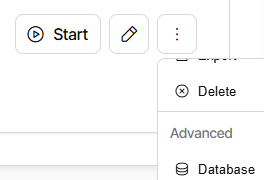
Since you already moved Duplicati somewhere, Database screen will let you move job database.
How close to full was C: before? A database is not usually very big. Is new backup verified on F:?
Thanks. Here is more detailed information on the issue. C: is ssd 454GB, D: internal 2TB and G: is 3TB internal and F: is external. OS and applications are all on C: which has 70.1Gb free before I started the current back up of 200898 files. I have been watching the free space on C: as the back up progresses and its now down to 46GB with 65 000 approx files to go. For this backup I have installed Duplicati on drive D: . But it is obviously still creating the database on C: Could you please explain how I can change that so it puts the database on drive D: where Duplicati is installed. I not very familiar with this program but my knowledge is improving. Sorry to be a nuisance. thanks.
The old user manual below explains, but uses old UI. New UI is similar, but manual is briefer.
If you want to make changes to the location where the local database is stored, you can use the Reset, Save, Save and repair and Move existing database buttons.
Basically use the Database screen, note the path. If you don’t like it, change it and click Move.
In new UI, there’s a three-dot menu on the job that you use for special operations, looking like:
Wow that sounds good. If this backup attempt fails I will do that, well at least give it a try. Did you think the available space looked small on C: Its Dells fault, fancy a SSD drive c: of 512GB these days! I should have thought more about that when I purchased unless of course I can find a way to upgrade SSD without too much trouble. thanks.
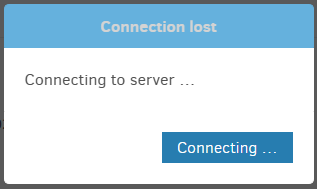
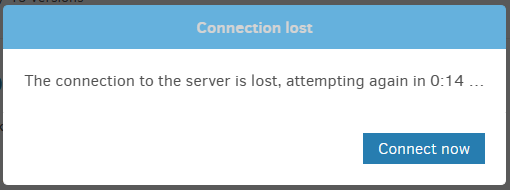
Hi, Here is an update! I moved the database to a larger drive, drive D:, had to copy to a new folder manually and then use the GUI to link to it. That worked thank you  There is still one thing that is a little annoying. I spit the backups into two smaller ones. Between them they cover all the files I need backed up. Both of these looked very unfinished at the end because they gave me a white dialogue box mid screen RECONNECTING TO SERVER then a short time in seconds and counted down then went up again etc but didn’t ever reconnect to what ever server it was trying to find. Bear in mind my backups are on route to an external drive F: Couldnt get out of this. So I shut down duplicati and reopened. Duplicati now tells me the backup is complete and version data appears. is this something i have done incorrectly while setting up the backup. many thanks.
The description sounds like the old UI. You might have switched? Use whichever UI you like.
Old UI has display like:
New UI has display like:
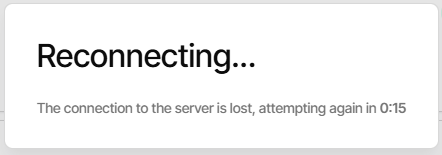
Did you try browser refresh button? I have to do that a lot, especially on new UI, after wake.
What timing is yours on? I don’t recall reports of a similar issue while actively doing backup.
The new UI also has a sessin timeout, although one can click “Keep me logged in” instead:
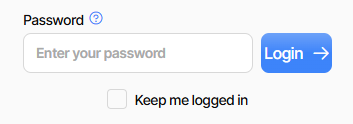
Possibly that’s involved, but which UI was backup on? I don’t think the old UI has a timeout.
If you see it again, we could try looking with browser developer tools (often on the F12 key).
Thanks useful. The reconnection message was in the new UI. It looked like it happened at the end of the backup because when I closed and re-opened duplicati it showed a complete new version. Refresh does get rid of Reconnecting message thanks. I could cope with either UI but you suggest the old doesnt do this reconnection message so I have switched to see if that works. thanks.
If old UI works, I’d also be interested in what’s going wrong in new UI. Do you ever “Log out”?

If not, then you probably wouldn’t see the “Login” screen. Opening from Tray Icon avoids it too.
Maybe there’s some usage that goes wrong sometimes, so knowing use would help sort it out.
On the new UI, I try to log out and this happens.
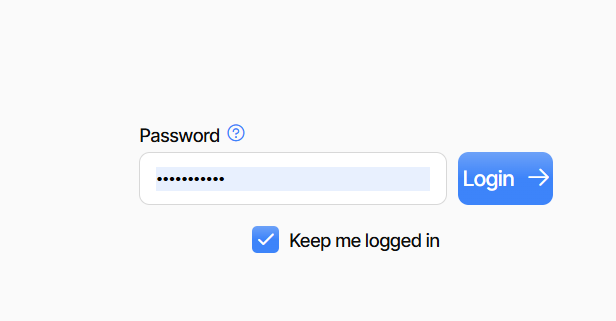
Changed to keep me logged in but clicking on login nothing happens. But I am logged in!! I can load duplicati and go straight in. I guess windows/edge password is autofilled. But I am not sure what is going on really! I was going to log out and then log in with keep me logged in as you suggested but I cant see what’s it doing. Click on Login on this screen and it just sits there! I dont know if this is much help but if I can help in any way I will. Let me know. Jon
Did you ever set a Duplicati password? It should have given the option at first 2.2 use.
If you chose not to do it then, you can get back in with TrayIcon, then set it in Settings.
Yes I did have a duplicati password
So when I get to this screen its already filled in and doesn’t do any thing!
I wouldn’t be by Duplicati, which doesn’t know Windows password, and has no auto-filler.
Sometimes browser auto-fill does unwanted fill. What browser? Can you turn auto-fill off?
Can you clear the field (say with backspace key) and replace it with your login password?
This isn’t the same (unless you set it) as backup encryption password you might have set.
Did you have GUI acces password before, on 2.0.7.1? It’s supposed to stay . If you didn’t,
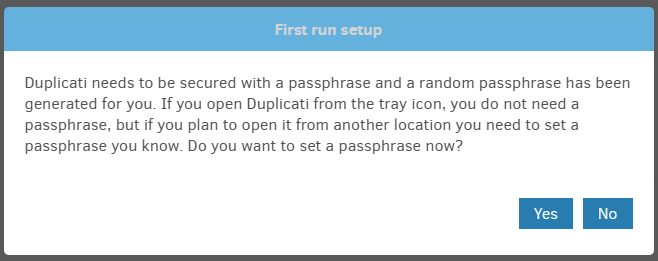
is the setup choice I was talking about. I’m setting up 2.2.0.1 now, and the next screen is:

Regardless, you might be at the point where the developer is better equipped to comment.
It might have sent something. This is when web developer tools on F12 or whatever can help.
Although I’d like to know what’s going on with the new login, you can try old one by browse to

Sorry I have had a busy few days and feel like I have lost where we were. As an update on previous issues I have switched to old UI and have had no issues, no connecting to server messages.
I was struggling to log out of Duplicati and login again in new UI it just seemed to know I was already in and I couldn’t find a way to stop it doing that. Is there something you need me to test out?
cheers Jon