Slow or stuck in SQLite at "Waiting for upload to finish"

It’s not really uploading yet, but busy (one core out of four) in SQLite preparing.

Normal backup needs about 3 seconds to get through about 6674 files like this:

2026-08-02 09:02:06 -04 - [Profiling-Timer.Begin-Duplicati.Library.Main.Operation.Backup.UploadRealFilelist-UploadNewFileset]: Starting - Uploading a new fileset
2026-08-02 09:02:09 -04 - [Profiling-Timer.Finished-Duplicati.Library.Main.Operation.Backup.UploadRealFilelist-UploadNewFileset]: Uploading a new fileset took 0:00:00:03.105

I’m in a test backup with 111,110 Files 11,110 Folders and it’s beginning like this:

2026-08-02 23:49:06 -04 - [Profiling-Timer.Begin-Duplicati.Library.Main.Operation.Backup.UploadRealFilelist-UploadNewFileset]: Starting - Uploading a new fileset

but it’s now 14 hours later, so something seems off. This is going to local C: drive.
This is second time, but Windows flaked out while I was looking at first. Rebooted.

2026-08-02 12:58:33 -04 - [Profiling-Timer.Begin-Duplicati.Library.Main.Operation.Backup.UploadRealFilelist-UploadNewFileset]: Starting - Uploading a new fileset
2026-08-02 21:53:14 -04 - [Verbose-GetGpgProgramPath-gpg]: 
2026-08-02 21:53:25 -04 - [Information-Duplicati.Server.WebServerLoader-ServerListening]: Server has started and is listening on 0.0.0.0, port 8304

2.3.0.4_stable_2026-07-09

The CPU symptom is it’s 25% busy on Windows 10, which is one CPU core on it.
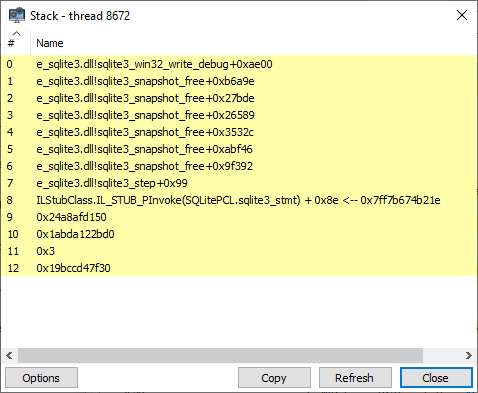
System Informer shows usage at thread level, and some samples of its stack are:

0, e_sqlite3.dll!sqlite3_snapshot_free+0xa8d6d
1, e_sqlite3.dll!sqlite3_snapshot_free+0x9f392
2, e_sqlite3.dll!sqlite3_step+0x99
0, e_sqlite3.dll!sqlite3_backup_pagecount+0x23
1, e_sqlite3.dll!sqlite3_snapshot_free+0x27e30
2, e_sqlite3.dll!sqlite3_snapshot_free+0x27d29
3, e_sqlite3.dll!sqlite3_snapshot_free+0x26589
4, e_sqlite3.dll!sqlite3_snapshot_free+0x3532c
5, e_sqlite3.dll!sqlite3_snapshot_free+0xabf46
6, e_sqlite3.dll!sqlite3_snapshot_free+0x9f392
7, e_sqlite3.dll!sqlite3_step+0x99

That doesn’t have the C# view, but dnSpy debugger does, to go along with that:

Native
NextResult
ExecuteReader
ExecuteReaderAsync
WriteFileset

It seems to be running _commandText of:

"\n SELECT\n \"G\".\"BlocksetID\",\n \"G\".\"ID\",\n \"G\".\"Path\",\n \"G\".\"Length\",\n \"G\".\"FullHash\",\n \"G\".\"Lastmodified\",\n \"G\".\"FirstMetaBlockHash\",\n \"H\".\"Hash\" AS \"MetablocklistHash\"\n FROM (\n SELECT\n \"B\".\"BlocksetID\",\n \"B\".\"ID\",\n \"B\".\"Path\",\n \"D\".\"Length\",\n \"D\".\"FullHash\",\n \"A\".\"Lastmodified\",\n \"F\".\"Hash\" AS \"FirstMetaBlockHash\",\n \"C\".\"BlocksetID\" AS \"MetaBlocksetID\"\n FROM\n \"FilesetEntry\" \"A\",\n \"File\" \"B\",\n \"Metadataset\" \"C\",\n \"Blockset\" \"D\",\n \"BlocksetEntry\" \"E\",\n \"Block\" \"F\"\n WHERE\n \"A\".\"FileID\" = \"B\".\"ID\"\n AND \"B\".\"MetadataID\" = \"C\".\"ID\"\n AND \"C\".\"BlocksetID\" = \"D\".\"ID\"\n AND \"E\".\"BlocksetID\" = \"C\".\"BlocksetID\"\n AND \"E\".\"BlockID\" = \"F\".\"ID\"\n AND \"E\".\"Index\" = 0\n AND (\n \"B\".\"BlocksetID\" = @FolderBlocksetId\n OR \"B\".\"BlocksetID\" = @SymlinkBlocksetId\n )\n AND \"A\".\"FilesetID\" = @FilesetId\n ) \"G\"\n LEFT OUTER JOIN \"BlocklistHash\" \"H\"\n ON \"H\".\"BlocksetID\" = \"G\".\"MetaBlocksetID\"\n ORDER BY\n \"G\".\"Path\",\n \"H\".\"Index\"\n

but seemingly this is one of the queries that escapes the Duplicati profiling log.
Looking in a 2.3.0.108_canary_2026-07-20, I don’t see this sort of query either.

is my guess at where it is per debugger data, but it’s not yet in the looping part.
It’s not busy with the job database or dup-* temporaries, per Process Monitor.
It’s interacting more with the server database, every 5 minutes or so, maybe for

"SELECT \"ID\", \"Tags\", \"Time\", \"Repeat\", \"LastRun\", \"Rule\" FROM \"Schedule\" "

read from NextResult, but I took off that breakpoint as it was being false-positive.
I left one in to see if it ever hit ReadAsync, but in quite a few hours it has not yet.

The test here was adding above mentioned folder to a backup of single short file.
I haven’t tried variations yet. Wondering about other things to look into in this run.
Next run might test deeper test subtree, e.g. 11,110 Files (0 length) 1,110 Folders

EDIT 1:

Still taking up a quarter of a quad CPU. Used about 32 hours of core (probably a
little devoted to work before this test). Debugger position unchanged, no spewing
related to this in debugger output window (getting token errors, but likely normal).
TrayIcon is batch-file launched, sometimes shows terminal messages. None now.
Finding nothing relevant in event logs. Had hope of debug log output from seeing:
but DebugView isn’t showing any from Duplicati, only from some other programs.
Profiling log has usual UnobservedTaskException, WebsocketInvalidToken noise.
Duplicati has these datafolder files:

File, C:\Duplicati\duplicati-2.3.0.4_stable_2026-07-09-win-x64-gui\RUN\control_dir_v2, Read data, Read attributes, Synchronize
File, C:\Duplicati\duplicati-2.3.0.4_stable_2026-07-09-win-x64-gui\RUN\control_dir_v2\lock_v2, Write, Read attributes
File, C:\Duplicati\duplicati-2.3.0.4_stable_2026-07-09-win-x64-gui\RUN\Duplicati-server.sqlite, Write, Read
File, C:\Duplicati\duplicati-2.3.0.4_stable_2026-07-09-win-x64-gui\RUN\server.2.3.0.4_stable_2026-07-09-win-x64-gui.log, Write, Read attributes
File, C:\Duplicati\duplicati-2.3.0.4_stable_2026-07-09-win-x64-gui\RUN\TZRHLRQVSV.sqlite, Write, Read
Section, C:\Duplicati\duplicati-2.3.0.4_stable_2026-07-09-win-x64-gui\RUN\TZRHLRQVSV.sqlite, Query, Map read, Delete, Read control, Write DAC, Write owner
File, C:\Duplicati\duplicati-2.3.0.4_stable_2026-07-09-win-x64-gui\RUN\TZRHLRQVSV.sqlite-shm, Write, Read
Section, C:\Duplicati\duplicati-2.3.0.4_stable_2026-07-09-win-x64-gui\RUN\TZRHLRQVSV.sqlite-shm, Query, Map read, Map write, Delete, Read control, Write DAC, Write owner
File, C:\Duplicati\duplicati-2.3.0.4_stable_2026-07-09-win-x64-gui\RUN\TZRHLRQVSV.sqlite-wal, Write, Read

and two open Temp files, one 0 bytes, one 232. It’s now Aug 4. Job DB files are:

image

EDIT 2:

Still spinning in SQLite, but other areas are failing. Some of this was in 2.3.0.3 too:

image

is the icon. Sometimes it recovers. This one’s been down hours. Web UI failed too.
It no longer responds to GET requests, except for OS TCP-level acknowledgment.
Something in server had been writing profiling log many times per second like this:

2026-08-04 08:17:31 -04 - [Error-Duplicati.WebserverCore.Notifications.WebsocketAccessor-WebsockSendFailure]: Failed to send websocket message
System.OperationCanceledException: The operation was canceled.
 ---> System.ObjectDisposedException: Cannot access a disposed object.
Object name: 'System.Net.WebSockets.WebSocket'.
   at System.Net.WebSockets.ManagedWebSocket.WriteFrameToSendBuffer(MessageOpcode opcode, Boolean endOfMessage, Boolean disableCompression, ReadOnlySpan`1 payloadBuffer)
   at System.Net.WebSockets.ManagedWebSocket.SendFrameFallbackAsync(MessageOpcode opcode, Boolean endOfMessage, Boolean disableCompression, ReadOnlyMemory`1 payloadBuffer, Task lockTask, CancellationToken cancellationToken)
   --- End of inner exception stack trace ---
   at System.Net.WebSockets.ManagedWebSocket.CreateOperationCanceledException(Exception innerException, CancellationToken cancellationToken)
   at System.Net.WebSockets.ManagedWebSocket.SendFrameFallbackAsync(MessageOpcode opcode, Boolean endOfMessage, Boolean disableCompression, ReadOnlyMemory`1 payloadBuffer, Task lockTask, CancellationToken cancellationToken)
   at System.Threading.ExecutionContext.RunFromThreadPoolDispatchLoop(Thread threadPoolThread, ExecutionContext executionContext, ContextCallback callback, Object state)
   at System.Runtime.CompilerServices.AsyncTaskMethodBuilder`1.AsyncStateMachineBox`1.ExecuteFromThreadPool(Thread threadPoolThread)
   at System.Threading.ThreadPoolWorkQueue.Dispatch()
   at System.Threading.PortableThreadPool.WorkerThread.WorkerThreadStart()
   at System.Threading.Thread.StartCallback()
--- End of stack trace from previous location ---
   at System.Net.WebSockets.ManagedWebSocket.SendFrameFallbackAsync(MessageOpcode opcode, Boolean endOfMessage, Boolean disableCompression, ReadOnlyMemory`1 payloadBuffer, Task lockTask, CancellationToken cancellationToken)
   at Duplicati.WebserverCore.Notifications.WebsocketAccessor.SendData[T](SubscriptionService key, T data, IEnumerable`1 connections)

Interestingly, that’s the last entry in server log file, even though it’s 2.5 hours later.
I think I’m going to have to kill the process, but I was tiring of waiting for it anyway.

EDIT 3:

Debugger shows similar view from when things went from bad to worse in server:
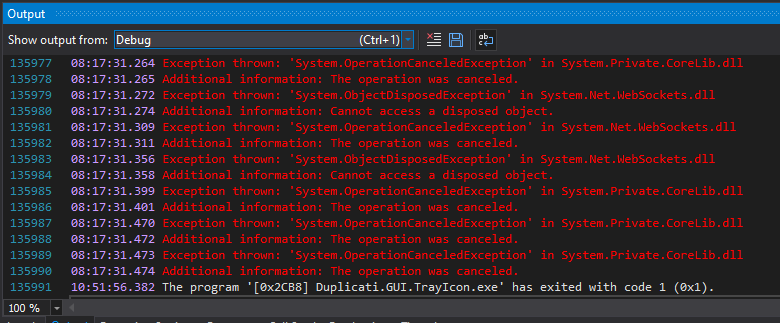
I think I saw some reliability changes go in recently that this Stable doesn’t have.
The TrayIcon x in it doesn’t seem to happen in a 2.3.0.108_canary_2026-07-20,
so this new info is sort of informational. I’d like focus to be on the original failures.

EDIT 4:

Testing with different initial backup and smaller trees on second. Original short.txt
file in first backup was the character 1 followed by CR and LF. New A.txt is just A.

2.3.0.4_stable_2026-07-09
PASS short.txt and level 5 C:\tree\000000\000000\000000\000000\000000\
PASS short.txt and level 4 C:\tree\000000\000000\000000\000000\
FAIL short.txt and level 3 C:\tree\000000\000000\000000\
FAIL A.txt and level 3 C:\tree\000000\000000\000000\

2.3.0.108_canary_2026-07-20
FAIL A.txt and level 3 C:\tree\000000\000000\000000\

Level 3 1,110 Files, 110 Folders
Level 4 110 Files, 10 Folders
Level 5 10 Files, 0 Folders

EDIT 5:

UploadNewFileset time, testing 2.3.0.108_canary_2026-07-20
Most of the tests use A.txt as first backup, timing second

110 Files, 10 Folders		0:00:00:00.171
440 Files, 44 Folders		0:00:00:10.180
880 Files, 88 Folders		0:00:01:21.810
1100 Files, 110 Folders		0:00:02:36.891
1,110 Files, 110 Folders	0:00:02:39.780

Above looks like more than linear slowdown with more files
Don't take benchmark as done pristinely though. No restart

Huge difference, first backup versus second is interesting

Without A.txt as first backup
11,110 Files, 1,110 Folders	0:00:00:00.152

With A.txt as first backup
11,110 Files, 1,110 Folders	still running after an hour

EDIT 6:

Still running after an overnight try for completion. About 9 hours elapsed time.
SQLite thread looks a little different compared to 2.3.0.4, with many unknown
addresses lower on the stack. The very top of stack bounces around as usual

0, e_sqlite3.dll!sqlite3_preupdate_depth+0x65cee
1, e_sqlite3.dll!sqlite3_preupdate_depth+0x5ef70
2, e_sqlite3.dll!sqlite3_step+0x95
3, ILStubClass.IL_STUB_PInvoke(SQLitePCL.sqlite3_stmt) + 0x8e <-- 0x7fff22270e0e
4, 0xeb78ffd5e0
5, 0x7fff22303ae8
6, 0x24ffb22f560
7, 0x240088dfaf0
8, 0x23ffd69c280
9, 0x1

Unsurprisingly, the Stop button and then the Abort button it becomes don’t work.
Probably going to do another process kill soon, but let me describe the data use.
It’s full of empty files with 10 per level, and 10 folders that go deeper recursively.
Eventually (it’s configurable, and I think I still have its Perl script) recursion ends.
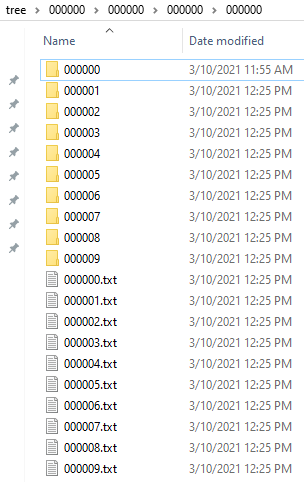
I’m not sure what else to say or do, and I might open an issue pointing back here.

EDIT 7:

Because I have old Duplicati versions handy, and test is simple, I tested old ones.
I also checked if changes such as SQLite switch to Microsoft and WAL correlated.
2.1 and 2.2 Stable were OK. 2.3 was not, and problem worsened at SQLite swap.
From profiling logs, I’m thinking journal_mode=WAL came in with the new SQLite.

I’ve also wondered if PRAGMA optimize from after first backup might mislead the
query planner into slow plan after large growth in tables during the second backup.

I don’t think Duplicati runs that often, and running it often might face some issues
if done before commit. Current plan runs it at close, presumably after the commits.

Results at what I call level 3 of tree have often been a bit variable, maybe slowing.
To get more regression at 2.1.0.121_canary_2025-07-07, I raised source to level 2.
That’s the 11,110 Files 1,110 Folders level of the tree. See elsewhere for more info.

2.1.0.5_stable_2025-03-04

2026-08-06 11:39:39 -04 - [Profiling-Timer.Begin-Duplicati.Library.Main.Operation.Backup.UploadRealFilelist-UploadNewFileset]: Starting - Uploading a new fileset
2026-08-06 11:39:39 -04 - [Profiling-Timer.Finished-Duplicati.Library.Main.Operation.Backup.UploadRealFilelist-UploadNewFileset]: Uploading a new fileset took 0:00:00:00.285
2026-08-06 11:44:09 -04 - [Profiling-Timer.Begin-Duplicati.Library.Main.Operation.Backup.UploadRealFilelist-UploadNewFileset]: Starting - Uploading a new fileset
2026-08-06 11:44:10 -04 - [Profiling-Timer.Finished-Duplicati.Library.Main.Operation.Backup.UploadRealFilelist-UploadNewFileset]: Uploading a new fileset took 0:00:00:00.671

2.2.0.3_stable_2026-01-06

2026-08-06 12:03:32 -04 - [Profiling-Timer.Begin-Duplicati.Library.Main.Operation.Backup.UploadRealFilelist-UploadNewFileset]: Starting - Uploading a new fileset
2026-08-06 12:03:32 -04 - [Profiling-Timer.Finished-Duplicati.Library.Main.Operation.Backup.UploadRealFilelist-UploadNewFileset]: Uploading a new fileset took 0:00:00:00.189
2026-08-06 12:04:24 -04 - [Profiling-Timer.Begin-Duplicati.Library.Main.Operation.Backup.UploadRealFilelist-UploadNewFileset]: Starting - Uploading a new fileset
2026-08-06 12:04:24 -04 - [Profiling-Timer.Finished-Duplicati.Library.Main.Operation.Backup.UploadRealFilelist-UploadNewFileset]: Uploading a new fileset took 0:00:00:00.442

2.3.0.0_stable_2026-04-14

2026-08-06 12:10:53 -04 - [Profiling-Timer.Begin-Duplicati.Library.Main.Operation.Backup.UploadRealFilelist-UploadNewFileset]: Starting - Uploading a new fileset
2026-08-06 12:10:53 -04 - [Profiling-Timer.Finished-Duplicati.Library.Main.Operation.Backup.UploadRealFilelist-UploadNewFileset]: Uploading a new fileset took 0:00:00:00.011
2026-08-06 12:12:54 -04 - [Profiling-Timer.Begin-Duplicati.Library.Main.Operation.Backup.UploadRealFilelist-UploadNewFileset]: Starting - Uploading a new fileset
(killed after over two core-hours of CPU use)

2.1.0.121_canary_2025-07-07

2026-08-06 14:46:14 -04 - [Profiling-Timer.Begin-Duplicati.Library.Main.Operation.Backup.UploadRealFilelist-UploadNewFileset]: Starting - Uploading a new fileset
2026-08-06 14:46:14 -04 - [Profiling-Timer.Finished-Duplicati.Library.Main.Operation.Backup.UploadRealFilelist-UploadNewFileset]: Uploading a new fileset took 0:00:00:00.143
2026-08-06 14:47:54 -04 - [Profiling-Timer.Begin-Duplicati.Library.Main.Operation.Backup.UploadRealFilelist-UploadNewFileset]: Starting - Uploading a new fileset
2026-08-06 14:50:37 -04 - [Profiling-Timer.Finished-Duplicati.Library.Main.Operation.Backup.UploadRealFilelist-UploadNewFileset]: Uploading a new fileset took 0:00:02:43.028

With second backup at level 2 instead of level 3:

2026-08-06 17:25:06 -04 - [Profiling-Timer.Begin-Duplicati.Library.Main.Operation.Backup.UploadRealFilelist-UploadNewFileset]: Starting - Uploading a new fileset
2026-08-06 17:25:06 -04 - [Profiling-Timer.Finished-Duplicati.Library.Main.Operation.Backup.UploadRealFilelist-UploadNewFileset]: Uploading a new fileset took 0:00:00:00.150
2026-08-06 17:32:40 -04 - [Profiling-Timer.Begin-Duplicati.Library.Main.Operation.Backup.UploadRealFilelist-UploadNewFileset]: Starting - Uploading a new fileset
(killed after 14 hours, 16 core-hours of CPU)

2.1.0.120_canary_2025-06-24

2026-08-06 17:00:42 -04 - [Profiling-Timer.Begin-Duplicati.Library.Main.Operation.Backup.UploadRealFilelist-UploadNewFileset]: Starting - Uploading a new fileset
2026-08-06 17:00:42 -04 - [Profiling-Timer.Finished-Duplicati.Library.Main.Operation.Backup.UploadRealFilelist-UploadNewFileset]: Uploading a new fileset took 0:00:00:00.210
2026-08-06 17:02:43 -04 - [Profiling-Timer.Begin-Duplicati.Library.Main.Operation.Backup.UploadRealFilelist-UploadNewFileset]: Starting - Uploading a new fileset
2026-08-06 17:02:43 -04 - [Profiling-Timer.Finished-Duplicati.Library.Main.Operation.Backup.UploadRealFilelist-UploadNewFileset]: Uploading a new fileset took 0:00:00:00.369

With second backup at level 2 instead of level 3:

2026-08-06 17:14:19 -04 - [Profiling-Timer.Begin-Duplicati.Library.Main.Operation.Backup.UploadRealFilelist-UploadNewFileset]: Starting - Uploading a new fileset
2026-08-06 17:14:19 -04 - [Profiling-Timer.Finished-Duplicati.Library.Main.Operation.Backup.UploadRealFilelist-UploadNewFileset]: Uploading a new fileset took 0:00:00:00.234
2026-08-06 17:17:47 -04 - [Profiling-Timer.Begin-Duplicati.Library.Main.Operation.Backup.UploadRealFilelist-UploadNewFileset]: Starting - Uploading a new fileset
2026-08-06 17:18:09 -04 - [Profiling-Timer.Finished-Duplicati.Library.Main.Operation.Backup.UploadRealFilelist-UploadNewFileset]: Uploading a new fileset took 0:00:00:21.382

EDIT 8:

2.3.1.0_beta_2026-07-28 on the level 2 test:

2026-08-07 11:10:58 -04 - [Profiling-Timer.Begin-Duplicati.Library.Main.Operation.Backup.UploadRealFilelist-UploadNewFileset]: Starting - Uploading a new fileset
2026-08-07 11:10:58 -04 - [Profiling-Timer.Finished-Duplicati.Library.Main.Operation.Backup.UploadRealFilelist-UploadNewFileset]: Uploading a new fileset took 0:00:00:00.012
2026-08-07 11:18:53 -04 - [Profiling-Timer.Begin-Duplicati.Library.Main.Operation.Backup.UploadRealFilelist-UploadNewFileset]: Starting - Uploading a new fileset

It’s now over 24 hours later and still at 25% CPU, so one core of a quad core CPU.

0, e_sqlite3.dll!sqlite3_preupdate_depth+0x67da9
1, e_sqlite3.dll!sqlite3_preupdate_depth+0x5ef70
2, e_sqlite3.dll!sqlite3_step+0x95
3, ILStubClass.IL_STUB_PInvoke(SQLitePCL.sqlite3_stmt) + 0x8e <-- 0x7fff4336508e
...

EDIT 9:

Back to 2.3.0.108_canary_2026-07-20 to try --long-database-query-threshold.
Set it to 1m and let it query 5 minutes. No warning. The report on the oddity is here.

Killed process and went to look for the size of first backup that slows on the second.
Level 4 to level 2 was fine. So was level 5, which is the final folder in the tree, but a
file within the bottom folder caused the problem. This seems a very narrow problem.

One difference in new UI is that changing a subfile or subfolder to a parent folder is
prone to deleting the subthing. That doesn’t happen when first backup is elsewhere,
but I don’t know if it matters. A slow/stuck seems to happen whether or not it’s kept.

EDIT 10:

After pretty thorough forum testing, made it an issue, though it seems a bit obscure.

GitHub issue got a change to help debug this. Before that, I tested Stable.
Issue still seems very reproducible with the right case, but case is narrow.

Based on creation date of tree, I’m attaching a Perl script that likely built it.

fill_tree.zip (407 Bytes)

Testing 2.3.0.4_stable_2026-07-09-win-x64-gui to see sensitivity to first backup.
That was varying number of empty files in bottom folder. Second is 10,000 folder.
That's round, and what I've been calling level 2, but I might rebuild small tree.

10	0:00:00:08.701
8	0:00:00:08.645
4	0:00:00:00.791
2	0:00:00:16.028
1	still going after 2 hours. Kill process

So issue write up said first backup should be 1 file, but symptoms 
Testing 2.3.0.109_canary_2026-08-14-win-x64-gui gave official report about issue:

2026-08-14 18:25:44 -04 - [Profiling-Timer.Begin-Duplicati.Library.Main.Operation.Backup.UploadRealFilelist-UploadNewFileset]: Starting - Uploading a new fileset
2026-08-14 18:27:11 -04 - [Warning-Duplicati.Library.Main.Database.SlowQueryMonitor-SlowQueryDetected]: Query still running after 87.7s in ExecuteReaderAsync: 
            SELECT
                "G"."BlocksetID",
                "G"."ID",
                "G"."Path",
                "G"."Length",
                "G"."FullHash",
                "G"."Lastmodified",
                "G"."FirstMetaBlockHash",
                "H"."Hash" AS "MetablocklistHash"
            FROM (
                SELECT
                    "B"."BlocksetID",
                    "B"."ID",
                    "B"."Path",
                    "D"."Length",
                    "D"."FullHash",
                    "A"."Lastmodified",
                    "F"."Hash" AS "FirstMetaBlockHash",
                    "C"."BlocksetID" AS "MetaBlocksetID"
                FROM
                    "FilesetEntry" "A",
                    "File" "B",
                    "Metadataset" "C",
                    "Blockset" "D",
                    "BlocksetEntry" "E",
                    "Block" "F"
                WHERE
                    "A"."FileID" = "B"."ID"
                    AND "B"."MetadataID" = "C"."ID"
                    AND "C"."BlocksetID" = "D"."ID"
                    AND "E"."BlocksetID" = "C"."BlocksetID"
                    AND "E"."BlockID" = "F"."ID"
                    AND "E"."Index" = 0
                    AND (
                        "B"."BlocksetID" = -100
                        OR "B"."BlocksetID" = -200
                    )
                    AND "A"."FilesetID" = 2
            ) "G"
            LEFT OUTER JOIN "BlocklistHash" "H"
                ON "H"."BlocksetID" = "G"."MetaBlocksetID"
            ORDER BY
                "G"."Path",
                "H"."Index"
            
... repeat report ...

2026-08-15 07:25:11 -04 - [Warning-Duplicati.Library.Main.Database.SlowQueryMonitor-SlowQueryDetected]: Query still running after 46767.7s in ExecuteReaderAsync: 

Log timestamp is about 13 hours later. That is 46800 seconds, so that lines up well.
CPU load is one quarter of quad core system. Busy thread stack top varies. Long one:

0, e_sqlite3.dll!sqlite3_prepare16_v2+0x43
1, e_sqlite3.dll!sqlite3_snapshot_free+0x28eeb
2, e_sqlite3.dll!sqlite3_snapshot_free+0x28df8
3, e_sqlite3.dll!sqlite3_snapshot_free+0x2734c
4, e_sqlite3.dll!sqlite3_snapshot_free+0x36623
5, e_sqlite3.dll!sqlite3_preupdate_depth+0x6b0ad
6, e_sqlite3.dll!sqlite3_preupdate_depth+0x5ef90
7, e_sqlite3.dll!sqlite3_step+0x95
8, ILStubClass.IL_STUB_PInvoke(SQLitePCL.sqlite3_stmt) + 0x8e <-- 0x7ff9f20f0fde

More typical is two levels of preupdate_depth, and above that becomes more variable.

EDIT 1:

I’ve been noticing that after I kill a stuck process, next backup is also stuck.
I saw this in 2.3.0.4, even after editing Source quantity back to a small one.
In 2.3.0.109 with Source left at level 2 and 5m slow query timeout, it warns:

# Message
Query still running after 590.1s in ExecuteReaderEnumerableAsync: 
                        SELECT "ID"
                        FROM "Fileset"

(which I find rather surprising, but I saw the same query in dnSpy in 2.3.0.4)

# Message
Query still running after 577.7s in ExecuteScalarInt64Async: 
                            SELECT COUNT(*)
                            FROM (
                                SELECT DISTINCT "Path"
                                FROM (
            SELECT
                "L"."Path",
                "L"."Lastmodified",
                "L"."Filelength",
                "L"."Filehash",
                "L"."Metahash",
                "L"."Metalength",
                "L"."BlocklistHash",
                "L"."FirstBlockHash",
                "L"."FirstBlockSize",
                "L"."FirstMetaBlockHash",
                "L"."FirstMetaBlockSize",
                "M"."Hash" AS "MetaBlocklistHash"
            FROM (
                SELECT
                    "J"."Path",
                    "J"."Lastmodified",
                    "J"."Filelength",
                    "J"."Filehash",
                    "J"."Metahash",
                    "J"."Metalength",
                    "K"."Hash" AS "BlocklistHash",
                    "J"."FirstBlockHash",
                    "J"."FirstBlockSize",
                    "J"."FirstMetaBlockHash",
                    "J"."FirstMetaBlockSize",
                    "J"."MetablocksetID"
                FROM (
                    SELECT
                        "A"."Path" AS "Path",
                        "D"."Lastmodified" AS "Lastmodified",
                        "B"."Length" AS "Filelength",
                        "B"."FullHash" AS "Filehash",
                        "E"."FullHash" AS "Metahash",
                        "E"."Length" AS "Metalength",
                        "A"."BlocksetID" AS "BlocksetID",
                        "F"."Hash" AS "FirstBlockHash",
                        "F"."Size" AS "FirstBlockSize",
                        "H"."Hash" AS "FirstMetaBlockHash",
                        "H"."Size" AS "FirstMetaBlockSize",
                        "C"."BlocksetID" AS "MetablocksetID"
                    FROM "File" "A"
                    LEFT JOIN "Blockset" "B"
                        ON "A"."BlocksetID" = "B"."ID"
                    LEFT JOIN "Metadataset" "C"
                        ON "A"."MetadataID" = "C"."ID"
                    LEFT JOIN "FilesetEntry" "D"
                        ON "A"."ID" = "D"."FileID"
                    LEFT JOIN "Blockset" "E"
                        ON "E"."ID" = "C"."BlocksetID"
                    LEFT JOIN "BlocksetEntry" "G"
                        ON "B"."ID" = "G"."BlocksetID"
                    LEFT JOIN "Block" "F"
                        ON "G"."BlockID" = "F"."ID"
                    LEFT JOIN "BlocksetEntry" "I"
                        ON "E"."ID" = "I"."BlocksetID"
                    LEFT JOIN "Block" "H"
                        ON "I"."BlockID" = "H"."ID"
                    WHERE
                        "A"."BlocksetId" >= 0
                        AND "D"."FilesetID" = 2
                        AND (
                            "I"."Index" = 0
                            OR "I"."Index" IS NULL
                        )
                        AND (
                            "G"."Index" = 0
                            OR "G"."Index" IS NULL
                        )
                ) "J"
                LEFT OUTER JOIN "BlocklistHash" "K"
                    ON "K"."BlocksetID" = "J"."BlocksetID"
                ORDER BY
                    "J"."Path",
                    "K"."Index"
            ) "L"
            LEFT OUTER JOIN "BlocklistHash" "M"
                ON "M"."BlocksetID" = "L"."MetablocksetID"
        )
                                UNION
                                SELECT DISTINCT "Path"
                                FROM (
            SELECT
                "G"."BlocksetID",
                "G"."ID",
                "G"."Path",
                "G"."Length",
                "G"."FullHash",
                "G"."Lastmodified",
                "G"."FirstMetaBlockHash",
                "H"."Hash" AS "MetablocklistHash"
            FROM (
                SELECT
                    "B"."BlocksetID",
                    "B"."ID",
                    "B"."Path",
                    "D"."Length",
                    "D"."FullHash",
                    "A"."Lastmodified",
                    "F"."Hash" AS "FirstMetaBlockHash",
                    "C"."BlocksetID" AS "MetaBlocksetID"
                FROM
                    "FilesetEntry" "A",
                    "File" "B",
                    "Metadataset" "C",
                    "Blockset" "D",
                    "BlocksetEntry" "E",
                    "Block" "F"
                WHERE
                    "A"."FileID" = "B"."ID"
                    AND "B"."MetadataID" = "C"."ID"
                    AND "C"."BlocksetID" = "D"."ID"
                    AND "E"."BlocksetID" = "C"."BlocksetID"
                    AND "E"."BlockID" = "F"."ID"
                    AND "E"."Index" = 0
                    AND (
                        "B"."BlocksetID" = -100
                        OR "B"."BlocksetID" = -200
                    )
                    AND "A"."FilesetID" = 2
            ) "G"
            LEFT OUTER JOIN "BlocklistHash" "H"
                ON "H"."BlocksetID" = "G"."MetaBlocksetID"
            ORDER BY
                "G"."Path",
                "H"."Index"
            )
                            )
                        

The messages repeat every 5 minutes, and come in pairs at same timestamp.

EDIT 2:

Note that this slowness is a follow-on test, and would best be tested from start.
Nevertheless, it seems to be reproducible even in DB Browser for SQLite later.
Take query above and let it run, and run… Still slow after kill and repeat. Good.
Put an EXPLAIN QUERY PLAN in front. Results below (not yet repeated though):

id parent notused detail
2 0 0 CO-ROUTINE (subquery-7)
3 2 0 COMPOUND QUERY
4 3 0 LEFT-MOST SUBQUERY
20 4 0 SEARCH D USING COVERING INDEX nn_FilesetentryFile (FilesetID=?)
24 4 0 SCAN A
31 4 0 SCAN B
36 4 0 SEARCH B USING INTEGER PRIMARY KEY (rowid=?) LEFT-JOIN
41 4 0 SEARCH C USING COVERING INDEX nnc_Metadataset (ID=?) LEFT-JOIN
48 4 0 SEARCH E USING INTEGER PRIMARY KEY (rowid=?) LEFT-JOIN
53 4 0 SEARCH G USING INDEX BlocksetEntry_BlocksetID (BlocksetID=?) LEFT-JOIN
67 4 0 SCAN F USING COVERING INDEX BlockSize LEFT-JOIN
74 4 0 SEARCH I USING INDEX BlocksetEntry_BlocksetID (BlocksetID=?) LEFT-JOIN
88 4 0 SCAN H USING COVERING INDEX BlockSize LEFT-JOIN
95 4 0 SEARCH K USING COVERING INDEX BlocklistHashBlocksetIDIndex (BlocksetID=?) LEFT-JOIN
102 4 0 SEARCH M USING COVERING INDEX BlocklistHashBlocksetIDIndex (BlocksetID=?) LEFT-JOIN
155 3 0 UNION USING TEMP B-TREE
164 155 0 SEARCH A USING COVERING INDEX nn_FilesetentryFile (FilesetID=?)
168 155 0 SEARCH E USING COVERING INDEX nnc_BlocksetEntry (Index=?)
172 155 0 SEARCH C USING COVERING INDEX MetadatasetBlocksetID (BlocksetID=?)
177 155 0 SCAN F USING COVERING INDEX BlockSize
182 155 0 SEARCH D USING INTEGER PRIMARY KEY (rowid=?)
190 155 0 MULTI-INDEX OR
191 190 0 INDEX 1
201 191 0 SCAN A
206 190 0 INDEX 2
216 206 0 SCAN A
232 155 0 SCAN B
237 155 0 SEARCH H USING COVERING INDEX BlocklistHashBlocksetIDIndex (BlocksetID=?) LEFT-JOIN
267 0 0 SCAN (subquery-7)

Looking in the database, there are two Fileset rows, as expected. 1 has 1 file.
2 (the usual one stuck on in original report) adds more rows for total of 12222.
LogData table has just one backup, probably due to kill. Operation table has 2.
Remotevolume table has second dlist as Temporary, which seems reasonable.
sqlite_stat1 looks old (expected but worrisome), with most tables having 1 row.

Before trying a repeat test, I might test some other Duplicati operations on this.

EDIT 3:

list * ran OK. Verify files did not, and may be similar to start of backup.
VerifyConsistencyInnerAsync SQL has LIST_FOLDERS_AND_SYMLINKS:

I’m testing in the other direction, reducing LIST_FOLDERS_AND_SYMLINKS.
I also tried NOT using the Files view, but CTE copy of it. Didn’t seem to help.
Just in case some view slowness got left, I used FileLookup. Also didn’t help.
PRAGMA optimize and PRAGMA analyze surprisingly seemed to give no help.
I can make a small enough query run fast, but there’s little left. Some examples:

                SELECT
                    0
                FROM
                    "FilesetEntry" "A",
                    "FileLookup" "B"
                WHERE
                    "A"."FileID" = "B"."ID"
                    AND (
                        "B"."BlocksetID" = -100
                        OR "B"."BlocksetID" = -200
                    )
                    AND "A"."FilesetID" = 2
is fast about 1 second


                SELECT
                    0
                FROM
                    "FilesetEntry" "A",
                    "FileLookup" "B",
                    "Metadataset" "C",
                    "Blockset" "D"
                WHERE
                    "A"."FileID" = "B"."ID"
                    AND "B"."MetadataID" = "C"."ID"
                    AND "C"."BlocksetID" = "D"."ID"
                    AND (
                        "B"."BlocksetID" = -100
                        OR "B"."BlocksetID" = -200
                    )
                    AND "A"."FilesetID" = 2
is medium about 83 seconds

EDIT 4:

                SELECT
                    0
                FROM
                    "FilesetEntry" "A",
                    "FileLookup" "B",
                    "Metadataset" "C",
                    "Blockset" "D",
                    "BlocksetEntry" "E"
                WHERE
                    "A"."FileID" = "B"."ID"
                    AND "B"."MetadataID" = "C"."ID"
                    AND "C"."BlocksetID" = "D"."ID"
                    AND "E"."BlocksetID" = "C"."BlocksetID"
                    AND "E"."Index" = 0
                    AND (
                        "B"."BlocksetID" = -100
                        OR "B"."BlocksetID" = -200
                    )
                    AND "A"."FilesetID" = 2
Execution finished without errors.
Result: 1111 rows returned in 11191692ms

which is 186 minutes, which is more than I waited first try, so backtrack to time.

sqlite_stat1 has the below. After posting, I’ll close the DB, retry PRAGMAs, etc.

tbl idx stat
Block BlockHashVolumeID 1 1 1
Block BlockSize 1 1
Block Block_IndexByVolumeId 1 1
Block BlockHashSize 1 1 1
BlocksetEntry BlocksetEntry_BlocksetID 1 1
BlocksetEntry nnc_BlocksetEntry 1 1 1 1
BlocksetEntry BlocksetEntry_IndexIdsBackwards 1 1
BlocksetEntry BlocksetEntry 1 1 1
Configuration sqlite_autoindex_Configuration_1 7 1
Metadataset nnc_Metadataset 1 1 1
Metadataset MetadatasetBlocksetID 1 1
Blockset BlocksetFullHash 2 1 1
PathPrefix PathPrefixPrefix 1 1
FileLookup FileLookupMetadataID 1 1
FileLookup nn_FileLookup_BlockMeta 1 1 1
FileLookup FileLookupPath 1 1 1 1 1
FilesetEntry nn_FilesetentryFile 1 1 1
FilesetEntry FilesetentryFileIdIndex 1 1
FilesetEntry FilesetEntry 1 1 1
Remotevolume RemotevolumeName 3 1 1
Remotevolume RemotevolumeNameOnly 3 1
Execution finished without errors.
Result: 0 rows returned in 11ms
At line 1:
PRAGMA optimize

Execution finished without errors.
Result: 0 rows returned in 7ms
At line 1:
PRAGMA analyze

Execution finished without errors.
Result: 1 rows returned in 102ms
At line 1:
PRAGMA integrity_check

integrity_check
ok

Execution finished without errors.
Result: 45 rows returned in 10ms
At line 1:
PRAGMA compile_options

compile_options
ENABLE_STAT4

There is no sqlite_stat4. sqlite_stat1 still looks to show way too few rows in stat.
I’m not expert in this, but there are tables visible in DB in the 10,000 row range.

EXPLAIN QUERY PLAN
                SELECT
                    0
                FROM
                    "FilesetEntry" "A",
                    "FileLookup" "B",
                    "Metadataset" "C",
                    "Blockset" "D",
                    "BlocksetEntry" "E"
                WHERE
                    "A"."FileID" = "B"."ID"
                    AND "B"."MetadataID" = "C"."ID"
                    AND "C"."BlocksetID" = "D"."ID"
                    AND "E"."BlocksetID" = "C"."BlocksetID"
                    AND "E"."Index" = 0
                    AND (
                        "B"."BlocksetID" = -100
                        OR "B"."BlocksetID" = -200
                    )
                    AND "A"."FilesetID" = 2
id parent notused detail
6 0 0 SEARCH A USING COVERING INDEX nn_FilesetentryFile (FilesetID=?)
10 0 0 SEARCH E USING COVERING INDEX nnc_BlocksetEntry (Index=?)
14 0 0 SEARCH B USING COVERING INDEX nn_FileLookup_BlockMeta (BlocksetID=?)
35 0 0 SEARCH C USING COVERING INDEX nnc_Metadataset (ID=? AND BlocksetID=? AND rowid=?)
42 0 0 SEARCH D USING INTEGER PRIMARY KEY (rowid=?)

Name the two steps inside UploadNewFileset that had no timer - #7174

is turning into a discussion, so here’s one of the things that was asked in there:

EXPLAIN QUERY PLAN
SELECT "G"."BlocksetID", "G"."ID", "G"."Path", "G"."Length", "G"."FullHash",
       "G"."Lastmodified", "G"."FirstMetaBlockHash", "H"."Hash" AS "MetablocklistHash"
FROM (
    SELECT "B"."BlocksetID", "B"."ID", "B"."Path", "D"."Length", "D"."FullHash",
           "A"."Lastmodified", "F"."Hash" AS "FirstMetaBlockHash",
           "C"."BlocksetID" AS "MetaBlocksetID"
    FROM "FilesetEntry" "A", "File" "B", "Metadataset" "C",
         "Blockset" "D", "BlocksetEntry" "E", "Block" "F"
    WHERE "A"."FileID" = "B"."ID" AND "B"."MetadataID" = "C"."ID"
      AND "C"."BlocksetID" = "D"."ID" AND "E"."BlocksetID" = "C"."BlocksetID"
      AND "E"."BlockID" = "F"."ID" AND "E"."Index" = 0
      AND ("B"."BlocksetID" = -100 OR "B"."BlocksetID" = -200)
      AND "A"."FilesetID" = 2
) "G"
LEFT OUTER JOIN "BlocklistHash" "H" ON "H"."BlocksetID" = "G"."MetaBlocksetID"
ORDER BY "G"."Path", "H"."Index";
id parent notused detail
12 0 0 SEARCH A USING INDEX nn_FilesetentryFile (FilesetID=?)
19 0 0 SEARCH E USING COVERING INDEX nnc_BlocksetEntry (Index=?)
23 0 0 SCAN B
25 0 0 SEARCH C USING COVERING INDEX MetadatasetBlocksetID (BlocksetID=?)
30 0 0 SEARCH D USING INTEGER PRIMARY KEY (rowid=?)
38 0 0 MULTI-INDEX OR
39 38 0 INDEX 1
52 39 0 SCAN A
57 38 0 INDEX 2
70 57 0 SCAN A
89 0 0 SCAN F USING COVERING INDEX BlockHashVolumeID
94 0 0 SEARCH H USING INDEX BlocklistHashBlocksetIDIndex (BlocksetID=?) LEFT-JOIN
127 0 0 USE TEMP B-TREE FOR ORDER BY

EDIT 5:

I see the second PR just closed while I was testing, so unsure of future of this.

long-database-query-threshold 10m
Backup 1 file in level 5 folder
Start backup of level 2 folder
Open live log at Warning level
Status Waiting for upload to finish …
Kill after slow query warning appears

image

Restart Duplicati
Database → Create bug report database (too many times due to slow response)
I’ve saved the bugreport.zip and the database, in case anyone wants to examine.

IMO there are still some dangling questions, such as other impact from stale stats.
Also unsure why I couldn’t get a PRAGMA to refresh them, as per the tests above.