Duplicati has never been able to send email when VPN is on. Is there a fix for this?
Which email service and VPN are you using?
Does fail make any warning or error? Check for red icons in bottom right.
The SEND-MAIL command (citing the old docs) can be useful for testing.
I think a mail send logs details at profiling log level if you want to see.
About Duplicati → Logs → Live is one way to see that. You can also use:
console-log-level=profiling if you wind up running in Commandline.
I use PIA VPN. Thunderbird has no trouble sending email behind it.
Duplicati use sendemail command, last I checked.
Also note, I running Linux Mint 21.3.
Warning while running 2018jennifer_MSOD
2026-06-02 15:43:51 -04 - [Warning-Duplicati.Library.Modules.Builtin.ReportHelper-ReportSubmitError]: Failed to send message: System.TimeoutException: The operation has timed out. TimeoutException: The operation has timed out.
Does Duplicati send an email when the VPN is disabled?
Yes, I does work when VPN is off
Just did a test to make sure it was not VPN server specific. It is not. Fails with in-country server as well.
Please show what you found when you checked. I haven’t heard of such a thing.
There is no such string in docs.duplicati.com, prev-docs.duplicati.com, or source.
There is a sendEmail client in existence, but I would think you’re using the send-mail-* options on backup command. Same options work in send-mail command which is a little less noisy if you want to do something like look at the profiling log.
I’m not sure it got that far though, as it’s best for showing transcript with a server.
You saw what at first glance is a failure to connect, except I can’t reproduce that.
What I get from specifying an unreachable host (on local LAN or Internet) is like:
2026-06-04 12:50:14 -04 - [Information-Duplicati.Library.Main.Controller-StartingOperation]: The operation SendMail has started
2026-06-04 12:50:14 -04 - [Profiling-Timer.Begin-Duplicati.Library.Main.Controller-RunSendMail]: Starting - Running SendMail
2026-06-04 12:50:14 -04 - [Profiling-Timer.Finished-Duplicati.Library.Main.Controller-RunSendMail]: Running SendMail took 0:00:00:00.586
2026-06-04 12:50:38 -04 - [Warning-Duplicati.Library.Modules.Builtin.ReportHelper-ReportSubmitError]: Failed to send message: System.Net.Sockets.SocketException: A connection attempt failed because the connected party did not properly respond after a period of time, or established connection failed because connected host has failed to respond.

System.Net.Sockets.SocketException (10060): A connection attempt failed because the connected party did not properly respond after a period of time, or established connection failed because connected host has failed to respond.
   at Duplicati.Library.Modules.Builtin.SendMail.SendMessage(String subject, String body)
   at Duplicati.Library.Modules.Builtin.ReportHelper.OnFinish(IBasicResults result, Exception exception)
2026-06-04 12:50:39 -04 - [Information-Duplicati.Library.Main.Controller-CompletedOperation]: The operation SendMail has completed
2026-06-04 12:52:38 -04 - [Information-Duplicati.Library.Main.Controller-StartingOperation]: The operation SendMail has started
2026-06-04 12:52:38 -04 - [Profiling-Timer.Begin-Duplicati.Library.Main.Controller-RunSendMail]: Starting - Running SendMail
2026-06-04 12:52:38 -04 - [Profiling-Timer.Finished-Duplicati.Library.Main.Controller-RunSendMail]: Running SendMail took 0:00:00:00.052
I was hoping for a stack trace showing how it got there. Just end isn’t informative.
I also looked in server log at About Duplicati → Logs → Stored. Please check too.
What port and encryption plan is Thunderbird using? As an example, here’s mine:
Details of selected server:
Description: 	Google Mail
Server Name: 	smtp.gmail.com
Port: 	465
User Name: 	me@gmail.com
Authentication method: 	OAuth2
Connection Security: 	SSL/TLS
I have a second Thunderbird “Outgoing server (SMTP)” on port 587 looking like:
Authentication method: 	Normal password
Connection Security: 	STARTTLS
Most of that is in the Duplicati send-mail-url option. Bubble help is long. CLI:
  --send-mail-url (String): SMTP Url
    Use this option to set a URL for the SMTP server, e.g.
    smtp://example.com:25. Multiple servers can be supplied in a prioritized
    list, separated with semicolon. If a server fails, the next server in the
    list is tried, until the message has been sent.
    If no server is supplied, a DNS lookup is performed to find the first
    recipient's MX record, and all SMTP servers are tried in their priority
    order until the message is sent.

    To enable SMTP over SSL, use the format smtps://example.com. To enable SMTP
    STARTTLS, use the format smtp://example.com:25/?starttls=when-available or
    smtp://example.com:25/?starttls=always. If no port is specified, port 25
    is used for non-ssl, and 465 for SSL connections. To force not to use
    STARTTLS use smtp://example.com:25/?starttls=never.
Split Tunnel App Examples shows Thunderbird. Check if you split tunnel yours.
Other ways to troubleshoot what might be a network issue (or at least varies) is
netstat -a | grep <smtp server> during a send-mail command (or timed
well if using a backup command, but that’s harder). Or create a simple backup.
Advanced options can be seen and copied via three dot menu on Options page:
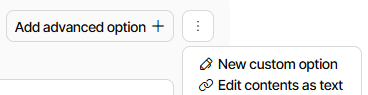
If your SMTP server is done by IP (or DNS is slow), use netstat -an instead.
Either way, is server shown? Non-response will usually show SYN_SENT State.
I misspoke. sendemail is what LuckyBackup uses. I use duplicati to move those backups to the cloud.
Thank you for you detailed reply. But this is not something I need bad enough to try and debug it. I’ll just turn VPN off when I run duplicati.