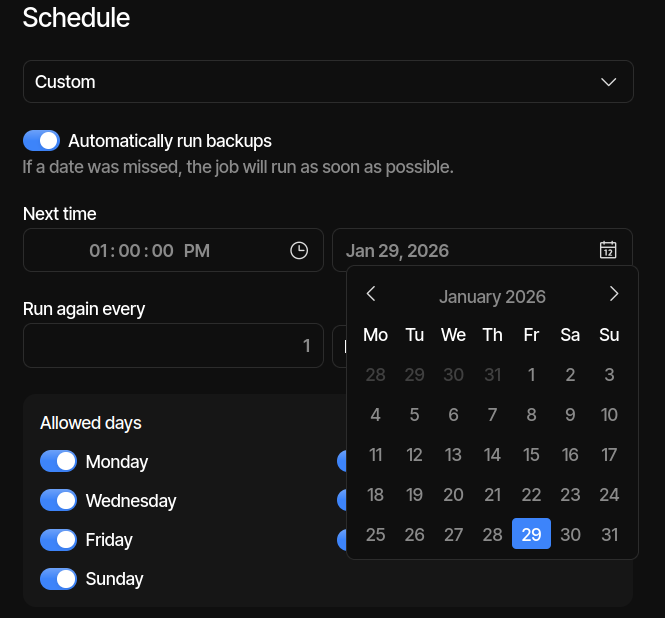
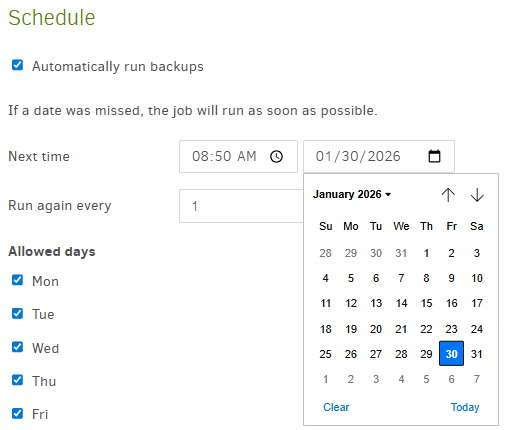
Hello. I’m using Duplicati with - 2.2.0.3 - 2.2.0.3_stable_2026-01-06 and when scheduling a backup using a custom schedule, the calendar in the Duplicati scheduler does not match the actual calendar. Selecting the day of the month works as expected but the header at the top of the calendar that shows the day of the week is off by one day. It’s showing M T W Th F Sa Su from left to right but should be Su M T W Th F Sa to align with the correct day of the month.
I’m on Linux Mint Debian Edition 7 and Kernel 6.12.63+deb13-amd64 and have the first day of the week set to Use Locale Default (I’m in North America).
Here’s a screenshot from Duplicati showing the calendar for a custom scheduled backup. It’s showing January 29th as Friday but it is actually Thursday.
Ignoring the wrong day of the week (which I’m also seeing, now that I look),
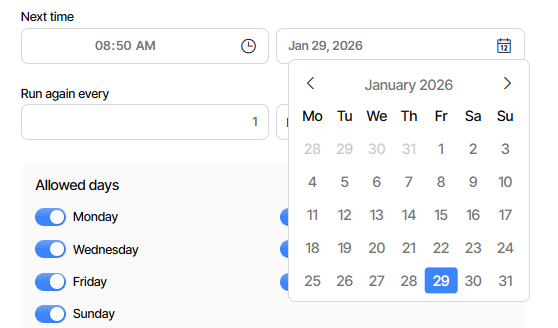
did the 1 PM backup already run? I “think” it’s past that time worldwide now.
I noted this in November, there was time zone discussion, nothing changed.
Basically, it seems wrong to show an already-past time and call it Next time.
What’s worse is that on a job edit, if you save the suggestion of a past time,
it runs – because it’s already passed… One can avoid this with a manual fix.
Actually the old UI also seems to offer past time, but new UI is a day earlier.
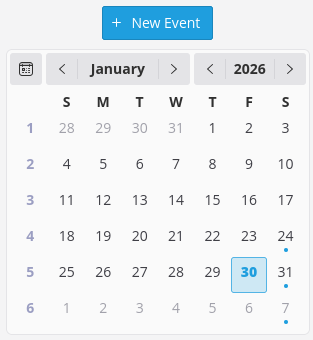
Getting back to the day-of-the-week header, the old UI seems to be correct:
The backup I had in the screenshot wasnt a real backup, I was setting it up to get a screenshot. Backups run fine, just setting them up on a custom schedule shows the wrong day of the week which was a little confusing at first.
That wasn’t exactly the question, but assuming it’s already past 1 PM Jan 29,
then you’re confirming it already ran. Perhaps its Jan 30 has already also run, however that depends on your time zone. In my UTC-5 it’s 2:30 PM on Jan 30.
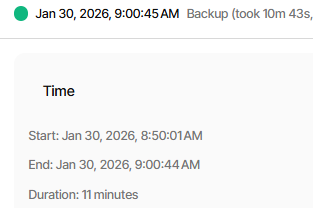
It does for me too, but (apologies for a side issue) I’m also thinking it shows an improper day of month. Maybe it’s just being silly, but IMO my 29 should say 31 because Jan 30 8:50 AM backup has taken place already, earlier this morning.
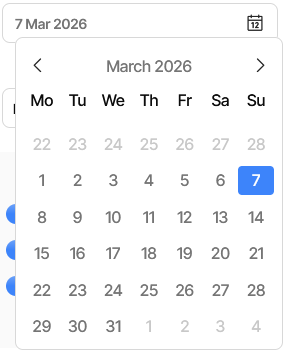
Hey - I’ve just starting using duplciati in a docker on my unraid server - it generallly seems to be pretty good, but I have the same error: it shows the wrong day for the date, i.e. it shows that today (Sat 7 Mar 26) as Sat 6 Mar 26. I’ve got my docker timezone set as New York, as I live in the EST time zone, but that shouldn’t affect the day / date displayed! Any ideas how to fix this erroneous date, or do we need to wait for a fix?
I also can’t see a way to easily change the time zone in the web interface; I hear it’s “best practice” to leave the docker time zone as UTC, and then change the display time zone to local - but I can’t see how to do that! Any ideas?
The issue is with the UI library we use (ShipUI) and it happens because your timezones are having Sunday as first-day-of-week. In other cultures, the first-day-of-week is monday, so the list of day names are shown incorrectly.
The row should be showing:
Su Mo Tu We Th Fr Sa
So if you just ignore the actual letters shown, and assume it is a regular calendar in your locale (first column is sunday) then it shows “correctly”.
Thank you @kenkendk. Ironically, I’m based in the US but from the UK so would much prefer Monday to be the start of the week - and that seems to be what shows. Is there a setting somewhere I can change to make it more “European”, with Monday’s day and date at the start of the week?!