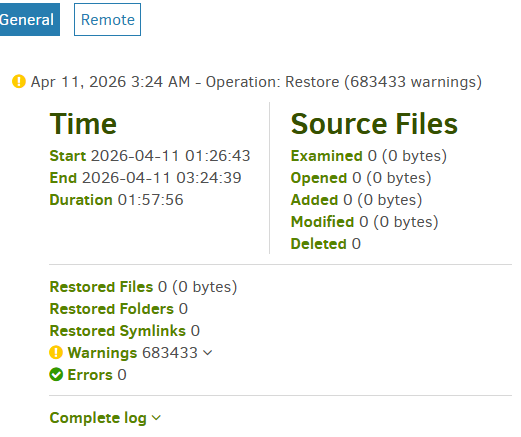
I am having a lot of trouble restoring a data drive with about 6 TB of files on Windows 11. My C: drive was not affected and so my local database from my routine backups was in pristine condition. During my first attempt at a restore to an empty data disk, essentially nothing was saved to the data disk after a dozen hours or so… one or two very large files. I discovered the bug that I reported here where the download function goes rogue:
Dozens of GB of data were showing up in C:\Users\Admin\AppData\Local\Temp, with dup-whatever file names.
After wrangling with that issue, I read about several other (related) issues with Duplicati restore and determined that I should stop using the “new and improved” restore and revert to the old restore. The new restore has several major drawbacks, the most obvious one is that the speed plummets to a crawl as it demands enormous amounts of volume downloads from the backup, in my case a USB drive, separate from the thrashing issue that I reported. (The way I understand it is that the new restore doesn’t re-use the downloaded volumes efficiently.)
Frustrated with the slow progress of the new restore method, which was able to store only about 300 GB of large files in the span of 12 hours, I used my secondary backups.
Windows backup/restore and plain copy-pasting were several magnitudes faster than Duplicati.
So now my 12 TB data drive needs another 3 TB from the backup. Ok, fine, so I re-ran Duplicati to restore from the USB drive as before, but this time with the old restore enabled. Basically, I just needed Duplicati to clean up my drive and put the missing files there.
You know what it did? It sat there and did no reading of the USB drive, it began to check the contents of the data disk. I watched live logs to monitor its progress deciding which files were and were not already good.
So, 6 hours of reading and comparing files on my data drive to the Duplicati database on drive C: and then, while I was away, it logged:
Error: database or disk is full database or disk is full (I assume the local database)
But Drive C: has 600 GB free. And my data drive isn’t full, either, it has TBs of room. What is full?! Now I didn’t catch the error during its occurrence, so perhaps there was a temporary bloating of this amount. I was using standard logging. I can’t imagine a database that large.
Note: my Blocksize is 1 MB. Server db is 144 KB. Local db is 4.7 GB. There is a “lock_v2” file present in the control directory.
Where do I go from here? Do I “vacuum” it? Do I “repair” it?
The log file is pasted below. There doesn’t seem like any way that I had a full hard drive.
code = Full (13), message = System.Data.SQLite.SQLiteException (0x800007FF): database or disk is full
database or disk is full
at System.Data.SQLite.SQLite3.Reset(SQLiteStatement stmt)
at System.Data.SQLite.SQLite3.Step(SQLiteStatement stmt)
at System.Data.SQLite.SQLiteDataReader.NextResult()
at System.Data.SQLite.SQLiteDataReader..ctor(SQLiteCommand cmd, CommandBehavior behave)
at System.Data.SQLite.SQLiteCommand.ExecuteReader(CommandBehavior behavior)
at Duplicati.Library.Main.Database.LocalRestoreDatabase.LocalBlockSource.GetFilesAndSourceBlocks(IDbConnection connection, String filetablename, String blocktablename, Int64 blocksize, Boolean skipMetadata)+MoveNext()
at Duplicati.Library.Main.Operation.RestoreHandler.ScanForExistingSourceBlocks(LocalRestoreDatabase database, Options options, Byte[] blockbuffer, HashAlgorithm hasher, RestoreResults result, RestoreHandlerMetadataStorage metadatastorage)
at Duplicati.Library.Main.Operation.RestoreHandler.DoRunAsync(IBackendManager backendManager, LocalRestoreDatabase database, IFilter filter, CancellationToken cancellationToken)
at Duplicati.Library.Main.Operation.RestoreHandler.RunAsync(String[] paths, IBackendManager backendManager, IFilter filter)
at Duplicati.Library.Main.Controller.<>c__DisplayClass23_0.<<Restore>b__0>d.MoveNext()
--- End of stack trace from previous location ---
at Duplicati.Library.Utility.Utility.Await(Task task)
at Duplicati.Library.Main.Controller.RunAction[T](T result, String[]& paths, IFilter& filter, Func`3 method)
at Duplicati.Library.Main.Controller.Restore(String[] paths, IFilter filter)
at Duplicati.Server.Runner.RunInternal(Connection databaseConnection, EventPollNotify eventPollNotify, INotificationUpdateService notificationUpdateService, IProgressStateProviderService progressStateProviderService, IApplicationSettings applicationSettings, IRunnerData data, Boolean fromQueue)