Restore not working - "completed without errors but no files were restored”

I have set up a backup to Amazon S3 and it seems to be working ok. However, when I try to do a restore to test the backup, I get no errors but 1 warning:

[Warning-Duplicati.Library.Main.Operation.RestoreHandler-NoFilesRestored]: Restore completed without errors but no files were restored”

To do the test I removed one of the directories that I have backed up (I copied it to another safe location first) so the directory that I backed up no longer exists. I then tried to restore the directory from S3 back to its original location. The restore quickly completes, which is surprising as the directory that I am trying to restore is 13GB and I get the above warning.

It’s not a file copy. It looks at what’s there, and restores only if necessary.
I suppose you could temporarily change a source file to see if it restores.

Basically, if nothing has to be restored, nothing gets needlessly done again.
This warning message confuses people a lot, and could use better wording.

Thanks, but I don’t quite understand. When you say that the target directory contains all of the files in their expected state,surely if the original source file and/or directory no longer exist then that is a necessary condition for a restore?

Just to be clear, I have backed up a local directory to S3, then deleted that directory and then tried to restore it using Duplicati.

I misread that. Sorry.

What happened besides message in title? Did any files go into the original area?
What Duplicati version is this? New UI has quite a bit of progress info for restore.
Any version should have a job log that with the summary on what the restore did.
After you provide some info, possibly a developer will be needed, but we will see.

No no files were restored to the original area. I am using version 2.2.0.3 - 2.2.0.3_stable_2026-01-06. This was the log:

{
“BrokenLocalFiles”: ,
“BrokenRemoteFiles”: ,
“RestoredFiles”: 0,
“SizeOfRestoredFiles”: 0,
“RestoredFolders”: 0,
“RestoredSymlinks”: 0,
“PatchedFiles”: 0,
“DeletedFiles”: 0,
“DeletedFolders”: 0,
“DeletedSymlinks”: 0,
“MainOperation”: “Restore”,
“RecreateDatabaseResults”: null,
“ParsedResult”: “Warning”,
“Interrupted”: false,
“Version”: “2.2.0.3 (2.2.0.3_stable_2026-01-06)”,
“EndTime”: “2026-05-12T15:27:50.933748Z”,
“BeginTime”: “2026-05-12T15:27:49.7354983Z”,
“Duration”: “00:00:01.1982497”,
“MessagesActualLength”: 14,
“WarningsActualLength”: 1,
“ErrorsActualLength”: 0,
“Messages”: [
“2026-05-12 16:27:49 +01 - [Information-Duplicati.Library.Main.Controller-StartingOperation]: The operation Restore has started”,
“2026-05-12 16:27:49 +01 - [Information-Duplicati.Library.Main.BasicResults-BackendEvent]: Backend event: List - Started: ()”,
“2026-05-12 16:27:50 +01 - [Information-Duplicati.Library.Main.BasicResults-BackendEvent]: Backend event: List - Completed: (1.77 KiB)”,
“2026-05-12 16:27:50 +01 - [Information-Duplicati.Library.Main.Database.LocalRestoreDatabase-SearchingBackup]: Searching backup 0 (29/04/2026 21:14:57) …”,
“2026-05-12 16:27:50 +01 - [Information-Duplicati.Library.Main.Database.LocalRestoreDatabase-SearchingBackup]: Searching backup 1 (27/04/2026 13:00:00) …”,
“2026-05-12 16:27:50 +01 - [Information-Duplicati.Library.Main.Database.LocalRestoreDatabase-SearchingBackup]: Searching backup 2 (20/04/2026 11:30:55) …”,
“2026-05-12 16:27:50 +01 - [Information-Duplicati.Library.Main.Database.LocalRestoreDatabase-SearchingBackup]: Searching backup 3 (25/03/2026 13:00:00) …”,
“2026-05-12 16:27:50 +01 - [Information-Duplicati.Library.Main.Database.LocalRestoreDatabase-SearchingBackup]: Searching backup 4 (17/02/2026 13:00:00) …”,
“2026-05-12 16:27:50 +01 - [Information-Duplicati.Library.Main.Database.LocalRestoreDatabase-SearchingBackup]: Searching backup 5 (10/01/2026 13:00:00) …”,
“2026-05-12 16:27:50 +01 - [Information-Duplicati.Library.Main.Database.LocalRestoreDatabase-SearchingBackup]: Searching backup 6 (28/11/2025 14:28:49) …”,
“2026-05-12 16:27:50 +01 - [Information-Duplicati.Library.Main.Database.LocalRestoreDatabase-SearchingBackup]: Searching backup 7 (27/10/2025 13:00:00) …”,
“2026-05-12 16:27:50 +01 - [Information-Duplicati.Library.Main.Database.LocalRestoreDatabase-SearchingBackup]: Searching backup 8 (17/09/2025 13:00:00) …”,
“2026-05-12 16:27:50 +01 - [Information-Duplicati.Library.Main.Database.LocalRestoreDatabase-SearchingBackup]: Searching backup 9 (21/07/2025 10:32:35) …”,
“2026-05-12 16:27:50 +01 - [Information-Duplicati.Library.Main.Database.LocalRestoreDatabase-SearchingBackup]: Searching backup 10 (27/05/2025 21:23:56) …”
],
“Warnings”: [
“2026-05-12 16:27:50 +01 - [Warning-Duplicati.Library.Main.Operation.RestoreHandler-NoFilesRestored]: Restore completed without errors but no files were restored”
],
“Errors”: ,
“BackendStatistics”: {
“RemoteCalls”: 1,
“BytesUploaded”: 0,
“BytesDownloaded”: 0,
“FilesUploaded”: 0,
“FilesDownloaded”: 0,
“FilesDeleted”: 0,
“FoldersCreated”: 0,
“RetryAttempts”: 0,
“UnknownFileSize”: 0,
“UnknownFileCount”: 0,
“KnownFileCount”: 1817,
“KnownFileSize”: 45468958821,
“KnownFilesets”: 11,
“LastBackupDate”: “2026-04-29T22:14:57+01:00”,
“BackupListCount”: 11,
“TotalQuotaSpace”: 0,
“FreeQuotaSpace”: 0,
“AssignedQuotaSpace”: -1,
“ReportedQuotaError”: false,
“ReportedQuotaWarning”: false,
“MainOperation”: “Restore”,
“ParsedResult”: “Success”,
“Interrupted”: false,
“Version”: “2.2.0.3 (2.2.0.3_stable_2026-01-06)”,
“EndTime”: “0001-01-01T00:00:00”,
“BeginTime”: “2026-05-12T15:27:49.7355015Z”,
“Duration”: “00:00:00”,
“MessagesActualLength”: 0,
“WarningsActualLength”: 0,
“ErrorsActualLength”: 0,
“Messages”: null,
“Warnings”: null,
“Errors”: null
}
}
The multiple SearchingBackup lines worries me. It acts like it couldn’t find things.
I can get that sort of log if I force in an incorrect path. How did you select the files?
As a side question if a dev stops by - why search in version other than requested?

That is a good question indeed. The normal restore flow will pass a specific version and then perform the restore from that version.

Since we see multiple versions being searched, that indicates that no version was specified and the restore will then keep searching in all versions until it finds the paths requested.

I updated it slightly for the next release so it now checks if all files already exist and gives an information message in that case, and only gives the warning if no files were attempted restored.

Still waiting for your answer to “How did you select the files” requested here.
You can also try variations on what you select, or GUI Commandline restore:

In Commandline, you can use wildcards (such as *) to pick what you restore.
You also get a pretty nice view of advanced options, in case any are suspect.
Adding console-log-level of Information will get a better view than job log
which was showing file searching behavior which is seemingly unexpected…

Thanks. Sorry for the delay in replying. I used the GUI Restore option.

According to the duplicati docs, the syntax is: duplicati-cli restore

That didn’t work for me, but I ran:

C:\Program Files\Duplicati 2>Duplicati.CommandLine.exe restore s3.us-east-1.amazonaws.com./*

and I got the following:

Restore started at 21/05/2026 14:26:41

Enter encryption passphrase: ****************************************
Listing remote folder …
The operation Restore has failed => The folder C:\Program Files\Duplicati 2\s3.us-east-1.amazonaws.com.* does not exist

ErrorID: FolderMissing

I haven’t used the CLI before. Have I used the wrong syntax?

You posted a GUI log, but then you speak Linux then Windows CLI.

Restoring files is GUI doc, and is generally easier if it gets job done.

Highly, but why did you switch to CLI? Is that the preferred way?

Command Line Interface CLI is the doc. You tried Linux tool first.
You’re apparently on Windows, so got further using that tool, but
what should be the destination URL isn’t URL, lacks credentials,
and maybe has some extra characters. You can get your URL by
GUI job Export As command line, or try to do it manually for S3:

URL format for Commandline (S3 URL format)

You’re also missing --dbpath. See docs. GUI simplifies all this.
I was trying to learn the steps that you took to get the odd result.

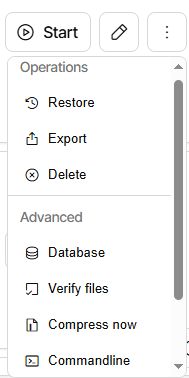
I misunderstood when you suggested using Commandline restore option. I am using Windows GUI. I don’t get a Commandline option on my gui. I notice in your screenshot that this is under “Advanced” settings, which I don’t have:

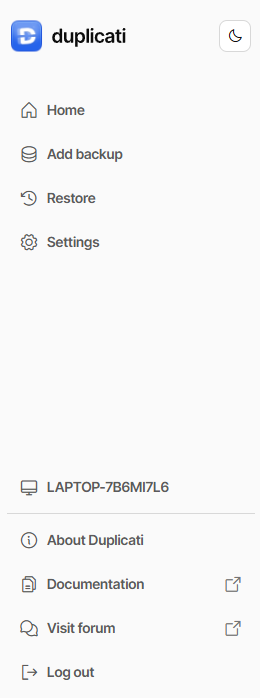
It’s not a setting and not on the left bar. It’s on three-dot menu at right of any job.
Are there no jobs, e.g. are you testing with only Direct restore from backup files?

I ran the restore from the Duplicati Commandline option under the job actions for the S3 backup and I get the same error as before:

Restore started at 02/06/2026 13:35:48
Checking remote backup …
Listing remote folder …
0 files need to be restored (0 bytes)
Verifying restored files …
Restore completed without errors but no files were restored
Restored 0 (0 bytes) files to original path
Duration of restore: 00:00:01
Return code: 2

Although the backup seems to work ok on each scheduled run and when I run it manually from the My Backups page, just out of interest I decided to also run Backup from the Duplicati Commandline option and I got this:

Backup started at 02/06/2026 13:35:08
Checking remote backup …
Listing remote folder …
Scanning source files …
0 files need to be examined (0 bytes)
Checking remote backup …
Listing remote folder …
Verifying remote backup …
Remote backup verification completed
Downloading file duplicati-20260513T130000Z.dlist.zip.aes (957 bytes) …
Downloading file duplicati-i54a05cf7cfd045209a6a2bc966b72240.dindex.zip.aes (2.56 KiB) …
Downloading file duplicati-bb3ccddb9d34c4e1eabf77e59a667193f.dblock.zip.aes (49.01 MiB) …
Duration of backup: 00:00:09.1381947
Remote files: 1817
Remote filesets: 11
Remote size: 42.35 GiB
Total remote quota: 0 bytes
Available remote quota: 0 bytes
Files added: 0
Files deleted: 0
Files changed: 0
Data uploaded: 0 bytes
Data downloaded: 49.01 MiB
No files were processed. If this was not intentional you may want to use the “test-filters” command
Backup completed successfully!
Return code: 1

As suggested, I ran the “test-filters” command and got this:

The operation TestFilters has failed => The filename, directory name, or volume label syntax is incorrect. : ‘C:\Program Files\Duplicati 2\s3:\akiaythc5rrxtjxs5tnm-akiaythc5rrxtfevwsny-backups?s3-location-constraint=&s3-storage-class=&s3-client=aws&auth-username=AKIAYTHC5RRXTJXS5TNM&auth-password=xxxxxxxxxxxxxxxxxxxxxxxxxxxxxxxxxxxxxxxxxx’

System.IO.IOException: The filename, directory name, or volume label syntax is incorrect. : ‘C:\Program Files\Duplicati 2\s3:\akiaythc5rrxtjxs5tnm-akiaythc5rrxtfevwsny-backups?s3-location-constraint=&s3-storage-class=&s3-client=aws&auth-username=AKIAYTHC5RRXTJXS5TNM&auth-password=pPNw1Wh4LkNf1baYQwGfbTfyPbLL6HRmuc8Vi%2FBR’
at System.IO.FileSystemInfo.EnsureDataInitialized()
at System.IO.FileSystemInfo.get_Attributes()
at Duplicati.Library.Main.Controller.ExpandInputSources(String inputsources, IFilter filter)
at Duplicati.Library.Main.Controller.<>c__DisplayClass43_0.b__1(TestFilterResults result, IBackendManager backendManager)
at Duplicati.Library.Main.Controller.RunAction[T](T result, String& paths, IFilter& filter, Func3 method) at Duplicati.Library.Main.Controller.TestFilter(String[] paths, IFilter filter) at Duplicati.CommandLine.Commands.TestFilters(TextWriter outwriter, Action1 setup, List1 args, Dictionary2 options, IFilter filter)
at Duplicati.CommandLine.Program.ParseCommandLine(TextWriter outwriter, Action1 setup, Boolean& verboseErrors, String[] args) at Duplicati.CommandLine.Program.RunCommandLine(TextWriter outwriter, TextWriter errwriter, Action1 setup, String args)
Return code: 100

Do you have ideas on what is going on please?

There’s no version passed from the GUI, and it wanders off into the others.
Test for this was to add an exclude filter of *, backup (makes it very empty).
GUI Restore the new backup, and restore folder gets all files not in version.

Is restore search a bug or a feature? It seems to have been present awhile.
It’s documented in find help, but not restore. I don’t set all-versions.

Check Evaluated stat in job log Source files from the routine backup. Is it zero?
If so, review Source Data screen to verify Paths and Filters are set up properly.
There have been users who exclude everything by accident, defeating backup.

The TEST-FILTERS command

Scans the source files and tests against the filters specified, the console output shows which files and folders are examined and the result. Usage:

Duplicati.CommandLine.exe test-filters <source-path> [<options>]

Result suggests that you didn’t use a source path but S3 URL was placed there.
GUI Commandline comes up set for backup, and anything else may need edits.
Unfortunately the new documentation only covers a few commands, so I link old.

Did GUI Commandline backup or restore have edits, or just a command change?