Restore doesn't show folder structure

My backups have lots LOTS of files, arranged in lots of folders. But the last update I installed they show all files next to each other its VERY hard to find with I want to restore, I tried add “advanced option” called “use legacy restore method” but doesn’t change this. Can you help me go back to restore In legacy UI. (yes I can go to setting and open legacy ui and works but I wanted to save and use legacy as default UI).


TY

Welcome to the forum @Joao_Horta

If you have or are willing to update to the recent 2.2.0.3_stable_2026-01-06:

image

Click the default to change it. That brings a better message on what it will do:

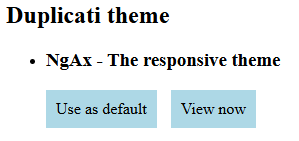
If you want to stay with earlier 2.2 awhile longer, edit URL to go to theme.html:

Click the NgAX “Use as default” to use the old UI.

They seem alphabetical (except uppercase goes before lowercase), if it helps.

I questioned the new design when it came out, but I can’t quickly find the post.

Maybe some developer can repeat the reason why it’s viewed as a better way.

1 Like

Thank you for your response. It works

1 Like