(2.2.0.3_stable_2026-01-06 on Win10)
Lately two of the three jobs I send to a WebDAV share repeatedly fail with “Found 1 remote files that are not recorded in local storage.“. I then run a repair and the (daily) job runs fine for a few days, then fails again with same message. The third one runs like a charm. All three jobs have their separate target folders, so no overlap. For one of then I even did a rebuild of the local DB some time ago, but this also didn’t help for more than 2 or three days. It’s always about a single file missing. Anything I can do to get this fixed for good or narrow down the issue?
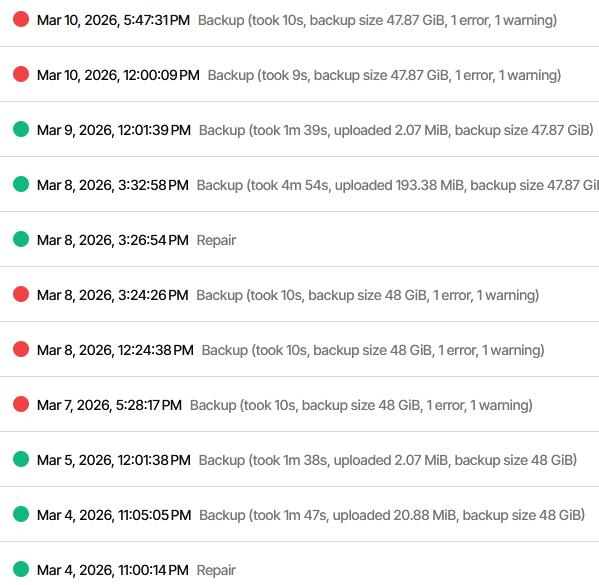
It’s getting worse: After two attempts to “delete and repair” ended with The operation Repair has failed\r\nHttpRequestException: Response status code does not indicate success: 400 (Bad Request)." I am stuck. What do I do now?
BTW: other jobs to the same share (different folders) runs OK, so no problem with the connection.
Fulll log here - backend stats seem to indicate succes, but the “end-time” looks odd:
 {
  "MainOperation": "Repair",
  "RecreateDatabaseResults": {
    "MainOperation": "Repair",
    "ParsedResult": "Success",
    "Interrupted": false,
    "Version": "2.2.0.3 (2.2.0.3_stable_2026-01-06)",
    "EndTime": "0001-01-01T00:00:00",
    "BeginTime": "2026-03-12T17:43:44.4131656Z",
    "Duration": "00:00:00",
    "MessagesActualLength": 0,
    "WarningsActualLength": 0,
    "ErrorsActualLength": 0,
    "Messages": null,
    "Warnings": null,
    "Errors": null,
    "BackendStatistics": {
      "RemoteCalls": 17,
      "BytesUploaded": 0,
      "BytesDownloaded": 22118450,
      "FilesUploaded": 0,
      "FilesDownloaded": 10,
      "FilesDeleted": 0,
      "FoldersCreated": 0,
      "RetryAttempts": 5,
      "UnknownFileSize": 0,
      "UnknownFileCount": 0,
      "KnownFileCount": 0,
      "KnownFileSize": 0,
      "KnownFilesets": 0,
      "LastBackupDate": "0001-01-01T00:00:00",
      "BackupListCount": 0,
      "TotalQuotaSpace": 0,
      "FreeQuotaSpace": 0,
      "AssignedQuotaSpace": 0,
      "ReportedQuotaError": false,
      "ReportedQuotaWarning": false,
      "MainOperation": "Repair",
      "ParsedResult": "Success",
      "Interrupted": false,
      "Version": "2.2.0.3 (2.2.0.3_stable_2026-01-06)",
      "EndTime": "0001-01-01T00:00:00",
      "BeginTime": "2026-03-12T17:43:44.4102971Z",
      "Duration": "00:00:00",
      "MessagesActualLength": 0,
      "WarningsActualLength": 0,
      "ErrorsActualLength": 0,
      "Messages": null,
      "Warnings": null,
      "Errors": null
    }
  },
  "ParsedResult": "Fatal",
  "Interrupted": false,
  "Version": "2.2.0.3 (2.2.0.3_stable_2026-01-06)",
  "EndTime": "2026-03-12T17:45:33.6298419Z",
  "BeginTime": "2026-03-12T17:43:44.4102929Z",
  "Duration": "00:01:49.2195490",
  "MessagesActualLength": 36,
  "WarningsActualLength": 0,
  "ErrorsActualLength": 1,
  "Messages": [
    "2026-03-12 18:43:44 +01 - [Information-Duplicati.Library.Main.Controller-StartingOperation]: Die Operation Repair wurde gestartet",
    "2026-03-12 18:43:44 +01 - [Information-Duplicati.Library.Main.BasicResults-BackendEvent]: Backend event: List - Started:  ()",
    "2026-03-12 18:43:46 +01 - [Information-Duplicati.Library.Main.BasicResults-BackendEvent]: Backend event: List - Completed:  (2,148 KB)",
    "2026-03-12 18:44:15 +01 - [Information-Duplicati.Library.Main.Operation.RecreateDatabaseHandler-RebuildStarted]: Rebuild database started, downloading 18 filelists",
    "2026-03-12 18:44:15 +01 - [Information-Duplicati.Library.Main.BasicResults-BackendEvent]: Backend event: Get - Started: duplicati-20250924T110000Z.dlist.zip.aes (2,067 MB)",
    "2026-03-12 18:44:16 +01 - [Information-Duplicati.Library.Main.BasicResults-BackendEvent]: Backend event: Get - Completed: duplicati-20250924T110000Z.dlist.zip.aes (2,067 MB)",
    "2026-03-12 18:44:16 +01 - [Information-Duplicati.Library.Main.BasicResults-BackendEvent]: Backend event: Get - Started: duplicati-20251025T043633Z.dlist.zip.aes (2,082 MB)",
    "2026-03-12 18:44:17 +01 - [Information-Duplicati.Library.Main.BasicResults-BackendEvent]: Backend event: Get - Completed: duplicati-20251025T043633Z.dlist.zip.aes (2,082 MB)",
    "2026-03-12 18:44:20 +01 - [Information-Duplicati.Library.Main.BasicResults-BackendEvent]: Backend event: Get - Started: duplicati-20251125T094642Z.dlist.zip.aes (2,099 MB)",
    "2026-03-12 18:44:22 +01 - [Information-Duplicati.Library.Main.BasicResults-BackendEvent]: Backend event: Get - Completed: duplicati-20251125T094642Z.dlist.zip.aes (2,099 MB)",
    "2026-03-12 18:44:22 +01 - [Information-Duplicati.Library.Main.BasicResults-BackendEvent]: Backend event: Get - Started: duplicati-20251231T110000Z.dlist.zip.aes (2,118 MB)",
    "2026-03-12 18:44:24 +01 - [Information-Duplicati.Library.Main.BasicResults-BackendEvent]: Backend event: Get - Completed: duplicati-20251231T110000Z.dlist.zip.aes (2,118 MB)",
    "2026-03-12 18:44:25 +01 - [Information-Duplicati.Library.Main.BasicResults-BackendEvent]: Backend event: Get - Started: duplicati-20260123T110000Z.dlist.zip.aes (2,129 MB)",
    "2026-03-12 18:44:26 +01 - [Information-Duplicati.Library.Main.BasicResults-BackendEvent]: Backend event: Get - Completed: duplicati-20260123T110000Z.dlist.zip.aes (2,129 MB)",
    "2026-03-12 18:44:27 +01 - [Information-Duplicati.Library.Main.BasicResults-BackendEvent]: Backend event: Get - Started: duplicati-20260130T110000Z.dlist.zip.aes (2,131 MB)",
    "2026-03-12 18:44:28 +01 - [Information-Duplicati.Library.Main.BasicResults-BackendEvent]: Backend event: Get - Completed: duplicati-20260130T110000Z.dlist.zip.aes (2,131 MB)",
    "2026-03-12 18:44:29 +01 - [Information-Duplicati.Library.Main.BasicResults-BackendEvent]: Backend event: Get - Started: duplicati-20260206T111854Z.dlist.zip.aes (2,133 MB)",
    "2026-03-12 18:44:31 +01 - [Information-Duplicati.Library.Main.BasicResults-BackendEvent]: Backend event: Get - Completed: duplicati-20260206T111854Z.dlist.zip.aes (2,133 MB)",
    "2026-03-12 18:44:32 +01 - [Information-Duplicati.Library.Main.BasicResults-BackendEvent]: Backend event: Get - Started: duplicati-20260214T110000Z.dlist.zip.aes (2,135 MB)",
    "2026-03-12 18:44:37 +01 - [Information-Duplicati.Library.Main.BasicResults-BackendEvent]: Backend event: Get - Completed: duplicati-20260214T110000Z.dlist.zip.aes (2,135 MB)"
  ],
  "Warnings": [],
  "Errors": [
    "2026-03-12 18:45:33 +01 - [Error-Duplicati.Library.Main.Controller-FailedOperation]: The operation Repair has failed\r\nHttpRequestException: Response status code does not indicate success: 400 (Bad Request)."
  ],
  "BackendStatistics": {
    "RemoteCalls": 17,
    "BytesUploaded": 0,
    "BytesDownloaded": 22118450,
    "FilesUploaded": 0,
    "FilesDownloaded": 10,
    "FilesDeleted": 0,
    "FoldersCreated": 0,
    "RetryAttempts": 5,
    "UnknownFileSize": 0,
    "UnknownFileCount": 0,
    "KnownFileCount": 0,
    "KnownFileSize": 0,
    "KnownFilesets": 0,
    "LastBackupDate": "0001-01-01T00:00:00",
    "BackupListCount": 0,
    "TotalQuotaSpace": 0,
    "FreeQuotaSpace": 0,
    "AssignedQuotaSpace": 0,
    "ReportedQuotaError": false,
    "ReportedQuotaWarning": false,
    "MainOperation": "Repair",
    "ParsedResult": "Success",
    "Interrupted": false,
    "Version": "2.2.0.3 (2.2.0.3_stable_2026-01-06)",
    "EndTime": "0001-01-01T00:00:00",
    "BeginTime": "2026-03-12T17:43:44.4102971Z",
    "Duration": "00:00:00",
    "MessagesActualLength": 0,
    "WarningsActualLength": 0,
    "ErrorsActualLength": 0,
    "Messages": null,
    "Warnings": null,
    "Errors": null
  }
}
Matching file name and log details would help reveal the nature of the issue.
External log-file at log-file-log-level=retry might be a good approach.
"RetryAttempts": 5 in log says you’re getting them. It might be significant.
number-of-retries stops and fails after 5, but they must be in a row (see log).
If you have a somewhat flaky network, you could try fiddling with that setting.
  --number-of-retries = 5
    If an upload or download fails, Duplicati will retry a number of times
    have changed, it may not be possible to retrieve all the required data
  --retry-delay = 10s
  --retry-with-exponential-backoff = false
    attempting again. This period is controlled by the retry-delay option.
Are the other jobs that are working OK running on the same system as this?
Any other guesses on any other factors that may be different between them?
For simpler errors such as 400 (Bad request) you can sometimes look at
About Duplicati → Logs → Stored to click on any error from the relevant time.
That should show a stack trace that will show what Duplicati was trying to do.
BackendTester can be run with destination URL modified to use empty folder.
Despite the other jobs working, this one looks like destination isn’t doing well.
Yes - sort of: One (1) works like a charm (daily backups with no errors for at least past 4 weeks), one (2) limps along (Repair - Ok - Ok - fail - repair …), one (3) started off like (2), but is completely dead by now (after delete & repair: “the operation Repair has failed\r\nHttpRequestException: Response status code does not indicate success: 400 (Bad Request)“, the following run ended with “The database was attempted repaired, but the repair did not complete.“)
All three of them:
- have their source on the same NAS
- have their target on the same (Magenta) cloud share - of course in different folders
- are scheduled to run daily around noon, time-delayed by with 10min
The connection test to the Magenta cloud share is successful and plenty of free space (> 200GB).
I was thinking of changing the name of the target folder for (3) in the cloud and in the job (to get it out of the way) and then set up the same job again, targeting the folder with the original name. Just in case: Is it safe to “move” an existing job like this, i.e. would it run (if I ever got it fixed)?
Below are the last lines of the “limping” job (2)’s last run:
2026-03-16 15:00:12 +01 - [Information-Duplicati.Library.Main.BasicResults-BackendEvent]: Backend event: List - Started:  ()
2026-03-16 15:00:14 +01 - [Information-Duplicati.Library.Main.BasicResults-BackendEvent]: Backend event: List - Completed:  (1,18 KB)
2026-03-16 15:00:14 +01 - [Information-Duplicati.Library.Main.Operation.FilelistProcessor-IgnoreRemoteDeletedFile]: Ignoring remote file listed as Deleted: duplicati-bb7ad446be3d9414e9f37dca1b4e077f0.dblock.zip.aes.part
2026-03-16 15:00:14 +01 - [Information-Duplicati.Library.Main.BasicResults-BackendEvent]: Backend event: Get - Started: duplicati-20260316T091904Z.dlist.zip.aes (951,53 KB)
2026-03-16 15:00:15 +01 - [Information-Duplicati.Library.Main.BasicResults-BackendEvent]: Backend event: Get - Completed: duplicati-20260316T091904Z.dlist.zip.aes (951,53 KB)
2026-03-16 15:00:15 +01 - [Information-Duplicati.Library.Main.BasicResults-BackendEvent]: Backend event: Get - Started: duplicati-i38bfbcc055374996911023d2550ad755.dindex.zip.aes (19,42 KB)
2026-03-16 15:00:15 +01 - [Information-Duplicati.Library.Main.BasicResults-BackendEvent]: Backend event: Get - Completed: duplicati-i38bfbcc055374996911023d2550ad755.dindex.zip.aes (19,42 KB)
2026-03-16 15:00:15 +01 - [Information-Duplicati.Library.Main.BasicResults-BackendEvent]: Backend event: Get - Started: duplicati-b56e647c887c740c3869269df7501ce92.dblock.zip.aes (50,00 MB)
2026-03-16 15:00:23 +01 - [Information-Duplicati.Library.Main.BasicResults-BackendEvent]: Backend event: Get - Completed: duplicati-b56e647c887c740c3869269df7501ce92.dblock.zip.aes (50,00 MB)
2026-03-16 15:00:23 +01 - [Information-Duplicati.Library.Main.Operation.TestHandler-Test results]: Successfully verified 3 remote files
2026-03-16 15:00:24 +01 - [Information-Duplicati.Library.Main.Controller-CompletedOperation]: Die Operation Backup ist abgeschlossen
2026-03-17 12:10:00 +01 - [Information-Duplicati.Library.Main.Controller-StartingOperation]: Die Operation Backup wurde gestartet
2026-03-17 12:10:02 +01 - [Information-Duplicati.Library.Main.BasicResults-BackendEvent]: Backend event: List - Started:  ()
2026-03-17 12:10:04 +01 - [Information-Duplicati.Library.Main.BasicResults-BackendEvent]: Backend event: List - Completed:  (1,18 KB)
2026-03-17 12:10:04 +01 - [Warning-Duplicati.Library.Main.Operation.FilelistProcessor-ExtraUnknownFile]: Extra unknown file: duplicati-bb7ad446be3d9414e9f37dca1b4e077f0.dblock.zip.aes.part
2026-03-17 12:10:04 +01 - [Error-Duplicati.Library.Main.Controller-FailedOperation]: The operation Backup has failed
Duplicati.Library.Interface.RemoteListVerificationException: Found 1 remote files that are not recorded in local storage. This can be caused by having two backups sharing a destination folder which is not supported. It can also be caused by restoring an old database. If you are certain that only one backup uses the folder and you have the most updated version of the database, you can use repair to delete the unknown files.
   at Duplicati.Library.Main.Operation.FilelistProcessor.VerifyRemoteList(IBackendManager backend, Options options, LocalDatabase database, IDbTransaction transaction, IBackendWriter log, IEnumerable`1 protectedFiles, IEnumerable`1 strictExcemptFiles, Boolean logErrors, VerifyMode verifyMode)
   at Duplicati.Library.Main.Operation.BackupHandler.PreBackupVerify(Options options, BackupResults result, IBackendManager backendManager)
   at Duplicati.Library.Main.Operation.BackupHandler.PreBackupVerify(Options options, BackupResults result, IBackendManager backendManager)
   at Duplicati.Library.Main.Operation.BackupHandler.RunAsync(String[] sources, IBackendManager backendManager, IFilter filter)
   at Duplicati.Library.Main.Controller.<>c__DisplayClass22_0.<<Backup>b__0>d.MoveNext()
--- End of stack trace from previous location ---
   at Duplicati.Library.Utility.Utility.Await(Task task)
   at Duplicati.Library.Main.Controller.RunAction[T](T result, String[]& paths, IFilter& filter, Func`3 method)
It obviously complains about an “extra unknown file”
Can you make any sense of this?
I was looking for a yes or a no. I will assume all three jobs are on same system.
That’s a minimal test. You should at least be running BackendTester for awhile.
Also check for retry counts before deleting the job database (which deletes logs).
As long as the configuration matches the new name, job shouldn’t mind renames.
Extra unknown file: duplicati-bb7ad446be3d9414e9f37dca1b4e077f0.dblock.zip.aes.part
The key here is that your destination is apparently one that creates a .part file during upload, and doesn’t clean it up. If this is consistent, there’s your problem.
Your backup configuration is a little different though, but winds up the same way.
You can ask Magenta support to see if they comment on use of the .part files.
You can also set up the logs I mentioned to see if, for example, the Duplicati file:
duplicati-bb7ad446be3d9414e9f37dca1b4e077f0.dblock.zip.aes
had something go wrong during its upload, thereby leaving a .part file behind.
If you are able to query Magenta, maybe you can even observe such file usage.
this was meant with tounge in cheek regarding the “run” aspect, since not all jobs run… But yes, the machine is the same.
I’m having touble running the BackendTester, since documentation is kinda terse…
Here is how I gleaned usage from the documentation, launched from a cmd window in “C:\Program Files\Duplicati 2\”:
.\Duplicati.CommandLine.BackendTester.exe webdav://user:pass@server/path
where
user = my username at magentacloud (same as in OK jobs)
pass = the password for magentacloud I also use in the OK jobs
server = magentacloud.de (same as in OK jobs)
path = same path as in OK jobs, just the leaf folder is different (a newly created Test-folder)
When I run this command however, connection fails with
Response status code does not indicate success: 401 (Unauthorized)
I’d appreciate help in correct usage of the Tester.
I made a WebDAV screen with dummy values, and looked at the URL it made.
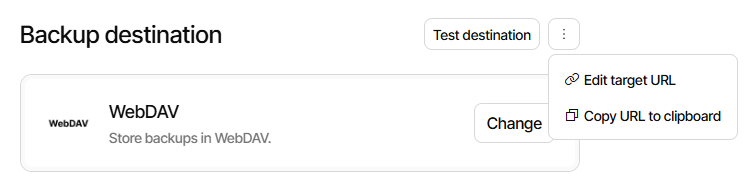
webdav://server/path?auth-username=username&auth-password=password&use-ssl=true
WebDAV Destination gives a format:
webdav://<hostname>/<path>
  ?auth-username=<username>
  &auth-password=<password>
so that matches, and I assumed you wanted TLS encryption.
To get job URL pre-quoted for a shell, easiest path is to use:
Export → As command line
and then (for this case, unlike most other commandline uses) modify the path.
Thanks for the hint with the Export command. Now I got it working.
However BackendTester doesn’t provide information that looks very useful (run with default args):
19.03.2026 09:55:43
[09:55:43 683] Starting run no 0
[09:55:48 130] *** Remote folder contains 2200 file(s), aborting
[09:55:48 130] *** First 10 file(s):
duplicati-20250924T110000Z.dlist.zip.aes
duplicati-20251025T043633Z.dlist.zip.aes
duplicati-20251125T094642Z.dlist.zip.aes
duplicati-20251231T110000Z.dlist.zip.aes
duplicati-20260123T110000Z.dlist.zip.aes
duplicati-20260130T110000Z.dlist.zip.aes
duplicati-20260206T111854Z.dlist.zip.aes
duplicati-20260214T110000Z.dlist.zip.aes
duplicati-20260221T113845Z.dlist.zip.aes
duplicati-20260226T110000Z.dlist.zip.aes
[09:55:48 135] *** … and 2190 more file(s)
I’m not sure how long I would need to run this (# of reruns?) to make this a useful diagnostic.
In the meantime I renamed the destination folder of the bad job, cloned it and modified the new job to target an empty destination folder (with the old name). The first run took some 4 hrs and completed successfully.
BTW While the job was running, I saw that there were always *.part files created, that later disappeared (when upload of the chunk was complete, I guess) - so this seems normal. My connection speed to the magentacloud is ~20MBit/s, shouldn’t be not too bad for this purpose.
Looking at the bad (renamed) destination folder I found the spurious *.part file to be from Feb 27. Interestingly some runs after Feb 27 succeeded, others failed complaining abouth this very file. And there was another fail due to an extra part file before Feb 27 (followed by some successful ones).
I will keep an eye on the new job and see if it behaves better.
EDIT: One oddity I noticed in the log file of the new job: Each run ends with an warning message like this, followed by several retries
2026-03-19 15:40:59 +01 - [Warning-Duplicati.Library.Modules.Builtin.SendHttpMessage-HttpResponseError]: HTTP Response request attempt 1 of 3 failed for: https://ingress.duplicati.com/backupreports/a~170char-string-looking-like-a-key
System.Net.Http.HttpRequestException: Response status code does not indicate success: 415 (Unsupported Media Type)
I didn’t explicitly set up a http message (yet) in the options. I notify https://www.duplicati-monitoring.com of the result with my other jobs and they don’t show such a warning.
found the reason for this one: in global options I have this URL specified for “HTTP report URL”. I remember I set this a long time ago when experimenting with fallback for reporting to the new Duplicati reporting website.
I lookes closer into the log file of the “limping” job. Attached is the log of the run where for the first time the name of the suspect .part file appears (look for duplicati-bb7ad446be3d9414e9f37dca1b4e077f0).
id3(T) 2026-02-20 12.10.00.zip (4.6 KB)
After a PUT operation fails, I see no further retries but the file gets renamed (to duplicati-b3567614382bd44a18e85c107bea9360f) and we end up with the “extra unknown file”.
Also attached is the log of a Repair activity which got listed with a green dot (=successful) in the reporting page of the UI
id3(T) 2026-03-20 17.34.19 Repair.zip (1.0 KB)
One more log: of the first Backup after the Repair
id3(T) 2026-03-20 17.39.46 Backup success.zip (1.3 KB)
It seems like this time the part file is successfully ignored - good or bad?
Do the logs shed more light on this?
Another oddity: Among the files on the destination folder of the job that has been running well for months, I also found a *dindex.aes.zip.part file of 0 size, dated from June. Duplicati doesn’t seem to mind this one …
Developer advice would help on the oddity you mentioned, and in general.
I did a test with a local folder backup, making a .part file similar to yours.
Repair did indeed try to delete it, and succeeded. Your delete was rejected.
I suppose you could test how stuck it is, e.g. try delete with some other tool.
There is maybe a chance Duplicati didn’t close, but you can close Duplicati.
What size is the .part file? You only mentioned the size of dindex .part.
Although this still sounds like it’s worth asking your provider, I found that the
provider moved their service to NextCloud, which has had this issue before:
Backup fail with ExtraUnknownFiles (has a few citations on underlying bug)
The initial 502 (Bad Gateway) is also a server side error (maybe overload).
You can look in general for what that means, but it may or may not fit here…
Regardless, there’s a lot going wrong here with storage. Please test and ask
MagentaCloud support at some time either now or after some more analysis.
update: I recreated both “limping” jobs to fresh target folders and both have been running without errors, one since March 7, the other since March 19. I’ll keep an eye on them and contact MagentaCloud when the problem shows up again. Thanks for all your advice.