Release: 2.3.0.110 (Canary) 2026-08-25

2.3.0.110_canary_2026-08-25

This release is a canary release intended to be used for testing.

Database update to version 20

This release updates the local database schema to version 20. The update adds a label column to the fileset table and is applied automatically on first use. After the update, the database can no longer be opened by earlier versions of Duplicati. If you need to downgrade, the bundled database tool (duplicati-database-tool) can downgrade the database back to version 19; downgrading removes the labels, but otherwise causes no data loss.

Labels on backup versions

Backup versions can now carry an optional text label. Labels have no functional purpose, but they help mark and distinguish versions, for example when backups are hand-curated instead of running on a schedule. The CLI and UI supports setting and showing labels.

Partition-level backup and restore

It is now possible to select a single disk partition as the backup source, instead of selecting the full disk and filtering the unwanted partitions. Restores are likewise more flexible: in addition to disk-to-disk restores, a single partition can now be restored into a partition on another disk, creating the partition as needed.

This also fixes a bug where a failing priority file would leave the restore stuck until it was cancelled, and a number of issues with enumerating and filtering disks and partitions, in particular on Windows.

Automatic metadata storage for sources that need it

Backups using a source provider that relies on database metadata, such as the disk image provider, previously required the user to set --store-metadata-content-in-database=true manually. The setting is now applied automatically when the source needs it, and can still be overridden by setting the option explicitly.

QNAP packages

This release adds native QNAP package support. Similar to the Synology package, it integrates with the QNAP OS, uses the built-in authentication, and only allows access for administrators.

Stricter Google Cloud Storage credentials

Google Cloud Storage credentials are now read as service account credentials, which is what the options are documented to take. Other credential types, such as stored user credentials or external account configurations, are now refused. If you authenticate to Google Cloud Storage, or the Google Cloud secret provider, with anything other than a service account key, you need to switch to a service account key.

Detailed list of changes

  • Updated all localizations, thanks to all translators
  • Added labels to backup versions, with CLI, API, and UI support
  • Added partition-level backup and partition-to-partition restore
  • Fixed disk image provider not initializing when listing drives, and improved disk enumeration and filter handling on Windows
  • Automatically enabled --store-metadata-content-in-database when the source provider requires it
  • Added native QNAP package support
  • Added a watchdog that restarts a stale remote management connection, and fixed issues that could drop the connection
  • Google Cloud Storage credentials are now read strictly as service accounts, thanks @JamBalaya56562
  • Fixed WebDAV destinations with a + in the path reporting uploaded files as missing, thanks @JamBalaya56562
  • Fixed Windows file:// target URLs with a query string being misparsed
  • Stopped reporting quota errors on read-only operations such as restore, thanks @JamBalaya56562
  • Fixed stale SQLite query statistics causing extremely slow fileset and consistency queries on growing databases, thanks @JamBalaya56562
  • Sped up cleanup after deleting a backup version by avoiding a full table scan
  • Fixed a similarly named file and folder in the source causing the folder to be omitted, and allowed explicitly including a file inside an excluded folder
  • Fixed backend statistics reporting a bogus zero timestamp in the operation log, thanks @JamBalaya56562
  • Fixed Linux desktop notifications using an unsupported signal API, thanks @JamBalaya56562
  • Fixed a restore with failing priority files getting stuck instead of failing
  • Aligned SharpAESCrypt, AWSSDK.Core, Azure.Core, and Microsoft.Extensions package versions across the solution, thanks @JamBalaya56562

Updates to ngclient

  • Added settings to control sorting of tree views
  • Added support for editing version labels
  • Disabled menu options that do not apply to sync jobs
  • Fixed the destination editor mixing up connection state when a destination is removed, thanks @JamBalaya56562
  • Allowed changing encryption settings for imported backups, thanks @JamBalaya56562
  • Fixed the usage statistics setting not matching the format used by the legacy UI and server settings, thanks @JamBalaya56562
  • Added a plain-language summary to the custom schedule editor, thanks @JamBalaya56562
  • Added support for browsing disks and partitions and for restoring disk images and partitions
  • Fixed Chinese locale selection, thanks @JamBalaya56562
  • Fixed absolute asset paths ignoring the path prefix when running behind a reverse proxy, thanks @scambra
  • Updated all translations, thanks to all translators
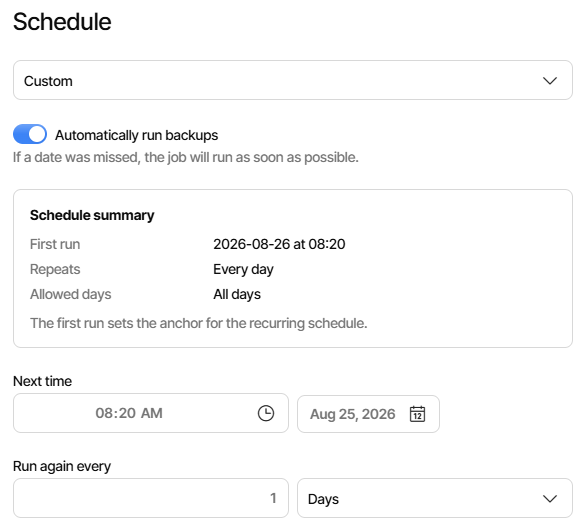
I have updated Windows/Fedora/Debian without issue, currently testing Windows disk backup which I didn’t see the same UI errors from .109

New schedule summary got run date right (8/26), but “Next time” is still a day early,
and is when it really runs (so basically it runs as soon as saved, since it’s PM now).
This is a new UI bug currently open, but there’s now another place for discrepancy:

Just had a new issue hit all my Windows VMs, I still need to test a workstation, but now all the backups are reporting issues with shadow copies:

2026-08-29 14:37:11 +02 - [Warning-Duplicati.Library.Main.Operation.Common.SourceProviderFactory-SnapshotFailed]: Failed to create a snapshot. The process appears to have the necessary permissions, but the snapshot failed anyway. Error message: No snapshot found for shadow ID 0824515e-72bc-4a3a-be0f-ef20089e735c.
InvalidOperationException: No snapshot found for shadow ID 0824515e-72bc-4a3a-be0f-ef20089e735c.

I thought it was because I updated VirtIO on all my VMs, .285 to .302, but even after rolling back the storage drivers I get the same. I’m not sure what else has changed as it was fine the day before.

I check a few things related to shadow copies and nothing stands out e.g. list writers is fine. I then tried as suggested from a search to execute a manual shadow copy against the one drive the backup backs up, but it too looks fine:

diskshadow
Microsoft DiskShadow version 1.0
Copyright (C) 2013 Microsoft Corporation
On computer:  LISA,  08/29/26 14:45:15


DISKSHADOW> set verbose on

DISKSHADOW> set context persistent

DISKSHADOW> add volume \\?\Volume{f9e2fb41-158b-4248-9ebe-c3612ac3e899}\

DISKSHADOW> begin backup

DISKSHADOW> create
Excluding writer "Shadow Copy Optimization Writer", because all of its components have been excluded.
Excluding writer "MSSearch Service Writer", because all of its components have been excluded.
Component "\BCD\BCD" from writer "ASR Writer" is excluded from backup,
because it requires volume  which is not in the shadow copy set.

* Including writer "Task Scheduler Writer":
        + Adding component: \TasksStore

* Including writer "VSS Metadata Store Writer":
        + Adding component: \WriterMetadataStore

* Including writer "Performance Counters Writer":
        + Adding component: \PerformanceCounters

* Including writer "System Writer":
        + Adding component: \System Files
        + Adding component: \Win32 Services Files

* Including writer "ASR Writer":
        + Adding component: \ASR\ASR
        + Adding component: \Volumes\Volume{f9e2fb41-158b-4248-9ebe-c3612ac3e899}
        + Adding component: \Volumes\Volume{97e682bd-5c88-4914-8b3e-520fb67b17ce}
        + Adding component: \Volumes\Volume{883630ae-8b53-4253-b6b9-0347e9d2b833}
        + Adding component: \Volumes\Volume{75babf4d-9b48-40da-8377-cd35d705290a}
        + Adding component: \Volumes\Volume{a1629273-cede-422b-8747-d6245ede6db0}
        + Adding component: \Disks\harddisk2
        + Adding component: \Disks\harddisk0
        + Adding component: \Disks\harddisk3
        + Adding component: \Disks\harddisk1

* Including writer "COM+ REGDB Writer":
        + Adding component: \COM+ REGDB

* Including writer "Registry Writer":
        + Adding component: \Registry

* Including writer "WMI Writer":
        + Adding component: \WMI

Alias VSS_SHADOW_1 for shadow ID {f25d102a-0f58-40ea-b1b7-d29134cd44e0} set as environment variable.
Alias VSS_SHADOW_SET for shadow set ID {1dbc16a7-cf8c-4ca1-b535-38569c1eda84} set as environment variable.
Inserted file Manifest.xml into .cab file 26-08-29_-46-40_LISA.cab
Inserted file BCDocument.xml into .cab file 26-08-29_-46-40_LISA.cab
Inserted file WM0.xml into .cab file 26-08-29_-46-40_LISA.cab
Inserted file WM1.xml into .cab file 26-08-29_-46-40_LISA.cab
Inserted file WM2.xml into .cab file 26-08-29_-46-40_LISA.cab
Inserted file WM3.xml into .cab file 26-08-29_-46-40_LISA.cab
Inserted file WM4.xml into .cab file 26-08-29_-46-40_LISA.cab
Inserted file WM5.xml into .cab file 26-08-29_-46-40_LISA.cab
Inserted file WM6.xml into .cab file 26-08-29_-46-40_LISA.cab
Inserted file WM7.xml into .cab file 26-08-29_-46-40_LISA.cab
Inserted file WM8.xml into .cab file 26-08-29_-46-40_LISA.cab
Inserted file WM9.xml into .cab file 26-08-29_-46-40_LISA.cab
Inserted file DisE948.tmp into .cab file 26-08-29_-46-40_LISA.cab

Querying all shadow copies with the shadow copy set ID {1dbc16a7-cf8c-4ca1-b535-38569c1eda84}

        * Shadow copy ID = {f25d102a-0f58-40ea-b1b7-d29134cd44e0}               %VSS_SHADOW_1%
                - Shadow copy set: {1dbc16a7-cf8c-4ca1-b535-38569c1eda84}       %VSS_SHADOW_SET%
                - Original count of shadow copies = 1
                - Original volume name: \\?\Volume{f9e2fb41-158b-4248-9ebe-c3612ac3e899}\ [C:\]
                - Creation time: 29/08/2026 14:46:40
                - Shadow copy device name: \\?\GLOBALROOT\Device\HarddiskVolumeShadowCopy1
                - Originating machine: LISA.mydomain.com
                - Service machine: LISA.mydomain.com
                - Not exposed
                - Provider ID: {b5946137-7b9f-4925-af80-51abd60b20d5}
                - Attributes:  No_Auto_Release Persistent Differential

Number of shadow copies listed: 1

DISKSHADOW> end backup

DISKSHADOW> exit

Any ideas?

Forgot, I also tried adding --vss-use-mapping=true and it was still the same.

Can you try also with --snapshot-provider=alphavss or --snapshot-provider=wmic to rule out an issue with the vanara based setup?

I tired both and they worked, or rather there were no warnings.

Which would you recommend I switch to for the time being?

Either is fine, I would say.

For AlphaVSS the only issue is that it is no longer maintained.
It has worked well for years.

For WMIC it is a built-in Windows feature. It works but has not been tested widely.

EDIT: I just tested this on Windows 11 x64, and here the Vanara-based VSS worked without issue :thinking:

I’ve switched to WMIC and will see how it goes.

All these machines are Windows Server 2025, sorry, should have been more specific. I haven’t been able to test an actual workstation yet.

I just discovered that @drwtsn32 reports WMIC is missing on some Windows systems:
https://github.com/duplicati/duplicati/issues/7005#issuecomment-5229679615

Looks like WMIC was deprecated in 2021:

Based on the timeline, rollouts in 2026 will no longer carry it, so AlphaVSS is the best bet.

I’d forgotten about that as I hit that a few months back, so I switched to AlphaVSS and so far no issues

Given recent problem with a leading backslash on Windows file path, is this OK?

image

That’s a saved destination. It appears to get stripped out when used, but I worry.

POST from job Submit sent BaseURL: "file:///C%3A%5C ...

FTP destination visual result is no leading slash, so maybe it’s not part of format.

@kenkendk I’m getting this now:

LimitedWarnings: [
    2026-08-31 02:01:40 +02 - [Warning-Duplicati.Library.Main.Operation.Common.SourceProviderFactory-SnapshotFailed]: Failed to create a snapshot. The process appears to have the necessary permissions, but the snapshot failed anyway. Error message: An item with the same key has already been added. Key: \\
ArgumentException: An item with the same key has already been added. Key: \\
]
LimitedErrors: []
Log data:
2026-08-31 02:01:40 +02 - [Warning-Duplicati.Library.Main.Operation.Common.SourceProviderFactory-SnapshotFailed]: Failed to create a snapshot. The process appears to have the necessary permissions, but the snapshot failed anyway. Error message: An item with the same key has already been added. Key: \\
System.ArgumentException: An item with the same key has already been added. Key: \\
   at System.Linq.Enumerable.ToDictionary[TSource,TKey,TElement](IEnumerable`1 source, Func`2 keySelector, Func`2 elementSelector, IEqualityComparer`1 comparer)
   at System.Linq.Enumerable.ToDictionary[TSource,TKey,TElement](IEnumerable`1 source, Func`2 keySelector, Func`2 elementSelector)
   at Duplicati.Library.Snapshots.Windows.SnapshotManager.MapVolumesToSnapShots()
   at Duplicati.Library.Snapshots.WindowsSnapshot..ctor(IEnumerable`1 sources, IDictionary`2 options, Boolean followSymlinks)
   at Duplicati.Library.Snapshots.SnapshotUtility.CreateWindowsSnapshot(IEnumerable`1 folders, Dictionary`2 options, Boolean followSymlinks)
   at Duplicati.Library.Snapshots.SnapshotUtility.CreateSnapshot(IEnumerable`1 paths, Dictionary`2 options, Boolean followSymlinks)
   at Duplicati.Library.Main.Operation.Common.SourceProviderFactory.GetFileSnapshotService(IEnumerable`1 sources, Options options)

@kenkendk I switched to WMIC and the warnings have all gone

Yes, I would think so. This is handled with the “relaxed url” rules used for backends.
The other issue was creating a filter with files to restore, where it needed to match the actual path.
But, the leading slash should not be there, do you know how it got in there?

Thanks, I am investigating.

Ok, that is good that you have it working, but unfortunately wmic.exe will likely be removed with the next Windows update.

I have instead been busy developing two new VSS providers: WMI and Native.

The WMI provider works similar to wmic.exe and is lightweight, but does not ask applications (MSSQL, HyperV, etc) to flush to disk before the snapshots are made (you get disk-consistent but not application-consisten).

The Native provider is a full rewrite of Vanara/AlphaVSS, but without any external libraries.

Both providers are now tested and ready. An upside is that they both work on x86/x64/arm64 and they do not require VCRedist to be installed. They will both be in the next canary (Native is default) and WMIC will be gone.

For now, the AlphaVSS and Vanara versions are still there in case I missed some edge case.

From what I can see this happens only with AlphaVSS. The problem is that some part of the snapshot fails, returning an empty string. There is no check for this, so instead the code continues until it tries to reuse the empty string, giving an unhelpful error message.

Could you look at Event Viewer → Windows Logs → Application, sources VSS and VolSnap, at the time of the backup? This could reveal potential errors.

Alternative is these commands:

vssadmin list writers
vssadmin list providers
vssadmin list shadows

If something is hanging or broken, this might give the reason.

Reviewing what my jobs look like, it looks like ngclient always puts it there.

Some sample outputs from creating a new job showed this sent the server:

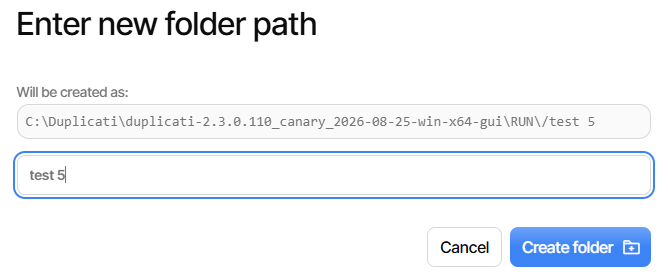
connection-strings POST "BaseUrl":"file:///C%3A%5CDuplicati%5Cduplicati-2.3.0.110_canary_2026-08-25-win-x64-gui%5CRUN%5Ctest%205%5C"

backups POST "TargetURL":"file:///C%3A%5CDuplicati%5Cduplicati-2.3.0.110_canary_2026-08-25-win-x64-gui%5CRUN%5Ctest%205%5C"

There’s sometimes a second excess leading slash, except I can’t repro it:

A forward slash springs in when I type the letter “t” to begin my subfolder.
I’m not sure why it didn’t go to the server, but I get this in another backup:

image

That’s a display, not a new typing.

EDIT 1:

Below is how it turned out, and I’m showing one of the five new Alert errors
which might be from filesystem requests’ 500 Internal Server Error

image

EDIT 2:

I can’t say exactly what actions led to what, but profiling log has these errors:

2026-09-02 15:35:55 -04 - [Error-Duplicati.WebserverCore.DuplicatiWebserver-UnhandledException]: Unhandled exception in webserver request to /api/v1/filesystem
System.Exception: Failed to process the path: The filename, directory name, or volume label syntax is incorrect. : '\\?\C:\Duplicati\duplicati-2.3.0.110_canary_2026-08-25-win-x64-gui\RUN\\'.
 ---> System.IO.IOException: The filename, directory name, or volume label syntax is incorrect. : '\\?\C:\Duplicati\duplicati-2.3.0.110_canary_2026-08-25-win-x64-gui\RUN\\'.

2026-09-02 15:35:55 -04 - [Error-Duplicati.WebserverCore.DuplicatiWebserver-UnhandledException]: Unhandled exception in webserver request to /api/v1/filesystem
System.Exception: Failed to process the path: The filename, directory name, or volume label syntax is incorrect. : '\\?\C:\Duplicati\duplicati-2.3.0.110_canary_2026-08-25-win-x64-gui\RUN\\test 3\\'.
 ---> System.IO.IOException: The filename, directory name, or volume label syntax is incorrect. : '\\?\C:\Duplicati\duplicati-2.3.0.110_canary_2026-08-25-win-x64-gui\RUN\\test 3\\'.

2026-09-02 16:04:43 -04 - [Error-Duplicati.WebserverCore.DuplicatiWebserver-UnhandledException]: Unhandled exception in webserver request to /api/v1/filesystem
System.Exception: Failed to process the path: The filename, directory name, or volume label syntax is incorrect. : '\\?\C:\Duplicati\duplicati-2.3.0.110_canary_2026-08-25-win-x64-gui\RUN\\test 3\\'.
 ---> System.IO.IOException: The filename, directory name, or volume label syntax is incorrect. : '\\?\C:\Duplicati\duplicati-2.3.0.110_canary_2026-08-25-win-x64-gui\RUN\\test 3\\'.

2026-09-02 16:04:43 -04 - [Error-Duplicati.WebserverCore.DuplicatiWebserver-UnhandledException]: Unhandled exception in webserver request to /api/v1/filesystem
System.Exception: Failed to process the path: The filename, directory name, or volume label syntax is incorrect. : '\\?\C:\Duplicati\duplicati-2.3.0.110_canary_2026-08-25-win-x64-gui\RUN\\'.
 ---> System.IO.IOException: The filename, directory name, or volume label syntax is incorrect. : '\\?\C:\Duplicati\duplicati-2.3.0.110_canary_2026-08-25-win-x64-gui\RUN\\'.

2026-09-02 16:05:09 -04 - [Error-Duplicati.WebserverCore.DuplicatiWebserver-UnhandledException]: Unhandled exception in webserver request to /api/v1/filesystem
System.Exception: Failed to process the path: The filename, directory name, or volume label syntax is incorrect. : '\\?\C:\Duplicati\duplicati-2.3.0.110_canary_2026-08-25-win-x64-gui\RUN\\'.
 ---> System.IO.IOException: The filename, directory name, or volume label syntax is incorrect. : '\\?\C:\Duplicati\duplicati-2.3.0.110_canary_2026-08-25-win-x64-gui\RUN\\'.

2026-09-02 16:05:09 -04 - [Error-Duplicati.WebserverCore.DuplicatiWebserver-UnhandledException]: Unhandled exception in webserver request to /api/v1/filesystem
System.Exception: Failed to process the path: The filename, directory name, or volume label syntax is incorrect. : '\\?\C:\Duplicati\duplicati-2.3.0.110_canary_2026-08-25-win-x64-gui\RUN\\test 3\\'.
 ---> System.IO.IOException: The filename, directory name, or volume label syntax is incorrect. : '\\?\C:\Duplicati\duplicati-2.3.0.110_canary_2026-08-25-win-x64-gui\RUN\\test 3\\'.

Looks like even WMIC is problematic, this is the second time this week:

DeletedFiles: 29
DeletedFolders: 0
ModifiedFiles: 40
ExaminedFiles: 45817
OpenedFiles: 50
AddedFiles: 10
SizeOfModifiedFiles: 4456425
SizeOfAddedFiles: 4420376963
SizeOfExaminedFiles: 84920140737
SizeOfOpenedFiles: 4424834731
NotProcessedFiles: 0
AddedFolders: 0
TooLargeFiles: 0
FilesWithError: 0
TimestampChangedFiles: 0
ModifiedFolders: 1
ModifiedSymlinks: 0
AddedSymlinks: 0
DeletedSymlinks: 0
PartialBackup: False
Dryrun: False
MainOperation: Backup
RemoteSynchronizationResults: []
ParsedResult: Error
Interrupted: False
Fatal: False
Version: 2.3.0.110 (2.3.0.110_canary_2026-08-25)
EndTime: 04/09/2026 17:02:57 (1788534177)
BeginTime: 04/09/2026 17:00:50 (1788534050)
Duration: 00:02:06.2786944
MessagesActualLength: 205
WarningsActualLength: 5
ErrorsActualLength: 2
LimitedMessages: [
    2026-09-04 17:00:51 +02 - [Information-Duplicati.Library.Main.Controller-StartingOperation]: The operation Backup has started,
    2026-09-04 17:00:59 +02 - [Information-Duplicati.Library.Main.BasicResults-BackendEvent]: Backend event: List - Started:  (),
    2026-09-04 17:01:00 +02 - [Information-Duplicati.Library.Main.BasicResults-BackendEvent]: Backend event: List - Completed:  (5.636 KiB),
    2026-09-04 17:01:12 +02 - [Information-Duplicati.Library.Main.Operation.BackupHandler-SkipUsnForVolume]: Performing full scan for volume "-redacted-": Next USN is zero,
    2026-09-04 17:01:19 +02 - [Information-Duplicati.Library.Main.BasicResults-BackendEvent]: Backend event: Put - Started: duplicati-b91e2109b3ea44ea18c8755f4bc693ad4.dblock.zip.aes (100.028 MiB),
    2026-09-04 17:01:19 +02 - [Information-Duplicati.Library.Main.BasicResults-BackendEvent]: Backend event: Put - Started: duplicati-b206e267bd29246bb9be931ef7ea97dc4.dblock.zip.aes (100.031 MiB),
    2026-09-04 17:01:19 +02 - [Information-Duplicati.Library.Main.BasicResults-BackendEvent]: Backend event: Put - Started: duplicati-be5b176c8fa2642f3a2ea636109882251.dblock.zip.aes (100.066 MiB),
    2026-09-04 17:01:19 +02 - [Information-Duplicati.Library.Main.BasicResults-BackendEvent]: Backend event: Put - Started: duplicati-bf4d00a5b4c1648bb92a4f1bf21689571.dblock.zip.aes (100.060 MiB),
    2026-09-04 17:01:24 +02 - [Information-Duplicati.Library.Main.BasicResults-BackendEvent]: Backend event: Put - Completed: duplicati-b206e267bd29246bb9be931ef7ea97dc4.dblock.zip.aes (100.031 MiB),
    2026-09-04 17:01:24 +02 - [Information-Duplicati.Library.Main.BasicResults-BackendEvent]: Backend event: Put - Started: duplicati-i734fbecce1ea47e78d74573dc68ceb6e.dindex.zip.aes (37.013 KiB),
...
]
LimitedWarnings: [
    2026-09-04 17:01:12 +02 - [Warning-Duplicati.Library.Main.Operation.Common.SourceProviderFactory-SnapshotFailed]: Failed to create a snapshot. The process appears to have the necessary permissions, but the snapshot failed anyway. Error message: Failed to create shadow copy
InvalidOperationException: Failed to create shadow copy,
    2026-09-04 17:01:12 +02 - [Warning-Duplicati.Library.Main.Operation.Backup.FileBlockProcessor.FileEntry-FileLocked]: Excluding path due to file locked: -redacted-,
    2026-09-04 17:01:12 +02 - [Warning-Duplicati.Library.Main.Operation.Backup.FileBlockProcessor.FileEntry-FileLocked]: Excluding path due to file locked: -redacted-,
    2026-09-04 17:01:12 +02 - [Warning-Duplicati.Library.Main.Operation.Backup.FileBlockProcessor.FileEntry-FileLocked]: Excluding path due to file locked: -redacted-,
    2026-09-04 17:01:12 +02 - [Warning-Duplicati.Library.Main.Operation.Backup.FileBlockProcessor.FileEntry-FileLocked]: Excluding path due to file locked: -redacted-
]
LimitedErrors: [
    2026-09-04 17:01:11 +02 - [Error-Duplicati.Library.WindowsModules.WmicShadowCopyManager-ShadowCopyFailed]: Failed to execute command: wmic shadowcopy call create Volume='-redacted-'
TimeoutException: Command 'wmic shadowcopy call create Volume='-redacted-'' timed out after 10000ms.,
    2026-09-04 17:01:11 +02 - [Error-Duplicati.Library.WindowsModules.WmicShadowCopyManager-ShadowCopyFailed]: Failed to create shadow copy for -redacted-: 
]
Log data:
2026-09-04 17:01:11 +02 - [Error-Duplicati.Library.WindowsModules.WmicShadowCopyManager-ShadowCopyFailed]: Failed to execute command: wmic shadowcopy call create Volume='-redacted-'
System.TimeoutException: Command 'wmic shadowcopy call create Volume='-redacted-'' timed out after 10000ms.
   at Duplicati.Library.WindowsModules.WmicShadowCopyManager.ExecuteCommand(String fileName, String arguments, Int32 timeoutMs)
2026-09-04 17:01:11 +02 - [Error-Duplicati.Library.WindowsModules.WmicShadowCopyManager-ShadowCopyFailed]: Failed to create shadow copy for -redacted-: 
2026-09-04 17:01:12 +02 - [Warning-Duplicati.Library.Main.Operation.Common.SourceProviderFactory-SnapshotFailed]: Failed to create a snapshot. The process appears to have the necessary permissions, but the snapshot failed anyway. Error message: Failed to create shadow copy
System.InvalidOperationException: Failed to create shadow copy
   at Duplicati.Library.WindowsModules.WmicShadowCopyManager.Add(String drive)
   at Duplicati.Library.WindowsModules.WmicVssBackup.AddToSnapshotSet(String drive)
   at Duplicati.Library.Snapshots.Windows.SnapshotManager.CheckAndAddSupportedVolumes(IEnumerable`1 sources)
   at Duplicati.Library.Snapshots.Windows.SnapshotManager.InitShadowVolumes(IEnumerable`1 sources)
   at Duplicati.Library.Snapshots.WindowsSnapshot..ctor(IEnumerable`1 sources, IDictionary`2 options, Boolean followSymlinks)
   at Duplicati.Library.Snapshots.SnapshotUtility.CreateWindowsSnapshot(IEnumerable`1 folders, Dictionary`2 options, Boolean followSymlinks)
   at Duplicati.Library.Snapshots.SnapshotUtility.CreateSnapshot(IEnumerable`1 paths, Dictionary`2 options, Boolean followSymlinks)
   at Duplicati.Library.Main.Operation.Common.SourceProviderFactory.GetFileSnapshotService(IEnumerable`1 sources, Options options)
2026-09-04 17:01:12 +02 - [Warning-Duplicati.Library.Main.Operation.Backup.FileBlockProcessor.FileEntry-FileLocked]: Excluding path due to file locked: -redacted-