This release is a canary release intended to be used for testing.
Sync copy mode
This release adds a often requested feature that enables simple copying of files from source to destination.
Where the regular backups are deduplicated, compressed, encrypted and versioned, the new sync mode will instead simply copy from source to destination.
The copy is currently a one-way sync, where the source is replicated on the destination. Files can be deleted on the destination during sync (use --sync-then-delete), but destination folders will not be deleted.
The option --sync-remote-state is by default be set to UseRemoteState which will list the destination and figure out what to upload. The setting UseLocalState uses a local database, similar to how backups work, to keep track of known remote files, and reduce the amount of remote listings done. Finally, the BlindlyUpload setting will just copy everything as-is to the remote.
The sync jobs support remote sources, snapshots, and multiple destinations. If snapshots are enabled, the copy is done from the snapshot, ensuring reliable reads.
Configuration of such a sync job is done the same way as with backup, but using a toggle option in the first step of the UI. Note that backup and sync jobs are not compatible as they use very different storage logic, so it is not possible to change the job mode after creating a job.
CLI mode also supports sync.
Multi version restore
A new option, --restore-all-files can be used to restore files matching a filter from multiple versions. This can be used to select specific versions and then restore a set of files in all versions. This option does not currently have a UI component.
Detailed list of changes
Fix MacOS Photos memory usage.
Fix Agent startup race condition.
Warn when VCRedist is missing on VSS failure.
Update localizations.
Fix incorrect help text for remote locks.
Added a restore callback module.
Added support for restoring files across multiple versions.
Added a sync command to the Controller and CLI.
Prevent creating a useless encryption key on startup.
Added an option to control OCSP/CRL failure handling.
Improved the secret provider loader and license checker.
Still cannot delete+recreate a database for one of my Windows server
  "Messages": [
    "2026-07-04 10:28:05 +02 - [Information-Duplicati.Library.Main.Controller-StartingOperation]: The operation Repair has started",
    "2026-07-04 10:28:05 +02 - [Information-Duplicati.Library.Main.BasicResults-BackendEvent]: Backend event: List - Started:  ()",
    "2026-07-04 10:28:05 +02 - [Information-Duplicati.Library.Main.BasicResults-BackendEvent]: Backend event: List - Completed:  (3.500 KiB)",
    "2026-07-04 10:28:06 +02 - [Information-Duplicati.Library.Main.Operation.RecreateDatabaseHandler-RebuildStarted]: Rebuild database started, downloading 32 filelists",
    "2026-07-04 10:28:06 +02 - [Information-Duplicati.Library.Main.BasicResults-BackendEvent]: Backend event: Get - Started: duplicati-20240614T040021Z.dlist.zip.aes (3.520 MiB)",
    "2026-07-04 10:28:06 +02 - [Information-Duplicati.Library.Main.BasicResults-BackendEvent]: Backend event: Get - Completed: duplicati-20240614T040021Z.dlist.zip.aes (3.520 MiB)",
    "2026-07-04 10:28:06 +02 - [Information-Duplicati.Library.Main.BasicResults-BackendEvent]: Backend event: Get - Started: duplicati-20240717T040010Z.dlist.zip.aes (3.723 MiB)",
    "2026-07-04 10:28:06 +02 - [Information-Duplicati.Library.Compression.ZipCompression.FileArchiveZip-CompressionReadErrorFallback]: Failed to open file with built-in ZIP archive, falling back to SharpCompress\r\nInvalidDataException: The archive entry was compressed using LZMA and is not supported.",
    "2026-07-04 10:28:06 +02 - [Information-Duplicati.Library.Main.BasicResults-BackendEvent]: Backend event: Get - Completed: duplicati-20240717T040010Z.dlist.zip.aes (3.723 MiB)",
    "2026-07-04 10:28:10 +02 - [Information-Duplicati.Library.Main.BasicResults-BackendEvent]: Backend event: Get - Started: duplicati-20240818T040007Z.dlist.zip.aes (3.350 MiB)",
    "2026-07-04 10:28:10 +02 - [Information-Duplicati.Library.Compression.ZipCompression.FileArchiveZip-CompressionReadErrorFallback]: Failed to open file with built-in ZIP archive, falling back to SharpCompress\r\nInvalidDataException: The archive entry was compressed using LZMA and is not supported.",
    "2026-07-04 10:28:10 +02 - [Information-Duplicati.Library.Main.BasicResults-BackendEvent]: Backend event: Get - Completed: duplicati-20240818T040007Z.dlist.zip.aes (3.350 MiB)",
    "2026-07-04 10:28:13 +02 - [Information-Duplicati.Library.Main.BasicResults-BackendEvent]: Backend event: Get - Started: duplicati-20240924T120341Z.dlist.zip.aes (3.496 MiB)",
    "2026-07-04 10:28:13 +02 - [Information-Duplicati.Library.Compression.ZipCompression.FileArchiveZip-CompressionReadErrorFallback]: Failed to open file with built-in ZIP archive, falling back to SharpCompress\r\nInvalidDataException: The archive entry was compressed using LZMA and is not supported.",
    "2026-07-04 10:28:13 +02 - [Information-Duplicati.Library.Main.BasicResults-BackendEvent]: Backend event: Get - Completed: duplicati-20240924T120341Z.dlist.zip.aes (3.496 MiB)",
    "2026-07-04 10:28:16 +02 - [Information-Duplicati.Library.Main.BasicResults-BackendEvent]: Backend event: Get - Started: duplicati-20241101T050001Z.dlist.zip.aes (3.111 MiB)",
    "2026-07-04 10:28:16 +02 - [Information-Duplicati.Library.Compression.ZipCompression.FileArchiveZip-CompressionReadErrorFallback]: Failed to open file with built-in ZIP archive, falling back to SharpCompress\r\nInvalidDataException: The archive entry was compressed using LZMA and is not supported.",
    "2026-07-04 10:28:16 +02 - [Information-Duplicati.Library.Main.BasicResults-BackendEvent]: Backend event: Get - Completed: duplicati-20241101T050001Z.dlist.zip.aes (3.111 MiB)",
    "2026-07-04 10:28:19 +02 - [Information-Duplicati.Library.Main.BasicResults-BackendEvent]: Backend event: Get - Started: duplicati-20241208T020001Z.dlist.zip.aes (4.048 MiB)",
    "2026-07-04 10:28:19 +02 - [Information-Duplicati.Library.Main.BasicResults-BackendEvent]: Backend event: Get - Completed: duplicati-20241208T020001Z.dlist.zip.aes (4.048 MiB)"
  ],
  "Warnings": [
    "2026-07-04 10:30:29 +02 - [Warning-Duplicati.Library.Main.Operation.RecreateDatabaseHandler-MissingFileDetected]: Remote file referenced as duplicati-b64453779588246e39e271e650b085228.dblock.zip.aes by duplicati-i836147d0459948d4a5d7663528f26aab.dindex.zip.aes, but not found in list, registering a missing remote file",
    "2026-07-04 10:31:07 +02 - [Warning-Duplicati.Library.Main.Operation.RecreateDatabaseHandler-MissingFileDetected]: Remote file referenced as duplicati-bf8a849d0b03543a683c0eed123f95a0b.dblock.zip.aes by duplicati-ic6525ccb791744ec9078123e24f4896f.dindex.zip.aes, but not found in list, registering a missing remote file",
    "2026-07-04 10:31:42 +02 - [Warning-Duplicati.Library.Main.Database.Local.LocalRecreateDatabase-MissingVolumesDetected]: Replaced blocks for 2 missing volumes; there are now 2 missing volumes",
    "2026-07-04 10:32:30 +02 - [Warning-Duplicati.Library.Main.Database.Local.LocalRecreateDatabase-MissingVolumesDetected]: Replaced blocks for 2 missing volumes; there are now 0 missing volumes"
  ],
  "Errors": [
    "2026-07-04 10:32:56 +02 - [Error-Duplicati.Library.Main.Controller-FailedOperation]: The operation Repair has failed\r\nUserInformationException: Some zero-length metadata entries could not be repaired."
Not sure if this is the best place to report this, but in this version I can’t search for advanced options: there’s a search field, and it has focus, but typing does nothing.
2.3.0.106_canary_2026-07-03, macOS 26.5.2, using Safari 26.5.2 in ngclient.
This means that Duplicati was unable to make a fix for the missing metadata.
You can run with ---disable-replace-missing-metadata=true.
This will cause Duplicati to instead remove the entries that it could not repair.
So I went into job’s Database menu, and deleted it, then in the Command menu I ran a repair adding the parameter you mentioned, without the extra “-” but it still fails:
starting
 Listing remote folder ...
   Downloading file duplicati-20240614T040021Z.dlist.zip.aes (3.520 MiB) ...
   Downloading file duplicati-20240717T040010Z.dlist.zip.aes (3.723 MiB) ...
 Failed to open file with built-in ZIP archive, falling back to SharpCompress => The archive entry was compressed using LZMA and is not supported.
   Downloading file duplicati-20240818T040007Z.dlist.zip.aes (3.350 MiB) ...
 Failed to open file with built-in ZIP archive, falling back to SharpCompress => The archive entry was compressed using LZMA and is not supported.
   Downloading file duplicati-20240924T120341Z.dlist.zip.aes (3.496 MiB) ...
 Failed to open file with built-in ZIP archive, falling back to SharpCompress => The archive entry was compressed using LZMA and is not supported.
   Downloading file duplicati-20241101T050001Z.dlist.zip.aes (3.111 MiB) ...
 Failed to open file with built-in ZIP archive, falling back to SharpCompress => The archive entry was compressed using LZMA and is not supported.
   Downloading file duplicati-20241208T020001Z.dlist.zip.aes (4.048 MiB) ...
ending
   Downloading file duplicati-iff89540bc11b419f8edacf0a7e7a647f.dindex.zip.aes (126.575 KiB) ...
   Downloading file duplicati-iffa5b3e307b74252b0844fd0e7ece7df.dindex.zip.aes (97.997 KiB) ...
 Replaced blocks for 2 missing volumes; there are now 2 missing volumes
 Replaced blocks for 2 missing volumes; there are now 0 missing volumes
 The operation Repair has failed => Some zero-length metadata entries could not be repaired.


 ErrorID: MetadataRepairFailed
 Some zero-length metadata entries could not be repaired.
 Return code: 100
I couldn’t find this logged anywhere on the server, nor could I get back the command it ran in case I had entered it incorrectly.
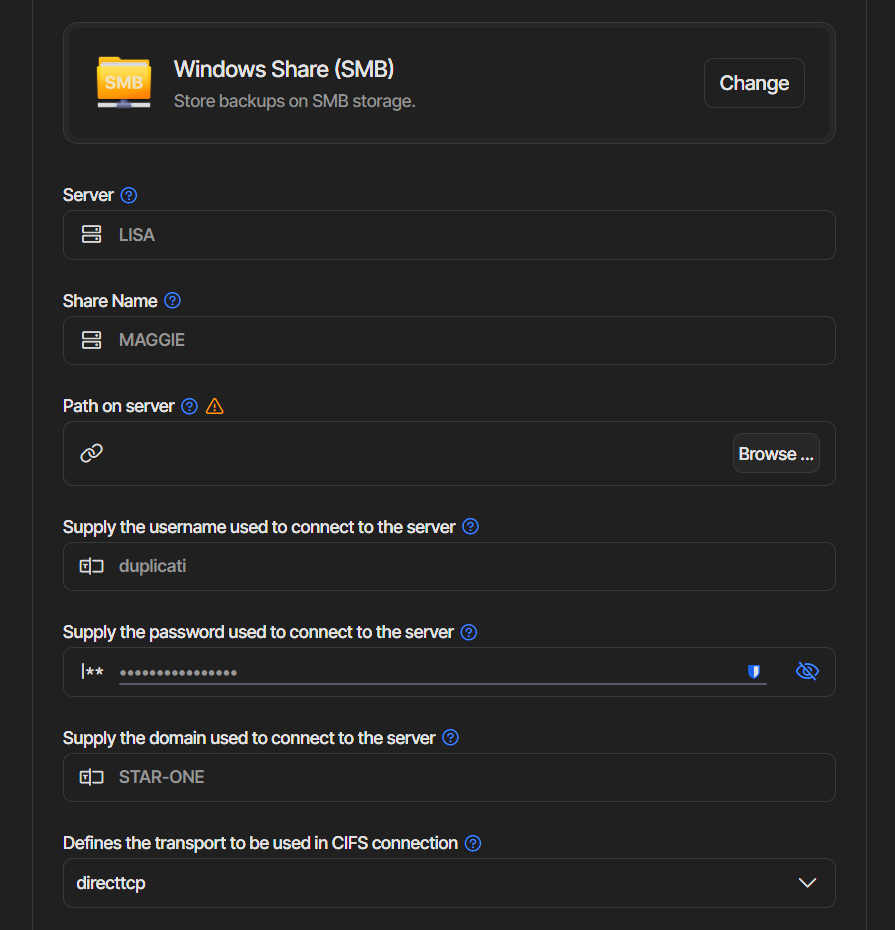
I think I found the problem and it’s not on my SMB server’s side - the password has a $ symbol, so when I try a mount command on any of my Linux machines, but don’t put the password in single-quotes, it fails, when I place quotes around it, then it’s fine. Now why this has suddenly happened is beyond me as all my machines were all fine before until this latest build.
I tried to add the quotes in the UI but that doesn’t help - the account is used in many jobs so changing it just to pander to Linux’s behaviour with special characters will take me forever. I have a note to someday use the new credential storage so maybe in the future I’ll have time to look at it and save myself the headache in case it happens again.
That could make sense if the default credential provider somehow kicks in.
If the password looks like: mypass$abc then the secret provider will pick up $abc and try to resolve abc. But since that key is (most likely) not found, the whole backup should fail.
Could you try to enter the real password on the connection page before pressing “Test” and see if that works? It really should work, and if not I have to dig and see where this goes wrong.
Edit: but a wrong password is not consistent with error code. It should be access denied if the password is wrong.
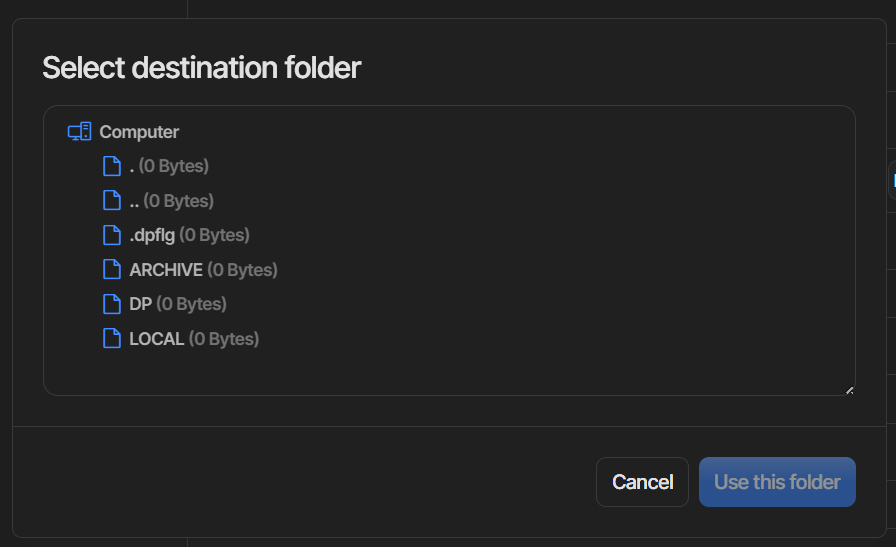
Under DUPLICATI should be two sub folders, and I tried both directtcp and netbios
I then went on a working Windows server to try the same but it also failed - when I checked its job it’s still using Local Filesystem for the destination and specifies a file:// URL that includes the path+credentials, which explains why the Windows machines all still work.
FYI, things got weirder - I did some checks using my Linux tablet and was able to get it to replicate the issue. I fixed that by running a CHKDSK of the server drive and after that the folders/files were visible - this makes no sense as from Windows machines there was no problem. I was then able to run the backups now, so that’s sorted.
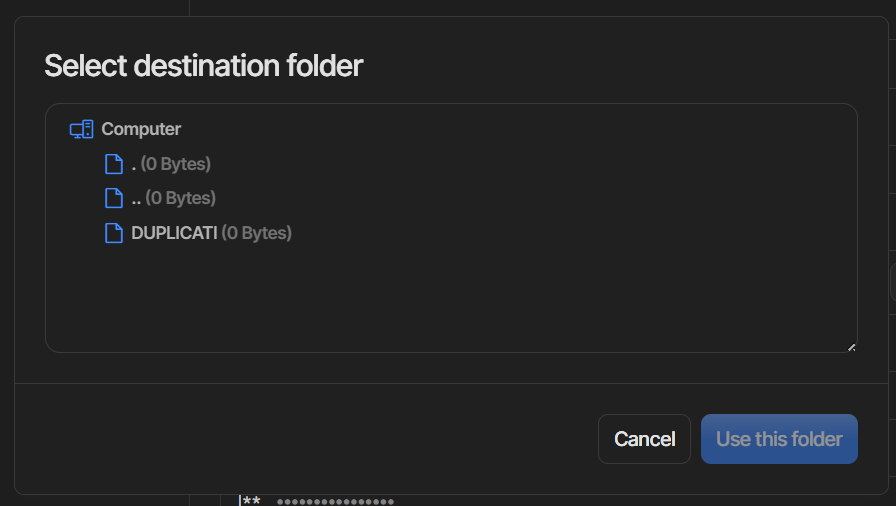
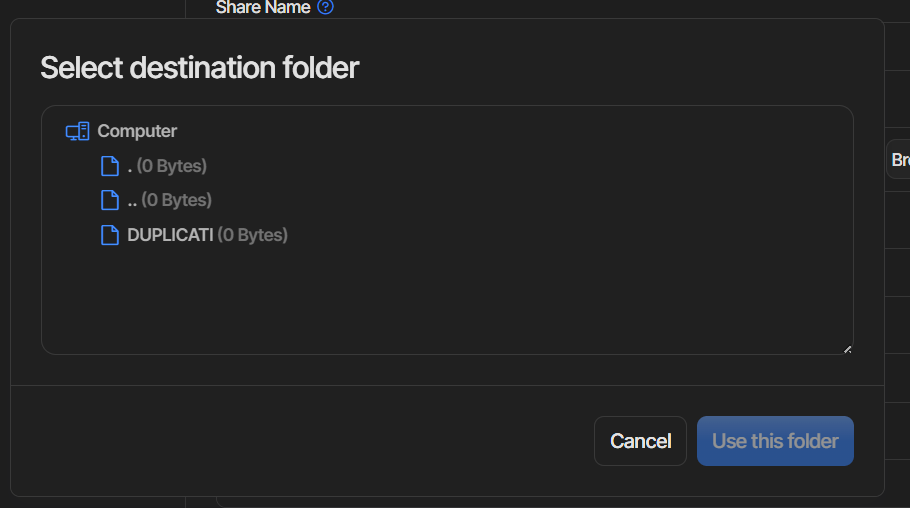
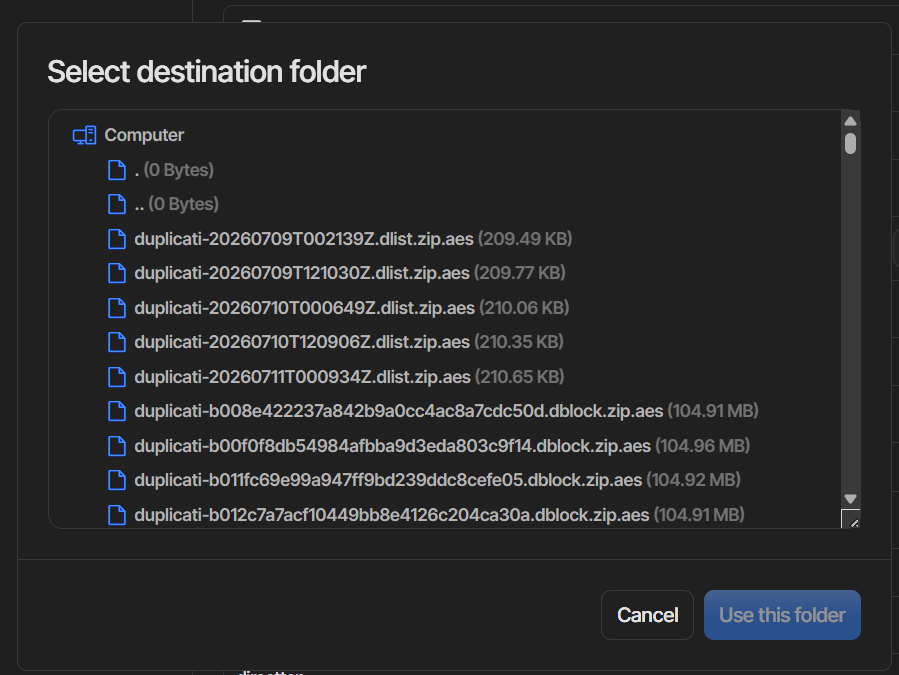
However, in trying to switch my Windows server from the file:// to a stored destination I found another problem - I cannot browse folders, they always show as 0 Bytes yet if I specify the subfolder and then browse it works.
No path, cannot click on DUPLICATI, nothing happens:
 but it still fails: