This release is a canary release intended to be used for testing.
Improved Windows installer
This change brings a major update to the Windows installers, which now integrates the ability to run as a service, as well as generate and use TLS (https). The service feature has been present for a while in the WindowsService.exe tool and the TLS certificates were added as part of the Duplicati.CommandLine.ConfigureTool.exe. With this update these things are now integrated into the installer, and exposed as simple checkboxes to toggle the features. Installing the service from a regular user account, will also auto-generate a secure password and configure the TrayIcon to connect to the service (only for the current user).
If you have installed the service manually, do not activate the new checkbox as it only works if there is no pre-existing service.
NTFS full-disk backup
This release extends the full disk backup feature to include NTFS support on Windows. With this support it is more efficient to make backups of NTFS formatted disks. To enable this feature, add the advanced option --diskimage-filesystem-parsed=true and the backups will attempt to parse the disk, and if it is one of the supported formats, it will only read the relevant sectors.
New Auto-Tune tool
This release also introduces a new AutoTune tool (Duplicati.CommandLine.AutoTuneTool / duplicati-autotune), designed to help evaluate and optimize performance-related settings automatically based on the system.
Read-only testing of backends
Backends now support read-only context-aware testing, which allows testing connections safely without risking unintended changes to the storage. The read-only testing is applied when testing a restore destination or a remote source, such that no files are attempted written to the remote storage.
New welcome page and start
The UI will now show a welcome page showing how to connect to the console with an option to continue without.
This can be suppressed with the option --webservice-suppress-welcome-page=true or environment variable DUPLICATI__SUPPRESS_WELCOME_PAGE=true.
If the connection is made from the TrayIcon, the initial dialog asking to set a password is no longer shown, as the intention is to use the TrayIcon to connect.
It is still possible to change the password from the Settings page if needed.
Detailed list of changes
Added handling for extended Win32 file attributes and option to ignore non-local files, such as OneDrive and Dropbox files
Fixed showing correct S3 lock mode values
Added full disk NTFS support
Added AutoTune tool
Added read-only testing to backends, thanks @realtek2017
Made FS parsing experimental
Fixed remote file locking on Windows
Fixed SMB source listing misclassifying directories as files, thanks @realtek2017
Improved MSI installer package for Service
Simplified console handling
Cleaned up state after registering
Removed explicit defaults in backup config
Hardened MSI installer
Changes in ngclient
Added toggle to show advanced option names instead of descriptions
Added confirmation popup before exporting configuration without encryption
Now showing remote lock results on log page
Toggling read-only testing of backends based on context
Fixed websocket not connecting on welcome page
Added a welcome page for simpler console connections
Removed attributes filter options on source page, in favor of using advanced options
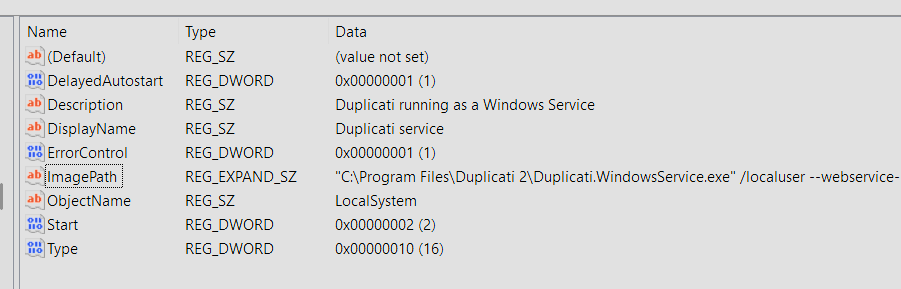
Having issues with the new installer when used from the command line by my software deployment service. It installed cleanly but the service that was already set up will not start. This is what it was and always was for a very long time:
It complains that Duplicati.WindowsService.exe does not exist, which seems to be the case.
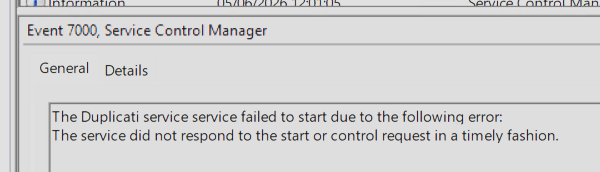
So I tried renaming it to just Duplicati.Service.exe and the service starts but gets stuck as starting then stops after a few minutes. During that time the web UI is available and looks working as I could see the new welcome window in the browser. So the executables are still running but are not controllable with the service manager so I can only kill the processes to stop it now.
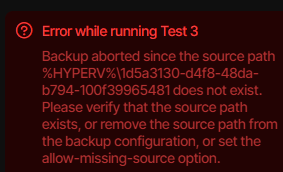
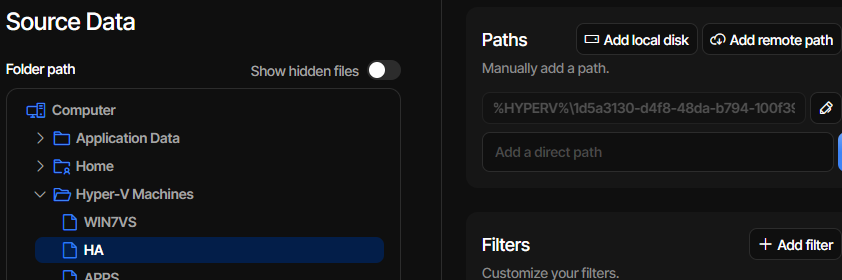
I’ve tested this release for the Hyper-V guest issue I’ve started experiencing since .103, still getting the same error. I’ve created a new test backup job in .104 as well as an existing job that worked in .102, both give the same error.
That sounds really strange, as Duplicati.WindowsService.exe is used for various things in the installer (if you enable the service there). I also tested many times with install/update scenarios, and I never experienced this.
Can you try an uninstall+install cycle to see if you get Duplicati.WindowsService.exe back?
Yes, that makes sense. The Duplicati.Service is just a generic runner, and it does not have the control interface that is needed to make it into a service. It can start, but it never signals Windows that it is running, so it won’t work.
We have not modified the Hyper-V code for this release, so not sure what is causing it.
Does it work if you downgrade to .102 ?
The error itself indicates that Duplicati tries to get the path to the VMs virtual disk, but gets a non-existing path back.
Hi, I posted this issue on the .103 release thread as well when that version was released. Same problem on .103 and .104. Downgrading to .102 the backup is sucessfull.
I first tried just to install over it but it was still the same, then I tried a repair, still the same and finally uninstall and reinstall but the file does not come back.
This is the original MSI log file and I can see the file is mentioned, it just isn’t getting placed on the server: 178501_Duplicati v2.3.zip (335.1 KB)
Struggling to get a Fedora 43 server where I upgraded to this version, but was doing the same with .103 - the backup takes forever to start, then never finishes getting the files and all the time there is zero logging in About, Logs, Live no matter what level. Not sure how I can troubleshoot this if nothing is being logged.
*** Update ***
Eventually after a while this appeared
# Exception
System.AggregateException: A Task's exception(s) were not observed either by Waiting on the Task or accessing its Exception property. As a result, the unobserved exception was rethrown by the finalizer thread. (The CancellationTokenSource has been disposed.)
 ---> System.ObjectDisposedException: The CancellationTokenSource has been disposed.
   at Duplicati.Server.Runner.<>c__DisplayClass16_2.<<RunInternalAsync>b__3>d.MoveNext()
   --- End of inner exception stack trace ---
# Message
A Task's exception(s) were not observed either by Waiting on the Task or accessing its Exception property. As a result, the unobserved exception was rethrown by the finalizer thread. (The CancellationTokenSource has been disposed.)
I think I worked out the issue - with .103 I had enabled the “Backup process isolation” but I thought I had disabled it when I thought better and give it a miss. So basically this is not working at all.
I’m currently rebuilding the job’s database as I tried that and it wasn’t even getting anywhere so I aborted it before disabling the experimental option. Now it’s running and I can also see the logging again.
2026-06-10 15:01:56 +02 - [Error-Duplicati.Library.Main.Controller-FailedOperation]: The operation Repair has failed
CryptographicException: Failed to read 5 bytes, likely not an encrypted archive
Thanks for bringing it up again, it was a larger bug but I found it, and it will be fixed in the next canary. It does not affect stable, because the isolated process runner change that caused it is not in stable yet.
Thanks for confirming. I found the issue, and it happens if you do not install the service (self-managed service). Since the installer now integrates the service management, this apparently has the side-effect that not installing the service will omit the executable. I have fixed it, and it will be in the next canary.
Is “this” the “Backup process isolation” that is not working at all?
That means that the file size is less than 5 bytes. Can you identify a file that is 1-4 bytes? Maybe we can get closer to what is causing it if we know what kind of file it is.
So I extracted all the files from the release zip and was able to get things going while waiting for the next release. When I tried to run the main backup job it complained about some backup file inconsistencies and that I should run a repair. That didn’t fix it so I tried a delete and repair:
{
  "MainOperation": "Repair",
  "RecreateDatabaseResults": {
    "MainOperation": "Repair",
    "ParsedResult": "Success",
    "Interrupted": false,
    "Version": "2.3.0.104 (2.3.0.104_canary_2026-06-04)",
    "EndTime": "2026-06-18T09:44:49.8709894Z",
    "BeginTime": "2026-06-18T09:40:23.6309346Z",
    "Duration": "00:04:26.2400548",
    "MessagesActualLength": 0,
    "WarningsActualLength": 0,
    "ErrorsActualLength": 0,
    "Messages": null,
    "Warnings": null,
    "Errors": null,
    "BackendStatistics": {
      "RemoteCalls": 1792,
      "BytesUploaded": 0,
      "BytesDownloaded": 307676611,
      "FilesUploaded": 0,
      "FilesDownloaded": 1791,
      "FilesDeleted": 0,
      "FoldersCreated": 0,
      "RetryAttempts": 0,
      "UnknownFileSize": 0,
      "UnknownFileCount": 0,
      "KnownFileCount": 0,
      "KnownFileSize": 0,
      "KnownFilesets": 0,
      "LastBackupDate": "0001-01-01T00:00:00",
      "BackupListCount": 0,
      "TotalQuotaSpace": 0,
      "FreeQuotaSpace": 0,
      "AssignedQuotaSpace": 0,
      "ReportedQuotaError": false,
      "ReportedQuotaWarning": false,
      "MainOperation": "Repair",
      "ParsedResult": "Success",
      "Interrupted": false,
      "Version": "2.3.0.104 (2.3.0.104_canary_2026-06-04)",
      "EndTime": "0001-01-01T00:00:00",
      "BeginTime": "2026-06-18T09:40:23.4398708Z",
      "Duration": "00:00:00",
      "MessagesActualLength": 0,
      "WarningsActualLength": 0,
      "ErrorsActualLength": 0,
      "Messages": null,
      "Warnings": null,
      "Errors": null
    }
  },
  "ParsedResult": "Fatal",
  "Interrupted": false,
  "Version": "2.3.0.104 (2.3.0.104_canary_2026-06-04)",
  "EndTime": "2026-06-18T09:45:00.0397175Z",
  "BeginTime": "2026-06-18T09:40:23.4398632Z",
  "Duration": "00:04:36.5998543",
  "MessagesActualLength": 3725,
  "WarningsActualLength": 4,
  "ErrorsActualLength": 1,
  "Messages": [
    "2026-06-18 11:40:23 +02 - [Information-Duplicati.Library.Main.Controller-StartingOperation]: The operation Repair has started",
    "2026-06-18 11:40:23 +02 - [Information-Duplicati.Library.Main.BasicResults-BackendEvent]: Backend event: List - Started:  ()",
    "2026-06-18 11:40:24 +02 - [Information-Duplicati.Library.Main.BasicResults-BackendEvent]: Backend event: List - Completed:  (3.466 KiB)",
    "2026-06-18 11:40:24 +02 - [Information-Duplicati.Library.Main.Operation.RecreateDatabaseHandler-RebuildStarted]: Rebuild database started, downloading 32 filelists",
    "2026-06-18 11:40:24 +02 - [Information-Duplicati.Library.Main.BasicResults-BackendEvent]: Backend event: Get - Started: duplicati-20240614T040021Z.dlist.zip.aes (3.520 MiB)",
    "2026-06-18 11:40:24 +02 - [Information-Duplicati.Library.Main.BasicResults-BackendEvent]: Backend event: Get - Completed: duplicati-20240614T040021Z.dlist.zip.aes (3.520 MiB)",
    "2026-06-18 11:40:24 +02 - [Information-Duplicati.Library.Main.BasicResults-BackendEvent]: Backend event: Get - Started: duplicati-20240717T040010Z.dlist.zip.aes (3.723 MiB)",
    "2026-06-18 11:40:24 +02 - [Information-Duplicati.Library.Compression.ZipCompression.FileArchiveZip-CompressionReadErrorFallback]: Failed to open file with built-in ZIP archive, falling back to SharpCompress\r\nInvalidDataException: The archive entry was compressed using LZMA and is not supported.",
    "2026-06-18 11:40:24 +02 - [Information-Duplicati.Library.Main.BasicResults-BackendEvent]: Backend event: Get - Completed: duplicati-20240717T040010Z.dlist.zip.aes (3.723 MiB)",
    "2026-06-18 11:40:28 +02 - [Information-Duplicati.Library.Main.BasicResults-BackendEvent]: Backend event: Get - Started: duplicati-20240818T040007Z.dlist.zip.aes (3.350 MiB)",
    "2026-06-18 11:40:28 +02 - [Information-Duplicati.Library.Compression.ZipCompression.FileArchiveZip-CompressionReadErrorFallback]: Failed to open file with built-in ZIP archive, falling back to SharpCompress\r\nInvalidDataException: The archive entry was compressed using LZMA and is not supported.",
    "2026-06-18 11:40:28 +02 - [Information-Duplicati.Library.Main.BasicResults-BackendEvent]: Backend event: Get - Completed: duplicati-20240818T040007Z.dlist.zip.aes (3.350 MiB)",
    "2026-06-18 11:40:31 +02 - [Information-Duplicati.Library.Main.BasicResults-BackendEvent]: Backend event: Get - Started: duplicati-20240924T120341Z.dlist.zip.aes (3.496 MiB)",
    "2026-06-18 11:40:31 +02 - [Information-Duplicati.Library.Compression.ZipCompression.FileArchiveZip-CompressionReadErrorFallback]: Failed to open file with built-in ZIP archive, falling back to SharpCompress\r\nInvalidDataException: The archive entry was compressed using LZMA and is not supported.",
    "2026-06-18 11:40:31 +02 - [Information-Duplicati.Library.Main.BasicResults-BackendEvent]: Backend event: Get - Completed: duplicati-20240924T120341Z.dlist.zip.aes (3.496 MiB)",
    "2026-06-18 11:40:34 +02 - [Information-Duplicati.Library.Main.BasicResults-BackendEvent]: Backend event: Get - Started: duplicati-20241101T050001Z.dlist.zip.aes (3.111 MiB)",
    "2026-06-18 11:40:34 +02 - [Information-Duplicati.Library.Compression.ZipCompression.FileArchiveZip-CompressionReadErrorFallback]: Failed to open file with built-in ZIP archive, falling back to SharpCompress\r\nInvalidDataException: The archive entry was compressed using LZMA and is not supported.",
    "2026-06-18 11:40:34 +02 - [Information-Duplicati.Library.Main.BasicResults-BackendEvent]: Backend event: Get - Completed: duplicati-20241101T050001Z.dlist.zip.aes (3.111 MiB)",
    "2026-06-18 11:40:37 +02 - [Information-Duplicati.Library.Main.BasicResults-BackendEvent]: Backend event: Get - Started: duplicati-20241208T020001Z.dlist.zip.aes (4.048 MiB)",
    "2026-06-18 11:40:37 +02 - [Information-Duplicati.Library.Main.BasicResults-BackendEvent]: Backend event: Get - Completed: duplicati-20241208T020001Z.dlist.zip.aes (4.048 MiB)"
  ],
  "Warnings": [
    "2026-06-18 11:42:43 +02 - [Warning-Duplicati.Library.Main.Operation.RecreateDatabaseHandler-MissingFileDetected]: Remote file referenced as duplicati-b64453779588246e39e271e650b085228.dblock.zip.aes by duplicati-i836147d0459948d4a5d7663528f26aab.dindex.zip.aes, but not found in list, registering a missing remote file",
    "2026-06-18 11:43:18 +02 - [Warning-Duplicati.Library.Main.Operation.RecreateDatabaseHandler-MissingFileDetected]: Remote file referenced as duplicati-bf8a849d0b03543a683c0eed123f95a0b.dblock.zip.aes by duplicati-ic6525ccb791744ec9078123e24f4896f.dindex.zip.aes, but not found in list, registering a missing remote file",
    "2026-06-18 11:43:51 +02 - [Warning-Duplicati.Library.Main.Database.LocalRecreateDatabase-MissingVolumesDetected]: Replaced blocks for 2 missing volumes; there are now 2 missing volumes",
    "2026-06-18 11:44:35 +02 - [Warning-Duplicati.Library.Main.Database.LocalRecreateDatabase-MissingVolumesDetected]: Replaced blocks for 2 missing volumes; there are now 0 missing volumes"
  ],
  "Errors": [
    "2026-06-18 11:45:00 +02 - [Error-Duplicati.Library.Main.Controller-FailedOperation]: The operation Repair has failed\r\nUserInformationException: Some zero-length metadata entries could not be repaired."
  ],
  "BackendStatistics": {
    "RemoteCalls": 1792,
    "BytesUploaded": 0,
    "BytesDownloaded": 307676611,
    "FilesUploaded": 0,
    "FilesDownloaded": 1791,
    "FilesDeleted": 0,
    "FoldersCreated": 0,
    "RetryAttempts": 0,
    "UnknownFileSize": 0,
    "UnknownFileCount": 0,
    "KnownFileCount": 0,
    "KnownFileSize": 0,
    "KnownFilesets": 0,
    "LastBackupDate": "0001-01-01T00:00:00",
    "BackupListCount": 0,
    "TotalQuotaSpace": 0,
    "FreeQuotaSpace": 0,
    "AssignedQuotaSpace": 0,
    "ReportedQuotaError": false,
    "ReportedQuotaWarning": false,
    "MainOperation": "Repair",
    "ParsedResult": "Success",
    "Interrupted": false,
    "Version": "2.3.0.104 (2.3.0.104_canary_2026-06-04)",
    "EndTime": "0001-01-01T00:00:00",
    "BeginTime": "2026-06-18T09:40:23.4398708Z",
    "Duration": "00:00:00",
    "MessagesActualLength": 0,
    "WarningsActualLength": 0,
    "ErrorsActualLength": 0,
    "Messages": null,
    "Warnings": null,
    "Errors": null
  }
}
How do I fix a The operation Repair has failed. UserInformationException: Some zero-length metadata entries could not be repaired?