Release: 2.3.0.100 (Canary) 2026-04-23

2.3.0.100_canary_2026-04-23

This release is a canary release intended to be used for testing.

Changes in this version

FAT32 Support for Full Disk Backup

Added FAT32 file system support for the full disk backup feature, including boot sector parser, table reader, streams, and directory walker.

Remote Synchronization Improvements

Integrated remote synchronization feature (aka 3-2-1 backups) from a separate module into the Main library for better integration, with improved error handling, progress tracking, and reliability.

Crash Dialog

Added a crash dialog window that appears when the application encounters an unhandled exception.

DeleteBackup Command

Added a DeleteBackup command to ServerUtil for deleting backups from the command line, thanks to @WouterTinus.

Avalonia 12 Update

Updated Avalonia UI framework to version 12.

Performance Improvements

Changed DataBlock and StreamBlockSplitter to use ArrayPool instead of new byte allocations, reducing memory pressure during backup operations, and speeding up backups.

Improved the disk-usage logic for improved performance on restores, thanks to @aureliandevel.

Detailed Changes

  • Improved localization resilience and updated all translations, thanks to all translators
  • Fixed empty file db-recreate issue
  • Improved configuration speed from console
  • Updated MailKit, MimeKit, Avalonia
  • Fixed remote sync ShouldTrigger error handling
  • Fixed a settings save bug
  • Performance improvement using ArrayPool for backup operations
  • Updated SharpCompress library
  • Added crash dialog window
  • Added DeleteBackup command to ServerUtil, thanks @WouterTinus
  • Refactored volume manager LRU cache, thanks @aureliandevel
  • Added FAT32 file system support for full disk backup
  • Fixed auth refresh infinite loop in ngax, thnaks @adnit
  • Moved remote synchronization to Main library with improved progress tracking
  • Fixed dollar sign in filename regex issue

Updates to ngclient

  • Fixed an issue with dblock-size not being saved correctly
  • Fixed an issue where the notification buttons were hidden
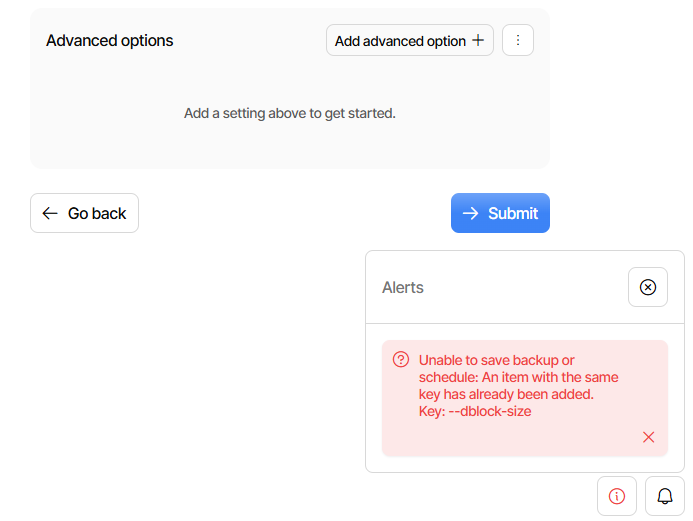
dblock-size is better, but there’s some confusion between the Remote volume size and dblock-size. Note I’ve found this confusing before, and might not understand it.

Steps:

In new UI, set dblock-size to 100 MB and save. Go to old UI and it’s there, BUT
Remote volume size is empty in both the value and units dropdown and complains

The chosen size is outside the recommended range. This may cause performance issues, excessively large temporary files or other problems.

Fix that, but set it to 101 MB to distinguish. Leave the 100 MB dblock-size, which does beg the question of which will rule, but that’s not new. Save, verify it returns.

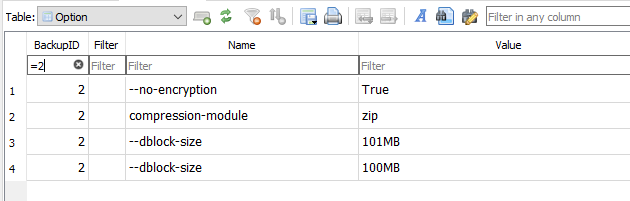
Server DB now has (no dash) dblock-size 101MB and --dblock-size 100MB

Switch to new UI. Export As Commandline picks up 100MB. Edit picks up both as

dblock-size=101MB
--dblock-size=100MB

Submit and Edit. On the network, --dblock-size comes as 101MB then 100MB

Options as text shows both, but the 101MB becomes 100MB so now there are two

--dblock-size=100MB
--dblock-size=100MB

Options editor shows two as well, both 100MB. OK, x one away, they both vanish.
This seems wrong, but whether you add one again or leave none, Submit will fail:

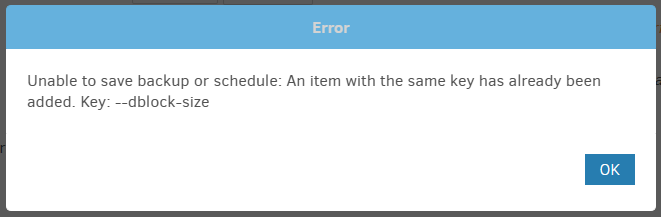
GUI did not send any form of dblock-size, yet server response code complained:

{
ā€œErrorā€: ā€œUnable to save backup or schedule: An item with the same key has already been added. Key: --dblock-sizeā€,
ā€œCodeā€: 500
}

DB at this point contains

Unclear how to recover. Try legacy UI. Remote volume size has empty values.
dblock-size is 100MB, but delete that. Try doing Save, and get same result:

I can probably delete the job or edit the database directly, but I’d prefer not to…

EDIT 1:

Editing the database to delete one or all of the dblock-size variants solves this.
That’s not something I’d recommend to everyone, and better solution is sought.

I tested 2.2.0.3_stable_2026-01-06 a bit, but couldn’t steer it into a stuck config.

image

happens in DB. Old and new UI uses non-dash version as Remote volume size.
Old UI uses dash version as dblock-size. New UI doesn’t seem to have it in edit.
New GUI Commandline has it as dblock-size, as does Export As command line.

Maybe it is time that we add an alias to the option called ā€œā€“remote-volume-sizeā€ ?

That is because the format treats block-size as a special property (no leading --), where ngclient now only treats it as an advanced setting. We need to capture the special property in ngclient and convert it to an advanced option.

I thought that ā€œ3rd time’s the charmā€ but this release hasn’t helped my broken jobs - all on Linux. All complain about the database in some way and all reported previously.

One job, that simple backs up all the Duplicati databases except its own, to a local SMB share was still failing - I gave up, deleted all the backup files and it’s run, but we’ll see if all is ok next run.

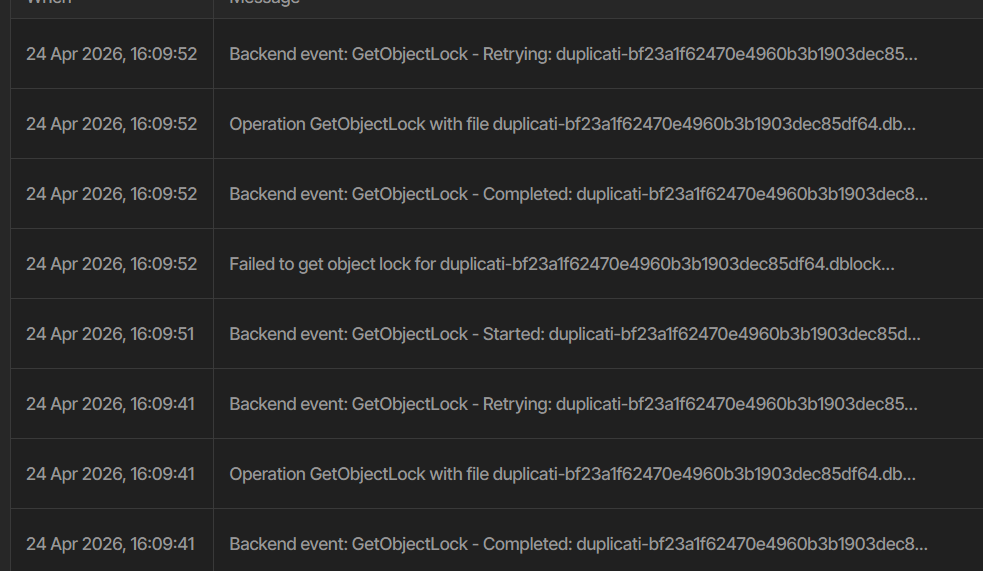
Second job, different machine, is a Wasabi S3 backup - I started a database delete/recreate and after several hours it been displaying

It’ s been doing this for several hours, I have no idea what the message means and it’s not a very big backup, 5 versions, 50Gb. Wasabi is working fine as other backups on other machines have all run throughout the day, so it’s not my connection.

Third job, same machine, is also with it’s Duplicati database backup, but as it’s stuck doing the above I’ve not had time to look at it. Will probably just delete it like I did to the one on the other machine.

The second job I really like to get fixed.

So this is reading the object locks to populate the database, and seemingly failing.
You can add --repair-refresh-lock-info=false to skip the lock information reading if you are not using remote locks.

How to I run the delete/recreate from the command line? I deleted the database, then went into the command menu but can’t find a create database command.

That would be ā€œrepairā€. If no local database is present, the repair command recreates the database.

It should also be possible to add the option to the general advanced options, so it is applied to all operations (including the UI’s ā€œRecreateā€ button).

Thanks, the repair finished but then the backup failed. After another normal repair the backup was fine. Makes no sense to me, but at least all my jobs are working for now.

Two minor UI issues

  1. Windows 11, tray icon, when my machine comes out of sleep, the icon shows as paused and remains like that. If I check the main UI it’s running. If I pause with the tray icon, it stays showing paused and the main UI says paused. If I then un-pause with the tray icon, it’s fine.
  2. During the command-line repair with the additional parameter, the UI shows the progress but doesn’t scroll the view, so you constantly have to scroll the mouse the keep up with the latest messages. Other places in the UI seem fine e.g. using the About, Logging, Live scrolls just fine.

New UI doesn’t let me run Purge Broken Files comand-line, as it won’t remove the exclusions and there’s no way to remove them cleanly - clearing the fields makes no difference. Had to use the old UI.

That works for me on Windows with Edge browser.
Does your browser have tools to see what is sent?
Sometimes it’s developer tools, sometimes on F12.

I’m using Brave and it’s Shield is disabled for all my local sites.

Any idea what this means?

2026-04-28 21:36:30 +02 - [Error-Duplicati.Library.Main.Operation.BackupHandler-FatalError]: Fatal error
SqliteException: SQLite Error 19: 'NOT NULL constraint failed: Block.VolumeID'.
2026-04-28 21:36:30 +02 - [Error-Duplicati.Library.Main.Controller-FailedOperation]: The operation Backup has failed
SqliteException: SQLite Error 19: 'NOT NULL constraint failed: Block.VolumeID'.

Backup first failed with a corrupt dblock file, destination is a local folder on a separate disk to the source, so I deleted it and ran a purge. Re-ran the backup and it complained about missing files, so ran a repair. It did the same, so I ran a delete/create, it complained about missing files, ran another purge. Now the above.

Thanks for reporting, created an issue for that:

Thanks for reporting, I have created an issue for that:

Can you give a redacted screenshot for this? Then I will try to replicate.

It means that Duplicati is attempting to insert a block into the database, but without any owner volume (the block exists without being stored).

Do you have a longer stack trace for that?

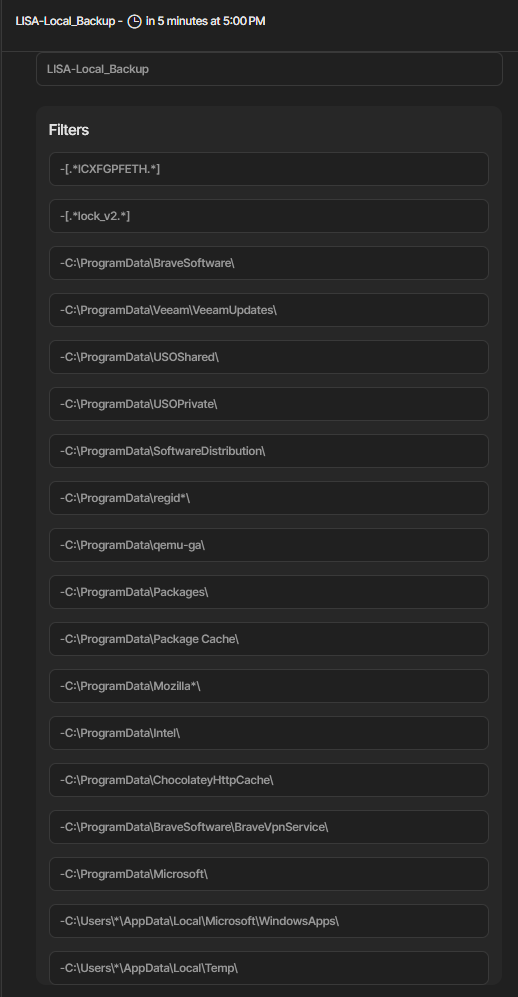
I’m not sure what you need, this is from Firefox, just compare to Brave, and the filter list has no way to edit as text like the old UI, and like I wrote clearing each one makes no difference.

As for the database error, there is this in the main log:

Microsoft.Data.Sqlite.SqliteException (0x80004005): SQLite Error 19: 'NOT NULL constraint failed: Block.VolumeID'.
   at Microsoft.Data.Sqlite.SqliteException.ThrowExceptionForRC(Int32 rc, sqlite3 db)
   at Microsoft.Data.Sqlite.SqliteDataReader.NextResult()
   at Microsoft.Data.Sqlite.SqliteCommand.ExecuteReader(CommandBehavior behavior)
   at System.Data.Common.DbCommand.ExecuteNonQueryAsync(CancellationToken cancellationToken)
--- End of stack trace from previous location ---
   at Duplicati.Library.Main.Database.LocalDeleteDatabase.PrepareForDelete(String filename, IEnumerable`1 volumeIdsToBeRemoved, CancellationToken token)
   at Duplicati.Library.Main.Database.LocalDeleteDatabase.PrepareForDelete(String filename, IEnumerable`1 volumeIdsToBeRemoved, CancellationToken token)
   at Duplicati.Library.Main.Database.LocalDeleteDatabase.PrepareForDelete(String filename, IEnumerable`1 volumeIdsToBeRemoved, CancellationToken token)
   at Duplicati.Library.Main.Operation.CompactHandler.DoDelete(LocalDeleteDatabase db, IBackendManager backend, IEnumerable`1 deleteableVolumes, CancellationToken cancellationToken)+MoveNext()
   at Duplicati.Library.Main.Operation.CompactHandler.DoDelete(LocalDeleteDatabase db, IBackendManager backend, IEnumerable`1 deleteableVolumes, CancellationToken cancellationToken)+System.Threading.Tasks.Sources.IValueTaskSource<System.Boolean>.GetResult()
   at Duplicati.Library.Main.Operation.CompactHandler.DoCompactAsync(LocalDeleteDatabase db, Boolean hasVerifiedBackend, IBackendManager backendManager)
   at Duplicati.Library.Main.Operation.CompactHandler.DoCompactAsync(LocalDeleteDatabase db, Boolean hasVerifiedBackend, IBackendManager backendManager)
   at Duplicati.Library.Main.Operation.CompactHandler.DoCompactAsync(LocalDeleteDatabase db, Boolean hasVerifiedBackend, IBackendManager backendManager)
   at Duplicati.Library.Main.Operation.DeleteHandler.DoRunAsync(LocalDeleteDatabase db, Boolean hasVerifiedBackend, Boolean forceCompact, IBackendManager backendManager)
   at Duplicati.Library.Main.Operation.BackupHandler.CompactIfRequired(IBackendManager backendManager, Int64 lastVolumeSize)
   at Duplicati.Library.Main.Operation.BackupHandler.CompactIfRequired(IBackendManager backendManager, Int64 lastVolumeSize)
   at Duplicati.Library.Main.Operation.BackupHandler.RunAsync(String[] sources, IBackendManager backendManager, IFilter filter)
   at Duplicati.Library.Main.Operation.BackupHandler.RunAsync(String[] sources, IBackendManager backendManager, IFilter filter)
   at Duplicati.Library.Main.Controller.<>c__DisplayClass22_0.<<Backup>b__0>d.MoveNext()
--- End of stack trace from previous location ---
   at Duplicati.Library.Main.Controller.RunAction[T](T result, String[]& paths, IFilter& filter, Func`3 method)
   at Duplicati.Library.Main.Controller.Backup(String[] inputsources, IFilter filter)
   at Duplicati.Server.Runner.RunInternal(Connection databaseConnection, EventPollNotify eventPollNotify, INotificationUpdateService notificationUpdateService, IProgressStateProviderService progressStateProviderService, IApplicationSettings applicationSettings, IRunnerData data, Boolean fromQueue)

No crash logs either.

You show 18 filters. Can you verify that there are not more, e.g. in new UI
scrolling, in an export as command line, or in old UI. This might be due to:

This got fixed in edit, but when I set 20 filters, Commandline only shows 18.
Clear everything in sight, set up F12 developer tools to watch, and in goes:

"--exclude=19","--exclude=20"

resulting in (justified given its input):

 The operation PurgeBrokenFiles has failed => Filters are not supported for this operation 
 
 
 ErrorID: FiltersNotAllowedOnPurgeBrokenFiles 
 Filters are not supported for this operation 
 Return code: 100 

The job has 24 exclusions

I see the issue now. @ts678 was on the right path.

The view only shows the first ~18 filters so you cannot remove them all.
I have fixed it by using the same filter editor from the source page, so it will scroll and give you the ā€œEdit as textā€ option.

I managed to fix that particular situation:

However, I was not able to reproduce the situation without directly manipulating the database.

Could you try to describe the steps that caused this in a simple-to-follow list form?

Not really as all the server did was run the backup