Release: 2.2.0.105 (Canary) 2026-02-20

2.2.0.105_canary_2026-02-20

This release is a canary release intended to be used for testing.

This canary release is intended to be the base for the next beta/stable release.

Changes in this version

Database schema updates

This version updates the Server database schema to version 11 (was 9 in 2.2.0.104).
These changes add the new remote destination repository table, and a table for tracking multiple backup destinations.

Updates are applied automatically, and if you need to downgrade, the database tool can perform downgrades.
Downgrades will wipe the new backup destinations and the backup destination repository, but otherwise does not cause data loss.

Multiple backup destinations

This version adds support for configuring multiple destinations for a single backup job.
This allows you to backup to multiple locations simultaneously, such as a local drive and a cloud storage provider.
With multiple destinations, you can now configure a complete 3-2-1 backup strategy in a single job.
After each completed backup, Duplicati will ensure that data is available on all destinations.

A 3-2-1 backup strategy is where you have 3 copies of your data, 2 of which are on different media, and 1 of which is offsite/immutable.

Windows folder status indicator

Thanks to @AndyBodnar, this version adds a Windows shell extension that shows the backup status of folders with icon overlays.
The feature is disabled by default but can be enabled with the option --enable-folder-status-service on either Server or TrayIcon.
Once the feature is enabled, you can run the RegisterFolderStatusExtension.ps1 script to register the extension, and you can then see the backup status of folders in Windows Explorer.

Google Workspace backup

This version adds support for backing up Google Workspace, including Gmail, Google Drive, Contacts, Calendar, and Chat.
Like the Office 365 backup feature, this is a proprietary module (source available) that requires a license to use in production.
Without a license, testing is possible with up to 5 users.

If you prefer a clean OSI-approved installation, you can prevent proprietary modules from loading by setting the environment variable DUPLICATI_DISABLE_PROPRIETARY_MODULES=1 or simply delete the files named Duplicati.Proprietary.* from your installation.

Full disk backup

This version adds simple support for backup and restore of entire disks, including the MBR/GPT partition table.
In this initial version, only Windows is supported, the backup is accessing the disk directly (no VSS).
We are working on adding support for Linux and macOS, as well as VSS support for Windows.
Like the Office 365 / Google Workspace backup features, this is a proprietary module (source available).

Full disk backup requires administrative privileges to access the disk directly.
Full disk restore requires administrative privileges and requires that the disk is unmounted and not write-protected.

Bugfixes and improvements

  • Fixed S3 endpoint port preservation and path validation, thanks @aureliandevel
  • Added connection string repository for simpler management of re-used backend connections

Detailed list of changes:

  • Added support for full disk backup and restore on Windows
  • Fixed incorrect commandline argument names in Agent
  • Added support for assigning license from console
  • Added Windows folder icon overlay for backup status, thanks @AndyBodnar
  • Fixed compile errors after merges
  • Added Google Workspace backup support
  • Added temp disk space check endpoint
  • Added support for multiple backup destinations
  • Updated translations
  • Fixed race condition with index file uploads during backup
  • Added latest translations
  • Updated translations from Transifex
  • Rolled back supplementary groups change
  • Fixed S3 host port preservation and path validation, thanks @aureliandevel
  • Fixed nullable warnings
  • Fixed large volume inputs handling
  • Fixed RPM spec ownership calculation
  • Fixed scheme detection on short paths

ngclient changes:

Features

  • Added support for picking disks for backup (if supported by the backend)
  • Added support for Google Workspace
  • Added support for saving multiple destinations
  • Added destination page
  • Added const to toggle auto-save of destinations
  • Added missing dropdown options for filters

Bug Fixes

  • Fixed issue with crashes in Chrome when showing tooltips
  • Fixed issue with ā€œloaderā€ buttons shrinking visually
  • Fixed advanced options not possible with UNC paths
  • Fixed include filters converting to paths
  • Fixed multi-line small screen styling of menu
  • Fixed non-existent icons

Improvements

  • Improved mobile display (responsive layout)
  • Improved status content
  • Improved status file text
  • Updated localizations, thansk to all translators
  • Updated status and destinations
  • Automatically open warnings/errors on the logs page
4 Likes

Updated both Windows and Linux machines, no issues there.

Regarding two of the new features:

  • Are the new Windows full disk backups always a full, or is it able to perform incrementals? Currently I use UrBackup for a couple of machines where I do disk image backups.

  • Can the multi-destination job use the backup destination of another job? I’ve been performing my local backup and S3 backups in separate jobs, and it would be nice if the local job could take over the S3 job by simply adding it as an additional destination.

1 Like

The backups work by treating the sectors of the disk as ā€œfilesā€ and then feeding it into Duplicati’s regular backup. In that sense the backups are always differential like the rest of Duplicati.

We do not currently track modified sectors so each backup will be a full disk scan, but only changed data will be backed up.

Not really in that way. The multi-destination is more like a specialized rclone/rsync style function, where it looks at what is present at the primary destination and then mirrors that to the secondary destinations.

With your current setup, there is no logical overlap in what is currently stored on the S3 destination and what is stored on the local destination (all filenames are different).

Thanks

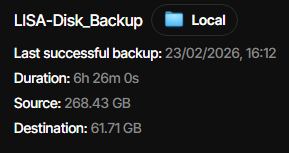
I did a quick test of backing up the C: drive of the a Windows server, 250GB, and it completed

Took quite a while, 6.5hrs, destination was another local data disk the same used for its file backups, C: drive is around 150GB of data so compressed quite nicely. I still need to test if I can access the backup, though I can’t really do a full restore.

2 Likes

A post was split to a new topic: Recreate database failure with Canary 2.2.0.105

Might be related, might be not… I’ve got well, as we know ā€œa fewā€ backup jobs. But this is something I think I see for the very first time:

Restore started at 2.3.2026 13.52.38
  Listing remote folder ...
  Downloading file duplicati-20260302T115145Z.dlist.zip.aes (51,98 KiB) ...
  Downloading file duplicati-ifc654a61ec7d48e4af6ff03754633796.dindex.zip.aes (54,12 KiB) ...
Checking remote backup ...
  Listing remote folder ...
  1132 files need to be restored (113,73 MiB)
The operation Restore has failed => Could not find a part of the path 'd:\'.

Duplicati error output:

System.IO.DirectoryNotFoundException: Could not find a part of the path ā€˜d:\’.
  at System.IO.FileSystem.GetFindData(String fullPath, Boolean isDirectory, Boolean ignoreAccessDenied, WIN32_FIND_DATA& findData)
  at System.IO.FileSystem.GetFinalLinkTarget(String linkPath, Boolean isDirectory)
  at System.IO.FileSystem.ResolveLinkTarget(String linkPath, Boolean returnFinalTarget, Boolean isDirectory)
  at Duplicati.Library.Common.IO.Util.GetFinalPath(String path)
  at Duplicati.Library.Common.IO.Util.IsPathInsideTarget(String path, String targetDestination)
  at Duplicati.Library.SourceProvider.FileRestoreDestinationProvider.VerifyPath(String path)
  at Duplicati.Library.SourceProvider.FileRestoreDestinationProvider.CreateFolderIfNotExists(String path, CancellationToken cancel)
  at Duplicati.Library.Main.Operation.RestoreHandler.CreateDirectoryStructure(LocalRestoreDatabase database, IRestoreDestinationProvider restoreDestination, Boolean restoreToOriginalLocation, Options options, RestoreResults result)
  at Duplicati.Library.Main.Operation.RestoreHandler.DoRunNewAsync(IBackendManager backendManager, LocalRestoreDatabase database, IFilter filter, IRestoreDestinationProvider restoreDestination, CancellationToken cancellationToken)
  at Duplicati.Library.Main.Operation.RestoreHandler.RunAsync(String[] paths, IBackendManager backendManager, IFilter filter, IRestoreDestinationProvider restoreDestination)
  at Duplicati.Library.Main.Operation.RestoreHandler.RunAsync(String[] paths, IBackendManager backendManager, IFilter filter, IRestoreDestinationProvider restoreDestination)
  at Duplicati.Library.Main.Controller.<>c__DisplayClass23_0.<b__0>d.MoveNext()
— End of stack trace from previous location —
  at Duplicati.Library.Utility.Utility.Await(Task task)
  at Duplicati.Library.Main.Controller.RunAction[T](T result, String[]& paths, IFilter& filter, Func`3 method)
  at Duplicati.Library.Main.Controller.Restore(String[] paths, IFilter filter)
  at Duplicati.CommandLine.Commands.Restore(TextWriter outwriter, Action`1 setup, List`1 args, Dictionary`2 options, IFilter filter)
  at Duplicati.CommandLine.Program.ParseCommandLine(TextWriter outwriter, Action`1 setup, Boolean& verboseErrors, String[] args)
  at Duplicati.CommandLine.Program.RunCommandLine(TextWriter outwriter, TextWriter errwriter, Action`1 setup, String[] args)

Context:

I run backup restores in automated manner (because that’s something you MUST do with Duplicati repeatedly), and suddenly one of restores which is configured just like all the others, fail like this. I have a restore job before and after it and those work. But this one won’t. Wondering what might be the reason for this.

Task 1: Ok (similar, yet different backup set, but similar content)
Task 2: This one, fails (similar to 1,3, but not same)
Task 3: Ok (similar, yet different backup set, but similar content)

Strange, way strange and alarming. Got multiple similar backup jobs, and one of those completely fails to restore, with highly confusing reason.

Version:
duplicati-2.2.0.105_canary_2026-02-20-win-x64

Update:
I deleted the backup set, created new, and run backup. - Restore STILL fails with same error. So it’s not random. - Strange… Maybe some filename issue or something else, who knows.

→ Fork it!
If anyone has seen this error as well, I guess it’s time to open a new thread about this. - Currently this is just unconfirmed hunch, and this is the first version I’ve ever seen it with.

Update:
If I restore it to different path, on empty drive it works. So backup set itself isn’t broken. It’s just something strange with the restore + this specific backup, which is still strange, because those should be very similar compared to other sets, which restore ok.

But no panic. Just annoying.

Extra:
Metadata contains just filenames which contain zero confidential information. I can share the metadata of the backups if necessary. After a debug session, I don’t know anything else than I can put 10 backup jobs in the restore batch and only job failing is the one, and it contains nothing different than the others which do work… - Go figure.

This is part of the new restore validation logic where it tries to make sure that when you choose to restore to a specific target path, no files are written outside that path (symlinks, etc).

It looks like something is breaking in your case, where it cannot resolve the ā€œfinal pathā€ of d:\ for some reason. Is there anything special about the D:? is it a mounted folder or a regular fixed disk?

You can set the option --allow-restore-outside-target-directory to disable the check, and the error should go away, but I would like to get a bit closer at understanding why the check fails.

1 Like

Great, I’ll test with the --allow-restore-outside-target-directory which btw, in this case shouldn’t be necessary. And now when you said it, something is going wrong, because the --restore-to="d:\restore" so it’s right that the destination path is NOT supposed to be d:\ .

I’ll do a few extra checks and test based on that input, and I can enable debug logs and dump those for you in private. I’ll also dump the source paths on the source system, as well as dump the backup file names / paths for you, as well as take full restore log. (When it’s working and when it’s not working.)

I’ll get back to this tomorrow.

- Thank you!

I agree, it looks like some read operation is failing which causes the detection to assume we are writing outside the target.

One workaround is to silently ignore that type of error, but I would prefer if we figure out exactly what is causing it and then fixing or targeting that issue directly, instead of a general ā€œthis is probably fineā€ approach.

Looks pretty clear fail to me, something just isn’t basically working right at all. I don’t know what. Sent you full logs in PM, but probably those do not make any difference at all, just more practically useless information.

2026-03-03 08.59.00 +02 - [Verbose-Duplicati.Library.Main.Database.LocalRestoreDatabase-RestoreTargetFileCount]: Needs to restore 1133 files (46,76 MiB)
2026-03-03 08.59.00 +02 - [Verbose-Duplicati.Library.Main.Operation.RestoreHandler-MappingRestorePath]: Mapping restore path prefix to "C:\dir1\dir2\" to "d:\restore\"
2026-03-03 08.59.00 +02 - [Verbose-Duplicati.Library.Main.Database.LocalRestoreDatabase-RestoreSourceSize]: Restore list contains 1158 blocks with a total size of 46,76 MiB
2026-03-03 08.59.00 +02 - [Error-Duplicati.Library.Main.Controller-FailedOperation]: The operation Restore has failed

I’ve included profiling log as well…

Thanks for the logs! I can see the same error that you posted originally.

I am not able to reproduce it, but asking AI the issue is that some Windows systems do not support calling GetFinalLink() on a drive root, which would explain the issue and my failure to reproduce.

I will be adding a two-layer fix to this. First, avoid asking for a link target if the path is a drive root. Second, ignore link resolution failures and log a warning.

The first part will ensure that the problem is no longer causing issues, and the second part ensures that if it happens in different places, restore still proceeds. If someone sees this warning later, hopefully they will report it so we know more.

1 Like