Release: 2.2.0.103 (Canary) 2026-01-08

2.2.0.103_canary_2026-01-08

This release is a canary release intended to be used for testing.

Changes in this versions

This version re-introduces the Synology native package, adds support for remote locking of files, and fixes a number of minor issues.

Synology native package

The Synology native package has been re-developed to support the new Synology DSM 7.2 and above.
This package installs as any other Synology package and uses the integrated DSM authentication to guard access, so only system admins can use Duplicati.
To use the package, you need to grant access to the shared folders that you want to back up.

Remote locking of files

This release adds support for remote locking of files, which is useful for example when using Duplicati with a remote storage provider that supports locking, such as S3 or Azure Blob Storage.
The feature works by completing the backup as usual, and then locking all files that are required to restore the backup.
The locking is done by asking the remote storage provider to lock the files, such that it is not possible to delete or overwrite the required files until the lock expires.
Duplicati then keeps track of the locks and avoids attempting to delete or overwrite the locked files.

To use the feature, set the advanced option --remote-file-lock-duration to the duration of the lock, for example 30D for 30 days.

Since locking requires support from the remote storage provider, this feature is only available for certain backends.
The locking is currently supported for S3, Azure Blob Storage, Backblaze B2, and iDrive e2.

Each of the backends that currently support locking also have a property to set the locking mode to either governance (default) or compliance.
The governance mode allows the lock to be removed in the admin console for the storage provider, while the compliance mode does not allow the lock to be removed.

If using this feature, note that each provider has different requirements for the bucket, usually requiring versioning to be enabled.
For S3 and B2, deleting the files after the lock expires will create a delete marker, which means that you will still be billed for the storage of the files, and need to set up lifecycle rules to actually delete the files after the lock expires.
For Azure Blob Storage, deleting the files after the lock expires will delete the files immediately.

Change to default database encryption

Carried over from 2.2.0.102_canary_2025-12-12, this release has a “default secret provider” for the current OS.
The mapping is:

  • Windows: Windows Credential Manager
  • MacOS: Keychain
  • Linux: libSecret (Gnome Keyring), or commandline pass if available

Warning: If there is no secret provider set, this change will cause the database to be encrypted with a random password, and the password will be stored in the default secret provider for the current OS.

Detailed list of changes:

  • Added Internxt S3 hostnames
  • Added improved support for hosting ngclient behind a reverse proxy
  • Added support for new API for remote management
  • Added support for remote locking of files
  • Re-introduced the Synology native package
  • Removed AWS specific labels on S3 options
  • Fixed a bug with testing on an empty destination
  • Added support for authentication regions with S3, particularly for Minio

ngclient changes:

  • Added support for serving behind a reverse proxy
  • Added support for hosting in an iframe, if configured
  • Improved handling auth attempts so successful re-auth is not shown as messages
  • Fixed proxied auth and websocket authentication
  • Fixed advanced options for rclone not working
  • Fixed hide connection status not showing when not connected

1 Like

Meaning the latest backup version, possibly extending old locks, and maybe
allowing lock expiration on backup files that are not referenced in latest one?

So user doesn’t need to be specially wary about the settings and operations?
Is avoidance messaged, or do things silently not run in their non-locked way?

Since that doesn’t say “AWS S3”, any feel for how “S3 Compatible” tend to do?
While we likely can’t write help for all providers, help with four might be helpful.

EDIT 1:

One issue with prior attempts at immutability was that space use never shrinks.
Lock scheme would suffer the same if whole backup was locked forever, which
locking only files needed to restore latest version can help, however better can
maybe be done (at space cost), e.g. if compact defers delete until lock expires.

A concern with this is below. Does Duplicati now risk locking wasteful dblocks?

It likely loses track if database gets destroyed. Does it relearn it at DB recreate?
Backend presumably knows locks, unlike state tracking for deferred delete idea.

I’m having some odd issues trying to install this on my Windows 11 (25H2) machine - .102 was already installed and running fine.

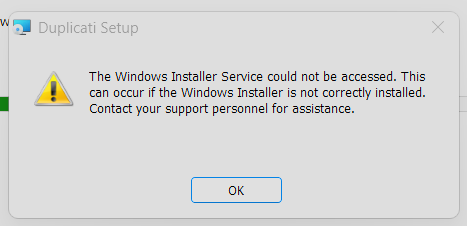
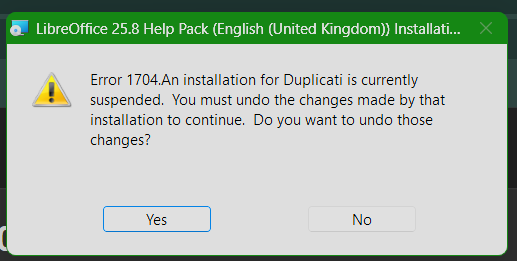
The installer fails with:
image

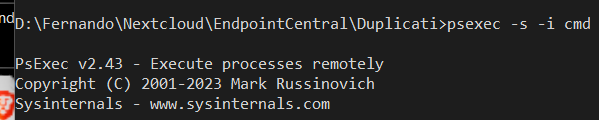
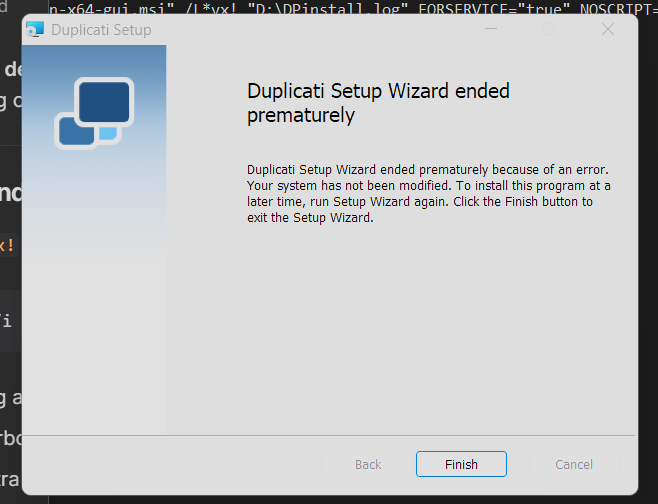
I have tried direct from the command-line to emulate the way it gets deployed, which uses the local system account:


Log file:
DPinstall.zip (153.2 KB)

The initial attempt removed the old version the “Add/Remove Programs”, but left the program folder intact. I have cleaned this out, and also cleared the Temp folders both user+system, I have tried to reinstall .102 and it’s the same, I have tried another MSI installer, repair, removed then reinstalled and also tried sfc/dism to check the system. Nothing helps.

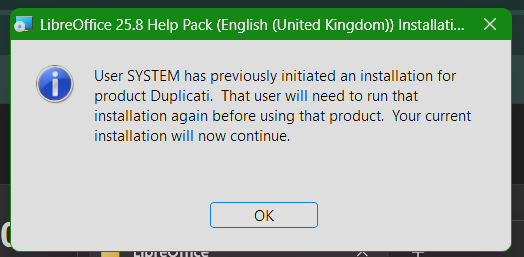
This happens when I try another MSI be it Duplicati again or any other:


Clicking Yes cleans up the failed Duplicati install and the install continues.

I’ve pushed the same to a Windows 2025 Server and it was fine, so it’s only this Win11 machine so far. I haven’t tried any Linux versions yet.

Any ideas?

It does not extend old locks automatically, but this can be done from the CLI.

After each (completed) backup, it figures out what remote files are needed to restore this new version. Then it issues a lock command for the duration specified. If the files are already locked, this will result in the locks on those files being extended.

When removing a version, this will be ignored if the fileset is locked. If the fileset can be removed, any files that remain locked will be left alone as long as they are locked (even if they are no longer needed).

For example:

  • Set lock duration 10 days
  • Set retention to delete files older than 5 days
  • On Jan 1st, a backup runs, and related files are locked until the 11th
  • On Jan 2nd a backup runs, and related files are locked until the 12th
  • … And so on
  • On Jan 6th a backup runs, but the backup from Jan 1st is locked
  • …
  • On Jan 11th a backup runs, and the backup from Jan 1st is now removed, potentially causing other files to be deleted, if these are not referenced from later backups.

When recreating the database, you need to request that lock information is updated as well, if you intend to continue running backups from that database. The UI now does this automatically, and restore operations does not need locking information.

If you set the retention to be longer than the lock duration, there is nothing to consider from a user perspective.

If you set the retention to be shorter than the lock duration, you will see warnings because versions are supposed to be deleted but cannot be.

Files other than filesets that are locked are ignored with an information message.

It really depends on the provider. At least Minio and Wasabi supports object locking, but details are very provider specific. Minio for instance uses WORM semantics (like Azure) where Wasabi uses versioning with a delete marker.

Yes and no. The point of locking is to prevent deletion by any means (attackers, insiders, software failure, etc) and because of this data will stick around longer than without locking.

For dblock volumes that are fully deletable, this should not be a problem. The dblock is always locked with a fileset. Once the fileset can be deleted, so can the dblock.

Compacting is the same, but since the same data is likely to be re-referenced across versions, some dblock volumes may contain something like metadata that is needed, thus continuously re-locking a dblock even if it only contains a few useable bytes.

For now, there is no handling of this, so this is the cost of using locking, but going forward we could make this better. We could go on with the compaction, creating duplicates of data, but not deleting the locked dblock. This will then be a volume with only duplicated blocks now, but since it is no longer required by any fileset, it will not be re-locked and can be removed once the lock expires.

Yes, this is a separate step. Unfortunately, none of the major providers have an API that lists files with lock info, so the implementation first recreates the database, then queries each remote file for locking information.

Thanks for the log file. I think this is related to the changes in .102 where I split the service status check and start/stop actions into different files.

One thing that I added was the MSI property that can be set like: NOSCRIPT=true.
If NOSCRIPT is set, the installer will not try to start or stop the service.

I developed and tested the changes on a Win11 machine :thinking:

The NOSCRIPT=true was one of the parameters I added when .102 released as I control that myself with my deployment.

Duplicati CLI? How? And by the way, I’m not understanding the non-extension:

It sounds from the below like it does, but implicitly through normal lock setting:

I think this solves the problem of largely-untouched initial backup losing locking.
Latest backup will be largely initial backup, will lock files, so implicitly extending.

Since I didn’t find a reply, I assume versions older than lock duration are at risk, however given an attacker trying to destroy backups, saving latest is really nice.

The space growth issue is still a concern, e.g. if 1 block from a 50 MB dblock is used by deduplication by latest version, largely empty dblock gets kept for that.

OK, I found the later note on how this is messaged, so it’s not silent.
Maybe some users will decide to use a suppress-warnings option.

Is this just normal delete scheme modified by not trying delete on any locked files?

How do you request, if not using the UI? I suppose arguably it’s a limited risk, because next backup should set the locks up again, then it will keep on track.

If there’s a new option, having it request by default might have been less risky.

I’m not clear on the general rule, but how does “nothing to consider” work with operations where the “supposed to” of user request is blocked by the locking?

If it’s blocked, maybe user should have considered but at least it’s explainable. Example would be manual delete attempt. I’d probably like a warning if it can’t.

If repair and purge-broken-files can’t do what they’re supposed to, result could be rather impactful, so it’s not consider in advance, but deal with denials.

I assume that the user still needs to run a backup before lock duration expires, unless there’s an automatic background task (is that what you thought I meant when I said “extending old locks”? – if so, I meant it in “latest backup version”).

That’s why the statement about “S3” bothered me. Over time, we’ll know more.
I’ve seen some software pull these together into what works and what doesn’t.

The comment about “help” was maybe add help for AWS and three proprietary when we add new challenges such as how to manage versioning and cleanup.

Regardless of its possible tradeoffs, this feature might be very wanted by some.
Thanks for these deeper explanations. They can help out when questions arise.

I found the issue - the agent I use for deployment was updated a few weeks ago and it included some “endpoint protection features” that I thought I had disabled in a previous update when first introduced. It had be re-enabled and once I removed it again the installer ran fine. It’s still strange that it worked under Windows Server 2025 because it was back on their as well.

Like this:

duplicati-cli set-locks s3://... --version=1 --file-lock-duration=10D

You can view it like that. Locks are extended.
Technically, “new” locks are applied, and sometimes they happen to expand on an existing lock.

Yes. We need the update I described to fully cover this situation.

Yes. Just skip deleting versions that are locked.

Use the read-lock-info command to fetch all missing lock information:

duplicati-cli read-lock-info s3://...

It will cause errors if the lock information is not up-to-date, as Duplicati will attempt to delete locked files if it does not know that they are locked. So even though next backup will set locks anyway, existing files lock information must be up-to-date in the database.

Not sure I understand the question in full, but generally the logic is:

  • If the user explicitly requests something that would violate a lock, skip and generate a warning
  • If the user requests something that would implicitly violate a lock, skip and generate an information message

They will not be able to bypass the locks either, so depending on the setup they may fail to run.

There is no background tasks that refreshes locks. The logic is that when you create the backup it is locked for the duration specified. If you do not run any backups, nothing new will be locked and locks will eventually expire.

This way it works the same for CLI backups and UI-controlled backups.

You can manually request locking a backup with the CLI tools.

Documentation is on my TODO for the locking feature, and I will look to this thread to try to cover as many questions as possible.

Great to hear there was an explanation.

1 Like