Release: 2.2.0.102 (Canary) 2025-12-12

2.2.0.102_canary_2025-12-12

This release is a canary release intended to be used for testing.

Changes in this versions

This release makes the S3 providers simpler to use by providing fewer options, and only showing relevant endpoints.

The release also adds support for excluding files based on extended attributes on Linux and MacOS, and adds support for supplementary access groups on Linux.

For Windows, the installer now supports NOSCRIPT=true which will prevent the installer from running scripts that start/stop the Windows service.

It is now also possible to change the encryption passphrase for a backup, using the RecoveryTool.

Change to default database encryption

This release now has a “default secret provider” for the current OS.
The mapping is:

  • Windows: Windows Credential Manager
  • MacOS: Keychain
  • Linux: libSecret (Gnome Keyring), or commandline pass if available

If no secret provider is given, the default secret provider for the current OS will be used.
The secret provider is then used to store secrets, inclduing the encryption password for the database and the password for the server, if using the TrayIcon to connect to the server.

Warning: This change will cause the database to be encrypted with a random password, and the password will be stored in the default secret provider for the current OS.

If you rely on getting the database contents for something, you need to ensure you also have a copy of the random password.

If you want to opt-out of this change, you can use the --disable-db-encryption option when starting the Server/TrayIcon.
If you already have an encryption password set, this change will not affect you.

If you are already using database encryption, and want to switch to the new managed way of storing the encryption password, you need to:

  • Stop the server/TrayIcon
  • Start the server/TrayIcon with the --disable-db-encryption option to remove the database encryption
  • Remove the --disable-db-encryption option
  • Remove the --webservice-password option or environment variable
  • Start the server/TrayIcon again

Detailed list of changes:

  • Added Rabata.io to list of support S3 providers
  • Added support for supplementary access groups on Linux
  • Added support for excluding files based on extended attributes (MacOS / Linux)
  • Added support for providing a URL for the servername for S3
  • Added a whitelist of public S3 providers, and include hostname in backup reports if the hostname is in the whitelist
  • Updated SSH.NET to latest version (2025.1.0)
  • Fixed an issue with startup delay not working correctly
  • Fixed a timeout issue with AliyunOSS
  • Updated RecoveryTool to also allow changing a backup’s encryption password, thansk @greyxr
  • Added support for providing the target URL and encryption passphrase in ServerUtil when importing a configuration
  • Fixed a warning on Windows with the EventLog commandline argument type
  • Updated MSI installer to support NOSCRIPT=true which will prevent the installer from running scripts that start/stop the Windows service
  • Updated MSI installer to ignore errors when stopping the service
  • Added a guard code to check that the database is in a good state before attempting removal
  • Added support for writing secrets with the secret providers and the secret tool
  • Added a dialog to TrayIcon that asks for the password to the server, if not using a hosted server instance
  • Added support for saving the TrayIcon password in the default secret provider for the current OS
  • Added automatic encryption of the Server database, using the default secret provider for the current OS, if possible
  • Added support for getting an authentication token for Filen.io when using MFA
  • Automatically run VACUUM on the database if the encryption settings are changed, so existing data is scrubbed
  • Added a Duplicati Storage backend that supports the Duplicati Storage service

ngclient changes:

  • Fixed an issue with loading Chinese language
  • Added support for custom bucket validation rules on B2 buckets
  • Added support for hiding the console connection indicator
  • Merged settings for remote control on the settings page
  • Fixed an issue with some default empty url not working on the destination page
  • Fixed supporting Storj Access Grant & Storj API key
  • More accurate display of destination type on the overview page
  • Added custom UIs for supported S3 providers
  • Added improved field validation for providers
  • Updated the “Direct restore” flow to use the same destination picker as when setting up a backup
  • Added some functionality to swap UI and choose the default UI (ngax vs ngclient)
  • Fixed startup delay settings not being saved
  • Fixed an issue with the data not being selectable in a custom schedule
  • Fixed back button not working on Schedule page
  • Now pushing serversettings via websocket instead of polling
  • Added a button for getting API token for Filen.io when using MFA
  • Allow finding deprecated backends by typing their full protocol key
  • Added support for Duplicati storage backend
3 Likes

Lots of changes, should be fun to test this weekend.

How can I confirm that the --disable-db-encryption parameter is being honoured? It’s set for all my servers so I don’t want to suddenly find myself locked out of the database at a later date because I didn’t know the new random password.

You can look at “About Duplicati” → “Server Settings” and then find encrypted-fields.
It should look something like this:

...
"disable-signin-tokens": "",
"encrypted-fields": "False",
"server-timezone": "Atlantic/Jan_Mayen",
"paused-until": "",
...

What happens if the system where duplicati resides crashes to the point that a full reinstall is needed - won’t all databases become useless and need to be rebuilt from scratch - possibly running for weeks if you have a few TBs offsite - because the credentials were in the crashed OS?

Great question, and I’ll add on.

I think this is the server database, to add another Securing the database way.

There are still plenty of questions. I asked several in Encrypting the database.

This style of advice to users bothers me, as it relies on users to figure out how.
Local providers names names for current releases, but that doesn’t go very far.
Perhaps it could be improved if the new feature is going to be relying on its use.

I’m making the argument that documentation and/or software should give leads,
including expected things like system migrations, or even migrating to a service.

To the long database recreate question, that’s not the one with sensitive secrets.
You’ll also have to recreate it even now if you lose server, but without the server
database you’ll also be trying to type the config in first from memory or whatever.

If you lose all the credentials you lose the entire backup, so worse than recreate.
“Direct restore”: “If you do not have the passphrase, it is not possible to restore.”
Some things such as destination logins might be available in some other source.

Basically some things are more critical than others, however safeguard can help.
Export or some other secrets protection is important, for the Import configuration.
Direct restore from backup files may also need secrets, but less than a full config.

If you have full system crash with loss of all files, I don’t think anything gets worse.
Migrating Duplicati to a new machine before old one fully dies may be harder. IDK.

Anytime software automatically locks things up, I think it’s essential to provide full
detailed directions for anything the user could run into that can be affected by that.

Whether OS tools or Duplicati tools are needed, provide all the information clearly.

2 Likes

I do have, fortunately, all configs exported, including with passwords on Dropbox, encrypted ofc, that password stored in a different place by a different provider (1Password), and backups themselves are stored in another place (Jottacloud). So the attacker would have to gain access to two out of three to do something.

But if the system database gets encrypted, it doesn’t help me that I have a live copy on Dropbox, because I won’t have the password.

As you mentioned, I would also need to know that I need to also copy it to 1Password. And I only know because we talk about it. I do have the environment variable version now, which I had to configure, so I have it saved, but not if I were a new user or if it were a new installation.

So, curious as well about the design decision for the future :slight_smile:


Btw. having databases stored in Dropbox and syncing them online (so I always have a current off-site version) brought a new issue - the lock file generated by the service in the database folder is exclusively locked and inaccessible by anything, and therefore Dropbox constantly fails to sync it. And it cannot be excluded, because the stream flag that would do that goes away with a restart of the service during a computer restart, when that file gets removed, including stream data. I have already reported it to Dropbox, but it didn’t seem like “permanently ignore some path” would be high on their to-do list.

Too many passwords, but need developer answers. The export has a password specifically for export, which you saved. The question is whether secrets inside encrypted exported are still encrypted with the server DB password even though they’re not in the server DB any more. That would make the export less portable.

If they’re decrypted at export, that’s portable, and protected by export password.

My personal use involves going in server DB enough that I don’t encrypt that DB.

Are you using an encrypted DB? If so, you can decrypt export to look at content.

Which one? If you have an environment variable server DB password,
you’d want to save it, but if DB export is encrypted, you also need that.

It would be good if Duplicati and its docs led users better on protection.
People who don’t read through the manual or ask in forum are at risk…

On other questions…

If I somehow found how to “also have a copy of the random password”, I wonder
what I’d do with that if, for example, I wanted to revert server DB to unencrypted?

Doesn’t MacOS Keychain (which I don’t have) try to validate the requesting app?
What does that mean for Duplicati which has different executables and versions?

Just four passwords (server database, configuration export, storage credentials, data encryption password) of many :slight_smile:

I was able to decrypt the configuration export; it does contain the data encryption password in clear text (so it is not double-encrypted with the database password).

K: Good idea with the password generator on the encryption screen!

Yup, and I have it, but only because I was actively setting it up. If it were randomly generated during installation, I would have no idea.

If I understood it well, if you start the service with the argument to not use DB encryption ( The server database | Duplicati. ), it should drop it?

I can back up and restore the Windows credentials store (not sure if MS does it via MS account automatically, as it does with BitLocker keys), but it doesn’t allow viewing already saved passwords. Maybe there are tools for that?

Their credentials names/hosts (including com.elgato.philips-hue and similar), not sure if they’re used to authenticate access to the credentials. But the backup mechanism at least allows to store it outside the computer being protected by Duplicati, so there’s a way.

Hmmm, does empty equal false?

  "encrypted-fields": "",
  "server-timezone": "Romance Standard Time",
  "paused-until": "",
  "last-update-check-version": "2.2.0.102",

This is my service startup command:

"C:\Program Files\Duplicati 2\Duplicati.WindowsService.exe" /localuser --webservice-password=<redacted> --webservice-sslcertificatefile=C:\ProgramData\Duplicati\lisa.mydomain.com.pfx --webservice-sslcertificatepassword=<redacted> --disable-db-encryption --server-datafolder=C:\ProgramData\Duplicati

As @ts678 points to, the database in question here is the Server database (the one that holds the configurations, including backup destination credentials, backup encryption key, etc).

This database is quite small and cannot be rebuilt, but can be somewhat recreated by importing configurations, or setting up backups again.

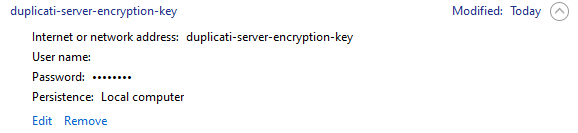
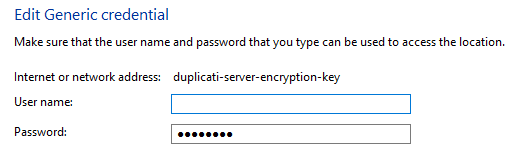
That could have been a little clearer. The name of the secret is duplicati-server-encryption-key. You can search for that name in your credential manager.

That is very true.

It was not the intention that the database should be used as a way to recover, but of course you can do that. I would then recommend that you ensure the database is encrypted, but you may want to either record the random encryption key, or pro-actively set up your own known key.

To set up the key, you can use the SecretTool:

Duplicati.CommandLine.SecretTool.exe set duplicati-server-encryption-key

You will then be prompted to enter the key. Do this before you start Duplicati, so the key is in place when Duplicati checks for it.

I think the easiest way to fix that is to exclude it from Dropbox:

The server encryption key is only for encrypting the server database. You can still export (file/commandline) and get the secrets out. The purpose is only to prevent a leaked database from being an issue.

I agree that the docs should be updated. We are very early with the feature so still collecting feedback on it before docs are updated.

However, I don’t see this change as a risk. The rule has always been:

keep a copy of the encryption password

As long as you have that, you only need to figure out how to connect to the storage (which is usually done with some management interface, commandline, etc).

Default encrypting the database does not change this at all.

You can get that from the secret provider, look for duplicati-server-encryption-key

That is explained in the release notes: simply set --disable-db-encryption.
If this is set, the database will be decrypted and written to disk.
If the database is already decrypted, nothing will happen.

Yes it does. However, Duplicati releases are signed with the same identity so they are logically “the same app” from MacOS security’s perspective. If this breaks for some reason, the user gets a popup asking to approve the app’s access

Yes. It means it has never been encrypted, so the value was not set.

You can double-check by opening the Duplicati-server.sqlite file with something like SQLiteBrowser and look in the Setting table. If you see any values starting with enc-v1: it is encrypted.

Or use an SQL query like this:

SELECT 'Database contains encrypted values' AS "Message"
FROM Option WHERE Value LIKE 'enc-v1:%'
UNION ALL
SELECT TargetURL
FROM Backup WHERE TargetURL LIKE 'enc-v1:%' LIMIT 1;

If you get no results from the query, the database is not encrypted. If you get “Database contains encrypted values”, then it does.

2 Likes

That was the “stream flag” I was mentioning, but because the lock file gets removed on service stop, that flag gets lost. BUT. I haven’t tried setting it on the control_dir_v2 folder itself - I just did, and it looks like Dropbox honors it.

All it says in this release note is “If you want to opt-out of this change, you can use the --disable-db-encryption option when starting the Server/TrayIcon.” which isn’t so clear on which change. I can believe it opts out of automatic password set, however I was skeptical that it’s as simple as said, and it actually fails unless one also provides the current password, at least it does when I set known one by hand on the startup command line using --settings-encryption-key. I haven’t tried a random settings encryption key yet, but I’m concerned that it might also reject like:

Duplicati.Library.Interface.UserInformationException: Server crashed on startup ---> System.Exception: A serious error occurred in Duplicati: Duplicati.Library.Interface.SettingsEncryptionKeyMissingException: Encryption key is missing.

If I request disable along with current password, it does decrypt DB as expected.

I’ll now rename insecure-permissions.txt file, then start optionless TrayIcon.

DB is encrypted (looked at job encryption key in a DB browser). Try to revert that.

Indeed it decrypts without me having to give it the random password I don’t know.

Good to know that barrier is removed, but security worsens (the usual tradeoff…).

Cycle back to automatic PW to see if credential manager can really show it to me.
Nope, only asterisks, which is the same result as I get for lots of other credentials.

I spent hours earlier reading Internet posts saying it won’t show this. Does yours?

Encrypting the database has replies which I’ll pull here, since it’s active now.
I’m hoping some other Canary users can keep this up, as I’ll be away awhile.

It sounds like reinstalls of a system suffer the same trouble as new system or changing user on same system (e.g. migration to Windows service). If option --disable-db-encryption works as simply described in the case I tested, then

is defeated. OTOH if the decrypt is tied to a system which is lost, the DB is lost.

Experiments so far seem to suggest that an export with its own export PW will do. Other encryption passwords are the server DB one and the one for backup data which is in the export. I suppose a redundant copy of that would add some safety, and it’s probably the most critical, even if one has to resort to using RecoveryTool.

Viewing server DB as not a primary source reduces worry about it. It’s not clear if random encryption password can even be obtained, but if one moves onto a new system or account, one should be able to import config using its export password.

Maybe the people who are available to try out scenarios can find “best practices”, which maybe eventually will be passed on to users in docs and the release notes.