This release is a canary release intended to be used for testing.
Changes in this versions
This version is a bugfix release for some issues discovered with the previous canary build and stable release.
Some of the changes in this Canary will be applied to a new revised stable release.
The changes in this version are mostly bugfixes and minor improvements that are not expected to cause issues.
Detailed list of changes:
Reporting remote filename on errors instead of temporary file
Added guards and fix for timeouts in MSGraph backend
Added guard against sending an unsupported header in remote control
Fixed href-base replacement, thanks @peloyeje
Fixed an error parsing flag-options (multiple option names in a single option)
Fixed an incorrect option name in release builder
Clear notifications on startup for issues that are resolved
Improved S3 hostname check to auto-prune trailing slashes
Show the assembly version in the version number
Made --send-email-password a password option so it is guarded
Added a dynamically adjusting deadlock timer for the restore flow
Improved parsing of WebDAV PROPFIND messages to cover more servers
Exposed options for pCloud that were previously not showed
Made the file-backend’s --use-move-for-put option auto-disable streaming transfers
Fixed an issue with restoring from a config file that would fail if the backups were encrypted
Added option to disable remote control when connected to the console
ngclient changes:
Added support for picking the power-mode provider in settings
Fixed some issues with filters
Fixed some buttons that were missing styling
Fixed issue with Test function not asking to create folder
Fixed not showing tooltip to remember password when not encrypting exported file
Fixed issues with parsing the exclude attributes and exclude by file size
Improved hint texts on start page to be less cloud-oriented
Correctly show duration if it takes over 24h
Renamed the “Start” button to “Resume” when the server is paused
No longer showing the usage reporter option if this is disabled by environment variables
The settings page now shows the currently installed version
Better detection of users language on initial load
Add a warning when doing cross-OS restores
Toggled some steps as disabled when clicking them would not result in a working flow
Added password visibility toggle on login page
Improved advanced options view to show file pickers and email parsers
Improved the display of the warning when typing a custom destination URL
Fixed some issues with the URL parsing, especially making it case-preserving and fixing Rclone
Using the Commandline UI now includes the global advanced settings
Very long error messages no longer overflow the screen but gets scrollable instead
Changed order of options on the restore overview page to nudge towards using configured backups
Added scrolling to source paths when entering more than 25 sources
Hiding FileJump destination due to a pending migration
Sizes can again be chosen in bytes, which also fixes the wrong warning displayed on the volume size picker
Updated localization, thanks to all translators
Added a new connection link that shows the console connection status
Updated naming for the console connection to be more consistent
Have updated my test Windows 20245 server, will see how the next backup goes in a few hours before updating my other machines.
I saw on the GUI the option to register but couldn’t resist and pressed it which changed it to claim - I then couldn’t find a way to unregister it, so needed to go to the old UI and cancel it there. I’m wondering if the option register should only appear when in settings?
Thanks for the swift feedback on the new UI, you can still cancel in the settings of the new UI - but im gonna make an option to cancel it in the topbar as well
My B2 backup corrupted, probably from network glitch, but I’m not certain it’s a new issue.
After backup said it successfully completed, my run-script-after found missing blocks.
First look says there’s blocklist in a dindex which is pointing to State Deleting dblock block..
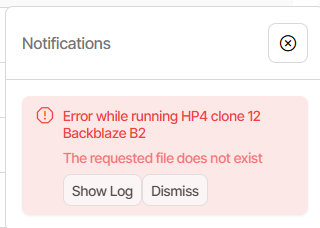
Confirming this wasn’t just a defect in my check, Direct restore got tree view fine, then got::
and Show log has no log to show, but that might just be the old Direct restore log limitation.
About → Logs → Stored has something which adds a bit more detail, including stack trace:
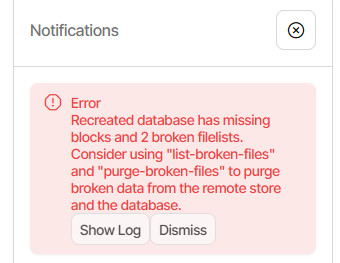
Duplicati.Library.Interface.UserInformationException: Recreated database has missing blocks and 2 broken filelists. Consider using "list-broken-files" and "purge-broken-files" to purge broken data from the remote store and the database.
   at Duplicati.Library.Main.Operation.RecreateDatabaseHandler.DoRunAsync(IBackendManager backendManager, LocalDatabase dbparent, Boolean updating, IFilter filter, NumberedFilterFilelistDelegate filelistfilter, BlockVolumePostProcessor blockprocessor)
   at Duplicati.Library.Main.Operation.RestoreHandler.RunAsync(String[] paths, IBackendManager backendManager, IFilter filter)
   at Duplicati.Library.Main.Controller.<>c__DisplayClass23_0.<<Restore>b__0>d.MoveNext()
--- End of stack trace from previous location ---
   at Duplicati.Library.Utility.Utility.Await(Task task)
   at Duplicati.Library.Main.Controller.RunAction[T](T result, String[]& paths, IFilter& filter, Func`3 method)
   at Duplicati.Library.Main.Controller.Restore(String[] paths, IFilter filter)
   at Duplicati.Server.Runner.RunInternal(Connection databaseConnection, EventPollNotify eventPollNotify, INotificationUpdateService notificationUpdateService, IProgressStateProviderService progressStateProviderService, IApplicationSettings applicationSettings, IRunnerData data, Boolean fromQueue
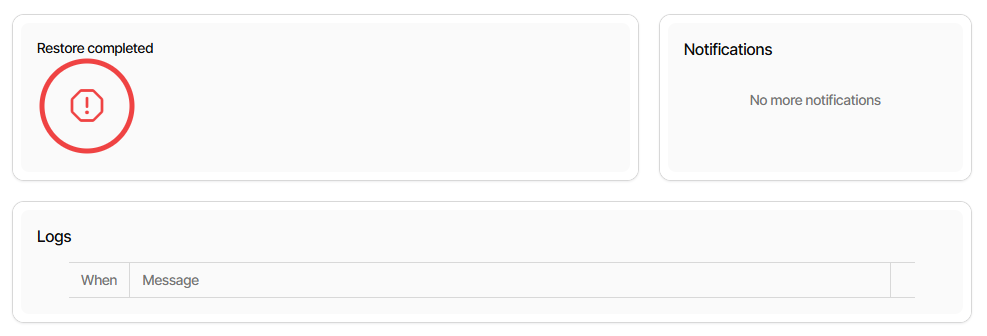
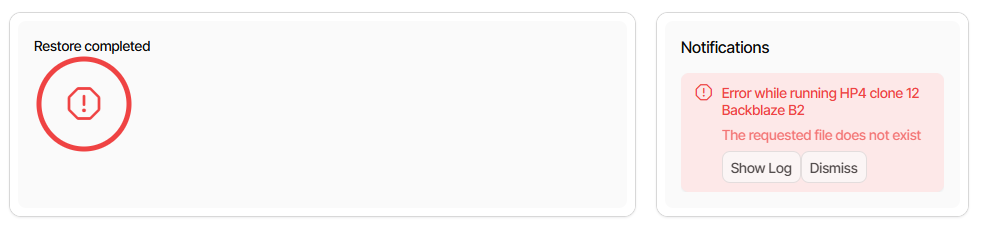
The reporting during the restore looks a little off, with no logs. What’s the notifications note?
To clarify versions, below is the 2.2.0.100 stack trace that I’m describing as a network issue.
I think some other things were glitching at the same time, including web browser and rclone.
Nov 6, 2025, 7:28:47 AM
System.Net.Http.HttpRequestException: The SSL connection could not be established, see inner exception.
 ---> System.IO.IOException: Unable to read data from the transport connection: An existing connection was forcibly closed by the remote host..
 ---> System.Net.Sockets.SocketException (10054): An existing connection was forcibly closed by the remote host.
   --- End of inner exception stack trace ---
   at System.Net.Sockets.Socket.AwaitableSocketAsyncEventArgs.ThrowException(SocketError error, CancellationToken cancellationToken)
   at System.Net.Sockets.Socket.AwaitableSocketAsyncEventArgs.System.Threading.Tasks.Sources.IValueTaskSource<System.Int32>.GetResult(Int16 token)
   at System.Net.Security.SslStream.EnsureFullTlsFrameAsync[TIOAdapter](CancellationToken cancellationToken, Int32 estimatedSize)
   at System.Runtime.CompilerServices.PoolingAsyncValueTaskMethodBuilder`1.StateMachineBox`1.System.Threading.Tasks.Sources.IValueTaskSource<TResult>.GetResult(Int16 token)
   at System.Net.Security.SslStream.ReceiveHandshakeFrameAsync[TIOAdapter](CancellationToken cancellationToken)
   at System.Net.Security.SslStream.ForceAuthenticationAsync[TIOAdapter](Boolean receiveFirst, Byte[] reAuthenticationData, CancellationToken cancellationToken)
   at System.Net.Http.ConnectHelper.EstablishSslConnectionAsync(SslClientAuthenticationOptions sslOptions, HttpRequestMessage request, Boolean async, Stream stream, CancellationToken cancellationToken)
   --- End of inner exception stack trace ---
   at System.Net.Http.ConnectHelper.EstablishSslConnectionAsync(SslClientAuthenticationOptions sslOptions, HttpRequestMessage request, Boolean async, Stream stream, CancellationToken cancellationToken)
   at System.Net.Http.HttpConnectionPool.ConnectAsync(HttpRequestMessage request, Boolean async, CancellationToken cancellationToken)
   at System.Net.Http.HttpConnectionPool.CreateHttp11ConnectionAsync(HttpRequestMessage request, Boolean async, CancellationToken cancellationToken)
   at System.Net.Http.HttpConnectionPool.AddHttp11ConnectionAsync(QueueItem queueItem)
   at System.Threading.Tasks.TaskCompletionSourceWithCancellation`1.WaitWithCancellationAsync(CancellationToken cancellationToken)
   at System.Net.Http.HttpConnectionPool.HttpConnectionWaiter`1.WaitForConnectionWithTelemetryAsync(HttpRequestMessage request, HttpConnectionPool pool, Boolean async, CancellationToken requestCancellationToken)
   at System.Net.Http.HttpConnectionPool.SendWithVersionDetectionAndRetryAsync(HttpRequestMessage request, Boolean async, Boolean doRequestAuth, CancellationToken cancellationToken)
   at System.Net.Http.RedirectHandler.SendAsync(HttpRequestMessage request, Boolean async, CancellationToken cancellationToken)
   at Microsoft.Extensions.Http.Logging.LoggingHttpMessageHandler.<SendCoreAsync>g__Core|4_0(HttpRequestMessage request, Boolean useAsync, CancellationToken cancellationToken)
   at Microsoft.Extensions.Http.Logging.LoggingScopeHttpMessageHandler.<SendCoreAsync>g__Core|4_0(HttpRequestMessage request, Boolean useAsync, CancellationToken cancellationToken)
   at System.Net.Http.HttpClient.<SendAsync>g__Core|83_0(HttpRequestMessage request, HttpCompletionOption completionOption, CancellationTokenSource cts, Boolean disposeCts, CancellationTokenSource pendingRequestsCts, CancellationToken originalCancellationToken)
   at Duplicati.Library.JsonWebHelperHttpClient.GetResponseAsync(HttpRequestMessage req, HttpCompletionOption httpCompletionOption, CancellationToken cancellationToken)
   at Duplicati.Library.JsonWebHelperHttpClient.GetResponseAsync(HttpRequestMessage req, HttpCompletionOption httpCompletionOption, CancellationToken cancellationToken)
   at Duplicati.Library.JsonWebHelperHttpClient.ReadJsonResponseAsync[T](HttpRequestMessage req, CancellationToken cancellationToken)
   at Duplicati.Library.JsonWebHelperHttpClient.GetJsonDataAsync[T](String url, CancellationToken cancellationToken, Action`1 setup)
   at Duplicati.Library.JsonWebHelperHttpClient.PostAndGetJsonDataAsync[T](String url, Object item, CancellationToken cancellationToken)
   at Duplicati.Library.Backend.Backblaze.B2.<>c__DisplayClass23_0.<<GetBucketAsync>b__1>d.MoveNext()
--- End of stack trace from previous location ---
   at Duplicati.Library.Utility.Utility.WithTimeout[T](TimeSpan timeout, CancellationToken token, Func`2 func)
   at Duplicati.Library.Backend.Backblaze.B2.GetBucketAsync(CancellationToken cancellationToken)
   at Duplicati.Library.Backend.Backblaze.B2.<>c__DisplayClass30_0.<<RebuildFileCache>b__0>d.MoveNext()
--- End of stack trace from previous location ---
   at Duplicati.Library.Utility.Utility.WithTimeout[T](TimeSpan timeout, CancellationToken token, Func`2 func)
   at Duplicati.Library.Backend.Backblaze.B2.RebuildFileCache(CancellationToken cancellationToken)
   at Duplicati.Library.Backend.Backblaze.B2.PutAsync(String remotename, Stream stream, CancellationToken cancelToken)
   at Duplicati.Library.Main.Backend.BackendManager.PutOperation.PerformUpload(IBackend backend, String hash, Int64 size, CancellationToken cancelToken)
   at Duplicati.Library.Main.Backend.BackendManager.PutOperation.ExecuteAsync(IBackend backend, CancellationToken cancelToken)
   at Duplicati.Library.Main.Backend.BackendManager.Handler.Execute[TResult](PendingOperation`1 op, CancellationToken cancellationToken)
   at Duplicati.Library.Main.Backend.BackendManager.Handler.Execute(PendingOperationBase op, CancellationToken cancellationToken)
   at Duplicati.Library.Main.Backend.BackendManager.Handler.ExecuteWithRetry(PendingOperationBase op, CancellationToken cancellationToken)
   at Duplicati.Library.Main.Backend.BackendManager.Handler.ExecuteWithRetry(PendingOperationBase op, CancellationToken cancellationToken)
   at Duplicati.Library.Main.Backend.BackendManager.Handler.ReclaimCompletedTasks(List`1 tasks)
   at Duplicati.Library.Main.Backend.BackendManager.Handler.EnsureAtMostNActiveTasks(Int32 n, List`1 tasks)
   at Duplicati.Library.Main.Backend.BackendManager.Handler.EnsureAtMostNActiveTasks(Int32 uploads, Int32 downloads)
   at Duplicati.Library.Main.Backend.BackendManager.Handler.Run(IReadChannel`1 requestChannel)
   at Duplicati.Library.Main.Operation.BackupHandler.RunMainOperation(Channels channels, ISourceProvider source, UsnJournalService journalService, BackupDatabase database, IBackendManager backendManager, BackupStatsCollector stats, Options options, IFilter filter, BackupResults result, ITaskReader taskreader, Int64 filesetid, Int64 lastfilesetid)
   at Duplicati.Library.Main.Operation.BackupHandler.RunAsync(String[] sources, IBackendManager backendManager, IFilter filter)
   at Duplicati.Library.Main.Operation.BackupHandler.RunAsync(String[] sources, IBackendManager backendManager, IFilter filter)
   at Duplicati.Library.Main.Controller.<>c__DisplayClass22_0.<<Backup>b__0>d.MoveNext()
--- End of stack trace from previous location ---
   at Duplicati.Library.Utility.Utility.Await(Task task)
   at Duplicati.Library.Main.Controller.RunAction[T](T result, String[]& paths, IFilter& filter, Func`3 method)
   at Duplicati.Library.Main.Controller.Backup(String[] inputsources, IFilter filter)
   at Duplicati.Server.Runner.RunInternal(Connection databaseConnection, EventPollNotify eventPollNotify, INotificationUpdateService notificationUpdateService, IProgressStateProviderService progressStateProviderService, IApplicationSettings applicationSettings, IRunnerData data, Boolean fromQueue)
Because I’ll look at 2.2.0.100 more, I did the Direct restore test on 2.1.2.3_beta_2025-10-11.
EDIT 2:
Try to figure out what file didn’t make it due to the Nov 6, 2025, 7:28:47 AM stack trace above.
Although the time is a little off, probably the below. Regardless, it’s the file I was looking into…
2025-11-06 07:28:30 -05 - [Retry-Duplicati.Library.Main.Backend.Handler-RetryPut]: Operation Put with file duplicati-bcb67ece942e44e55b42ac23cf2a26d5a.dblock.zip.aes attempt 2 of 1 failed with message: The SSL connection could not be established, see inner exception.
2025-11-06 07:28:30 -05 - [Warning-Duplicati.Library.Main.Backend.Handler-BackendManagerHandlerFailure]: Error in handler: The SSL connection could not be established, see inner exception.
Confirm backups started, using the log file, as job logs with errors (like the 7:20) get lost:

2025-11-06 07:20:01 -05 - [Information-Duplicati.Library.Main.Controller-StartingOperation]: The operation Backup has started
2025-11-06 08:34:41 -05 - [Information-Duplicati.Library.Main.Controller-StartingOperation]: The operation Backup has started
2025-11-06 08:39:38 -05 - [Information-Duplicati.Library.Main.Controller-StartingOperation]: The operation Backup has started

Look for run-script-after complaints:

2025-11-06 07:28:37 -05 - [Error-Duplicati.Library.Modules.Builtin.RunScript-InvalidExitCode]: The script "HP4 clone 12 Backblaze B2\sync.bat" returned with exit code 4
2025-11-06 08:37:51 -05 - [Error-Duplicati.Library.Modules.Builtin.RunScript-InvalidExitCode]: The script "HP4 clone 12 Backblaze B2\sync.bat" returned with exit code 4
2025-11-06 08:42:53 -05 - [Error-Duplicati.Library.Modules.Builtin.RunScript-InvalidExitCode]: The script "HP4 clone 12 Backblaze B2\sync.bat" returned with exit code 4

IIRC the 8:37 failed because it is designed to preserve existing errors, for example the 7:28.
The 8:42 run of backup checks noticed the backup corruption, but when exactly did that get in?

2025-11-06 07:20:05 -05 - [Information-Duplicati.Library.Main.BasicResults-BackendEvent]: Backend event: List - Started:  ()
2025-11-06 07:23:51 -05 - [Information-Duplicati.Library.Main.BasicResults-BackendEvent]: Backend event: List - Retrying:  ()
2025-11-06 07:24:01 -05 - [Information-Duplicati.Library.Main.BasicResults-BackendEvent]: Backend event: List - Started:  ()
2025-11-06 07:24:42 -05 - [Information-Duplicati.Library.Main.BasicResults-BackendEvent]: Backend event: List - Completed:  (1.02 KiB)
2025-11-06 07:26:08 -05 - [Information-Duplicati.Library.Main.BasicResults-BackendEvent]: Backend event: Put - Started: duplicati-bf33a18ddadc544b78edd732d3383c92e.dblock.zip.aes (9.95 MiB)
2025-11-06 07:26:08 -05 - [Information-Duplicati.Library.Main.BasicResults-BackendEvent]: Backend event: Put - Started: duplicati-b894d37478d714400a730ba137f3016c6.dblock.zip.aes (9.96 MiB)
2025-11-06 07:26:22 -05 - [Information-Duplicati.Library.Main.BasicResults-BackendEvent]: Backend event: Put - Started: duplicati-bb6ea2c87fdd543489c4df5b130cd921c.dblock.zip.aes (9.96 MiB)
2025-11-06 07:26:22 -05 - [Information-Duplicati.Library.Main.BasicResults-BackendEvent]: Backend event: Put - Started: duplicati-becdc7173b25740efa18cfd486f6d882d.dblock.zip.aes (9.93 MiB)
2025-11-06 07:27:54 -05 - [Information-Duplicati.Library.Main.BasicResults-BackendEvent]: Backend event: Put - Retrying: duplicati-bf33a18ddadc544b78edd732d3383c92e.dblock.zip.aes ()
2025-11-06 07:27:54 -05 - [Information-Duplicati.Library.Main.BasicResults-BackendEvent]: Backend event: Put - Retrying: duplicati-b894d37478d714400a730ba137f3016c6.dblock.zip.aes ()
2025-11-06 07:28:04 -05 - [Information-Duplicati.Library.Main.BasicResults-BackendEvent]: Backend event: Put - Rename: duplicati-bf33a18ddadc544b78edd732d3383c92e.dblock.zip.aes (9.95 MiB)
2025-11-06 07:28:04 -05 - [Information-Duplicati.Library.Main.BasicResults-BackendEvent]: Backend event: Put - Rename: duplicati-b2e0598e273684d9b8267164a6dc24347.dblock.zip.aes (9.95 MiB)
2025-11-06 07:28:04 -05 - [Information-Duplicati.Library.Main.Backend.PutOperation-RenameRemoteTargetFile]: Renaming "duplicati-bf33a18ddadc544b78edd732d3383c92e.dblock.zip.aes" to "duplicati-b2e0598e273684d9b8267164a6dc24347.dblock.zip.aes"
2025-11-06 07:28:04 -05 - [Information-Duplicati.Library.Main.BasicResults-BackendEvent]: Backend event: Put - Started: duplicati-b2e0598e273684d9b8267164a6dc24347.dblock.zip.aes (9.95 MiB)
2025-11-06 07:28:04 -05 - [Information-Duplicati.Library.Main.BasicResults-BackendEvent]: Backend event: Put - Rename: duplicati-b894d37478d714400a730ba137f3016c6.dblock.zip.aes (9.96 MiB)
2025-11-06 07:28:04 -05 - [Information-Duplicati.Library.Main.BasicResults-BackendEvent]: Backend event: Put - Rename: duplicati-bcb67ece942e44e55b42ac23cf2a26d5a.dblock.zip.aes (9.96 MiB)
2025-11-06 07:28:04 -05 - [Information-Duplicati.Library.Main.Backend.PutOperation-RenameRemoteTargetFile]: Renaming "duplicati-b894d37478d714400a730ba137f3016c6.dblock.zip.aes" to "duplicati-bcb67ece942e44e55b42ac23cf2a26d5a.dblock.zip.aes"
2025-11-06 07:28:04 -05 - [Information-Duplicati.Library.Main.BasicResults-BackendEvent]: Backend event: Put - Started: duplicati-bcb67ece942e44e55b42ac23cf2a26d5a.dblock.zip.aes (9.96 MiB)
2025-11-06 07:28:23 -05 - [Information-Duplicati.Library.Main.BasicResults-BackendEvent]: Backend event: Put - Retrying: duplicati-bb6ea2c87fdd543489c4df5b130cd921c.dblock.zip.aes ()
2025-11-06 07:28:23 -05 - [Information-Duplicati.Library.Main.BasicResults-BackendEvent]: Backend event: Put - Retrying: duplicati-becdc7173b25740efa18cfd486f6d882d.dblock.zip.aes ()
2025-11-06 07:28:30 -05 - [Information-Duplicati.Library.Main.BasicResults-BackendEvent]: Backend event: Put - Failed: duplicati-bcb67ece942e44e55b42ac23cf2a26d5a.dblock.zip.aes ()
2025-11-06 07:28:30 -05 - [Information-Duplicati.Library.Main.BasicResults-BackendEvent]: Backend event: Put - Failed: duplicati-b2e0598e273684d9b8267164a6dc24347.dblock.zip.aes ()

duplicati-bcb67ece942e44e55b42ac23cf2a26d5a.dblock.zip.aes wound up State Uploading
duplicati-ia9c7ee5113c242fca20d310149a2931e.dindex.zip.aes wound up State Uploading
RpcxQeqEw_c9dA5E84rED0YUTiu66scrJh8Ef9dAAic= blocklist hash isn't around yet
5MvSsZn7kb3AjSBydSONxAjVMHFSF2Bukv5vAAbbirI= block is registered to
duplicati-bcb67ece942e44e55b42ac23cf2a26d5a.dblock.zip.aes still in State Uploading

Later it seemingly notices that dblock isn't present, and so goes to State Deleting

2025-11-06 08:34:31 -05 - [Information-Duplicati.Library.Main.Operation.FilelistProcessor-SchedulingMissingFileForDelete]: Scheduling missing file for deletion, currently listed as Uploading: duplicati-bcb67ece942e44e55b42ac23cf2a26d5a.dblock.zip.aes
2025-11-06 08:34:46 -05 - [Information-Duplicati.Library.Main.Operation.FilelistProcessor-KeepDeleteRequest]: Keeping delete request for duplicati-bcb67ece942e44e55b42ac23cf2a26d5a.dblock.zip.aes until 11/6/2025 10:34:31 AM
2025-11-06 08:37:44 -05 - [Information-Duplicati.Library.Main.Operation.FilelistProcessor-KeepDeleteRequest]: Keeping delete request for duplicati-bcb67ece942e44e55b42ac23cf2a26d5a.dblock.zip.aes until 11/6/2025 10:34:31 AM
2025-11-06 08:39:43 -05 - [Information-Duplicati.Library.Main.Operation.FilelistProcessor-KeepDeleteRequest]: Keeping delete request for duplicati-bcb67ece942e44e55b42ac23cf2a26d5a.dblock.zip.aes until 11/6/2025 10:34:31 AM
2025-11-06 08:41:24 -05 - [Information-Duplicati.Library.Main.Operation.FilelistProcessor-KeepDeleteRequest]: Keeping delete request for duplicati-bcb67ece942e44e55b42ac23cf2a26d5a.dblock.zip.aes until 11/6/2025 10:34:31 AM

Looking in the DB as of 8:34:
RpcxQeqEw_c9dA5E84rED0YUTiu66scrJh8Ef9dAAic= blocklist hash isn't around yet
5MvSsZn7kb3AjSBydSONxAjVMHFSF2Bukv5vAAbbirI= block is registered to
duplicati-bcb67ece942e44e55b42ac23cf2a26d5a.dblock.zip.aes which is State Deleting

Looking in the DB as of 8:37:
RpcxQeqEw_c9dA5E84rED0YUTiu66scrJh8Ef9dAAic= blocklist hash has now shown up
5MvSsZn7kb3AjSBydSONxAjVMHFSF2Bukv5vAAbbirI= block is registered to
duplicati-bcb67ece942e44e55b42ac23cf2a26d5a.dblock.zip.aes which is State Deleting

5MvSsZn7kb3AjSBydSONxAjVMHFSF2Bukv5vAAbbirI= block isn't in any DeletedBlock table

5MvSsZn7kb3AjSBydSONxAjVMHFSF2Bukv5vAAbbirI= block is 705098
It's in use in one or more BlocksetEntry but doesn't seem to be in the destination
EDIT 3:
Pre-fail DB lacks 5MvSsZn7kb3AjSBydSONxAjVMHFSF2Bukv5vAAbbirI= block and checked OK.
Problem seems to have originated in scheduled 7:20 backup where block dblock upload failed.
That backup end was a little messy, but might leave destination consistent since little uploaded.
8:34:41 backup starts and tries to help the 7:20 by uploading its dlist, but the destination is bad:
Possibly dlist upload exposes the inconsistency. DB ends with block refs to State Deleting dblock.
When are such bad references supposed to be noticed? The backups look good, but are broken:
EDIT 4:
The backup that ran from 8:34 to 8:37 uploaded two dlist files, first synthetic, later its own usual:
The 7:20 backup left duplicati-20251106T122001Z.dlist.zip.aes at State Temporary. Significant?
If so, this makes a repro harder, as one might have to keep dlist from reaching State Uploading.
EDIT 5:
After several unsuccessful attempts at simple repro of the synthetic filelist, quote of process is:
One question might be the exact definition of “whatever completed”, e.g. what about uploading?
So far my testing has been with one file backed up while offline. But maybe I need several files? Regardless of test steps (easy or hard), there’s the fact that it happened on my ordinary backup.
EDIT 6:
Went ahead and filed an issue. Regardless of outcome, I’m sure there’s one in here somewhere.
I’m still holding off a fix attempt, trying to preserve state. Meanwhile, I ran some database tests:
SELECT DISTINCT FilesetID,Path FROM
Block
JOIN Remotevolume ON Block.VolumeID = RemoteVolume.ID
JOIN BlocksetEntry ON Block.ID = BlocksetEntry.BlockID
JOIN FileLookup ON BlocksetEntry.BlocksetID = FileLookup.BlocksetID
JOIN FilesetEntry ON FileLookup.ID = FilesetEntry.FileID
WHERE RemoteVolume.State <> 'Verified'

FilesetID	Path
444	glogg.ini
445	glogg.ini
444	recovery.jsonlz4
445	recovery.jsonlz4
444	recovery.baklz4
445	recovery.baklz4

Looking at DB.3:

SELECT FileID FROM FilesetEntry WHERE FilesetID = 442
EXCEPT
SELECT FileID FROM FilesetEntry WHERE FilesetID = 441

FileID
57568
57569
57570
57571
57572
57573
57574
57575

ID	PrefixID	Path
57568	24	My Drive\
57569	6062	desktop.ini
57570	86	desktop.ini
57571	23	sessionstore-backups\
57572	23	bookmarkbackups\
57573	3569	recovery.baklz4
57574	3568	bookmarks-2025-11-06_37_w-wRQnFrZjdSyy9ArpMQzMIsJW1FAGsjIZ4yexTO-YA=.jsonlz4
57575	3571	glogg.ini
EDIT 7:
Since key data is preserved locally, I decided to continue poking at the backup.
Testing my newly discovered broken file, an attempt to restore glogg.ini got:
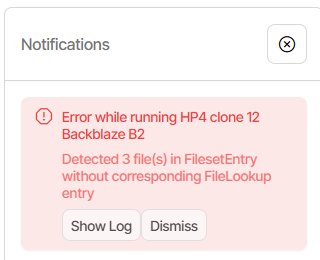
No job log as usual. Server log doesn’t clarify a whole lot more, and lacks names:
System.Data.ConstraintException: Detected 3 file(s) in FilesetEntry without corresponding FileLookup entry
   at Duplicati.Library.Main.Database.LocalDatabase.RemoveRemoteVolumes(IEnumerable`1 names, CancellationToken token)
   at Duplicati.Library.Main.Database.LocalDatabase.RemoveRemoteVolumes(IEnumerable`1 names, CancellationToken token)
   at Duplicati.Library.Main.Operation.FilelistProcessor.RemoteListAnalysis(IBackendManager backendManager, Options options, LocalDatabase database, IBackendWriter log, IEnumerable`1 protectedFiles, IEnumerable`1 strictExcemptFiles, VerifyMode verifyMode, CancellationToken cancellationToken)
   at Duplicati.Library.Main.Operation.RepairHandler.RunRepairRemoteAsync(IBackendManager backendManager, CancellationToken cancellationToken)
   at Duplicati.Library.Main.Operation.RepairHandler.RunRepairRemoteAsync(IBackendManager backendManager, CancellationToken cancellationToken)
   at Duplicati.Library.Main.Operation.RepairHandler.RunRepairRemoteAsync(IBackendManager backendManager, CancellationToken cancellationToken)
   at Duplicati.Library.Main.Operation.RepairHandler.RunAsync(IBackendManager backendManager, IFilter filter)
   at Duplicati.Library.Utility.Utility.Await(Task task)
   at Duplicati.Library.Main.Controller.RunAction[T](T result, String[]& paths, IFilter& filter, Func`3 method)
   at Duplicati.Library.Main.Controller.RunAction[T](T result, IFilter& filter, Func`3 method)
   at Duplicati.Library.Main.Controller.Repair(IFilter filter)
   at Duplicati.Server.Runner.RunInternal(Connection databaseConnection, EventPollNotify eventPollNotify, INotificationUpdateService notificationUpdateService, IProgressStateProviderService progressStateProviderService, IApplicationSettings applicationSettings, IRunnerData data, Boolean fromQueue)
Profiling log shows no file names, and source looks like it just doesn’t show them.
Arguably there’s not much that typical users could do with the file names anyway.
So off to see what can be made from what I have. The message might be by this:
Since SQL is happy now, pre-commit validation must have reduced FileLookup:
might be it, as the corrupted DB thinks it has the blocksets, but lacks the blocks.
Three is the right number of files in sorry situation, per posted SQL query result.
Question is – how to fix this? Recreate doesn’t work, at least on initial try of that.
Run list-broken-files to see if it has any files to flag. Sadly it doesn’t notice:
   Listing remote folder ...
 Return code: 0
Sometimes when it’s thought that a recent backup messed up, deletion can help.
This reminds me I should have changed retention earlier to keep all the versions.
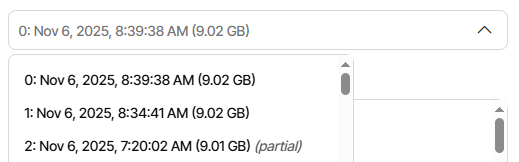
I’ll check Restore to confirm my last two backups (ID 444 and 445) still exist. Yes:
and one can also see the 7:20 one that had the network glitch that began all this.
Delete all three versions. That would be --version=0-2 in a GUI Commandline.
   Listing remote folder ...
 The operation Delete has failed => Detected 3 file(s) in FilesetEntry without corresponding FileLookup entry


 System.Data.ConstraintException: Detected 3 file(s) in FilesetEntry without corresponding FileLookup entry
   at Duplicati.Library.Main.Database.LocalDatabase.RemoveRemoteVolumes(IEnumerable`1 names, CancellationToken token)
   at Duplicati.Library.Main.Database.LocalDatabase.RemoveRemoteVolumes(IEnumerable`1 names, CancellationToken token)
   at Duplicati.Library.Main.Operation.FilelistProcessor.RemoteListAnalysis(IBackendManager backendManager, Options options, LocalDatabase database, IBackendWriter log, IEnumerable`1 protectedFiles, IEnumerable`1 strictExcemptFiles, VerifyMode verifyMode, CancellationToken cancellationToken)
   at Duplicati.Library.Main.Operation.FilelistProcessor.VerifyRemoteList(IBackendManager backend, Options options, LocalDatabase database, IBackendWriter log, IEnumerable`1 protectedFiles, IEnumerable`1 strictExcemptFiles, Boolean logErrors, VerifyMode verifyMode, CancellationToken cancellationToken)
   at Duplicati.Library.Main.Operation.FilelistProcessor.VerifyRemoteList(IBackendManager backend, Options options, LocalDatabase database, IBackendWriter backendWriter, Boolean latestVolumesOnly, VerifyMode verifyMode, CancellationToken cancellationToken)
   at Duplicati.Library.Main.Operation.DeleteHandler.DoRunAsync(LocalDeleteDatabase db, Boolean hasVerifiedBackend, Boolean forceCompact, IBackendManager backendManager)
   at Duplicati.Library.Main.Operation.DeleteHandler.RunAsync(IBackendManager backendManager)
   at Duplicati.Library.Main.Operation.DeleteHandler.RunAsync(IBackendManager backendManager)
   at Duplicati.Library.Utility.Utility.Await(Task task)
   at Duplicati.Library.Main.Controller.RunAction[T](T result, String[]& paths, IFilter& filter, Func`3 method)
   at Duplicati.Library.Main.Controller.RunAction[T](T result, Func`3 method)
   at Duplicati.Library.Main.Controller.Delete()
   at Duplicati.CommandLine.Commands.Delete(TextWriter outwriter, Action`1 setup, List`1 args, Dictionary`2 options, IFilter filter)
   at Duplicati.CommandLine.Program.ParseCommandLine(TextWriter outwriter, Action`1 setup, Boolean& verboseErrors, String[] args)
   at Duplicati.CommandLine.Program.RunCommandLine(TextWriter outwriter, TextWriter errwriter, Action`1 setup, String[] args)
 Return code: 100
It seems sort of a circular deadlock – mess in DB impedes cleaning mess in DB.
Before I try purge on three files whose names I wasn’t given, but I can guess at,
perhaps I’ll see if the developer has any response to the GitHub issue I opened.
EDIT 8:
Decided to try a gentle start to purge testing, to see if it can even start a purge.
Give it a bogus path (missing file on missing drive letter). Nope, it refuses to run:
 The operation PurgeFiles has failed => Unable to start the purge process as there are 3 orphan file(s)


 ErrorID: CannotPurgeWithOrphans
 Unable to start the purge process as there are 3 orphan file(s)
 Return code: 100
I’m moderately sure I can get this backup going again by deleting new damage.
dir /od for Nov 6, by backup

Backup 1 log didn't get made

Backup 2
Start: Nov 6, 2025, 8:34:41 AM
End: Nov 6, 2025, 8:37:49 AM

Backup 3
Start: Nov 6, 2025, 8:39:37 AM
End: Nov 6, 2025, 8:41:38 AM

From backup 1, no files due to network outage on upload.

From backup 2, 7 dblock, 7 dindex, 2 dlist, so 16 files.
11/06/2025  08:35 AM           920,221 duplicati-20251106T122002Z.dlist.zip.aes
11/06/2025  08:36 AM        10,462,109 duplicati-b23d818566745409d942170a718ea9862.dblock.zip.aes
11/06/2025  08:36 AM        10,405,597 duplicati-bdbdd7cdc0d7e4ad58a3b76c04ad78a8c.dblock.zip.aes
11/06/2025  08:36 AM             5,533 duplicati-i8b2e5a929d7a499da787fca9f0cf87ce.dindex.zip.aes
11/06/2025  08:36 AM             5,517 duplicati-id77f8471c4bc484eabc4cf18ba7f0c3c.dindex.zip.aes
11/06/2025  08:36 AM        10,397,613 duplicati-baa5ba12e6d07484e98af0255b7c44e59.dblock.zip.aes
11/06/2025  08:36 AM        10,399,901 duplicati-b03b99901c4b34248a31177d0a948c31d.dblock.zip.aes
11/06/2025  08:36 AM        10,417,069 duplicati-b9b6b4a90b8874436bf8bb03abedc2ff3.dblock.zip.aes
11/06/2025  08:36 AM             5,389 duplicati-i64db4c41d10f42a69510211e07d418c1.dindex.zip.aes
11/06/2025  08:36 AM             5,325 duplicati-iab29e300b2b3487a96d80e4701260c95.dindex.zip.aes
11/06/2025  08:36 AM             5,389 duplicati-ia73b9d7e96c84b829776318857bfdbd3.dindex.zip.aes
11/06/2025  08:37 AM        10,463,533 duplicati-b0ba609a030ca4c9bb08ffe32e326a5f7.dblock.zip.aes
11/06/2025  08:37 AM         5,828,029 duplicati-be82557377b464c95be44c173e64c86d2.dblock.zip.aes
11/06/2025  08:37 AM            66,621 duplicati-i4880b3fde3a14111affb6cba3a76c6d6.dindex.zip.aes
11/06/2025  08:37 AM            60,637 duplicati-ia2ea1a0501f44ce1a30b2c82a8f5fe43.dindex.zip.aes
11/06/2025  08:37 AM           920,429 duplicati-20251106T133441Z.dlist.zip.aes

From backup 3, 1 dblock, 1 dindex, 1 dlist, so 3 files.
11/06/2025  08:41 AM            50,493 duplicati-bd04a1cb957ae4817b4c7eadc7f596567.dblock.zip.aes
11/06/2025  08:41 AM             1,757 duplicati-i09a586d34d984a59a50c30c6a50af7be.dindex.zip.aes
11/06/2025  08:41 AM           920,429 duplicati-20251106T133938Z.dlist.zip.aes
and then doing Recreate, however I see that the last time I had to do Recreate:
instead of deleting new files beforehand (which can be riskier if a compact ran), Recreate probably helped to break the deadlock, to allow the repair tools to run.
EDIT 9:
Rather than experiment further on the actual B2 backup, I tested on a local copy.
Unsurprisingly, Recreate couldn’t find what it needed in dindex, so got all dblock.
This would bother some due to time and maybe fees, but I always rclone to local.
Unsurprisingly, Recreate remained unhappy due to the missing blocks in backup:
Recreated database has missing blocks and 2 broken filelists. Consider using “list-broken-files” and “purge-broken-files” to purge broken data from the remote store and the database.
The two broken filelists were the versions after the run that failed due to network. purge-broken-files on the recreated DB runs fine, then the Recreate runs fine.
Resetting the local copy from the remote, then deleting the newer files after some careful studying also resulted in a clean Recreate without any dblock “download”, however it sacrifices all of those newer versions instead of just purging breakages.
Nice move would be to fix the bug causing the corruption. Tools could improve too.