This release is a beta release inteded to be used for testing.
If no major issue are found with this release, it will be used to create a new stable release.
About this release
This release is primarily a bugfix release from the previous beta and fixes a few minor issues discovered during the testing period.
A few minor enhancements have been added as they proved stable.
Database version upgrade
This version updates the server database to v9 and adds an extra column.
The database tool can downgrade without data loss.
Permission update on Windows
To simplify working with a Windows Service based installation, the privileges set on the database and data folder now grants explicit access to Admin as well as the intended users.
New since last beta
Revert MinIO API to v6.0.0 to fix upload failures
S3 checks that the path does not contain an endpoint, thanks @smyja
Fixed support for HyperV and MSSQL in new user interface
Better parsing of MSGraph errors
Support for remotely managed backup configs
Removing null characters from paths to fix a Windows mounted/virtual folder issue
Fixed log not showing values for SQL statements
Added support for Google IAM
Updated CoCoL to remove a flurry of unhandled exception log messages
Fixed a case where recreated index files were sometimes incomplete
Permissions for datafolder on Windows are now granted to Administrator as well
Fixed a slowdown when listing files to restore
Updated UI to latest version
Summary of large changes since last stable
New user interface
New datafolder default location for Administrator/root
New backends pCloud, Filen and Filejump.
New backend for SMB to avoid mounting shares
Removed Sia backend and marked Mega as deprecated
Common http options are now applied to backends, and timeout options are renamed
Installer packages are now signed by Duplicati Inc
Remote source support for S3, SSH and SMB
Database is upgraded to v17 for local db, and v9 for settings database
Database upgrade/downgrade tool is provided
New file and folder enumeration logic
Timeouts logic on all backend operations
Improved database validation and repair logic
ServerUtil can output JSON for script integration
Improved support for having Duplicati behind a proxy
Updated throttle logic, all streams share the throttle
Improved repair logic
VSS is automatically on if running on Windows with sufficient privileges
Hi,
The backup export feature isn’t working for me in this version. It worked in the previous beta version.
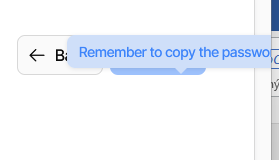
When I hover my mouse over the button, a warning appears saying “Remember to copy …” and this prevents me from clicking the button.
I found a problem in Windows Server 2019 with this beta version. Backups take a very long time there. A backup that took 1 minute with version 2.1.0.5 now takes 40 minutes. The “My backup - Verifying backend data …” phase takes about 39 minutes. The logs show that the backup took a few seconds.
Step 3 “Source data” when editing a backup also takes a long time. New files can only be added after about 40 minutes.
Now the logs should flicker as data is flooding in. At some point during the “Verifying backend data …” Try to see what the logs are explaining that it is doing. Maybe there is one thing that is taking up all the time, or maybe it is many small things.
Whatever hints you can collect can perhaps reveal what the issue is.
Oct 9, 2025, 5:57:01 PM
Backup end

...

Oct 9, 2025, 5:56:56 PM
  Tag: Profiling-Timer.Finished-Duplicati.Library.Main.Database.ReusableTransaction-CommitFinalizingBackup
  CommitTransaction: CommitFinalizingBackup took 0:00:00:00.000

20 minutes of idle time

Oct 9, 2025, 5:36:55 PM
  Tag: Profiling-Timer.Finished-Duplicati.Library.Main.Backend.Handler-RemoteOperationPut
  RemoteOperationPut took 0:00:00:00.176

...

Oct 9, 2025, 5:36:46 PM
  Tag: Verbose-Duplicati.Library.Main.Operation.Backup.FileEnumerationProcess-IncludingPath
  Including path as no filters matched: C:\Dat---o\Obrazky\

20 minutes of idle time

Oct 9, 2025, 5:16:29 PM
  Tag: Profiling-Timer.Finished-Duplicati.Library.Main.Database.ExtensionMethods-ExecuteNonQuery
  ExecuteNonQuery: DELETE FROM "Configuration"  took 0:00:00:00.002

...

Oct 9, 2025, 5:16:29 PM
Backup start
I finally solved it by adding the setting:
“Control the use of disk snapshots” to “off”
Since then, the backup has been taking a few seconds again.
The problem remains when editing or adding a new backup.
Here is the log:
Oct 9, 2025, 10:18:42 PM
    Duplicati.Library.Interface.UserInformationException: Microsoft SQL Server VSS Writer not found - cannot backup SQL databases.
       at Duplicati.Library.Snapshots.Windows.MSSQLUtility.QueryDBsInfo(SnapshotProvider provider)
       at Duplicati.WebserverCore.Endpoints.V1.FilesystemPlugins.MSSQL.GetEntries(String[] pathSegments)
    Failed to enumerate MSSQL databases: Microsoft SQL Server VSS Writer not found - cannot backup SQL databases.

Oct 9, 2025, 10:18:42 PM
    System.NullReferenceException: Object reference not set to an instance of an object.
       at Duplicati.Library.Snapshots.Windows.SnapshotManager.Dispose()
    Failed during VSS esnapshot closing

Oct 9, 2025, 10:18:42 PM
    Alphaleonis.Win32.Vss.VssBadStateException: The VSS object was in an incorrect state for the requested operation.
       at Alphaleonis.Win32.Vss.ThrowException(Int32 errorCode)
       at Alphaleonis.Win32.Vss.VssBackupComponents.BackupComplete()
       at Duplicati.Library.Snapshots.Windows.AlphaVssBackup.BackupComplete()
       at Duplicati.Library.Snapshots.Windows.SnapshotManager.Dispose()
    Failed to signal VSS completion

20 minutes of idle time

Oct 9, 2025, 9:58:42 PM
    Cannot open WMI provider \\localhost\root\virtualization\v2. Hyper-V is probably not installed.

Oct 9, 2025, 9:58:42 PM
	Using WMI provider \\localhost\root\virtualization\v2
I have to wait 20 minutes before I can set step 3 “Source data.”
Makes sense. With 2.1.2.x we are now auto-enabling VSS if you are running with Administrator privileges. The logic for this is to support reading locked files by default, if possible.
I think you have a defective VSS writer that hangs.
You can use this command to list VSS Writers:
vssadmin list writers
Once you have the list of writers on your system, you can try systematically testing which one is causing the hang.
Once you hit the right one, the command will complete in roughly a second.
(The writer e8132975-6f93-4464-a53e-1050253ae220 is a system state writer that is excluded if you do not give a list, so you need to add it when manually picking writers).
When you find the correct one, you can add that into settings, and re-enable VSS.
Or, you may be able to fix or uninstall the defective writer.
Unfortunately, the override for excluded writers does not go into the source picker, so that will continue to be slow until you remove or fix the hanging writer.