Prerequisites for Enabling Remote File Locking in Duplicati with Azure Destination

Hi. I use Dupcliati (and love it!) to store backups in Azure storage accounts (blob containers). I would like to make use of the remote file locking feature/support which was recently added to Duplicati - especially to protect against potential ransomware attacks.

I read the Duplicati docs about remote file locking ( Using remote file locking | Duplicati ) and also the Azure docks about immutability support ( Overview of immutable storage for blob data - Azure Storage | Microsoft Learn ). It’s not 100% clear to me how this works. I have the following questions:

  • Are there prerequisites for Azure storage accounts and/or Azure blob containers which I need to meet/check before I can/should enable remote file locking in Duplicati? Or can I just set the destination options in Duplicati and am good to go? Especially I am wondering whether or not I need to enable “blob versioning” for the storage account and/or whether or not I need to enable “Container-level or version-level immutability support” in Azure beforehand.
  • I understand that Duplicati builds blocks of data (files with a configurable size) with changed data and stores these kind of files in the destinations. Along with these I assume that there need to be a kind of index. Further I assume that this index needs to be updated for every backup job run. If the target would make the files in a container immutable for x days, how could Duplicati update the blocks and the index? If the index would be maintained on the machine (not on the target) would making the files in the target immutable be sufficient to protect the backup data against ransomware attacks?

More hints:

  • The “Important Storage Considerations” section in Using remote file locking | Duplicati is pretty vague. It’s not 100% clear what applies to which provider. It’s also not 100% clear what are just considerations and whether there are hard prerequisites. Maybe it could be improved to show concrete considerations and/or prerequisites per provider (instead of saying “… and others”).
  • The Duplicati CLI docs are not up-to-date with the latest version. The remote file locking commands are missing.
  • Depending on the answers, maybe also the above questions could be made more clear in the Duplicati docs.
@kenkendk Could you help me out with this? Any help is greatly appreciated.

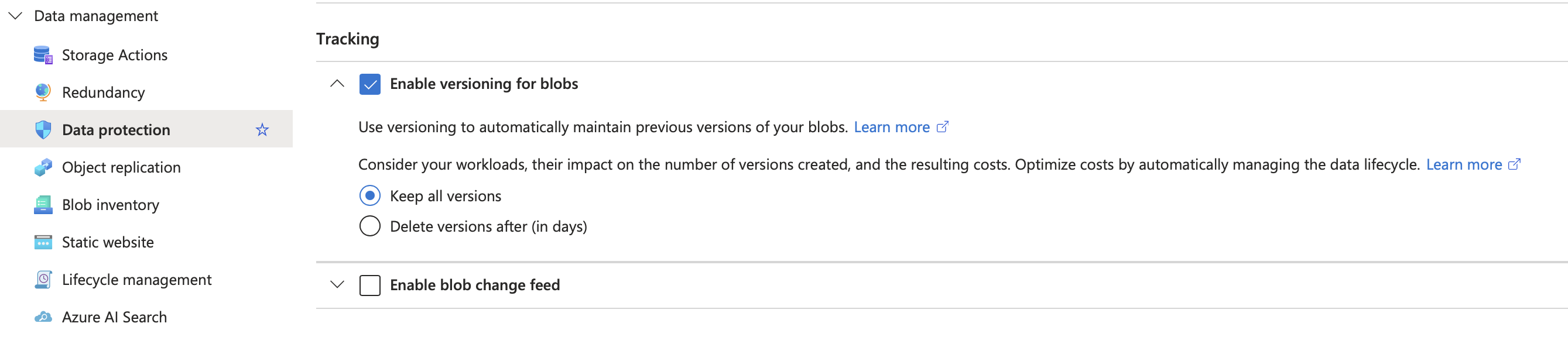
You need to enable “Versioning for Blobs” on the “Storage account” (look under “Data protection”):

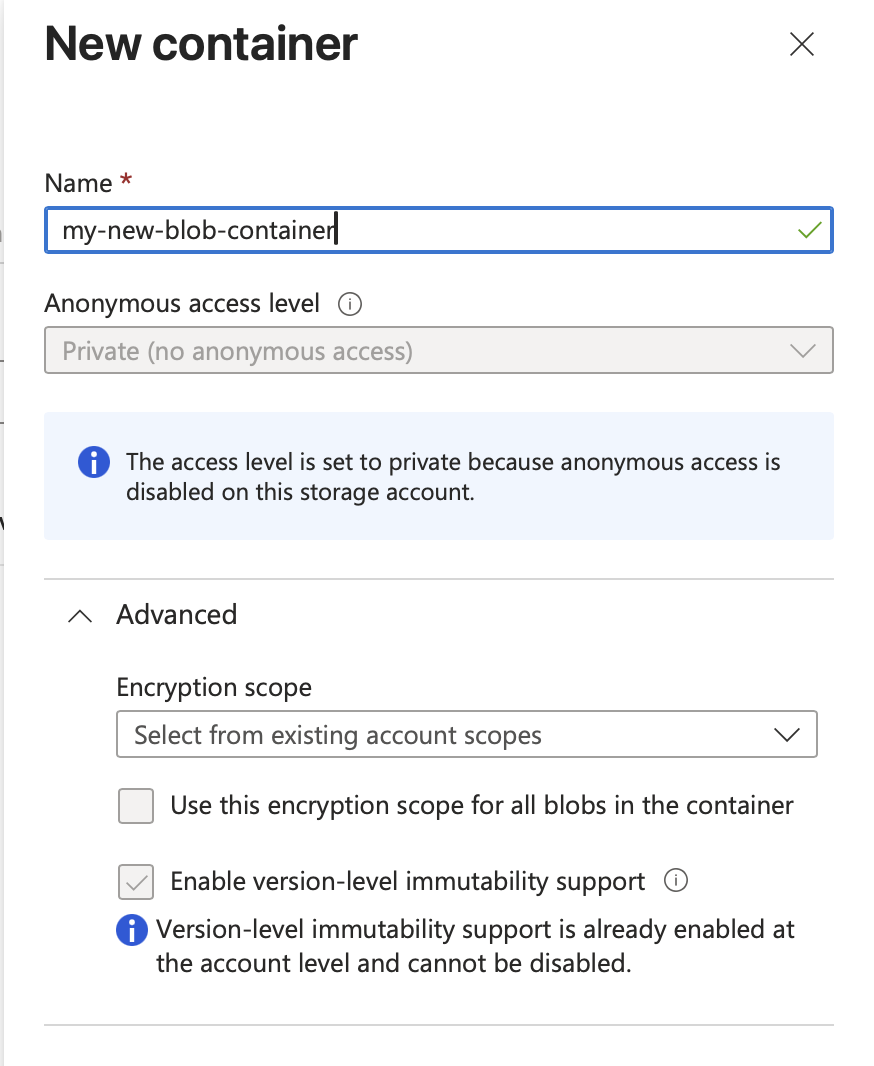
Then on the “Blob container” itself, you need to check the advanced option “Enable version-level immutability support”. I think it is possible to migrate an existing blob container, but I have not tried that. When creating a new one, the options look like this:

The only thing that is visible at the destination are the encrypted zip files (aka volumes). Duplicati knows what volumes are needed to restore a specific version. After a backup completes, Duplicati will lock ALL volumes needed to restore that specific version for the specified duration. If the files are already locked, this will simply extend the lock for those files.

Then, in the local database, Duplicati records what locks were applied, so it does not attempt to auto-remove locked files, even if you expire things before the locks expire.

Duplicati never updates volumes after they are uploaded. If changes are needed (such as for compact), Duplicati will instead upload new volumes and delete the old ones afterwards. This ensures there can never be a partial update, and plays nicely with remote file locks.

Since the remote destination (Azure in this case) is responsible for enforcing the file locks, an attacker that can read all secrets from Duplicati can still not touch the files before the locks expire. If you use compliance mode (aka policy-mode=Locked), not even compromised Azure admin credentials can change the locks.

Happy to improve that, but not sure what the vague part is?

For Azure, the section explains that it uses direct file locking (WORM), so no special storage considerations are required.

I am intentionally not listing all CLI commands on the docs page because it is bound to be outdated.

The commandline tool has built-in help, which is always up-to-date with the version running locally.

If you have specific suggestions, I am open to implementing it. You are also free to edit and create a change request here:

@kenkendk Thank you very much for your response. Very much appreciated!

Your explanations help me a lot. So I understand now that I have to prepare my blob storage account and/or container accordingly (enable versioning on the storage account and migrate my existing container to support version-level immutability).

So can you confirm that this process is correct?

  • Enable versioning on my existing storage account
  • Enable support for version-level immutability on my existing blob container (will migrate the container)
  • Set an unlocked retention interval of 28 days in Azure
  • Add the following options to my Azure destination in my backup job:
    • --remote-file-lock-duration=29D
    • --azure-blob-immutability-policy-mode=unlocked
  • Execute duplicati-cli set-locks <storage-url> --version=0 --file-lock-duration=29D
    • Repeat this command for some more versions 1, 2, 3, etc.
  • Execute duplicati-cli read-lock-info <storage-url> --refresh-lock-info-complete=true

Later when everything works (optionally):

  • Lock the retention policy in Azure
  • Update the --azure-blob-immutability-policy-mode option to locked

My backup jobs run daily and uses a custom retention policy of 3D:1D,4W:1W,6M:1M,5Y:1Y. I basically want to lock the backups in the destination for +/- 1 month. Are the values suggested above (retention policy in Azure: 28 days, remote file lock duration in Duplicati: 29 days) reasonable for this setup? Or should I align the number of days? Or should I align my custom retention policy, so Duplicati would keep daily backups for 28/29 days? Is it correct that with this setup, Duplicati would basically wait for 29 days before attempting to delete old backups in the destination which are not maintained for longer because of the custom retention policy?

Am I missing something?

(Just want to make sure everything works smoothly when I enable this for my existing backups and I don’t break my existing backups. Thank you again in advance for your response!)

It looks correct, but there might be details.

I don’t think this is required. Any reason you want this?

You can set it, but it is the default setting.

You don’t need this, the set-locks command will update the database, but it does not hurt.

That is fine, but remember that Duplicati cannot free the data before the lock expires. So even if you have 3D:1D, then after 3 days (assuming daily backups), some backups would normally be deleted, but cannot be due to locks, so these backups will stick around until the locks expire.

Duplicati will not attempt to delete them while locked, so it will look like it “forgot” to delete the versions until the lock expires.

@kenkendk Thank you very much for your clarifications! I still have some questions:

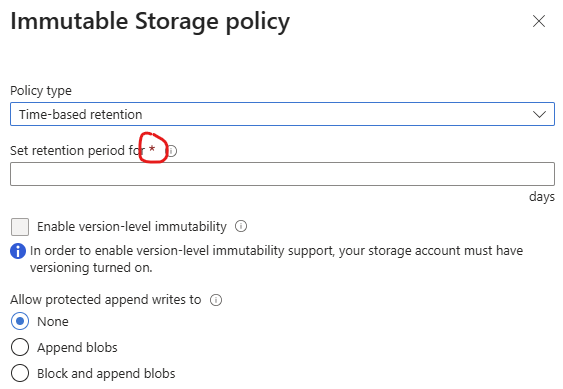
I am forced to set a retention period for the container when migrating an existing container to support version-level immutability:

The Microsoft docs say that this is being used as the default retention policy for the container, but the value can be overridden per blob object. When I migrated the container, I set a retention period of 28 days. This set the retention policy of every(!) blob object already present in the container (I already have lots of backups in the container) to 28 days from now - even very old backups which are kept according to my retention period configuration (see above). Is this fine from the Duplication point-of-view?

More importantly, I got stuck when I tried to execute the “duplicati-cli set-locks” command:

root@duplicati:/# duplicati-cli help set-locks

Usage: duplicati-cli set-locks <storage-URL> [<options>]

  Applies object locks to remote volumes belonging to the selected fileset(s).
  This operation requires:
    - A local database (set --dbpath if it is not found automatically)
    - A backend that supports object locking

  You must specify which version(s) to lock using one of:
    --version=<int>
    --time=<time>
    --all-versions=true

  --file-lock-duration=<time>
    Sets how long the remote volumes should be protected (for example, 30D).
    The lock expiration is computed as: now + file-lock-duration.

root@duplicati:/# duplicati-cli set-locks https://<storage_account_name>.blob.core.windows.net/<container_name> --version=0 --file-lock-duration=7D

Enter encryption passphrase: ********************************
The supplied option --file-lock-duration is not supported and will be ignored
The operation SetLock has failed => The backend url cannot start with http:// or https://. If you intend to use a webdav backend, please use a url starting with webdav://

ErrorID: BackendNotSupportedHttp
The backend url cannot start with http:// or https://. If you intend to use a webdav backend, please use a url starting with webdav://

Frist question: Why does it say The supplied option --file-lock-duration is not supported and will be ignored?

Second question: What should I set as <storage-URL> in order to make it work?

This is not something I have experience with unfortunately.

I guess that makes some sense. Maybe you can set it to zero days? Or 1 day? Then you can use set-locks to only apply to specific versions you want to lock.

Yes. Duplicati will fail if it attempts to delete some of the locked files, but this should be a safe failure. You cannot shorten the period, so if you want to apply a 7 day lock, this will fail if the object is already locked for more than 7 days.

That is a bug in the documentation. The option was renamed to --remote-file-lock-duration to be more specific, but the built-in docs were not updated.

That is the destination url that Duplicati uses for backup and restore, etc. It should start with azure:// for Azure Blob Storage.