Duplicati won’t start any more since Version 2.4.0.0 demands a secure secure datafolder. The error message tells me to restrict the permissions of the secure datafolder manually or by using ‘Duplicati.CommandLine.ConfigureTool.exe secure-datafolder’.
The error message does not tell me what to manually restrict the permissions to, and using the above command in a cmd shell returns a “command Duplicati.CommandLine.ConfigureTool.exe not found” (I translate from German).
Obviously I’m missing very basic knowledge at this point. I wouldn’t even know how to search for it. Could anyone point me in the right direction?
Try search of windows command not found. The Google answer looks pretty accurate to me, however it’s a little incomplete. When you type a simple command, Windows goes searching
according to the PATH environment variable, which has the standard (hopefully-safe) folders.
Rather than adjust path, it’s likely easier to either give full path or use cd to the install folder. C:\Program Files\Duplicati 2 is typical for Windows, but special machines might differ…
Assuming you chose the default download on the download page, that’s where programs are.
Checking non-default installer “Install Duplicati as a Windows service” gets more complicated.
I’m hoping you’ve just been using the default install, but did an upgrade from too old a version.
I did. I kept the version I had originally first installed for a long time, as I found no way to uninstall it. It was not listed as an active application under Windows, no uninstall.exe to be found, and simply deleting the Duplicati directory seemed risky, not wanting to lose my backups. And even when the section on upgrading was eventually added to Upgrading and downgrading | Duplicati (the subheading still reads “This page describes how to downgrade Duplicati …”), it took me a while to actually get to it. So here I am, having upgraded from 1.? to 2.4.
For the installation of Duplicati 1.? I used a folder not on my C:\ drive. I tried using the same drive for the installation of Duplicati 2, but the installation wizard immediately crashed when I hit the “Browse”-button that is part of the “Installation options”-mask of the Duplicati installation wizard (it still does, just tried; error code 2812).
I was, however, able to perform the installation using the default options (and specifically not “as a Windows service”).
When I then received the error message around the insecure data-folder, I tried executing ‘Duplicati.CommandLine.ConfigureTool.exe secure-datafolder’, but the .exe was not found. I searched C:\ for “Duplicati”, and navigated to that directory, but the command was still unknown. Small wonder, the search had directed me to “C:\Users\[BoahEy]\AppData\Local\Duplicati”. This may be a leftover from the “Duplicati 1.?” installation.
I now found the “C:\Program files\Duplicati 2”-folder. After navigating to this folder, the ‘Duplicati.CommandLine.ConfigureTool.exe secure-datafolder’ command worked like a charm.
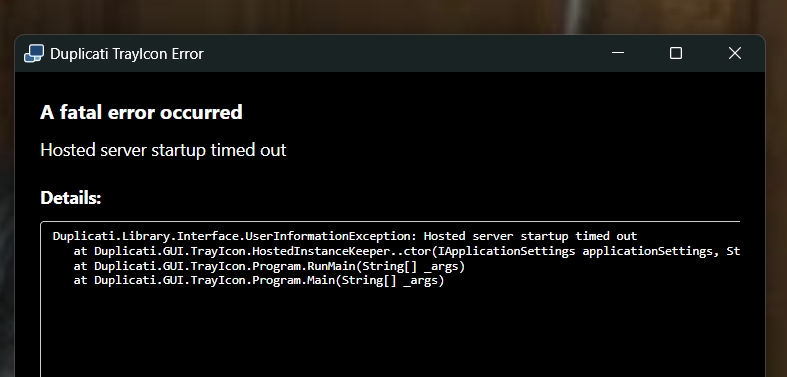
However, this has not been the end of my travails. After restarting my computer, I now received a different error message: Hosted server startup timed out, see below. Would you know what to do?
I don’t recall having heard of that. It’s listed recently, but we don’t know what you installed.
You can go to the install folder and see if there’s a changelog.txt file that says what it is.
There’s no such upgrade path. The last 1.? was 1.3.4 in 2013, completely different in design.
You might have an earlier Duplicati 2, but check for the changelog, or we can look into other
things like .exe files (name several) or seeing dlist, dblock, dindex files in destination.
That’s where to look for the old one, I’d think. Check file dates and read the changelog.txt file.
The MSI now remembers the install location on upgrade, and the path browse button has been fixed.
I explained that part before, but after finding location you did the cd that I had suggested:
I can’t find prior reports of “Hosted server startup timed out”, but ones in images won’t search.
It looks like there’s a 100 second timeout. Is your computer fast, or overloaded during restart?
Ideally you would first check Task Manager for any leftover Duplicati first, but you can also try
just starting it again from the Start menu or Desktop, and maybe notice about how fast it fails.
If you use Task Manager, the Details tab might be easiest, as you can sort it alphabetically.
You might be able to find prior errors in Event Viewer or make more logs if it’s reproducible:
--windows-eventlog: Use this option to log to the Windows event log. The provided name is in the format Log:Source. If no log name is provided, "Duplicati 2" is used.
--windows-eventlog-level: Use this option to set the log level for the Windows event log.
--log-file: Output log information to the file given
--log-level: Determine the amount of information written in the log file
--log-console: Output log information to the console
Easiest is probably to just open a terminal and run it live to see if it says anything interesting.
If not (and if it still fails) you can check Task Manager and do manual start with more options.
C:\Program Files\Duplicati 2\Duplicati.GUI.TrayIcon.exe or cd there if you prefer.