I am running the 2.1.21_beta_2025-10-03 version on an older Windows Server 2012 R2. I decided to update it from the 2.1.0.5_stable_2025-03-04 because it might solve the issue I am having with the tray icon randomly crashing.
However, it seems that the new ngclient does not work properly on that machine. Clicking anywhere does not do anything. Because of that, clicking on the “Use old UI” does not work. I attached a screenshot to show how it looks like (there’s even some weird overlapping on the bottom right).
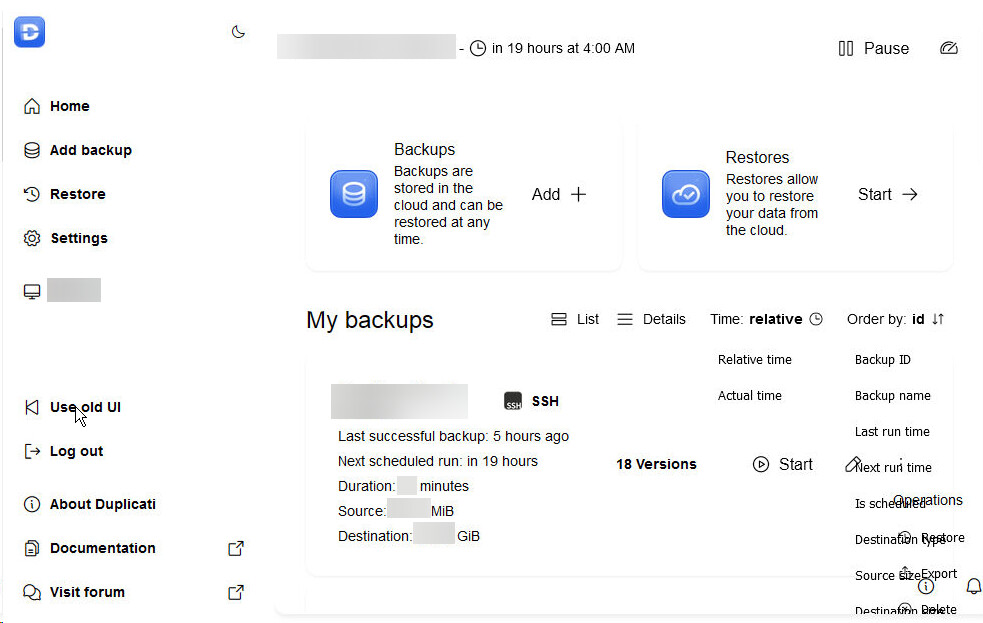
I can work around this by using the localhost:8200/ngax link. However, it always opens the ngclient when clicking on the tray icon.
I assume that these ngclient issues are likely related to some .NET problem or other configuration that is not supported, correct me if I’m wrong.
Is it possible to set the tray icon to open the ngax link by default instead of ngclient for that machine? How?
Thanks!