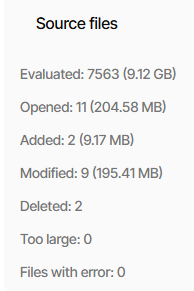
I’m a new user trying out Duplicati (docker). I’ve recently tried a copy job from a Synology Nas to my Unraid server over tailscale (1.8tb) - it’s slow to seed, which is fine. Last month the job stopped because the docker image was updated.
Looking at the log, it managed to copy 649.89GB - but looking at the log (new interface) it said under “Source Files”
Deleted: 14372
Which caused a bit of panic as I couldn’t be sure on the amount of files/size on the source - so I can’t work out if there were files deleted or not.
Could anyone shed any light on what it means? Also, is there a more detailed log that might explain what was deleted? thanks
Not sure whether it is just terminology or I am missing a Duplicati “copy” feature - is “copy job” a backup job or something else? In the latter case, following remarks might not be helpful, I assumed you are reporting about a normal backup job:
From my understanding, “Deleted” means that these files were included in the previous backup run but not in the most recent run. It doesn’t necessarily mean that files have been deleted. For instance, renaming a file on source would produce an “Added: 1, Deleted: 1” report. If you rename a whole folder, you will likely have even more files reported both as added and deleted but they should still be present in your backup. Maybe it could be interesting to see how many “Deleted” files your previous job run reported and whether the amount of “Deleted” files in the last run could be in a normal range. “Deleted” does not mean any deletion on source and if your previous backup revision is still present, the files reported to have been deleted in the most recent run should still be existing in the previous revision (and will be present in the data of the next job run if you do not delete them on source’s filesystem in the mean time).
In addition to the condensed log you can also check the live log (About → Logs → Live) as well as a manual job log (add log-file and log-file-log-level to your job’s arguments to tell Duplicati under which file path a log should be created and which log level you want to observe). Both additional logs are only available if you activate them beforehand (live log also shows only a limited number of recent messages in the web UI and thus might not be suitable as reference for a whole job run). To be honest, I am not so confident that deletions are actually logged even at verbose log level (I looked in a recent job log and at least did not see such entries at first glance).
For more expert advice than mine you might add what you mean by:
Did Duplicati report a successful job run or it being incomplete?
I hope I didn’t completely misunderstand your question.
(to use an example) is saying what Source changes were seen. A Modified file is one that was there before, but had changes. Deleted and Added were explained.
The COMPARE command will say what was added, modified, or deleted. Run in Commandline on the job menu, and clear excess CommandLine Arguments data. Leave the box empty to show change between the previous two backup versions.