Linux: Cannot encrypt database when using --settings-encryption-key

Hi all,

After upgrade Duplicati started to complain that my DB is not encrypted. So I followed the guide and now my command looks like this:

ExecStart=/opt/duplicati/duplicati --webservice-port=8200 --auto-update=false --settings-encryption-key=*************

This is part of user service defined in /usr/lib/systemd/user/duplicati.service

Yet after restart, Duplicati still complains with yellow icon, that my DB is not encrypted.

Tray icon:

image

Web GUI:

App installed from AUR (en) - duplicati-bin

At this point not sure if this is a bug or I am doing something wrong here.

Welcome to the forum @gladykov

From your link, would this be version duplicati-bin 2.2.0.0-1 from AUR team yesterday?
Someone else is reporting a weird bug (not this one) with that. Any idea of old version?

Warnings can persist over restarts, as they’re in server database. Did you ever Dismiss?

Another test could be to use known-bad --settings-encryption-key to see if it breaks.

I’m not much up on user service behavior. If needed, maybe test the same line from shell?
This tends to write errors onto the terminal. OTOH you might find yours in systemd journal.

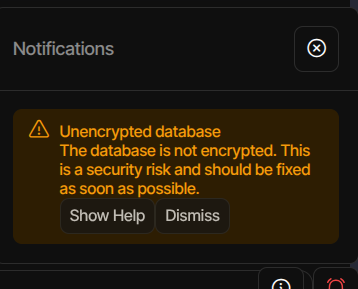
Lol, I had to dismiss alert, and it went away. Thank you :smiley:

1 Like