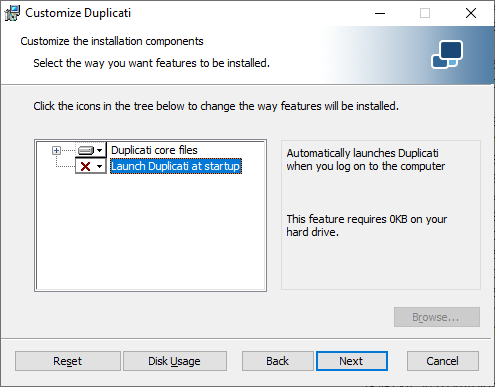
Please see Running the Server as a Windows Service. It’s a later scriptable step after Duplicati is installed by whichever means you pick from my choices, AFAIK.
I assume you mean the below, but I don’t like its “startup” wording
because it’s too suggestive of system startup. It’s actually at login.
With .zip install, put it where you like. I’m not sure if msiexec way can do it.
If I ask Google “can msiexec install to a custom path” it gives me hopeful reply.
That leads me to Duplicati source, which also gives me hope for INSTALLDIR.
One could guess from path and code that it uses WiX language. You can study.
This is the other usual thing one changes to avoid the default of a plain TrayIcon.
That means it’s probably come up before. Did you do any search for the answer?
Let me try starting in About → Changelog going from older to newer in its history:
- Re-added the
FORSERVICE=true flag to MSI packages
- Fixed an issue with quiet MSI upgrades
- MSI will automatically attempt to stop and restart the service during install
Got citations? I don’t know the area. Much might be handled by installer code, meaning what goes in between app code in WiX language and Windows itself.
Here’s an AI answer to a question I posed:
Yes, the WiX Toolset is fundamentally designed to create installers for the Windows Installer engine and it leverages the underlying Windows Installer API
Is that the API you mean? If so, I think you’re all set. Just customize WiX code.
This is one of the more recent posts, from lead dev in forum Developer section.
Are you a developer? If not, I’m not sure anyone will direct you from ground up.
There are hundreds or thousands times more “asks” than available developers.
GitHub Issues (two main ones) holds the backlogs. Forum requests can be lost.
It’s still a good place to search. I’d start with searches for msiexec FORSERVICE,
then look at the code if you need ideas on what it does, then look for other ones.
It would be nice if direction got in the manual, but it seems to be changing slowly, evidenced by the change log and forum search. Or maybe it’s a resources issue? There plenty of stuff that the new manual could do better on, but dev is stretched.
You can bypass all of this .msi complexity if you do a .zip install. Will that fly?
It looks like the .msi has the advantage of trying to handle service on upgrades.
https://github.com/duplicati/duplicati/commits/master/ReleaseBuilder/Resources/Windows/TrayIcon/Duplicati.wxs
will show installer change history. In 2019 era, a second developer volunteer did:
Add parameter to Wix installer that will install only the core feature #3893
This new option will only install the Core feature and will not auto start Duplicati:
msiexec /i duplicati.msi FORSERVICE = “true”
You then look at GitHub change history and current version for later change.
You look at forum and maybe Issues, or try Google etc. for a broader search.
That’s how you see if what’s there works and suits you, or needs more work.
If it needs more work and is generally useful, open a pull request for change.
If you’re a mostly-set developer needing boost, try forum developer category.
A pull request, If accepted, stands a chance of letting you use normal release
going forward. If you just change code in your own fork, you will maintain that.
Duplicati is open source under MIT license, so you can reapply custom patch,
however you’re then into building it and figuring out how to get update to user.
I’d still like to hear why .zip install won’t work. I use it all the time on this PC.