How do I disable the “Mega support library is currently unmaintained” warning, since it makes my Duplicati system tray icon yellow every time a backup is made.
I hope someone with more information will chime in, as I’ve never used this particular setting before and so I can’t give you any tips on it. There is a “suppress specific warnings” option that can be set that should do what you need. The part I don’t know is how to get the “warning IDs” that the option is asking for.
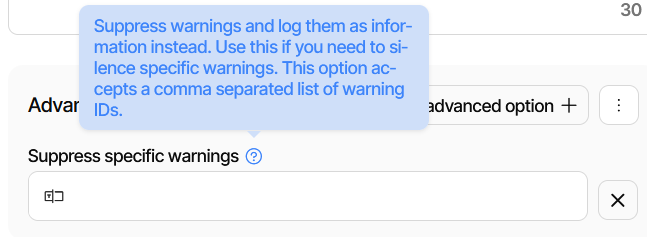
Release: 2.2.0.0 (Stable) 2025-10-23 says it’s the last part in the brackets.
Unfortunately the leftmost parts are sometimes suppressed, but in job log:
"2026-03-07 08:11:42 -05 - [Warning-Duplicati.Library.Main.Controller-MegaUnmaintained]: The Mega support library is currently unmaintained and may not work as expected. Mega has not published an official API so it may break at any moment. Please consider migrating to another backend."
So you add suppress-warnings advanced option saying MegaUnmaintained.
Mine is red because I don’t actually have MEGA. Surprisingly, no yellow either.
I’m pretty sure one-color tray icon picks highest, but why no notification either?

It would also be nice if documentation could be improved while awaiting better.
Thank you both, this worked.