"Completing previous backup" following update to latest (2.3.0.1)

I have been a long time Duplicati user, and have four backup jobs directing backups to various destinations (two local HDDs and two remote over SFTP/SSH). Over the years there have been times when Duplicati would suffer database corruption and I would rebuild (when files are local) or wipe it out and start over (when files are remote). So I’m used to keeping an eye on Duplicati and wiping its bottom when it needs help.

I upgraded to 2.3.0.1 as soon as it came out a few days ago, and have noticed a significant change in behaviour since doing so.

One of my jobs appears to be stuck on “Completing previous backup …”. The live log shows no new activity, so I have no idea what it is doing. The CPU usage is at 100%, all being gobbled up by the Duplicati task. I have restarted a couple of times and each time this job restarts it goes straight to “Completing previous backup …” and stays there.

The last few log entries (Information level) that are in the log are as follows:

  1. ExecuteScalarInt64Async:
  2. INSERT INTO "Fileset" (
  3. "OperationID",
  4. "Timestamp",
  5. "VolumeID",
  6. "IsFullBackup"
  7. )
  8. VALUES (
  9. 66,
  10. 1776348063,
  11. 4682,
  12. 0
  13. );
  14. SELECT last_insert_rowid();
  15. took 0:00:00:00.000

Starting - CommitTransaction: Unnamed commit

CommitTransaction: Unnamed commit took 0:00:00:00.000

That last one was over an hour ago, nothing since.

Could be a bug?

What do you suggest I do? Wipe this job and start again? Roll back to previous version?

PS: Some activity in the log throughout the day, but no change in overall behaviour. Still pegged at 100% CPU, no disk activity. Log message was:

# Exception

  1. System.AggregateException: A Task's exception(s) were not observed either by Waiting on the Task or accessing its Exception property. As a result, the unobserved exception was rethrown by the finalizer thread. (The CancellationTokenSource has been disposed.)

  2. ---> System.ObjectDisposedException: The CancellationTokenSource has been disposed.

  3. at Duplicati.Server.Runner.<>c__DisplayClass16_2.<<RunInternal>b__3>d.MoveNext()

  4. --- End of inner exception stack trace ---

# Message

  1. A Task's exception(s) were not observed either by Waiting on the Task or accessing its Exception property. As a result, the unobserved exception was rethrown by the finalizer thread. (The CancellationTokenSource has been disposed.)

Whatever this issue is it has now infected another of my backup jobs, so 2 out of the 4, simply get stuck on this message and don’t appear to run. They’ve had days of time and nothing is happening.

If there are no suggestions for how to recover, my only option is to reset the backup by deleting the backup files and the local database and starting again. Not much fun on a 2.3 TB backup set, but there you go, this is something I typically have to do once a year for each backup, and it’s always been that way. Why do you think I maintain four backups?

found a method that has worked for several people. I suppose you could try it.
Also see if it resembles what you hit. Still waiting for any developer comments.

You wouldn’t happen to have set up a log-file, would you? Those may help.
Even log-file-log-level of information shows highlights, but more is better.
Live log at Profiling level would be worth a whirl to watch for SQL action.

What OS is this? It’s pretty hard use up all CPU cores. Using one is possible.

More advanced monitoring tools are also available, but they vary with the OS.

If nothing else, I suppose you should try to preserve a copy of a job database.
Include any similar file names with an extra suffix such as -wal or -journal.
I’m not sure you’ll be able to copy them while in use. If you must restart, then
“Create bug report database” button on Database screen can do a better job.
Picking the job with the smallest database will make the files easier to handle.

A log-file from the start might be informative. Information would be a good start.
Verbose might be better, but can reveal source names. Profiling will be huge…

I think what it’s trying to do here is to upload a synthetic file list for a backup that was interrupted. It makes a version that is what includes updates as far as it got.

My live log (reverse chronological lines) shows this very well at Information level.

The 3 minute difference is an SQL query which fills a core (so 25% of my total).

  --disable-synthetic-filelist (Boolean): Disable synthetic filelist
    If Duplicati detects that the previous backup did not complete, it
    will generate a filelist that is a merge of the last completed backup
    and the contents that were uploaded in the incomplete backup session.
    * default value: false

possibly would allow the backup to continue, but a look with a log would still help.
Unfortunately the SQL details need Profiling level, your choice of live or a log file.

But if a log at Information shows it starting the upload, it’s already past that point.

Are your backups pretty big? My 3 minute delay came from only 8 GB of source,
from about 6500 files. Sometimes SQL time grows greatly as backup size grows.

No log, as in the past the live log would typically provide enough information to figure it out.

But there is nothing in the live log, even at “Information” level.

I am hesitant to turn on logging to disk as the backup set is 2.5 TB and I suspect the log files will grow in size much too rapidly. Of course am happy to turn it on temporarily if that’s going to show something different to the live log.

EDIT: Just saw the log file retention option in the advanced settings. How bit the bullet and turned on Information logging for all backups with 30 day retention. That won’t take up too much space and will ensure I have more information to describe this problem.

OS is Linux Mint.

Databases are between 2 and 5 GB in size so I don’t really want to be messing around with them. Along with the backup copies, the Duplicati folder (which contains the databases) is 47 GB. That is the price you pay for tracking block-level deduplication on a 2.5 TB file set. Block size is already at 5 MB.

The main point I want to make is that yes, my backup is large, but it has been working relatively well for many years. Yes the databases get big, but I upgraded to an 8 TB primary SSD and so I don’t mind allocating 50 GB to the Duplicati folder.

What I do mind is that the program went from working well to not working at all. Two backups are already stuck, and I am concerned that the others will fall over in a similar way.

Perhaps something to mention that may be relevant: the source computer is a laptop. This is used to travel the world for work. The backups take place as and when they are able, and there are many times when they are interrupted. Mostly because I need to put the laptop to sleep and take it to the next site. For my use case it is imperative that stopping/interrupting a backup is not terminal for the operation. In the past the interrupted backup would simply be flagged as a partial backup, but could still be used for restores if needed. It worked. Whatever has changed in the latest version(s) has stopped it from working.

Right now it is running one of the good working backup sets. Once that is complete I’ll allow it to run one of the affected ones with the live logging on (Information level) and will paste the whole log here.

EDIT: Re-read the advice above and will change the logging level to Profiling.

I’m looking for information leading up to the issue. There’s some then, right?
You have to start again, but the problem is very consistent, from what I hear.

It depends on log level. Information is very light. Profiling could be lots of lines.

If you mean for one run+hang, that would do. This doesn’t run for long, right?
If you left it on all the time for successful backups, that would be more output.

That applies logs kept in the job database, e.g. what GUI offers as Log on menu.
The external log-file logs are just files. If you want to trim, that’s manual work.
Still, Information level is not much data.

It worked for me yesterday, which means challenge is to find when it doesn’t.

In the present too. Here’s mine from yesterday when I killed Duplicati process:

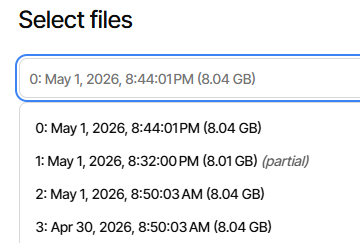
I previously posted image from my live log of the 8:32 PM dlist being uploaded.
That’s the synthetic file list. If yours is broken somehow, you can try disabling it.
The issue I linked found another method involving deleting temporary dlist files.

Both of those seem like they should keep it out of seemingly slow SQL such as

2026-05-01 20:48:03 -04 - [Profiling-Timer.Finished-Duplicati.Library.Main.Database.ExtensionMethods-ExecuteNonQueryAsync]: ExecuteNonQueryAsync: 
                        INSERT INTO "FilesetEntry" (
                            "FilesetID",
                            "FileID",
                            "Lastmodified"
                        )
                        SELECT
                            335 AS "FilesetID",
                            COALESCE(
                                (SELECT "ID" FROM "File" "NewFile"
                                 WHERE "NewFile"."Path" = "OldFile"."Path"
                                 AND "NewFile"."ID" != "OldEntry"."FileID"
                                 ORDER BY "NewFile"."ID" DESC LIMIT 1),
                                "OldEntry"."FileID"
                            ) AS "FileID",
                            "OldEntry"."Lastmodified"
                        FROM (
                            SELECT DISTINCT
                                "FilesetID",
                                "FileID",
                                "Lastmodified"
                            FROM "FilesetEntry"
                            WHERE
                                "FilesetID" = 333
                                AND "FileID" NOT IN (
                                    SELECT "FileID"
                                    FROM "FilesetEntry"
                                    WHERE "FilesetID" = 335
                                )
                        ) "OldEntry"
                        INNER JOIN "File" "OldFile" ON "OldEntry"."FileID" = "OldFile"."ID"
                        /* 
                           Filter out files that are already in the current fileset (e.g. via --changed-files).
                           We check by Path because the FileID might be different (new version of the file).
                        */
                        WHERE "OldFile"."Path" NOT IN (
                            SELECT "Path" FROM "File"
                            WHERE "ID" IN (
                                SELECT "FileID" FROM "FilesetEntry"
                                WHERE "FilesetID" = 335
                            )
                        )
                     took 0:00:02:51.914

That’s the Finished line with the time. There’s a Begin line in log above that.
If live log or log-file end after a Begin during slow busy spot, it’s in SQLite.
We’ll see. Thanks for the profiling level logs. Lower levels don’t detail SQL use.

Thank you. So I configured logging like this:

On the backup definition, under step 5, “Advanced Options”:

log-file: I chose “/home/[username]/.config/Duplicati/logs/[jobname].log”

On the global options, under Settings, “Default options”:

log-file-log-level: “Profiling”

log-retention: “30 days” (but I appreciate now that this is unrelated to the log-file parameter)

Then I started the backup job. The main GUI shows: “Completing previous backup …”

The log file does not exist.

The live log shows absolutely nothing, even when set to “Profiling”.

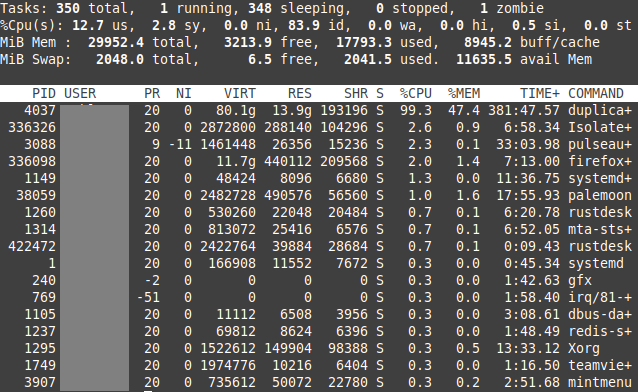
The CPU is pegged at 100% all used by Duplicati. In case this is unbelievable, I have attached a screen shot from top.

Checking disk space:

/ has 86 GB available, use at 35%

/home has 3.8 TB available, use at 46%. This is where the log folder is. Permissions are fine, Duplicati runs as the local user, I am the local user, I can make files in that log folder no problem.

The backup target is on a remote SSH server. Checking space on the server the target folder is on a file system with 1.7 TB available, use at 88%.

So the empty log is quite concerning. Does the software not “bookend” log files with something like “Starting backup for job XYZ” and “Ending backup for job XYZ” which would then at least assure the user that basic things are working.

Anyway, what do you guys make of this? What else can I do?

I’m reading it as 83.9% idle, although I’m not a top wizard. Here’s man page:

top(1) - Linux man page

us = user mode sy = system mode ni = low priority user mode (nice) id = idle task …

image

For %CPU, I think you left top in its default Irix mode. You can see totals
are over 100% even among what’s shown, which is 100.6%. If you have, say
an 8 core CPU then the max total would be 800%, so 87.4% idle (likely less).
The un-shown processes might take it down to the 83.9% id in the summary.

Understanding top command in unix has a more concise explanation of top.

These are both pretty weird. I haven’t tried splitting log options though.
Permissions do have to be right for whatever user Duplicati is running.
Filesystem permissions shouldn’t hurt live logs, but it needs early start.
Once on, even most non-backup operations should get it making lines.

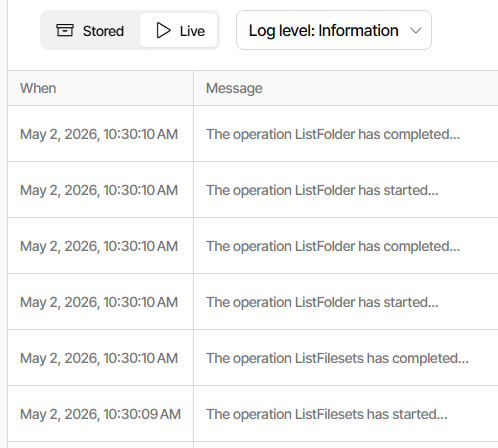
Here’s me clicking Restore but only allowing it to get to the first screen:

It does here. This is the Verify files button, showing such bookends in log file:

2026-05-02 10:34:30 -04 - [Information-Duplicati.Library.Main.Controller-StartingOperation]: The operation Test has started
...
2026-05-02 10:34:31 -04 - [Information-Duplicati.Library.Main.Controller-CompletedOperation]: The operation Test has completed

Agreed. You checked space and permissions. You could try putting all options in
one job config. One can also set up the logging directly at Server/TrayIcon level.

--log-file: Output log information to the file given
--log-level: Determine the amount of information written in the log file

That’s from the Server --help. TrayIcon accepts Server options and then some.
It can be a little awkward adding commandline options to the launch unless your
Server is the systemd one, in which case please read Using Server as a Service.

The devs now seem to be more active on week days. I hope one will help out.
Meanwhile, if you need a workaround to try, I’ve posted two of them for you to
get the most important (maybe) backup back while others can get looked into.

Too bad the looking isn’t going so well…

EDIT 1:

The “bookends” log at information level, which is more than default log level.

  --log-file-log-level (Enumeration): Log file information level
    Specify the amount of log information to write into the file specified
    by the option --log-file.
    * values: ExplicitOnly, Profiling, Verbose, Retry, Information,
    DryRun, Warning, Error
    * default value: Warning

You can also go back to confirm your log Settings are actually configured right.

Thank you for the comments about CPU usage, I should have been more specific by saying 100% CPU on one core. Since whatever task that Duplicati is running at this stage of the operation is single threaded it can only use 100% of a single core, which is what top is showing.

To check the log settings. I killed the duplicati task, started it, and ran one of my other good working backup jobs. Please note that all jobs are configured exactly the same just with different targets and volume sizes (larger volumes for local targets) and log files (each job has its own output file, all in the same folder).

This time the log file appeared immediately, and the log file begins with:

2026-05-02 16:25:07 +01 - [Information-Duplicati.Library.Main.Controller-StartingOperation]: The operation Backup has started

So that tells us that for the “good” backup jobs everything in general is working as expected. I won’t kill this backup, I find the terminate commands to be unreliable and I want to let it run to completion just in case it catches the same problem as the others.

Something is stopping the “bad” backup jobs from even getting going :frowning:

BTW, for general interest, after 1 hour of running with a log at “Profiling” level, the log file size is 2.1 GB.

All I did was wait for the “good” backup to run, then started the “bad” backup and this time it created a log file. No idea why it did not do this the first time, I assure you no settings have been changed.

Here is the tail of the log leading up to the stalled behaviour. This does look to be an issue with the synthetic file list

2026-05-02 17:33:52 +01 - [Profiling-Timer.Begin-Duplicati.Library.Main.Operation.Common.DatabaseCommon-CommitTransactionAsync]: Starting - PreSyntheticFilelist
2026-05-02 17:33:52 +01 - [Profiling-Timer.Begin-Duplicati.Library.Main.Database.ReusableTransaction-PreSyntheticFilelist]: Starting - CommitTransaction: PreSyntheticFilelist
2026-05-02 17:33:52 +01 - [Profiling-Timer.Finished-Duplicati.Library.Main.Database.ReusableTransaction-PreSyntheticFilelist]: CommitTransaction: PreSyntheticFilelist took 0:00:00:00.000
2026-05-02 17:33:52 +01 - [Profiling-Timer.Finished-Duplicati.Library.Main.Operation.Common.DatabaseCommon-CommitTransactionAsync]: PreSyntheticFilelist took 0:00:00:00.000
2026-05-02 17:33:57 +01 - [Information-Duplicati.Library.Main.Operation.Backup.UploadSyntheticFilelist-PreviousBackupFilelistUpload]: Uploading filelist from previous interrupted backup
2026-05-02 17:33:57 +01 - [Profiling-Timer.Begin-Duplicati.Library.Main.Database.ExtensionMethods-ExecuteScalarInt64Async]: Starting - ExecuteScalarInt64Async:
SELECT “ID”
FROM “Remotevolume”
WHERE “Name” = “duplicati-20260423T110008Z.dlist.zip.aes”

2026-05-02 17:33:57 +01 - [Profiling-Timer.Finished-Duplicati.Library.Main.Database.ExtensionMethods-ExecuteScalarInt64Async]: ExecuteScalarInt64Async:
SELECT “ID”
FROM “Remotevolume”
WHERE “Name” = “duplicati-20260423T110008Z.dlist.zip.aes”
took 0:00:00:00.000
2026-05-02 17:33:57 +01 - [Profiling-Timer.Begin-Duplicati.Library.Main.Database.ExtensionMethods-ExecuteScalarInt64Async]: Starting - ExecuteScalarInt64Async:
SELECT “ID”
FROM “Remotevolume”
WHERE “Name” = “duplicati-20260423T110009Z.dlist.zip.aes”

2026-05-02 17:33:57 +01 - [Profiling-Timer.Finished-Duplicati.Library.Main.Database.ExtensionMethods-ExecuteScalarInt64Async]: ExecuteScalarInt64Async:
SELECT “ID”
FROM “Remotevolume”
WHERE “Name” = “duplicati-20260423T110009Z.dlist.zip.aes”
took 0:00:00:00.000
2026-05-02 17:33:57 +01 - [Profiling-Timer.Begin-Duplicati.Library.Main.Database.ExtensionMethods-ExecuteScalarInt64Async]: Starting - ExecuteScalarInt64Async:
INSERT INTO “Remotevolume” (
“OperationID”,
“Name”,
“Type”,
“State”,
“Size”,
“VerificationCount”,
“DeleteGraceTime”,
“ArchiveTime”,
“LockExpirationTime”
)
VALUES (
94,
“duplicati-20260423T110009Z.dlist.zip.aes”,
“Files”,
“Temporary”,
-1,
0,
0,
0,
0
);
SELECT last_insert_rowid();

2026-05-02 17:33:57 +01 - [Profiling-Timer.Finished-Duplicati.Library.Main.Database.ExtensionMethods-ExecuteScalarInt64Async]: ExecuteScalarInt64Async:
INSERT INTO “Remotevolume” (
“OperationID”,
“Name”,
“Type”,
“State”,
“Size”,
“VerificationCount”,
“DeleteGraceTime”,
“ArchiveTime”,
“LockExpirationTime”
)
VALUES (
94,
“duplicati-20260423T110009Z.dlist.zip.aes”,
“Files”,
“Temporary”,
-1,
0,
0,
0,
0
);
SELECT last_insert_rowid();
took 0:00:00:00.000
2026-05-02 17:33:57 +01 - [Profiling-Timer.Begin-Duplicati.Library.Main.Database.ExtensionMethods-ExecuteScalarInt64Async]: Starting - ExecuteScalarInt64Async:
INSERT INTO “Fileset” (
“OperationID”,
“Timestamp”,
“VolumeID”,
“IsFullBackup”
)
VALUES (
94,
1776942009,
10578,
0
);
SELECT last_insert_rowid();

2026-05-02 17:33:57 +01 - [Profiling-Timer.Finished-Duplicati.Library.Main.Database.ExtensionMethods-ExecuteScalarInt64Async]: ExecuteScalarInt64Async:
INSERT INTO “Fileset” (
“OperationID”,
“Timestamp”,
“VolumeID”,
“IsFullBackup”
)
VALUES (
94,
1776942009,
10578,
0
);
SELECT last_insert_rowid();
took 0:00:00:00.000
2026-05-02 17:33:57 +01 - [Profiling-Timer.Begin-Duplicati.Library.Main.Database.ReusableTransaction-Unnamed commit]: Starting - CommitTransaction: Unnamed commit
2026-05-02 17:33:57 +01 - [Profiling-Timer.Finished-Duplicati.Library.Main.Database.ReusableTransaction-Unnamed commit]: CommitTransaction: Unnamed commit took 0:00:00:00.000

Taking advice from further up the thread, I have now enabled “disable-synthetic-filelist” in my “Default options” and restarted one of the “bad” backup jobs.

Some good news, the backup is now running as it should, changing that option has definitely fixed the issue.

What is the drawback of disabling the synthetic file list? Does this mean that if I am to restore in the future I will not be able to use a partial backup (i.e. the previous incomplete backup that this stuck task was trying to resume) as a source?

It busy-hung in the suspected neighborhood, but I’m not sure what to make of
no logging of the SQL that took almost 3 minutes for me. I’m used to seeing
it logged in advance, but maybe logging changed. Maybe a dev will comment.

My flow looks similar to yours, except it kept going. Here’s the earlier part of it:

2026-05-01 20:45:11 -04 - [Profiling-Timer.Finished-Duplicati.Library.Main.Database.ExtensionMethods-ExecuteScalarInt64Async]: ExecuteScalarInt64Async: 
                INSERT INTO "Fileset" (
                    "OperationID",
                    "Timestamp",
                    "VolumeID",
                    "IsFullBackup"
                )
                VALUES (
                    688,
                    1777681920,
                    6963,
                    0
                );
                SELECT last_insert_rowid();
             took 0:00:00:00.008
2026-05-01 20:45:11 -04 - [Profiling-Timer.Begin-Duplicati.Library.Main.Database.ReusableTransaction-Unnamed commit]: Starting - CommitTransaction: Unnamed commit
2026-05-01 20:45:11 -04 - [Profiling-Timer.Finished-Duplicati.Library.Main.Database.ReusableTransaction-Unnamed commit]: CommitTransaction: Unnamed commit took 0:00:00:00.061
2026-05-01 20:45:12 -04 - [Profiling-Timer.Begin-Duplicati.Library.Main.Database.ExtensionMethods-ExecuteNonQueryAsync]: Starting - ExecuteNonQueryAsync: 
                        INSERT INTO "FilesetEntry" (
                            "FilesetID",
                            "FileID",
                            "Lastmodified"
                        )
                        SELECT

is what I get, and I’m not detailing SELECT because I posted its ending earlier.

I will look through some code again, to try to follow the code it’s going through.

The backup does this:

and goes here, and this is where the disable option can keep it from running:

Later (assuming it wasn’t disabled), it gets ready to prepare synthetic file list:

I think the AppendFilesFromPreviousSetAsync leads into my slow SQL use.

Regardless, this is developer territory to comment on logging and where it is.

I think the idea is right. Details need tweak.

I don’t think it’s going to resume the previous backup. It just uploads what it got.
It’s about to run a new backup, so resuming old now would be almost pointless.

End result will be no partial to restore from. You get version before and this one.

Thank you for the input.

Not being able to restore from an incomplete backup is a show stopper for me. There are times when I am on the go for weeks at a time, staying in hotels with mixed internet quality, and the backups run when and as they are able to. Even leaving them running all night, on a flaky connection they won’t finish, and of course getting up at 3 am to go catch the next flight means they are being interrupted constantly.

The software must be able to handle this, for anyone, not just a road warrior with a large backup set.

Previous versions were fine with this, and incomplete backups could be used as a “best effort” restore. Whatever has changed in this latest version needs to be fixed. More than happy to help with testing and feedback.

same Problem her. Win11.

You might want to time the backup jobs so that the most important files finish.

While I agree that this bug needs a fix (and will need a developer to do that),
even if partial backups were produced, they will lack changes never reached.

While you can make jobs as you like, I think the file scan within a job is static.
If a job never finishes, the files at the end of the backup will never get backup.

Presumably the connection is not always flaky, and so sometimes-finish helps.
Just a suggestion to increase restore availability for flaky-connection situation.

Welcome to the forum @AI_Journey

Does the disable-synthetic-filelist option workaround avoid the issue?
If the side effect of lack of partial backup impact you too, feel free to comment.

Are you technically inclined and willing to help examine the issue? Windows 11
has some good system use tools available that may or may not exist for Linux.

For example, I think one can directly confirm if a busy thread is busy in SQLite.
If any Linux wizard has an easy way to get stack of all threads, please chime in.

On Windows, I found System Informer Portable can do that, and the page links
to installable versions as well, if one doesn’t happen to be using PortableApps.