I decided not to pursue compact test case because it makes more sense to develop that, then test with the pull request which builds on the recent AddTempBlockListHash speedup which I’m not familiar with.
What I’m testing instead is a backup of a file of 32769 a characters with blocksize 1KB, similar to older case. The dlist has two blocklist hash references, and I’ll break the first one by editing its Base64 hash, changing the initial D to an E. You’ll see the whole reference in some of the test reports posted later…
Recreate got red popup: Recreated database has missing blocks and 1 broken filelists. Consider using “list-broken-files” and “purge-broken-files” to purge broken data from the remote store and the database
In database, File view takes me to blockset 1. Blockset table has it as length 32769, but BlocksetEntry skipped the first 32768 bytes (whose blocklist reference I broke in filelist.json), so has only final 1 byte:
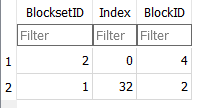
One GUI test is to click Verify files which made red popup: Found inconsistency in the following files while validating database: C:\backup source\32769.txt, actual size 32769, dbsize 1, blocksetid: 1 . Run repair to fix it.
GUI Commandline test all shows that (probably from the same test underneath before downloading):
System.IO.InvalidDataException: Found inconsistency in the following files while validating database:
C:\backup source\32769.txt, actual size 32769, dbsize 1, blocksetid: 1
. Run repair to fix it.
   at Duplicati.Library.Main.Database.LocalDatabase.VerifyConsistency(Int64 blocksize, Int64 hashsize, Boolean verifyfilelists, IDbTransaction transaction)
   at Duplicati.Library.Main.Operation.TestHandler.Run(Int64 samples)
   at Duplicati.Library.Main.Controller.RunAction[T](T result, String[]& paths, IFilter& filter, Action`1 method)
   at Duplicati.Library.Main.Controller.Test(Int64 samples)
   at Duplicati.CommandLine.Commands.Test(TextWriter outwriter, Action`1 setup, List`1 args, Dictionary`2 options, IFilter filter)
   at Duplicati.CommandLine.Program.ParseCommandLine(TextWriter outwriter, Action`1 setup, Boolean& verboseErrors, String[] args)
   at Duplicati.CommandLine.Program.RunCommandLine(TextWriter outwriter, TextWriter errwriter, Action`1 setup, String[] args)
Return code: 100
GUI Commandline list-broken-files says:
0	: 1/4/2024 6:57:59 AM	(1 match(es))
	C:\backup source\32769.txt (32.00 KB)
Return code: 0
Let’s see what my Python script has to say:
5 blocks seen in dindex files
1 blocklists seen in dindex files
2 blocks used by dlist files blocklists
Missing dlist blocklist from dindex vol/ blocks {'EWypxEXA7TXbM2azclwoTH+Y7rEgA9kbDa4/K3ycNdA='}
1 blocks used by dlist large files data
0 blocks used by dlist small files data
1 blocks used by dlist files metadata
2 blocks unused
1 large blocksets in dlist files
0 small blocksets in dlist files
small file blocksets that are also metadata blocksets: set()
small file blocksets that are also blocklists: set()
or if I add --verbose which is supposed to ignore less serious oddities, it looks like
5 blocks seen in dindex files
1 blocklists seen in dindex files
2 blocks used by dlist files blocklists
Missing dlist blocklist from dindex list/ cache {'EWypxEXA7TXbM2azclwoTH+Y7rEgA9kbDa4/K3ycNdA='}
Missing dlist blocklist from dindex vol/ blocks {'EWypxEXA7TXbM2azclwoTH+Y7rEgA9kbDa4/K3ycNdA='}
1 blocks used by dlist large files data
0 blocks used by dlist small files data
1 blocks used by dlist files metadata
2 blocks unused
1 large blocksets in dlist files
0 small blocksets in dlist files
small file blocksets that are also metadata blocksets: set()
small file blocksets that are also blocklists: set()
Now see if problem removal works. The test command suggested Repair, so push Repair. Red popup: The database was attempted repaired, but the repair did not complete. This database may be incomplete and the repair process is not allowed to alter remote files as that could result in data loss.
Now try purge-broken-files with console-log-level=Information to get a better view of the work:
The operation PurgeBrokenFiles has started
Found 1 broken filesets with 1 affected files, purging files
Removing entire fileset 1 as all 1/4/2024 11:57:59 AM file(s) are broken
Preventing removal of last fileset, use --allow-full-removal to allow removal ...
No remote filesets were deleted
Database was previously marked as in-progress, checking if it is valid after purging files

System.IO.InvalidDataException: Found inconsistency in the following files while validating database:
C:\backup source\32769.txt, actual size 32769, dbsize 1, blocksetid: 1
. Run repair to fix it.
   at Duplicati.Library.Main.Database.LocalDatabase.VerifyConsistency(Int64 blocksize, Int64 hashsize, Boolean verifyfilelists, IDbTransaction transaction)
   at Duplicati.Library.Main.Operation.PurgeBrokenFilesHandler.Run(IFilter filter)
   at Duplicati.Library.Main.Controller.RunAction[T](T result, String[]& paths, IFilter& filter, Action`1 method)
   at Duplicati.Library.Main.Controller.PurgeBrokenFiles(IFilter filter)
   at Duplicati.CommandLine.Commands.PurgeBrokenFiles(TextWriter outwriter, Action`1 setup, List`1 args, Dictionary`2 options, IFilter filter)
   at Duplicati.CommandLine.Program.ParseCommandLine(TextWriter outwriter, Action`1 setup, Boolean& verboseErrors, String[] args)
   at Duplicati.CommandLine.Program.RunCommandLine(TextWriter outwriter, TextWriter errwriter, Action`1 setup, String[] args)
Return code: 100
so maybe it tried, but tripped on a safety which I’ll remove as suggested, with --allow-full-removal
The operation PurgeBrokenFiles has started
Found 1 broken filesets with 1 affected files, purging files
Removing entire fileset 1 as all 1/4/2024 11:57:59 AM file(s) are broken
Deleting 1 remote fileset(s) ...
Backend event: Delete - Started: duplicati-20240104T115759Z.dlist.zip (733 bytes)
  Deleting file duplicati-20240104T115759Z.dlist.zip  (733 bytes) ...
Backend event: Delete - Completed: duplicati-20240104T115759Z.dlist.zip (733 bytes)
Deleted 1 remote fileset(s)
Database was previously marked as in-progress, checking if it is valid after purging files
Purge completed, and consistency checks completed, marking database as complete
Return code: 0
So success, except purging the only file in the only version didn’t leave me with much backup left.
I’m not sure which approaches @Sami_Lehtinen prefers to pursue, but tests like these are some.