I’m running Duplicati 2.3.0.1_stable_2026-04-24 and edited one of my existing backup configs using the ngclient for the first time today (in this case, to add a folder to the backup).
After clicking Submit on the final Options screen, I was surprised to see the backup immediately start, even though its next scheduled start time wasn’t for another 30 minutes. Is this intended behavior, and if so, can I disable it?
Fixed an issue where the date for a scheduled backup would be off-by-one when edited
It’s still broken for me on that release though. I hope some dev reopens issue.
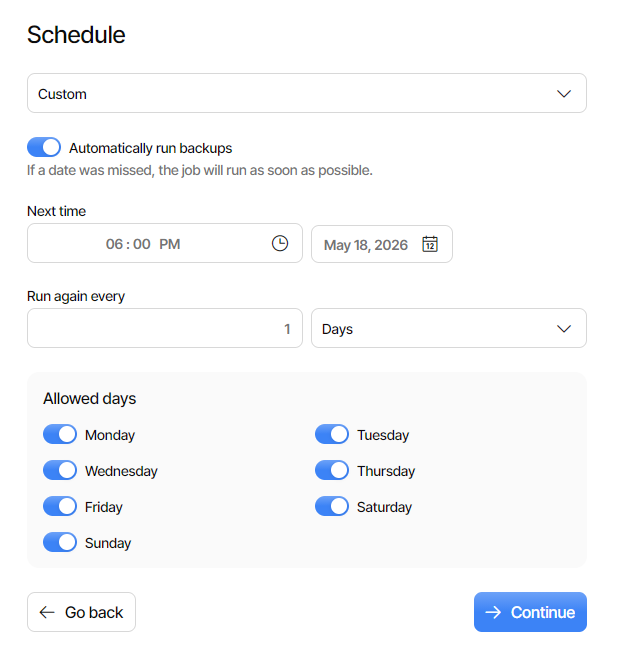
My backup schedule is daily. Editing in ngclient backs up schedule by one day
which causes a backup to immediately start after saving config, surprising me.
Does this fit your case? Just bring up the editor and see if Schedule is correct.
If so, an ugly workaround seems to be to fix the schedule of each ngclient edit.
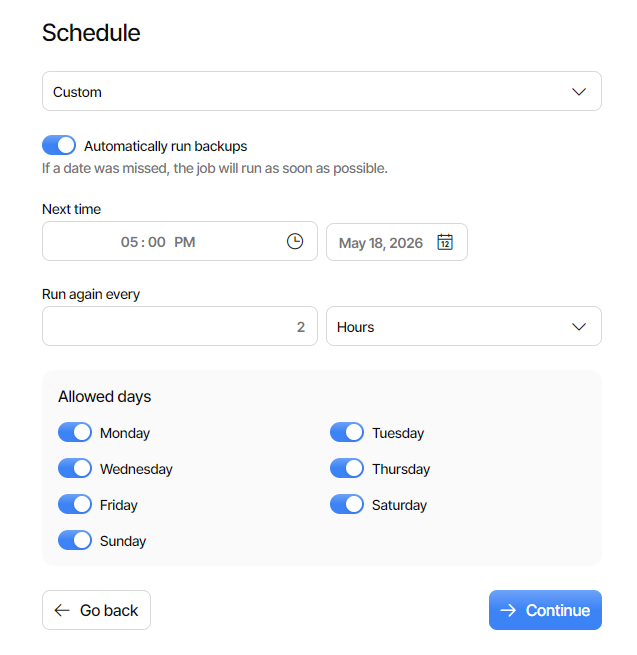
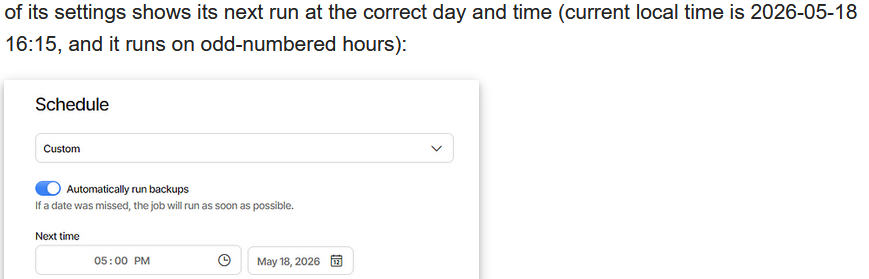
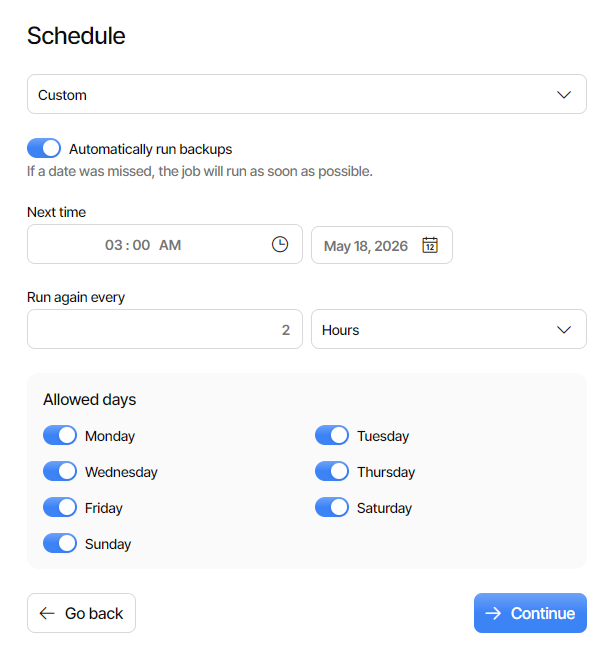
The schedule looks correct to me. My primary backup runs every 2 hours, and the schedule page of its settings shows its next run at the correct day and time (current local time is 2026-05-18 16:15, and it runs on odd-numbered hours):
So I don’t think this is related to the scheduling bug you mentioned.
Interestingly, I attempted to reproduce the issue just now, and was unable to do so. Hypothesizing that it might only trigger when modifying the backup’s source paths, I also tried adding a new source path and then saving the config, but it still did not start.
From my logs, I can clearly see that the backup started at an unscheduled time (previous backup ran at 23:00, unscheduled backup started at 00:33, right after I saved its settings), so I’m not imagining things, but the root cause must be something more complex.
The timing still suggests to me that a wrong time went in.
One way to see it might be to put it in Pause beforehand.
Be ready for run eventually, but meanwhile, look at plan.
The status bar might needs browser refresh to update it.
I think the home page doesn’t need that sort of prodding.
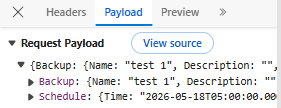
A more technical way is web developer tools, often F12.
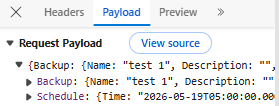
The schedule time is likely somewhere in network traffic.
I poked 2.3.0.1 more here, and found another odd result.
A day-early doesn’t happen if time of day is at next hour.
It’s now around 7:30. Setting 8:00 edits back on right day.
Setting 7:59 (P.M.) does not. The schedule is to run daily.
Since the scheduling bug (and your issue) appear erratic,
I’m not sure the bug can be ruled out. When it looked OK,
it ran OK. How does it look when the issue is reproduced?
Unfortunately, I’ve not been able to repro the issue yet, but I will keep an eye on the schedule tab in the future when editing my backups. (For the record, when the issue occurred last night, the only change I made to the backup was to add a path to its source list. I did not make any changes to the Schedule screen.)
Now that it’s 8-something approaching 9, revised theory is:
Day-early doesn’t happen if time of day is next day in UTC.
My 8 PM in Eastern Daylight Time is UTC-4, UTC next day.
You seem to be UTC-7 (Pacific time?) so works 5 and later.
Maybe you would see the day shift with hours before 5 P.M.
Let me try the same boundary probe in 2.3.0.102 (with PR).
Error grew solid. 7:59 PM, 8:00 PM, 11:59 PM all shift back.
Testing early AM, 00:01 AM also shifts back. Maybe all do?
Note one can schedule two days ahead to avoid having run.
Pause should also work, and you get to see what’s planned.
When I did my repro tests, local time was 2026-05-18 16:15 PDT, which would be 2026-05-18 23:15 UTC (same day), and I didn’t see any abnormalities in the schedule page.
Checking now (2026-05-18 18:20 PDT/2026-05-19 01:20 UTC) on my daily backup still shows the correct next backup time and date on the schedule page.
If there is a time sensitivity based on schedule hour, your 2 hour interval backup would show it some hours (before 5 PM). This might explain why it’s intermittent.
It would probably have scheduled its next backup for 01:00 which is before 17:00, which would maybe have scheduled for 01:00 the day before, so ran immediately.
You were expecting to run at 01:00 today, but maybe it scheduled it for yesterday.
I don’t think it matters whether or not you changed the Schedule screen, if it did.
You might not have noticed my latest test showing time breaks when GUI reads.
Submit button submits the whole job, so in goes the wrong time, if it went wrong.
The daily backup getting wrong would be harder to explain. This is all just theory.
is what goes in for this job, which is 2 (you can look at the URL to get number).
Bring it up again to edit, click directly to Options screen, click Submit. It sends:
and it runs, because it backed up one day, so thinks it has missed its schedule.
EDIT 1:
If time suits you, you can certainly edit 2 hour backup after 11 P.M. run finishes.
If that’s awkward, later in morning (or maybe until 3 P.M. run) might show issue.
Okay, yep. Editing the backup and checking the settings page this morning (2026-05-19 02:00 PDT/09:00 UTC) does, indeed, show the next scheduled backup a day earlier than it should be.
Well done! You both @amloessb@ts678 are not alone in these issues discussed, I too experienced everything talked about in this thread while I was initially configuring/editing my 3 current separate backups which I thought curious/odd at the time, but discarded my confusion once my configurations successful and completed. In hindsight, I realize I should’ve mentioned it here, but thought it again my novice ignorance the cause. Love & Light