Backup as User - SQLiteException: unable to open database file

  • I have searched open and closed issues for duplicates.
  • I have searched the forum for related topics.

Environment info

  • Duplicati version: 2.1.0.5_stable_2025-03-04
  • Operating system: Windows 11 Pro 26100.6584
  • Backend: Local

Description

Starting after the last Windows Cumulative Update, backup and verify files give the following error:

2025-10-01 03:00:03 -07 - [Error-Duplicati.Library.Main.Controller-FailedOperation]: The operation Backup has failed with error: unable to open database file
unable to open database file
SQLiteException: unable to open database file
unable to open database file

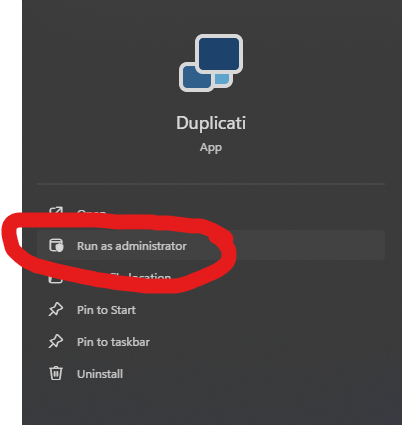
When running Duplicati as admin, backup and verify files work normally.
Nothing is different about the DB file, and my user account has full control and read/write permissions on it.

Steps to reproduce

  1. Run Duplicati as a user
  2. Access the Duplicati UI from the tray icon
  3. Expand the Local backup
  4. Click “Advanced > Verify files”
  • Actual result:
    The verify fails immediately with
2025-10-01 07:33:37 -07 - [Error-Duplicati.Library.Main.Controller-FailedOperation]: The operation Test has failed with error: unable to open database file
unable to open database file
SQLiteException: unable to open database file
unable to open database file
  • Expected result:
    The verify runs to completion.
Welcome to the forum @tag

I’m assuming that this Issue filed earlier is the same one now being brought to forum.

Please clarify “as admin”. Does that mean as the same admin user but elevated?

Except for Windows service and custom setups, the databases are in user profile.

Did its reboot manage to kill a backup run? Other than that, I don’t know how Windows would cause this. Please look in About → Show Log → Stored and click on any similar error. If none there, see if About → Show Log → Live → Warning can get it during runs.

What other sort of operations, if any, work? Even the job logs are stored in the job’s DB, raising the question of what you’re quoting when posting the 3 A.M. error (an odd time).

The local database can (aside from logs) be recreated from Destination, but finding log details about whatever’s going wrong to stop database’s open would probably be better.

1 Like

Yes, it’s the same issue. In case it is user error, I will close the GH issue.

I’m not sure, but I don’t think so.

Oct 3, 2025 5:20 AM: Failed while executing Backup "Local" (id: 1)
code = CantOpen (14), message = System.Data.SQLite.SQLiteException (0x800007FF): unable to open database file
unable to open database file
   at System.Data.SQLite.SQLite3.Reset(SQLiteStatement stmt)
   at System.Data.SQLite.SQLite3.Step(SQLiteStatement stmt)
   at System.Data.SQLite.SQLiteDataReader.NextResult()
   at System.Data.SQLite.SQLiteDataReader..ctor(SQLiteCommand cmd, CommandBehavior behave)
   at System.Data.SQLite.SQLiteCommand.ExecuteReader(CommandBehavior behavior)
   at System.Data.SQLite.SQLiteCommand.ExecuteDbDataReader(CommandBehavior behavior)
   at Duplicati.Library.Main.Database.ExtensionMethods.ExecuteReader(IDbCommand self, Boolean writeLog, String cmd, Object[] values)
   at Duplicati.Library.Main.Database.ExtensionMethods.ExecuteReader(IDbCommand self, String cmd, Object[] values)
   at Duplicati.Library.Main.Database.LocalDatabase.VerifyConsistency(Int64 blocksize, Int64 hashsize, Boolean verifyfilelists, IDbTransaction transaction)
   at Duplicati.Library.Main.Operation.Backup.BackupDatabase.<>c__DisplayClass34_0.<VerifyConsistencyAsync>b__0()
   at Duplicati.Library.Main.Operation.Common.SingleRunner.<>c__DisplayClass3_0.<RunOnMain>b__0()
   at Duplicati.Library.Main.Operation.Common.SingleRunner.DoRunOnMain[T](Func`1 method)
   at Duplicati.Library.Main.Operation.BackupHandler.PreBackupVerify(String backendurl, Options options, BackupResults result)
   at Duplicati.Library.Main.Operation.BackupHandler.RunAsync(String[] sources, IFilter filter, CancellationToken token)
   at CoCoL.ChannelExtensions.WaitForTaskOrThrow(Task task)
   at Duplicati.Library.Main.Operation.BackupHandler.Run(String[] sources, IFilter filter, CancellationToken token)
   at Duplicati.Library.Main.Controller.<>c__DisplayClass17_0.<Backup>b__0(BackupResults result)
   at Duplicati.Library.Main.Controller.RunAction[T](T result, String[]& paths, IFilter& filter, Action`1 method)
   at Duplicati.Library.Main.Controller.Backup(String[] inputsources, IFilter filter)
   at Duplicati.Server.Runner.Run(IRunnerData data, Boolean fromQueue)

Nothing requiring the DB file works.

This is the scheduled backup time, so not odd.

It’s also when Windows wakes the system if necessary, and runs Windows Update work, potentially interfering with Duplicati. I’m assuming you didn’t “Run as administrator” then. For that test, do you set up during daytime, then it avoids issue at 3 A.M. GUI schedule?

“Run as administrator” is smoother if account is already an administrator, as it enables its special powers by elevating. If not an administrator, it needs to ask admin and password.

How User Account Control works

So no job logs? Is that the server log (About → Show log → Stored) that you’re quoting?

It sounds like you must have restarted Duplicati in order to test a “Run as administrator”.

You can use that with “Resource Monitor”, then on the CPU tab type Database filename.

image

The message you got is unfortunately still pretty non-specific, but DB being open when it isn’t doing some Duplicati operation would be unexpected, and may block regular access.

If convenient and not already done (outside of update), a Windows restart might be nice.

You could also try using Windows Explorer to copy job’s database (random-letters.sqlite). That might fail just like Duplicati, but that would be a clue. If copy is OK, then you can try database Recreate with (somewhat) less troubles if the Recreate is not able to complete.

If you don’t feel like waiting for a Recreate, you could use Explorer to rename the DB and then edit DB’s path on Database screen, then “Save” to pick it up in its renamed location.

Basically, database seems either broken or being interfered with, and there’s little info yet.

DB Browser for SQLite is a third-party tool you can try on DB, but make backup copy first.

PRAGMA integrity_check is sometimes useful if SQLite database corruption is suspected.
Even without that, it will be a second opinion on whether the database seems openable…

How To Corrupt An SQLite Database File lists the ways that database damage can occur.

Thanks for the replies, @ts678. My system was having trouble with Windows updates as well, so I went ahead and reinstalled Windows 11. I have not had any issues with Duplicati since reinstalling (aside from a couple of unrecognized files in the backups that were ignored after the first run).

1 Like
