If you decide to use Beta, a second one came out a few hours ago. Release note is at:
Seems to work for me in 2.1.2.1, however I set environment just before Duplicati start:
set DUPLICATI__DISABLE_UPDATE_CHECK=true
set USAGEREPORTER_Duplicati_LEVEL=none
Seems to work for me in the old UI which looks like 2.1.0.5. The new UI Settings shows:
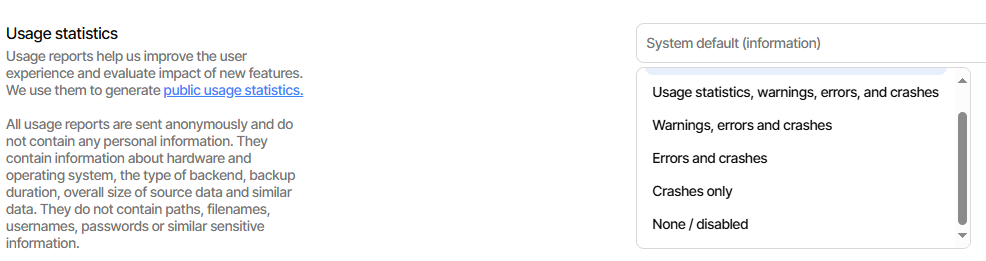
and while I haven’t tried asking for “None”, it seems to be off or at least I get no reports.
I’m watching in “Everything” search for dupl-usagereport files, and watching network.
Disconnecting the Wi-Fi and doing more local backups gets no complaint in log-file.
I think you might have deleted some of your posts on setup, so say again, step by step,
including any Duplicati restarts, and what sort of unwanted result you have, and where.
EDIT 1:
While your case seems to work for me in 2.0.2.1, one that doesn’t is the old UI Settings.
Setting to “None / Disabled” doesn’t disable. New UI is worse, and can’t even set None.
Can’t display it either, after setting from old UI. Note we’re kind of off-topic for this topic.
EDIT 2:
The old manual has had guidance for a very long time. New manual got that yesterday, looking like Settings is meant to be able to disable usage report, except one on startup.
Telemetry collection is the new page, and Opting out gives the details on how to do that, however based on my test, I’m not certain it all works, especially in the new UI Settings.
EDIT 3:
Just opened Usage reporter Settings confuses None with default #368 issue on new UI.
EDIT 4:
so if the complaint was that the section is present but not working, I agree with that.
The saving situation for @anon83604523 might be that environment variable did disable.