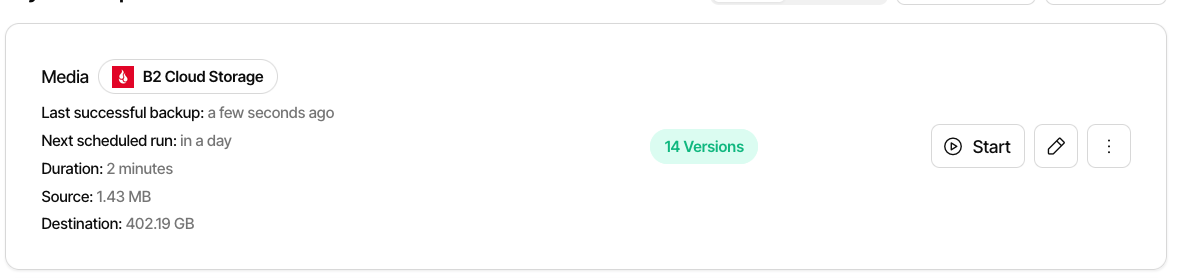
Can someone explain to me if this means that the latest backup is 1.43MB or that my backup is not actually working correctly anymore?
I also find it very troublesome that this happened without me changing anything.
It also shows me that the current passphrase as ***** when I press to show it, however if I enter my actual passphrase it says:
You have changed the passphrase, which is not supported. You are encouraged to create a new backup instead.
Hi @HEPBO3AH, welcome to the forum 
The numbers mean that the last backup found 1.43MB of source data.
The backup data stored by Duplicati in B2 takes up 402.19GB.
There are 14 versions stored for this backup.
Most likely, one or more versions contains large files that are no longer part of the backup.
If you expected a larger number for “Source”, check if there were warnings during the last backup.
Also, I would recommend trying the “Restore” part and check if some data is missing in the latests backup versions.
That is by design. To avoid leaking the password, Duplicati will mask all secrets before sending them to the browser, so you cannot get the password.
As the message states, Duplicati does not directly support changing the password. You get the message here incorrectly because the UI thinks your current password is literally ******* and you have typed in something else. Also, this message is from the legacy UI, as the new UI does not allow you to attempt changing the password.