2.4.0.0 Did not install properly on Windows and lost all config

I was casually looking at my Duplicati install and noticed that there was an update. I exited the tray icon and then installed it.

It did not go well.

The .msi ran and I selected the option to run it as a Windows service. As far as I can remember, this is how I’ve upgraded before. It completed with no errors.

But when I ran the browser page, it opened up to the old interface (which is my preference), but it stated that there are “No scheduled tasks.”

That’s not good. When I exited a few minutes earlier, (probably duplicati-2.3.0.4_stable_2026-07-09-win-x64-gui), it had told me that the next backup would be tomorrow.

I was unsuccessful importing the config from earlier in the day. (Thankfully, I backup my User profile daily, so I found the config in C:\Users\USERNAME\AppData\Local\Duplicati as a .sqlite file.)

I then went hunting for logs. I discovered this odd log entry in Event Viewer:

Category: Microsoft.AspNetCore.Diagnostics.ExceptionHandlerMiddleware
EventId: 1
SpanId: 7ea9344dfda6111b
TraceId: 3b9216ead1ca702df547f3829dc1e2bd
ParentId: 0000000000000000
ConnectionId: 0HNOFJ4DKPVPK
RequestId: 0HNOFJ4DKPVPK:00000002
RequestPath: /api/v1/auth/refresh

An unhandled exception has occurred while executing the request.

Exception:
Duplicati.WebserverCore.Exceptions.UnauthorizedException: Failed to refresh token
at Duplicati.WebserverCore.Endpoints.V1.Auth.<>c.<b__3_0>d.MoveNext()
--- End of stack trace from previous location ---
at Microsoft.AspNetCore.Http.RequestDelegateFactory.g__ExecuteAwaited|92_0[T](Task1 task)    at Duplicati.WebserverCore.Middlewares.HostnameFilter.InvokeAsync(EndpointFilterInvocationContext context, EndpointFilterDelegate next)    at Duplicati.WebserverCore.Middlewares.LanguageFilter.InvokeAsync(EndpointFilterInvocationContext context, EndpointFilterDelegate next)    at Microsoft.AspNetCore.Http.RequestDelegateFactory.<ExecuteValueTaskOfObject>g__ExecuteAwaited|130_0(ValueTask1 valueTask, HttpContext httpContext, JsonTypeInfo`1 jsonTypeInfo)
at Microsoft.AspNetCore.Http.RequestDelegateFactory.<>c__DisplayClass102_2.<b__2>d.MoveNext()
--- End of stack trace from previous location ---
at Duplicati.WebserverCore.Middlewares.WebsocketExtensions.<>c__DisplayClass0_0.<b__0>d.MoveNext()
--- End of stack trace from previous location ---
at Microsoft.AspNetCore.Diagnostics.ExceptionHandlerMiddlewareImpl.g__Awaited|10_0(ExceptionHandlerMiddlewareImpl middleware, HttpContext context, Task task)

This was Event 1000, .NET Runtime, logged a few seconds after duplicati was installed with no errors.

Does anyone have a way to resurrect my install? Do I need to downgrade? Any clue why .NET would log that error to the Application log?

I discovered that duplicati also logged errors. It’s under Windows logs at Applications and Services Logs:

2026-09-10 19:10:29 -05 - [Error-Duplicati.Server.Program-UnobservedTaskException]: A Task's exception(s) were not observed either by Waiting on the Task or accessing its Exception property. As a result, the unobserved exception was rethrown by the finalizer thread. (The channel "" is retired)
System.AggregateException: A Task's exception(s) were not observed either by Waiting on the Task or accessing its Exception property. As a result, the unobserved exception was rethrown by the finalizer thread. (The channel "" is retired)
---> CoCoL.RetiredException: The channel "" is retired
at CoCoL.Channel`1.WriteAsync(T value, ITwoPhaseOffer offer)
--- End of inner exception stack trace ---

And then, a few seconds later:

2026-09-10 19:10:49 -05 - [Error-Duplicati.WebserverCore.Endpoints.V1.Auth-RefreshTokenError]: Failed to refresh token
Microsoft.IdentityModel.Tokens.SecurityTokenSignatureKeyNotFoundException: IDX10517: Signature validation failed. The token's kid is missing. Keys tried: 'Microsoft.IdentityModel.Tokens.SymmetricSecurityKey, KeyId: '', InternalId: 'NtYy2rOdgO8B7gqjQ29Jizi2xyQzumgUJNzWo-J8QH8'.'.
Number of keys in TokenValidationParameters: '1'.
Number of keys in Configuration: '0'.
Exceptions caught:
'[PII of type 'System.String' is hidden. For more details, see PII · AzureAD/azure-activedirectory-identitymodel-extensions-for-dotnet Wiki · GitHub. ]'.
token: '[PII of type 'System.IdentityModel.Tokens.Jwt.JwtSecurityToken' is hidden. For more details, see PII · AzureAD/azure-activedirectory-identitymodel-extensions-for-dotnet Wiki · GitHub. ]'. See Search - Microsoft Bing for details. at System.IdentityModel.Tokens.Jwt.JwtSecurityTokenHandler.ValidateSignature(String token, JwtSecurityToken jwtToken, TokenValidationParameters validationParameters, BaseConfiguration configuration) at System.IdentityModel.Tokens.Jwt.JwtSecurityTokenHandler.ValidateSignatureAndIssuerSecurityKey(String token, JwtSecurityToken jwtToken, TokenValidationParameters validationParameters, BaseConfiguration configuration) at System.IdentityModel.Tokens.Jwt.JwtSecurityTokenHandler.ValidateJWS(String token, TokenValidationParameters validationParameters, BaseConfiguration currentConfiguration, SecurityToken& signatureValidatedToken, ExceptionDispatchInfo& exceptionThrown) — End of stack trace from previous location — at System.IdentityModel.Tokens.Jwt.JwtSecurityTokenHandler.ValidateToken(String token, JwtSecurityToken outerToken, TokenValidationParameters validationParameters, SecurityToken& signatureValidatedToken) at System.IdentityModel.Tokens.Jwt.JwtSecurityTokenHandler.ValidateToken(String token, TokenValidationParameters validationParameters, SecurityToken& validatedToken) at Duplicati.WebserverCore.Middlewares.JWTTokenProvider.ParseAndValidateToken(String token, TokenType tokenType) at Duplicati.WebserverCore.Middlewares.JWTTokenProvider.ReadRefreshToken(String token, String nonce) at Duplicati.WebserverCore.Services.LoginProvider.PerformLoginWithRefreshTokenAsync(String refreshTokenString, String nonce, CancellationToken ct) at Duplicati.WebserverCore.Endpoints.V1.Auth.<>c.<b__3_0>d.MoveNext()`

The option to install as a service is new in 2.4.

When you run Duplicati as a Windows Service, you are running as a different user. This has a few effects, including:

  • Ability to read locked files (VSS permissions are granted)
  • Mounted network drives are not available (network drives belong to the user)
  • Duplicati’s data folder is different (service has C:\ProgramData\Duplicati user has %LOCALAPPDATA%\Duplicati)

This is because the service is using a different folder, C:\ProgramData\Duplicati, so there are no backups configured.

That is caused by loading the page without the correct token. It can happen in various ways but does not indicate an error as such. The other log entries you list are internal issues that are benign, but noisy and we should fix or silence them.

Two ways, depending on what you want:

  1. Install without checking Windows Service
    Uninstall 2.4, then install again without checking the Windows Service checkbox.
    Duplicati will then run as it has done in the past, just starting up when you log in.
    You can delete the folder C:\ProgramData\Duplicati to clean up

  2. Keep the service installation
    First, stop the service
    Then copy your data from the %LOCALAPPDATA%\Duplicati folder to C:\ProgramData\Duplicati
    Start a command prompt as Administrator
    Run the command:

"C:\Program Files\Duplicati 2\Duplicati.CommandLine.DatabaseTool.exe" secure-datafolder --server-datafolder=C:\ProgramData\Duplicati

Then restart the service.

You also need to go into each backup via the UI and edit the database path. We have fixed this for 2.4, but existing paths from 2.3 and before are not auto-fixed.

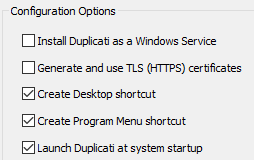
“Install Duplicati as a Windows Service” that was recently added and
“Launch Duplicati at system startup” which is (and has been) default
seem easy to confuse, especially since the old message is incorrect,
or at least confusing, as “system startup” clearly suggests boot time.

2.3.0.4 had the same confusion, but it hurt less. Look at left and right.
I side with the help text, as a launch at startup is by Windows service,
which wasn’t an option then. It is now, so choices are easy to confuse.

image

Run Duplicati as a Windows Service shows the 2.4.0.0 installer with
all boxes checked, which I hope is Service plus tray icon to monitor.

Confusion of user probably varies depending on their technical level.
One who knows of Windows Service would wonder about last option.

This also gets into question of what “Duplicati” is, as there’s both the
web based server part connected to backup engine, and there’s icon.
Documentation covers that, but it’s a big read. Installer is overly brief.

EDIT 1:

Installing Duplicati on Windows is the old doc, now obsolete as of 2.4.

Duplicati not starting after start PC was another example of confusion.

This is far from the correct answer, but it is getting somewhere. Using option 2.

After I copied my database and settings to the folder for the new server, and re-ran the server from Services, it burped out a refusal due to me now having admin privileges to the folder. In the logs, it sort of told me what to do.

  1. Ran Services, tried to start Duplicati. It fails.
  2. Ran Event Viewer, found Duplicati 2 logs
  3. It told me that it is very snippy about the folder permissions.
  4. I do this at a cmd prompt:

cd C:\Program Files\Duplicati 2

Duplicati.CommandLine.ConfigureTool.exe secure-datafolder

This actually does not work. Starting duplicati fails again. But I am a seasoned professional in fixing buggy software that does weird stuff like this. I guess.

  1. I open Windows Explorer to C:\ProgramData and look at Properties, Security.
  2. I find that my Administrator-level account is listed. I delete my own user’s permissions and leave the Administrators group’s permission alone.
  3. I switch to Services, and start Duplicati. It now runs and then stops (checks logs) due to an encrypted database, which I suppose means that it is from a previous version of duplicati.

Since this is stream of consciousness writing (above), I have not fixed the breakage yet. I happen to know that this encryption is a known issue, so I am on my way to browse through a myriad of "[Error-Duplicati.Server.Program-ServerCrashed]: The server crashed: Encryption key used to encrypt target settings does not match current key.
Duplicati.Library.Interface.SettingsEncryptionKeyMismatchException: Encryption key used to encrypt target settings does not match current key." issues on this forum.

Maybe that crash report could direct me to the underlying problem and its fix, but oh, well.

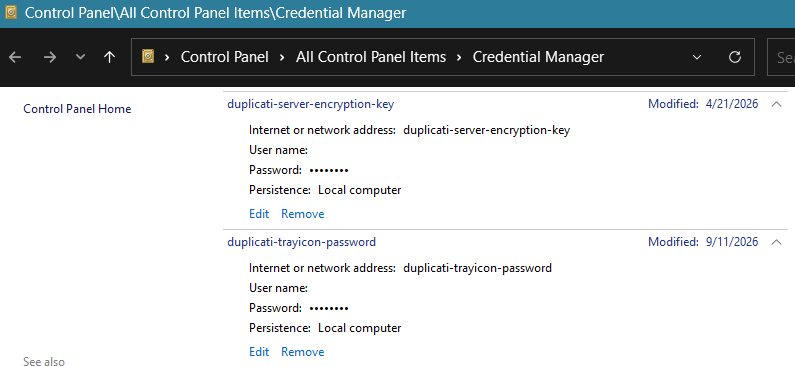
So is this where I need to look, in Windows Credential Manager? I’ve never heard of that until I saw someone talk about it on this forum. I have the tray icon and now the service. Can I make them the same?

The directions continued (scroll) with --server-datafolder=C:\ProgramData\Duplicati
You confirm the path. Are you sure you secured the right path? Was next failure the same?
I’m pretty sure the command works, as I use it that way before program startup all the time.

Another path concern. Database location on Windows is C:\ProgramData\Duplicati
for current Windows Service install layout. It also shows old one, and non-service one.
If you actually omitted --server-datafolder it might have secured non-service path.

The --help for ConfigureTool has another option that might fit. I don’t know if it flips
the default path to current default for service. Regardless, option’s described like this:

Securing the data folder

If the data folder is intended to be used by a service account rather than the current user, use the --for-service option. This excludes the current user from the permissions and instead grants access only to the accounts that the service runs under.

I haven’t used this, and don’t know if it’s really needed. Personally, I like having access as well.
Maybe directions didn’t suggest it, if it’s only for maximum security and gives no other benefits.
IDK

Since Duplicati was from what was thought to be 2.3.0.4, doesn’t user switch fail decryption?
We had a discussion about this, and I think it led to this being added into migration directions:

From version 2.3 the default is to encrypt the configuration database, and you need to decrypt it before copying. If you have disabled database encryption, you can skip the decryption step.

I think this is because using automatic database encryption uses Windows Credential Manager.
I don’t know much about it, but I think it’s per-user, and Service user is not your previous user…

You have to run this with the same user that you run Duplicati with. It looks at the current context and then assigns permissions the exact way that Duplicati expects it (Admin+current user).

You can, but I would not suggest doing that. The database encryption password prevents leaking secrets from the on-disk settings. The TrayIcon password grants access to the live service.

Yes, exactly, each user has its own WCM vault. The Service runs in the SYSTEM account by default, and this is different than Administrator or local user.

To me, this makes sense for an ordinary user, but less sense (and harder) if user is SYSTEM.

The user is using your option 2 which looks like a standard Windows service run as SYSTEM, which should be in the permissions – assuming it hits the right path, which maybe wasn’t said.

Securing the data folder

This will set the folder permissions such that only the current user (and on Windows, the Administrator and System accounts) have access.

Code seems to agree, though I’m not expert at it. My other findings are based on other code.

The --for-service option looks like it does what doc says, so just drops current user entry.
That might improve security, but if user wants access, it shouldn’t keep service from working.

The --data-folder option looks required if setting up for a different user, such as SYSTEM.
EDIT 1: unless of course the command is reasonable to run as that other user, as suggested.
Because asking user to run tool as SYSTEM is a big ask, --data-folder seems preferable.
That was spelled out in your directions, but when user said what they ran, it lacked the option.
My questions above about it were never answered, but it seems like bad path will keep failing.

Then maybe getting to option 2 could have run through option 1 (non-service install), then used
migration directions to get unencrypted server database, then move to service path to continue.

Sudden repeated “Server crashed on startup”

was my clarifications and advice for @Nosenko who was posting there, seemingly on this issue.
I suggested using wipe-encryption from DatabaseTool if secrets were safeguarded elsewhere.
Possibly that’s an easier fixup from current situation than going back to options 1-then-2 instead.
I haven’t heard anything back, so not sure where things are, regarding recovery or starting again.

I’ve got duplicati back up and running using the Tray icon method. I ditched the Services method. With all the encryption messed up and no way to easily copy and paste the key for the user to the system, I gave up. I see no point in the encryption of this database. I don’t know why everyone thinks that personal computers are under attack and data files need any such protection. The data files I am backing up are unprotected, as well.

Here was my line of inquiry before giving up:

I wonder if there could be an additional item added to the interface?

In the Old interface, when I click my task's down arrow, there is an Advanced section and a part that says "Database ..."

Perhaps when I click there, I could see under Maintenance an option to unencrypt the database?

So never mind. It was too much trouble.

Just replying here as I’ve had the same experience. Installation completely trashed because it seems I selected the ‘Install Duplicati as a Windows Service option’. I’ve spent a few hours trying to recover from this but it looks like I’ve lost everything. Attempting to rebuild the database from the backup also fails. Looks like I’ve also lost months of backups too.

To top it all I can no longer run Duplicati on FreeBSD so it looks like I’ve got to start from scratch everywhere.

Everyone has different security levels and we try to support that (use --disable-db-encryption). But at the same time, Duplicati is used in very different environments, so we want the default to be as secure as possible.

That sounds odd. The Windows Service install uses a different folder than the regular install so there should be no interference. Additionally, Duplicati makes backups of the existing database before upgrading them, so you should be able to recover any unexpected issue quickly.