Hi, I’m a new user to Duplicati. I run it in a docker (x64, debian), altough that douldn’t make any difference. I want to backup to Onedrive Business. After generating an auth key using Sign in to your account and registring, Duplicati actually ends up in my connected Enterprise apps in the Azure portal. Filling out the settings as below, using the generated auth-key as ‘access key’ I get the ‘No SharePoint web could be logged in to at path’ error.
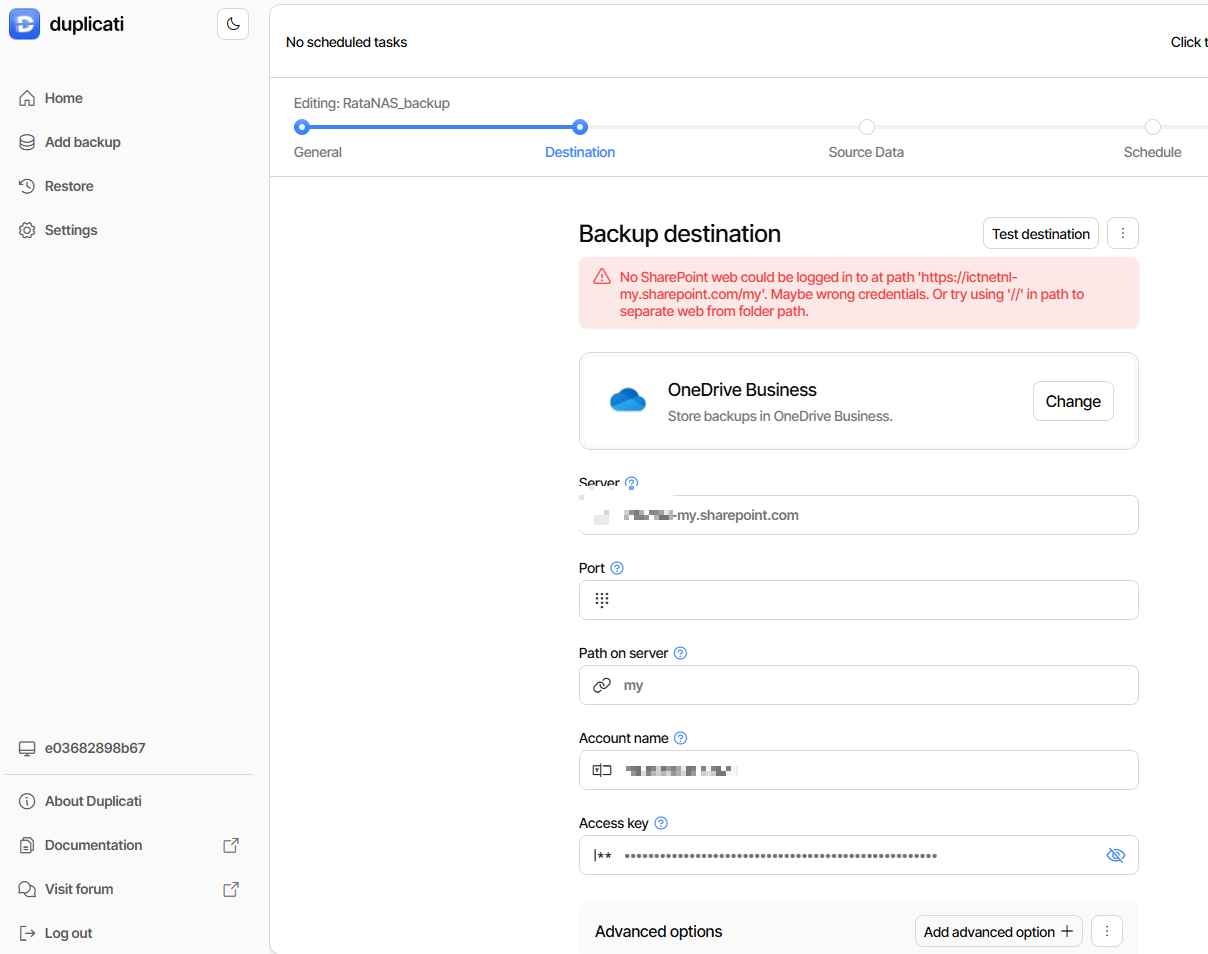
As Account name I fill out the address I login to OneDrive with. When browsing to the url /my I end up at the actual Onedrive. I’ve fiddled with the ‘path on server’ to no avail. When I use a subfolder (which I ultimately would like, something like ‘backup’) and browse that, the url becomes my?id=%2Fpersonal%2Femailaddress%2FDocuments%2Fbackup
(I’ve masked the email address here) which I don’t see in any of the screenshots on other forum posts about this issue. I’ve read several forum posts with the same issue, some of them as old as 2017, but I’ve nowhere found a solution.
So, is there a more eleborate step-by-step manual to get Duplicati to connect to OD4B? Btw on the account I use I do have MFA enabled, but using an authid I assume that wouldn’t matter?
 . So far I’m really impressed with Duplicati!