# Yet another Duplicati stall
**URL:** https://forum.duplicati.com/t/yet-another-duplicati-stall/17159
**Category:** Support
**Created:** [December 11, 2023, 9:43am UTC](https://forum.duplicati.com/t/yet-another-duplicati-stall/17159 "2023-12-11T09:43:31Z")
**Posts on this page:** 18
**Page:** 3
### Author:  [@ts678](https://forum.duplicati.com/u/ts678)
#### Post date: [December 18, 2023, 7:52pm UTC](https://forum.duplicati.com/t/yet-another-duplicati-stall/17159/42 "2023-12-18T19:52:02Z")
> [@gpatel-fr](#):
>
> it would log in BackendManager and it would be actually written in the log before the send is attempted
My profiling log lacks that. This range of lines is from a regex `BackendManager|BackendEvent`:
```plaintext
2023-12-18 07:26:57 -05 - [Profiling-Timer.Begin-Duplicati.Library.Main.BackendManager-RemoteOperationList]: Starting - RemoteOperationList
2023-12-18 07:26:57 -05 - [Information-Duplicati.Library.Main.BasicResults-BackendEvent]: Backend event: List - Started: ()
2023-12-18 07:26:58 -05 - [Information-Duplicati.Library.Main.BasicResults-BackendEvent]: Backend event: List - Completed: (425 bytes)
2023-12-18 07:27:00 -05 - [Profiling-Timer.Finished-Duplicati.Library.Main.BackendManager-RemoteOperationList]: RemoteOperationList took 0:00:00:03.440
2023-12-18 07:36:49 -05 - [Information-Duplicati.Library.Main.BasicResults-BackendEvent]: Backend event: Put - Started: duplicati-b24fdec92d7cd452bb7a16640f8f00456.dblock.zip.aes (49.91 MB)
2023-12-18 07:37:08 -05 - [Information-Duplicati.Library.Main.BasicResults-BackendEvent]: Backend event: Put - Completed: duplicati-b24fdec92d7cd452bb7a16640f8f00456.dblock.zip.aes (49.91 MB)
2023-12-18 07:38:26 -05 - [Information-Duplicati.Library.Main.BasicResults-BackendEvent]: Backend event: Put - Started: duplicati-b145f024d5c9d404a8c58f77ec852529d.dblock.zip.aes (42.23 MB)
2023-12-18 07:38:26 -05 - [Information-Duplicati.Library.Main.BasicResults-BackendEvent]: Backend event: Put - Started: duplicati-i3118f8e94b7e45dfa31d24bc604c69d5.dindex.zip.aes (71.51 KB)
2023-12-18 07:38:27 -05 - [Information-Duplicati.Library.Main.BasicResults-BackendEvent]: Backend event: Put - Completed: duplicati-i3118f8e94b7e45dfa31d24bc604c69d5.dindex.zip.aes (71.51 KB)
2023-12-18 07:38:43 -05 - [Information-Duplicati.Library.Main.BasicResults-BackendEvent]: Backend event: Put - Completed: duplicati-b145f024d5c9d404a8c58f77ec852529d.dblock.zip.aes (42.23 MB)
2023-12-18 07:38:44 -05 - [Information-Duplicati.Library.Main.BasicResults-BackendEvent]: Backend event: Put - Started: duplicati-ia8149b4811304e93888019492745a3b5.dindex.zip.aes (23.73 KB)
2023-12-18 07:38:44 -05 - [Information-Duplicati.Library.Main.BasicResults-BackendEvent]: Backend event: Put - Completed: duplicati-ia8149b4811304e93888019492745a3b5.dindex.zip.aes (23.73 KB)
2023-12-18 07:38:44 -05 - [Information-Duplicati.Library.Main.BasicResults-BackendEvent]: Backend event: Put - Started: duplicati-20231218T122018Z.dlist.zip.aes (933.93 KB)
2023-12-18 07:38:47 -05 - [Information-Duplicati.Library.Main.BasicResults-BackendEvent]: Backend event: Put - Completed: duplicati-20231218T122018Z.dlist.zip.aes (933.93 KB)
```
I am getting `UploadSpeed` reports from diverse sources:
```plaintext
2023-12-18 07:37:00 -05 - [Profiling-Duplicati.Library.Main.Operation.Backup.BackendUploader-UploadSpeed]: Uploaded 49.91 MB in 00:00:11.0038006, 4.54 MB/s
2023-12-18 07:38:27 -05 - [Profiling-Duplicati.Library.Main.Operation.Backup.BackendUploader-UploadSpeed]: Uploaded 71.51 KB in 00:00:00.9987470, 71.60 KB/s
2023-12-18 07:38:43 -05 - [Profiling-Duplicati.Library.Main.Operation.Backup.BackendUploader-UploadSpeed]: Uploaded 42.23 MB in 00:00:17.4080022, 2.43 MB/s
2023-12-18 07:38:44 -05 - [Profiling-Duplicati.Library.Main.Operation.Backup.BackendUploader-UploadSpeed]: Uploaded 23.73 KB in 00:00:00.2011164, 118.00 KB/s
2023-12-18 07:38:47 -05 - [Profiling-Duplicati.Library.Main.Operation.Backup.BackendUploader-UploadSpeed]: Uploaded 933.93 KB in 00:00:02.3479870, 397.76 KB/s
2023-12-18 07:42:19 -05 - [Profiling-Duplicati.Library.Main.BackendManager-UploadSpeed]: Uploaded 87.19 KB in 00:00:02.6789489, 32.55 KB/s
```
I’m not clear on the designed division of labor between BackendManager and BackendUploader, but
```plaintext
2023-12-18 07:36:49 -05 - [Information-Duplicati.Library.Main.BasicResults-BackendEvent]: Backend event: Put - Started: duplicati-b24fdec92d7cd452bb7a16640f8f00456.dblock.zip.aes (49.91 MB)
2023-12-18 07:38:26 -05 - [Information-Duplicati.Library.Main.BasicResults-BackendEvent]: Backend event: Put - Started: duplicati-b145f024d5c9d404a8c58f77ec852529d.dblock.zip.aes (42.23 MB)
2023-12-18 07:38:26 -05 - [Information-Duplicati.Library.Main.BasicResults-BackendEvent]: Backend event: Put - Started: duplicati-i3118f8e94b7e45dfa31d24bc604c69d5.dindex.zip.aes (71.51 KB)
2023-12-18 07:38:44 -05 - [Information-Duplicati.Library.Main.BasicResults-BackendEvent]: Backend event: Put - Started: duplicati-ia8149b4811304e93888019492745a3b5.dindex.zip.aes (23.73 KB)
2023-12-18 07:38:44 -05 - [Information-Duplicati.Library.Main.BasicResults-BackendEvent]: Backend event: Put - Started: duplicati-20231218T122018Z.dlist.zip.aes (933.93 KB)
2023-12-18 07:42:16 -05 - [Information-Duplicati.Library.Main.BasicResults-BackendEvent]: Backend event: Put - Started: duplicati-verification.json (87.19 KB)
```
might give a clue. BackendManager upload did verification file, but BackendUploader did earlier files, therefore I’m questioning usefulness of BackendManager data here, but maybe your log results differ.
---
### Author:  [@gpatel-fr](https://forum.duplicati.com/u/gpatel-fr)
#### Post date: [December 18, 2023, 8:26pm UTC](https://forum.duplicati.com/t/yet-another-duplicati-stall/17159/43 "2023-12-18T20:26:19Z")
> [@ts678](#):
>
> My profiling log lacks that.
Goes to show that I don’t know much about upload, I had never even suspected that DoPut was actually duplicated, one private occurrence in Library/Main/BackendManager.cs and another one in Library/Main/Operation/Backup/BackendUploader.cs. Hey for code reuse 🙂
---
### Author:  [@ts678](https://forum.duplicati.com/u/ts678)
#### Post date: [December 18, 2023, 10:37pm UTC](https://forum.duplicati.com/t/yet-another-duplicati-stall/17159/44 "2023-12-18T22:37:16Z")
A profiling log might still be useful. That’s about as heavy logging as possible, unless you want to instrument a test build for users to run, adding some debug code, maybe at ExplicitOnly log level.
I searched verbose log for files that changed, using regex `CheckFileForChanges.*True`. Got 10,
however they’re kind of small with total size of maybe 25 MB, so wouldn’t fill even a 50 MB dblock.
Getting file sizes done by filtering of Process Monitor file. That was simpler than asking OP to look.
Small amount of data emphasizes question of whether or not the SpillCollector ran to pack blocks.
Best view of that unfortunately requires the `profile-all-database-queries` profiling log option.
---
### Author:  [@Kobayen](https://forum.duplicati.com/u/Kobayen)
#### Post date: [December 19, 2023, 10:25am UTC](https://forum.duplicati.com/t/yet-another-duplicati-stall/17159/45 "2023-12-19T10:25:52Z")
As a note.
I might be silent, but I am paying attention. If you guys need something needing doing say it, but since the last time, I have not run Duplicati, and I have saved something new in the folder (thats my Documents folder, something would be saved there eventually). Although it should, I dont know if the stall will happen.
---
### Author:  [@gpatel-fr](https://forum.duplicati.com/u/gpatel-fr)
#### Post date: [December 19, 2023, 1:36pm UTC](https://forum.duplicati.com/t/yet-another-duplicati-stall/17159/46 "2023-12-19T13:36:31Z")
@Kobayen
a few additional questions: I have seen dropbox in your task list, are dropbox managed files (or any replicated files such as OneDrive or whatever) backed up by Duplicati ? Also, you are backing up to an external disk, is this external disk also backed up to the cloud by some replication software ?
---
### Author:  [@ts678](https://forum.duplicati.com/u/ts678)
#### Post date: [December 19, 2023, 2:36pm UTC](https://forum.duplicati.com/t/yet-another-duplicati-stall/17159/47 "2023-12-19T14:36:15Z")
I’m still puzzled by your source configuration and how Duplicati is partly double-enumerating without
> [Verbose-Duplicati.Library.Main.Controller-RemoveDuplicateSource]: Removing duplicate source:
or similar message (but different technical question is why my backup double-enumerates after that).
This may or may not be relevant to the stall, but getting everything back to normal setup seems wise.
Regarding the nature and location of the stall, the new file in Documents might change the result, but intentionally adding something somewhere else at the end of the source list might add a more certain indication of whether `steam_autocloud.vdf` was the stuck point, or just the last file needing reading. Indications so far point to the latter, but despite the data so far (thank you), there’s still data lacking…
@gpatel-fr Do you think it’s worth going for a profiling log with profile-all-database-queries option on? There’s no guarantee that will reveal the cause, but it seems like it will probably get us a little closer…
---
### Author:  [@Kobayen](https://forum.duplicati.com/u/Kobayen)
#### Post date: [December 19, 2023, 3:17pm UTC](https://forum.duplicati.com/t/yet-another-duplicati-stall/17159/48 "2023-12-19T15:17:13Z")
> [@gpatel-fr](#):
>
> dropbox managed files (or any replicated files such as OneDrive or whatever) backed up by Duplicati?
No, the Dropbox folder is specifically excluded from the backup. Or should be, I do remember excluding it. If its showing, it might not be. Id have to open the backup to see if it actually is, and can only do that tomorrow. (Im offhome until then)
Duplicati backs up to a different internal drive in my own machine, because it ran once every four hours for versioning reasons. My job has relied one time too many on having X file Y hour available, and Windows File History ended up being too unreliable. I ran into Duplicati when File History broke, and I was recommended to not use it anymore.
The actual backup PC gets a full copy of this backup once a week. I just copy it over the LAN with Explorer. Nothing fancy or ideal.
> [@ts678](#):
>
> there’s still data lacking
As long as we manage to figure whats causing this, this entire mess will have been worth it.
---
### Author:  [@ts678](https://forum.duplicati.com/u/ts678)
#### Post date: [December 19, 2023, 3:51pm UTC](https://forum.duplicati.com/t/yet-another-duplicati-stall/17159/49 "2023-12-19T15:51:33Z")
> [@Kobayen](#):
>
> Or should be, I do remember excluding it. If its showing, it might not be.
I think the reference to “task list” was the Process Explorer or Resource Manager views you posted.
Dropbox was one of the excludes in the Verbose log you shared, and one can see that doubled too.
It sounds like further exploration of the backup configuration will have to wait at least until tomorrow.
That will give us a little more time to decide on whether to go for profilng log now, or try other things.
---
### Author:  [@ts678](https://forum.duplicati.com/u/ts678)
#### Post date: [December 20, 2023, 12:11am UTC](https://forum.duplicati.com/t/yet-another-duplicati-stall/17159/50 "2023-12-20T00:11:16Z")
I looked more at the verbose log to try to spot a pattern behind when the metadata reads stopped.
This was done by using Linux sort and comm commands to compare enumeration with metadata.
There seemed to be 17134 files (not folders) which were enumerated but lacked a metadata read.
Pure comm output was hard to read, as folders and files got interleaved because paths got sorted.
I adjusted by using perl sort based on folder depth, while preserving original order for equal depth:
> `cat comm.txt | perl -e '@array = <>; print sort {$a =~ tr/\\// <=> $b =~ tr/\\//} @array' | less`
This found that even in top-level Documents folder, only some of the files there had metadata read.
The pattern was not clear, but the view was sorted, so probably not the original order of processing.
So return to Process Monitor, find last `QuerySecurityFile` which gets ACL. Look for near oddities.
Ignore unusual events that are common enough to presume are not a problem, but what about this?
> 10:54:44.5382905 AM Duplicati.GUI.TrayIcon.exe 15624 19096 ReadFile C:\Users\Kobayen\AppData\Local\Duplicati\RLWEXIKJJV.sqlite DEVICE DATA ERROR 2.6175946 10:54:47.1558851 AM
> Offset: 273,784,832
> Length: 4,096
That looks like an attempted SQLite page read that takes almost 3 seconds then fails. Why would it?
The next few tries didn’t work either. Note all the blue at the top. I turned everything on while fishing:

I haven’t tried investigating what causes a DEVICE DATA ERROR. I assume that it’s not just an EOF,
but perhaps we can get @Kobayen to tell us what size that file is. Maybe also look in event log then.
This may or may not be related, but it sure looks odd. I haven’t looked into what it might do to SQLite.
---
### Author:  [@gpatel-fr](https://forum.duplicati.com/u/gpatel-fr)
#### Post date: [December 20, 2023, 12:19am UTC](https://forum.duplicati.com/t/yet-another-duplicati-stall/17159/51 "2023-12-20T00:19:02Z")
> [@ts678](#):
>
> Do you think it’s worth going for a profiling log with profile-all-database-queries option on?
Well, it could be interesting.
Given your most recent post at this time, also check if the database directory is excluded from the job.
---
### Author:  [@ts678](https://forum.duplicati.com/u/ts678)
#### Post date: [December 20, 2023, 12:29am UTC](https://forum.duplicati.com/t/yet-another-duplicati-stall/17159/52 "2023-12-20T00:29:42Z")
> [@gpatel-fr](#):
>
> check if the database directory is excluded from the job.
Verbose log says there appear to be two excluded folders, in C:\Users\Kobayen\Documents.
Checking config wouldn’t hurt, but…
This wouldn’t be trying to backup the database anyway, as the attempted read size is wrong.
4096 is the [default SQLite page size](https://www.sqlite.org/pragma.html#pragma_page_size).
EDIT:
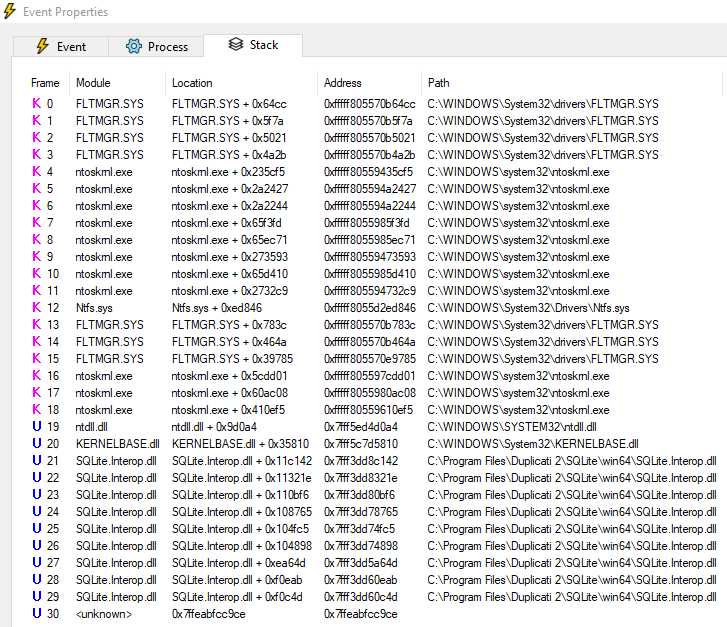
I can’t interpret it, but FWIW the stack on that read try was:
---
### Author:  [@Kobayen](https://forum.duplicati.com/u/Kobayen)
#### Post date: [December 20, 2023, 8:01pm UTC](https://forum.duplicati.com/t/yet-another-duplicati-stall/17159/53 "2023-12-20T20:01:56Z")
> [@ts678](#):
>
> I haven’t tried investigating what causes a DEVICE DATA ERROR. I assume that it’s not just an EOF,
> but perhaps we can get @Kobayen to tell us what size that file is. Maybe also look in event log then.
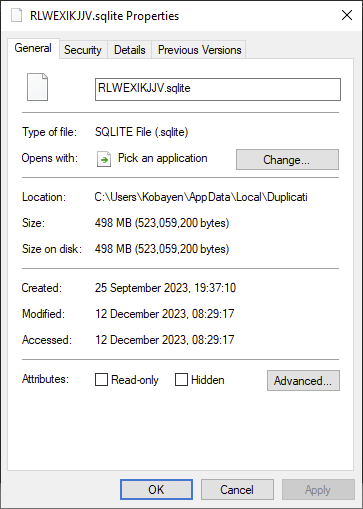
Do you want me to send it to ya?
> [@gpatel-fr](#):
>
> check if the database directory is excluded from the job.
I dont use Duplicati to make a backup of open Duplicati databases for it generally sounds like a bad idea. I just used Windows Explorer whenever Duplicati wasnt running.
---
### Author:  [@ts678](https://forum.duplicati.com/u/ts678)
#### Post date: [December 20, 2023, 8:20pm UTC](https://forum.duplicati.com/t/yet-another-duplicati-stall/17159/54 "2023-12-20T20:20:50Z")
> [@Kobayen](#):
>
> Do you want me to send it to ya?
Not particularly, as I certainly can’t translate read error in the middle of the file into even SQLite results.
I suppose you could see how well it copies with Windows Explorer. Nice and fast, or having slow spot?
If suspect, a tool such as [DB Browser for SQLite](https://sqlitebrowser.org/) running [PRAGMA integrity\_check](https://www.sqlite.org/pragma.html#pragma_integrity_check) might help interpret.
Or having made a DB copy, you could rename the old DB and rename the copy into its place in case an issue such as a weak sector is deep inside the old one, but not so severe that the copy was impossible.
---
### Author:  [@ts678](https://forum.duplicati.com/u/ts678)
#### Post date: [December 21, 2023, 6:08pm UTC](https://forum.duplicati.com/t/yet-another-duplicati-stall/17159/55 "2023-12-21T18:08:47Z")
I watched two of my backups with Process Monitor, but saw no `DEVICE DATA ERROR` on database.
This reinforces the idea that they are abnormal. Meanwhile the double enumeration seems normal.
Duplicati backup appears to start another one in CountFilesHandler.cs. I hope it’s really necessary.
I also wrote the script I thought might do very well to get an original-order study of the enumeration:
```plaintext
# Track relevant lines using hash of array of line numbers.
while (<>) {
if (/(?<=no filters matched: )(.*)/) {
push @{$ref{$1}}, $.;
}
}
# Show ref count and two references in original line order.
for (sort {${$ref{$a}}[0] <=> ${$ref{$b}}[0]} keys %ref) {
@ref = @{$ref{$_}};
printf("%d\t%d\t%d\t%s\n", scalar(@ref), @ref[0,1], $_);
}
```
and it nicely showed where double enumeration went down to single near DEVICE DATA ERROR.
The `Skipped checking file, because no metadata was updated` also stopped around then.
Maybe what happened is the unclear-purpose enumeration finished while the critical one stopped?
Anyway, plan to try to examine or chase away that DEVICE DATA ERROR still seems a good plan.
---
### Author:  [@Kobayen](https://forum.duplicati.com/u/Kobayen)
#### Post date: [December 22, 2023, 4:32pm UTC](https://forum.duplicati.com/t/yet-another-duplicati-stall/17159/56 "2023-12-22T16:32:08Z")
I hate to be a bearer of bad news, but a recent power outage in the region knocked down this computer. I wouldnt doubt one of these mistimed outages caused this entire debacle, somehow.
I have no idea of the state of the hard drive we were examining, the state of the files there, or the backup database inside it. I dont think I can keep diagnosing this problem anymore.
I’m sorry.
---
### Author:  [@ts678](https://forum.duplicati.com/u/ts678)
#### Post date: [December 22, 2023, 4:41pm UTC](https://forum.duplicati.com/t/yet-another-duplicati-stall/17159/57 "2023-12-22T16:41:19Z")
Setting Process Monitor’s filter to look at all the database accesses found the DEVICE DATA ERROR posted [earlier](https://forum.duplicati.com/t/yet-another-duplicati-stall/17159/50) to be contiguous. Filter on Details found them to be the only uses at offset 273,784,832, however whatever happened inside Windows and SQLite did permit other database accesses later on.
Possibly an error was given to Duplicati, but it mishandled it. A profiling log might provide more details.
The Windows event log might also show if it saw any sort of disk error when Process Monitor saw that.
Process Monitor could also watch the old database during its copying to see if the bad result shows up.
BUT
now the power outage has left things in an unknown state. Maybe computer will come back, maybe not.
If computer got damaged and you want to try restore from whatever backup there is, please let us know.
If it does come back, then maybe we can continue exploring what fixing DEVICE DATA ERROR can do.
---
### Author:  [@Kobayen](https://forum.duplicati.com/u/Kobayen)
#### Post date: [December 24, 2023, 10:24am UTC](https://forum.duplicati.com/t/yet-another-duplicati-stall/17159/58 "2023-12-24T10:24:32Z")
I should have an answer by January. Hopefully its just the PSU.
How would I get said profiling log?
---
### Author:  [@ts678](https://forum.duplicati.com/u/ts678)
#### Post date: [December 24, 2023, 12:19pm UTC](https://forum.duplicati.com/t/yet-another-duplicati-stall/17159/59 "2023-12-24T12:19:22Z")
> [@Kobayen](#):
>
> How would I get said profiling log?
```plaintext
--profile-all-database-queries (Boolean): Activates logging of all database
queries
To improve performance of the backups, frequent database queries are not
logged by default. Enable this option to log all database queries, and
remember to set either --console-log-level=Profiling or
--log-file-log-level=Profiling to report the additional log data
* default value: false
```
[log-file-log-level](https://duplicati.readthedocs.io/en/latest/06-advanced-options/#log-file-log-level)=profiling
[log-file](https://duplicati.readthedocs.io/en/latest/06-advanced-options/#log-file)=\ (maybe use a different one than the verbose log that I’m still referencing was using)
> [@Kobayen](#):
>
> Hopefully its just the PSU.
If system comes up (or even if it doesn’t, but drive still works), you can look at drive [S.M.A.R.T](https://en.wikipedia.org/wiki/Self-Monitoring,_Analysis_and_Reporting_Technology) stats.
[CrystalDiskInfo](https://crystalmark.info/en/software/crystaldiskinfo/) is one such tool, but there are many more. Check for errors and reallocated sectors.
Also:
[Data corruption and disk errors troubleshooting guidance](https://learn.microsoft.com/en-us/troubleshoot/windows-server/backup-and-storage/troubleshoot-data-corruption-and-disk-errors)
[What Is the Windows Event Viewer, and How Can I Use It?](https://www.howtogeek.com/123646/htg-explains-what-the-windows-event-viewer-is-and-how-you-can-use-it/)
[Previous page](https://forum.duplicati.com/t/yet-another-duplicati-stall/17159.md?page=2)