# Yet, another "Deleting unwanted files …" stuck for days
**URL:** https://forum.duplicati.com/t/yet-another-deleting-unwanted-files-stuck-for-days/18715
**Category:** Support
**Created:** [July 18, 2024, 1:21pm UTC](https://forum.duplicati.com/t/yet-another-deleting-unwanted-files-stuck-for-days/18715 "2024-07-18T13:21:29Z")
**Posts on this page:** 20
**Page:** 1
### Author:  [@vazquezjm](https://forum.duplicati.com/u/vazquezjm)
#### Post date: [July 18, 2024, 1:21pm UTC](https://forum.duplicati.com/t/yet-another-deleting-unwanted-files-stuck-for-days/18715/1 "2024-07-18T13:21:29Z")
This is not the first time it happens, but this time I was charged a fee because I exceeded my storage provider plan quota of 1TB (IDrive e2)
As you can see, for some reason, there are 5 versions, when Backup retention is set to 1.
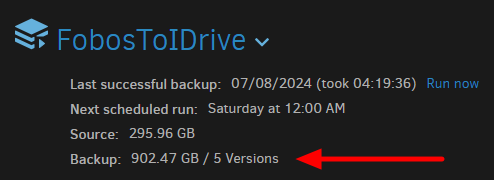
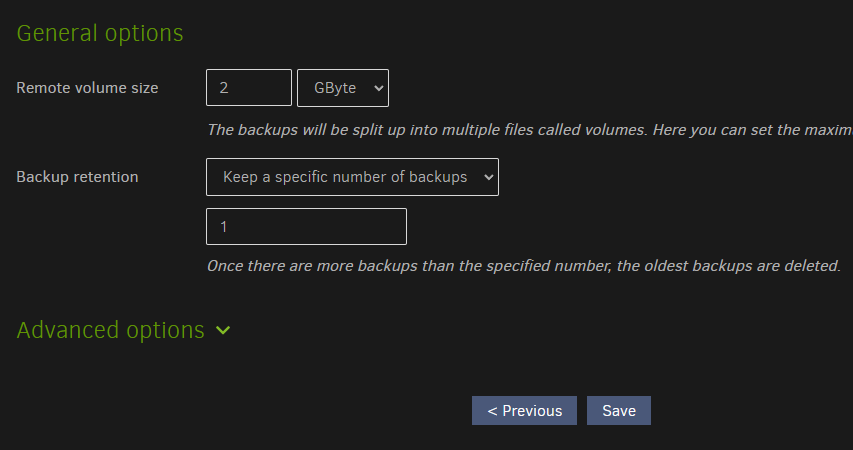
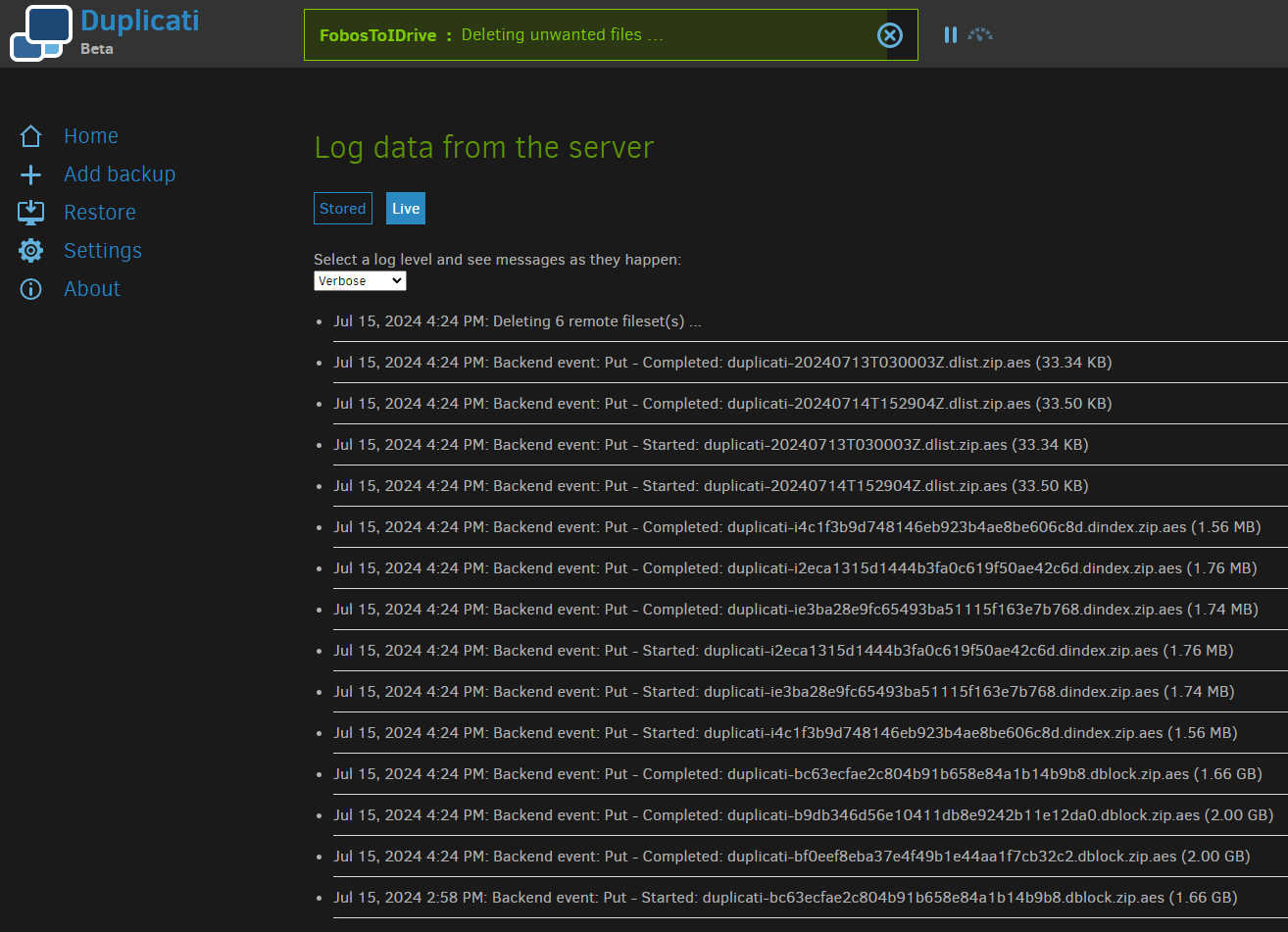
Currently, the backup job is stuck at “Deleting unwanted files” since 07/15 (3 days)
Duplicati is running as Docker container on top of OMV 7.4
Any help will be much appreciated!
---
### Author:  [@drwtsn32](https://forum.duplicati.com/u/drwtsn32)
#### Post date: [July 18, 2024, 3:12pm UTC](https://forum.duplicati.com/t/yet-another-deleting-unwanted-files-stuck-for-days/18715/2 "2024-07-18T15:12:28Z")
How fast is your internet connection? A remote volume size of 2GB is quite large, so if Duplicati is trying to do a compaction it may have to download/repackage some of those remote volumes.
Normally I wouldn’t change that option from the default of 50MB unless you have a back end that has a limit on the number of files that can be stored.
Regarding the version count, that does seem odd. Normally Duplicati can keep many versions and store them efficiently due to its deduplication feature. Only keeping 1 version seems risky to me. Did you recently deselect a large amount of data for Duplicati to protect? Or delete data it was protecting?
---
### Author:  [@ts678](https://forum.duplicati.com/u/ts678)
#### Post date: [July 18, 2024, 3:38pm UTC](https://forum.duplicati.com/t/yet-another-deleting-unwanted-files-stuck-for-days/18715/3 "2024-07-18T15:38:50Z")
Or recently change the retention setting from its default value of `Keep all backups`?
You can also look at your log files. Retention setting should be applied after a backup.
Basically, at the top of the screenshot, seeing it want to do 6 right now seems strange.

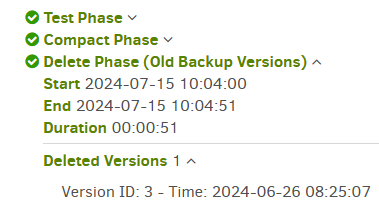
Your job logs show what your backups did, and any deletions that were done. Example:
> [@vazquezjm](#):
>
> this time I was charged a fee because I exceeded my storage provider plan quota of 1TB (IDrive e2)
That sounds like a storage size charge, although they can also charge if egress gets too high. Natural reaction to too much storage would be to lower retention policy. Is that the sequence?
Or are you saying they charged you (but for what?) right in the middle of the current slow run?
What OS is this? You can sometimes distinguish between stuck and slow by resource usages.
Even CPU use would be a clue.
---
### Author:  [@vazquezjm](https://forum.duplicati.com/u/vazquezjm)
#### Post date: [July 18, 2024, 3:40pm UTC](https://forum.duplicati.com/t/yet-another-deleting-unwanted-files-stuck-for-days/18715/4 "2024-07-18T15:40:21Z")
> [@drwtsn32](#):
>
> How fast is your internet connection?
Upload speed is usually around 90/100Mbps
> [@drwtsn32](#):
>
> Normally I wouldn’t change that option from the default of 50MB unless you have a back end that has a limit on the number of files that can be stored.
Interesting… Will try that.
> [@drwtsn32](#):
>
> Regarding the version count, that does seem odd. Normally Duplicati can keep many versions and store them efficiently due to its deduplication feature. Only keeping 1 version seems risky to me.
I’m using Duplicati for off-site backup, I also have local backups.
> [@drwtsn32](#):
>
> Did you recently deselect a large amount of data for Duplicati to protect? Or delete data it was protecting?
No, but now that I’m thinking, since backup jobs take too long to complete, OMV installs security updates automatically and most likely Docker gets restarted while the backup is still running, leaving “unfinished jobs” behind?
---
### Author:  [@vazquezjm](https://forum.duplicati.com/u/vazquezjm)
#### Post date: [July 18, 2024, 3:49pm UTC](https://forum.duplicati.com/t/yet-another-deleting-unwanted-files-stuck-for-days/18715/5 "2024-07-18T15:49:01Z")
> [@ts678](#):
>
> You can sometimes distinguish between stuck and slow by resource usages.
> Even CPU use would be a clue.
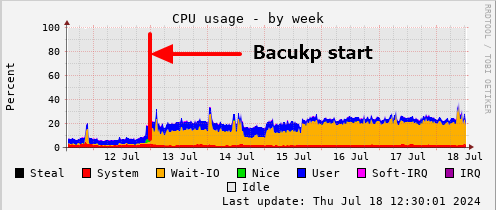
Sorry, I didn’t chose the right words. I’m pretty sure it is not stuck, based on the CPU usage (job started 07/13 at 12:00am and it looks it is still running). Usually the CPU usage is around 10%
> [@ts678](#):
>
> That sounds like a storage size charge, although they can also charge if egress gets too high. Natural reaction to too much storage would be to lower retention policy. Is that the sequence?
Correct, they charged me because I overused my 1TB quota last month. That’s why I have retention set to 1 version.
---
### Author:  [@ts678](https://forum.duplicati.com/u/ts678)
#### Post date: [July 18, 2024, 3:59pm UTC](https://forum.duplicati.com/t/yet-another-deleting-unwanted-files-stuck-for-days/18715/6 "2024-07-18T15:59:29Z")
OK, so it’s no surprise that Duplicati is doing a lot of cleanup on the first job after the change.
Suspicion is that SQLite is having a slow query due to [blocksize](https://docs.duplicati.com/en/latest/06-advanced-options/#blocksize) being left at default 100 KB.
This should be more like 1 MB for a 1 TB backup. The default will be set to that next release.
> [@vazquezjm](#):
>
> Usually the CPU usage is around 10%
Can you use `ps` or `top` or something that sees per-process stats? Read stats would be best, however CPU at one core’s worth occupied would suggest that SQLite is in some slow query.
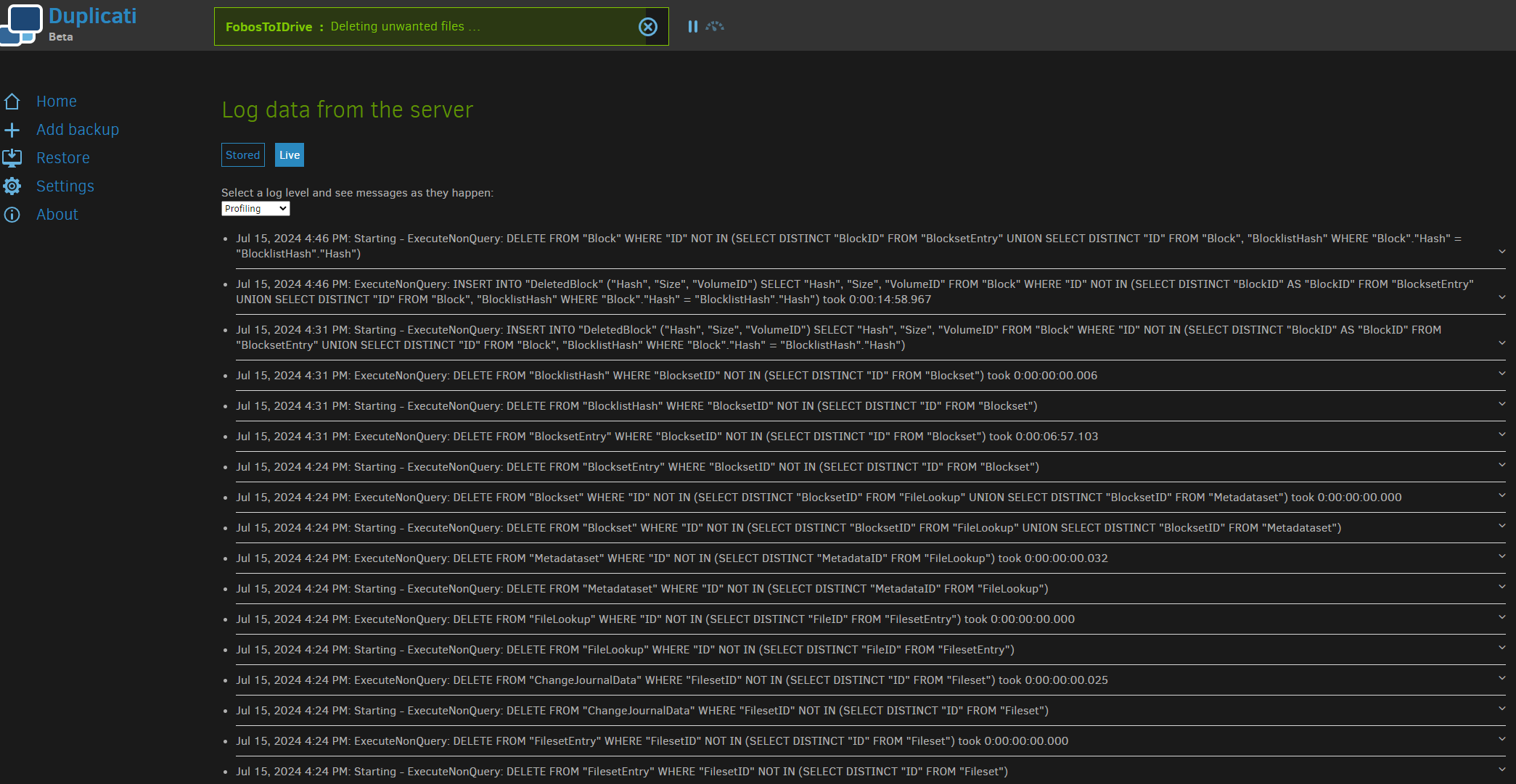
I’m not sure if it sees queries retroactively, but there’s About → Show log → Live → Profiling.
EDIT:
[iotop](https://linux.die.net/man/1/iotop), if you have it or can get it (what OS?), might show I/O.
---
### Author:  [@vazquezjm](https://forum.duplicati.com/u/vazquezjm)
#### Post date: [July 18, 2024, 5:11pm UTC](https://forum.duplicati.com/t/yet-another-deleting-unwanted-files-stuck-for-days/18715/7 "2024-07-18T17:11:21Z")
> [@ts678](#):
>
> [iotop](https://linux.die.net/man/1/iotop), if you have it or can get it (what OS?), might show I/O.
Installed on Debian 12

I noticed there’s also a BTRFS scrub job (OMV) running at the same time 🤦♂️
---
### Author:  [@vazquezjm](https://forum.duplicati.com/u/vazquezjm)
#### Post date: [July 18, 2024, 5:13pm UTC](https://forum.duplicati.com/t/yet-another-deleting-unwanted-files-stuck-for-days/18715/8 "2024-07-18T17:13:54Z")
> [@ts678](#):
>
> I’m not sure if it sees queries retroactively, but there’s About → Show log → Live → Profiling.
---
### Author:  [@ts678](https://forum.duplicati.com/u/ts678)
#### Post date: [July 18, 2024, 5:40pm UTC](https://forum.duplicati.com/t/yet-another-deleting-unwanted-files-stuck-for-days/18715/9 "2024-07-18T17:40:57Z")

Well, I guess that’s where it’s hard at work… I don’t know why live log sometimes can look back. Somebody who knows the logging code might have an idea. Regardless, nice to see some clue.
I’m not sure what to make of the iotop output. On Windows, Duplicati SQLite can get read rates extremely high at the request-to-OS level, but Windows can answer most from caches not drive.
These were generally SQLite temporary files, with `etilqs` (sqlite reversed) in the file name, and probably a result of large tables (big backup, small blocksize) and [limited SQLite memory cache](https://www.sqlite.org/pragma.html#pragma_cache_size).
I’m not sure how to see the low level action better, short of running strace on mono. I suppose it might leave some etilqs files visible in /tmp or somewhere, or maybe they’re deleted so invisible.
The [lsof](https://linux.die.net/man/8/lsof) command can see files that are deleted but still in use.
Short of waiting it out or giving up and trying to add cache (there’s an environment variable), I’m unsure what the best way is to look deeper, but there are ideas.
---
### Author:  [@vazquezjm](https://forum.duplicati.com/u/vazquezjm)
#### Post date: [July 19, 2024, 12:32pm UTC](https://forum.duplicati.com/t/yet-another-deleting-unwanted-files-stuck-for-days/18715/10 "2024-07-19T12:32:27Z")
Aaaand, it finished
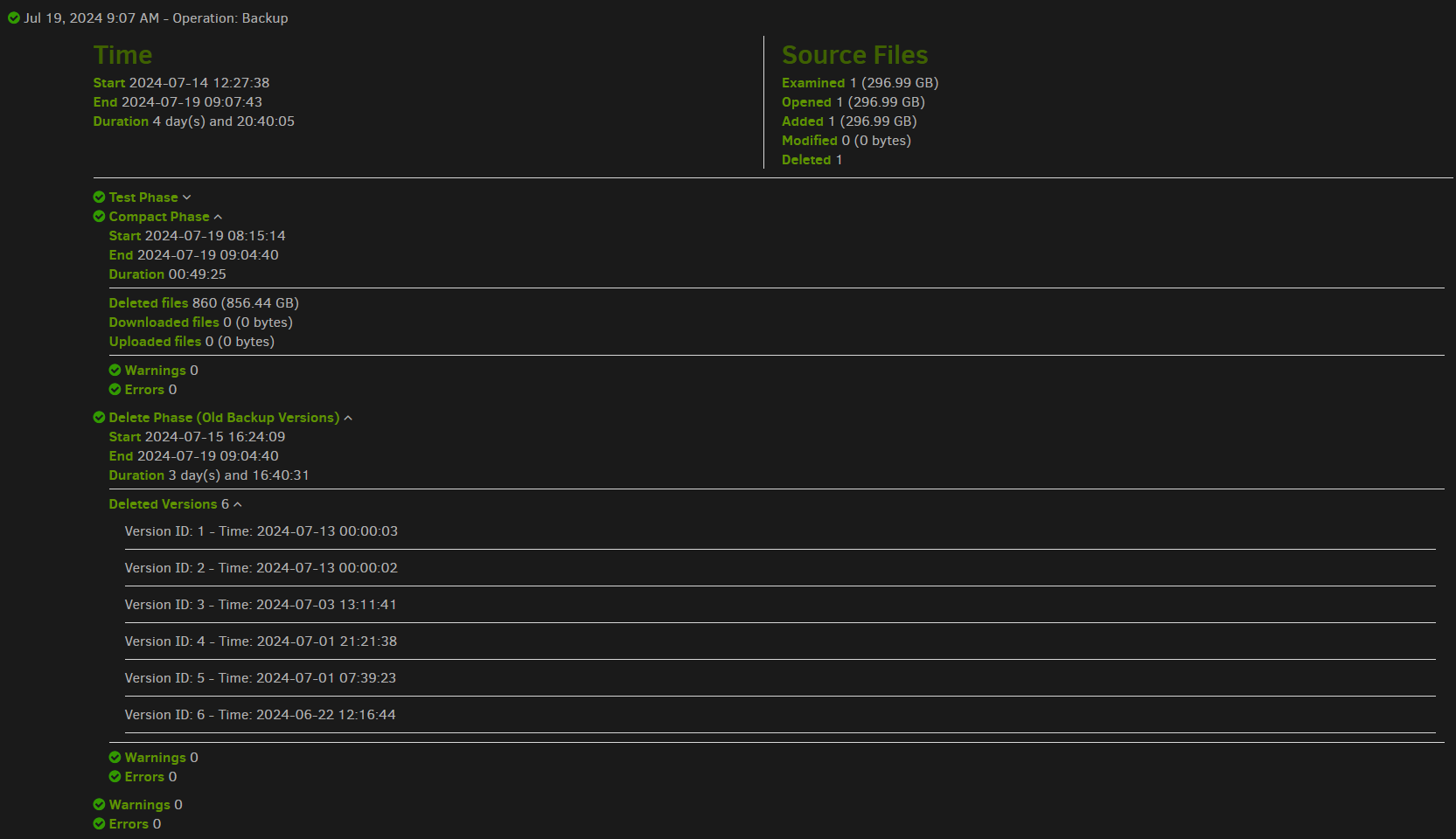
@ts678 do you suggest trying with a lower remote volume size? Size is about 300GB
---
### Author:  [@ts678](https://forum.duplicati.com/u/ts678)
#### Post date: [July 19, 2024, 9:38pm UTC](https://forum.duplicati.com/t/yet-another-deleting-unwanted-files-stuck-for-days/18715/11 "2024-07-19T21:38:34Z")
> [@vazquezjm](#):
>
> do you suggest trying with a lower remote volume size? Size is about 300GB

The 50 MB default would be reasonable, however the link explains why you might want higher, however I think higher would usually be somewhat higher, but not 6000 (without some reason).
[Choosing Sizes in Duplicati](https://forum.duplicati.com/t/choosing-sizes-in-duplicati/17683)
`Remote volume size` is the relevant section for the above setting, but I think the more relevent overall is `The block size` because the slow SQL in the log is dealing with blocks not volumes.
```plaintext
DELETE
FROM "Block"
WHERE "ID" NOT IN (
SELECT DISTINCT "BlockID"
FROM "BlocksetEntry"
UNION
SELECT DISTINCT "ID"
FROM "Block"
,"BlocklistHash"
WHERE "Block"."Hash" = "BlocklistHash"."Hash"
)
```
> [@vazquezjm](#):
>
> I exceeded my storage provider plan quota of 1TB
so at default 100 KB blocksize, that means a couple of 10 million row tables in the SQL above.
As mentioned, this tends to not work well with the default 2 MB memory cache (which we can maybe increase if you can spare memory). Using a 1 MB blocksize cuts DB rows by 10 times, however it can’t be changed on an existing backup. Remote volume size can change, but that probably won’t make any difference to the known slow spot. It might help some others though.
300 GB remote volumes (as mentioned in the article) can make for slow restores, as an entire volume must be downloaded to extract even a single byte needed for some file restore, and it potentially could need multiple remote volumes to collect everything to gather all data needed.
Some of this is usage dependent, and you have some really unusual looking source data stats.
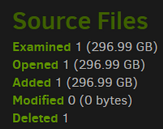
so I guess these are few but big files?
[Compacting files at the backend](https://docs.duplicati.com/en/latest/03-using-the-graphical-user-interface/#compacting-files-at-the-backend) explains the general plan, as some old backups age out.
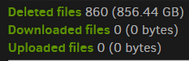
is interesting because this is the version of compact that doesn’t repackage remaining data.
Maybe your files tend to be extremely unique, so block level deduplication isn’t doing much.
If you have roughly 300 GB files with unique data, then compacts might always look like the screenshots above, where one source file goes into a source file then gets deleted later, so damage from being way oversize might not be that much but we don’t know that for certain.
Back to SQL, and don’t worry if the topic is too deep, but this delete area came up in below:
> [@Reducing Time Spent Deleting Blocks](https://forum.duplicati.com/t/reducing-time-spent-deleting-blocks/16403):
>
> I had a thought about an issue that was discussed here: [Backup Runtime after 2.0.7.1 update - #23 by tkohhh](https://forum.duplicati.com/t/backup-runtime-after-2-0-7-1-update/16378/23) We were discussing the delete process, which runs through the following queries: DELETE FROM "Fileset" WHERE "Timestamp" IN (1686226500) DELETE FROM "FilesetEntry" WHERE "FilesetID" NOT IN (SELECT DISTINCT "ID" FROM "Fileset") DELETE FROM "ChangeJournalData" WHERE "FilesetID" NOT IN (SELECT DISTINCT "ID" FROM "Fileset") DELETE FROM "FileLookup" WHERE "ID" NOT IN (SELECT DISTINCT "FileID…
Just looking at the title, you can see that blocks are the concern, and it’s my concern here… Smaller blocksize (like default) save more space, but only if there’s actually duplicated data.
> [@vazquezjm](#):
>
> Duplicati is running as Docker container on top of OMV 7.4
This actually might be a good way to test expanding memory for SQLite cache to gain speed.
I don’t use Docker (or OMV), but isn’t setting environment variables for containers very easy?
That could be a quick test without having to rearrange both of the other settings, or start fresh.
---
### Author:  [@vazquezjm](https://forum.duplicati.com/u/vazquezjm)
#### Post date: [July 21, 2024, 4:13pm UTC](https://forum.duplicati.com/t/yet-another-deleting-unwanted-files-stuck-for-days/18715/12 "2024-07-21T16:13:23Z")
Thanks for the thorough explanation!
1st thing I’ll try is set the remote block size back to 50MB
Then:
> [@ts678](#):
>
> This actually might be a good way to test expanding memory for SQLite cache to gain speed.
> I don’t use Docker (or OMV), but isn’t setting environment variables for containers very easy?
It is easy, but I’m not sure how the SQLite cache can be modified for Duplicati as a container
---
### Author:  [@ts678](https://forum.duplicati.com/u/ts678)
#### Post date: [July 21, 2024, 5:24pm UTC](https://forum.duplicati.com/t/yet-another-deleting-unwanted-files-stuck-for-days/18715/13 "2024-07-21T17:24:21Z")
> [@vazquezjm](#):
>
> I’m not sure how the SQLite cache can be modified for Duplicati as a container
Assuming that the environment variable passes as far as Duplicati, you could set
CUSTOMSQLITEOPTIONS\_DUPLICATI to `cache_size=-200000` to get 200 MB.
SQLite [documentation](https://www.sqlite.org/pragma.html#pragma_cache_size) explains the number as the negative of the kibibytes cache.
Default is -2000, so 2 MB. Expanding by less than 100 times might also speed up.
You can tell if the value gets in by watching About → Show log → Live → Verbose
>
The message on the bottom line should come out at database opening at backup start.
---
### Author:  [@vazquezjm](https://forum.duplicati.com/u/vazquezjm)
#### Post date: [July 21, 2024, 9:22pm UTC](https://forum.duplicati.com/t/yet-another-deleting-unwanted-files-stuck-for-days/18715/14 "2024-07-21T21:22:06Z")
> [@ts678](#):
>
> so I guess these are few but big files?
Actually, there’s only one file of about 300GB generated by a Windows backup app (Easus) I need to backup offsite.
But, now that I’m thinking, probably that’s not the propper use of Duplicati (one single file that most likely will differ in size to what was previously backed up everytime the scheduled job runs).
---
### Author:  [@ts678](https://forum.duplicati.com/u/ts678)
#### Post date: [July 21, 2024, 9:30pm UTC](https://forum.duplicati.com/t/yet-another-deleting-unwanted-files-stuck-for-days/18715/15 "2024-07-21T21:30:46Z")
> [@vazquezjm](#):
>
> one single file that most likely will differ in size
Being a different size is no problem for deduplication, but if it also looks changed inside from a fixed length block point of view, then [deduplication](https://docs.duplicati.com/en/latest/01-introduction/#features) is defeated, so any little change might cause a lot to upload. This works, but is just far more wasteful of bandwidth and limited storage space.
---
### Author:  [@shalmirane](https://forum.duplicati.com/u/shalmirane)
#### Post date: [July 22, 2024, 6:23pm UTC](https://forum.duplicati.com/t/yet-another-deleting-unwanted-files-stuck-for-days/18715/16 "2024-07-22T18:23:00Z")
> [@ts678](#):
>
> Suspicion is that SQLite is having a slow query due to [blocksize](https://docs.duplicati.com/en/latest/06-advanced-options/#blocksize) being left at default 100 KB.
> This should be more like 1 MB for a 1 TB backup. The default will be set to that next release.
Then we might also need some tool to update it once the files are uploaded (which documentation now says it’s impossible). Because even small backups can grow over time and those TBs are already uploaded at the remote site (and not always feasible to delete and reupload). Or perhaps something, that can dynamically update that.
But it would explain why my database folder has 16GB for my backup sets, the biggest one having half of that 🙂
---
### Author:  [@ts678](https://forum.duplicati.com/u/ts678)
#### Post date: [July 22, 2024, 6:41pm UTC](https://forum.duplicati.com/t/yet-another-deleting-unwanted-files-stuck-for-days/18715/17 "2024-07-22T18:41:34Z")
> [@shalmirane](#):
>
> Then we might also need some tool to update it once the files are uploaded (which documentation now says it’s impossible)
It’s extremely awkward to do, as blocks are identified by their mathematical [hash](https://en.wikipedia.org/wiki/Hash_function), and these don’t combine mathematically if you combine blocks. You need to have all the data around to read, but it’s on the destination.
If you want an extremely experimental tool with limitations based on above limit, you can test this:
> [@I made a tool to increase the blocksize of existing backups](https://forum.duplicati.com/t/i-made-a-tool-to-increase-the-blocksize-of-existing-backups/16432):
>
> A few weeks ago, I was catching up on the forum and saw some reports of performance issues, with the recommendation to increase the blocksize for larger backups. When I created my backup years ago, I didn’t know about the option of blocksize (it certainly doesn’t help that it is hidden in advanced options), so I used the default. Because the size keeps growing, I decided that I should increase the blocksize, but I also didn’t want to lose my backup history. Inspired by [this post](https://forum.duplicati.com/t/database-recreate-performance/5999/32), I extended t…
---
### Author:  [@shalmirane](https://forum.duplicati.com/u/shalmirane)
#### Post date: [July 22, 2024, 9:01pm UTC](https://forum.duplicati.com/t/yet-another-deleting-unwanted-files-stuck-for-days/18715/18 "2024-07-22T21:01:43Z")
Thanks, will check it out.
I run backups, so I do have all original data on local disks if that helps 🙂
_One of the disks plays the role of the archive, but from backup perspective it’s same as other disks; all backuped online_
---
### Author:  [@vazquezjm](https://forum.duplicati.com/u/vazquezjm)
#### Post date: [August 7, 2024, 1:01pm UTC](https://forum.duplicati.com/t/yet-another-deleting-unwanted-files-stuck-for-days/18715/19 "2024-08-07T13:01:30Z")
I noticed a huge difference in backup times running them from my laptop directly (Duplicati Windows client) compared to having a different app (was Easus) creating the backup to my NAS (OMV), then having Duplicati do it’s job from the NAS to the cloud storage.
> [@ts678](#):
>
> but if it also looks changed inside from a fixed length block point of view, then [deduplication](https://docs.duplicati.com/en/latest/01-introduction/#features) is defeated, so any little change might cause a lot to upload. This works, but is just far more wasteful of bandwidth and limited storage space.
What would be the best approach for large file uploads?
---
### Author:  [@ts678](https://forum.duplicati.com/u/ts678)
#### Post date: [August 7, 2024, 1:09pm UTC](https://forum.duplicati.com/t/yet-another-deleting-unwanted-files-stuck-for-days/18715/20 "2024-08-07T13:09:04Z")
> [@vazquezjm](#):
>
> I noticed a huge difference in backup times
Presumably fast is better? Which way is fast? Is this just a comment, or there a question?
> [@vazquezjm](#):
>
> large file uploads?
Are there large files there? If so, please describe usages. Or do you mean large backups?
[Next page](https://forum.duplicati.com/t/yet-another-deleting-unwanted-files-stuck-for-days/18715.md?page=2)