# \[Usability\] Positions of Buttons

**URL:** https://forum.duplicati.com/t/usability-positions-of-buttons/5753
**Category:** UX
**Created:** [December 23, 2018, 9:12am UTC](https://forum.duplicati.com/t/usability-positions-of-buttons/5753 "2018-12-23T09:12:23Z")
**Posts on this page:** 4
**Page:** 1

<div class="post-metadata">

### Author: ![capilano](https://forum.duplicati.com/user_avatar/forum.duplicati.com/capilano/32/2398_2.png) [@capilano](https://forum.duplicati.com/u/capilano)
#### Post date: [December 23, 2018, 9:12am UTC](https://forum.duplicati.com/t/usability-positions-of-buttons/5753/1 "2018-12-23T09:12:24Z")

</div>

Hello together,

i think the buttons in some cases are to far away of the settings/option. It would be very nice, if the buttons directly or near on the right site of the input fields.
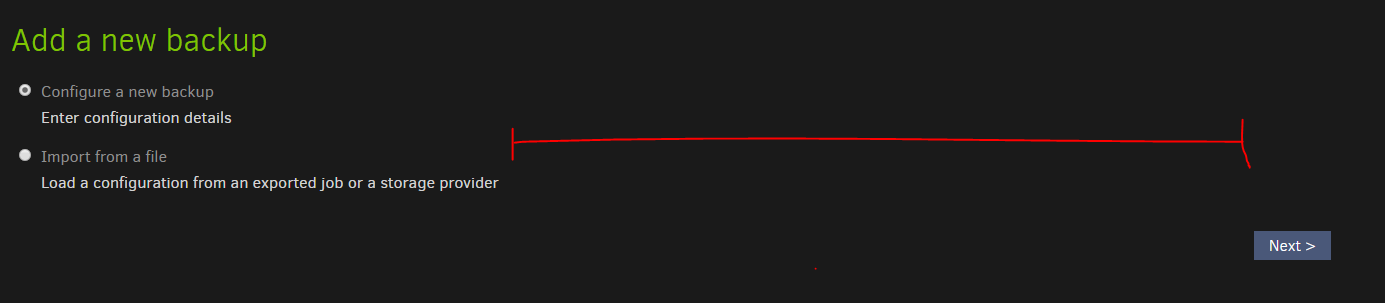
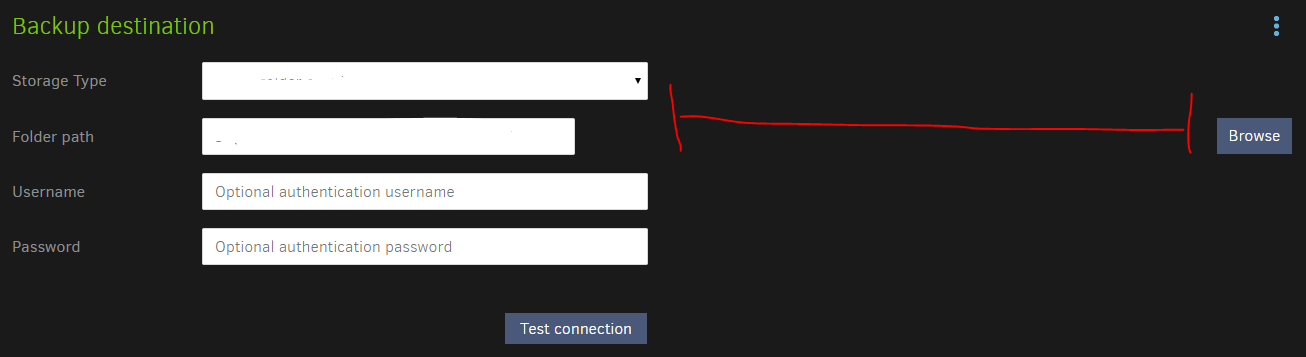
 ![image](https://forum.duplicati.com/uploads/default/original/2X/4/46214ca962f9d7b4e5958efaf7fd8b068c93b510.png)

 ![image](https://forum.duplicati.com/uploads/default/original/2X/6/60d7c343c3eb5874a06341bd402edb8fe2489d71.png)

_edit: this screenshots are make on 1920x1080_

---

<div class="post-metadata">

### Author: ![mikaelmello](https://forum.duplicati.com/user_avatar/forum.duplicati.com/mikaelmello/32/2097_2.png) [@mikaelmello](https://forum.duplicati.com/u/mikaelmello)
#### Post date: [December 26, 2018, 4:35pm UTC](https://forum.duplicati.com/t/usability-positions-of-buttons/5753/2 "2018-12-26T16:35:56Z")

</div>

I believe this one is on me. When doing some changes in the log views I set `width: 100%` somewhere and it must be affecting all pages.

Anyone that knows HTML/CSS better than I do knows how to compromise between having 100% in the logs page but not on the other ones? I remember trying to set 100% on the log div but it didn’t work, setting it in the parent div was the only thing that worked.

---

<div class="post-metadata">

### Author: ![capilano](https://forum.duplicati.com/user_avatar/forum.duplicati.com/capilano/32/2398_2.png) [@capilano](https://forum.duplicati.com/u/capilano)
#### Post date: [December 28, 2018, 12:00pm UTC](https://forum.duplicati.com/t/usability-positions-of-buttons/5753/3 "2018-12-28T12:00:03Z")

</div>

When i analyse the layout, there is an div-Container with this information  
`ng-view="" class="content ng-scope" style="width: 100%"`

when i change `style="width: 100%"` to `style="width: 40%"` it looks:
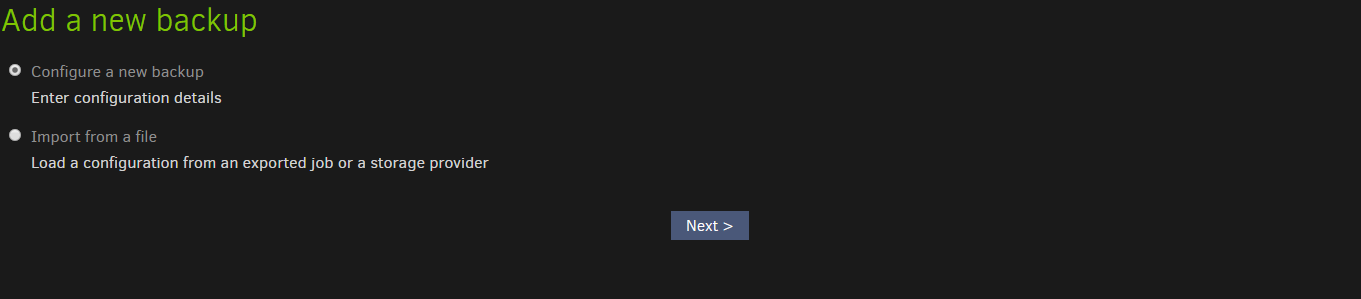
 ![image](https://forum.duplicati.com/uploads/default/original/2X/d/d7fc14d4e40d5599f693b9c59fc6bf5d1dd14002.png)

The Code-Block

```
<div ng-view="" class="content ng-scope" style="width: 100%"><div ng-controller="AddWizardController" class="addwizard ng-scope">
    
    <h1><div translate=""><span class="ng-scope">Add a new backup</span></div></h1>

    <form class="styled ng-pristine ng-valid">
    	<ul>
    		<li class="input" ng-click="selection.style = 'blank'" data-vivaldi-spatnav-clickable="1">
	    		<input type="radio" name="blank" id="blank" ng-model="selection.style" value="blank" class="ng-pristine ng-untouched ng-valid">
    			<label for="direct" translate=""><span class="ng-scope">Configure a new backup</span></label>
    			<div class="subtext" translate=""><span class="ng-scope">Enter configuration details</span></div>
    		</li>

            <li class="input" ng-click="selection.style = 'importfile'" data-vivaldi-spatnav-clickable="1">
                <input type="radio" name="blank" id="blank" ng-model="selection.style" value="importfile" class="ng-pristine ng-untouched ng-valid">
                <label for="direct" translate=""><span class="ng-scope">Import from a file</span></label>
                <div class="subtext" translate=""><span class="ng-scope">Load a configuration from an exported job or a storage provider</span></div>
            </li>

            <!--<li class="input" ng-click="selection.style = 'importremote'">
                <input type="radio" name="blank" id="blank" ng-model="selection.style" value="importremote">
                <label for="direct">From a remote backup</label>
                <div class="subtext">Import configuration from a backup folder</div>
            </li> -->

    	</ul>

        <div class="buttons">
            <input class="submit next" type="button" ng-click="nextPage()" value="Next >">
        </div>
    </form>
</div>

```

Another solution can be  
`form.styled .buttons { overflow: hidden; float: right; margin-right: 50%; // new option }`

it looks

 ![image](https://forum.duplicati.com/uploads/default/original/2X/e/e65c551100e8e7c178deaf9c54999d6f8366a4c1.png)

but i dont know how the other forms/layouts looks after these change

---

<div class="post-metadata">

### Author: ![capilano](https://forum.duplicati.com/user_avatar/forum.duplicati.com/capilano/32/2398_2.png) [@capilano](https://forum.duplicati.com/u/capilano)
#### Post date: [December 28, 2018, 1:32pm UTC](https://forum.duplicati.com/t/usability-positions-of-buttons/5753/5 "2018-12-28T13:32:47Z")

</div>

An solution can be to change  
`<div ng-view="" class="content ng-scope" style="width: 100%">`

to  
`<div ng-view="" class="content ng-scope creationBackup">`  
with the css-format  
`div.creationBackup { width: 40%; }`  
OR  
`div.creationBackup { margin-right: 50%; }`

Note: this is not tested yet
