### Author:  [@ts678](https://forum.duplicati.com/u/ts678)
#### Post date: [November 16, 2024, 1:27am UTC](https://forum.duplicati.com/t/upgrade-with-msi-causes-duplicated-versions-installed/19542/1 "2024-11-16T01:27:50Z")
> [@Release: 2.0.9.109 (Canary) 2024-11-06](https://forum.duplicati.com/t/release-2-0-9-109-canary-2024-11-06/19449/22):
>
> I have no idea how that is even possible.
I found a repro, but be careful, as I also found a way ([maybe user error](https://www.reddit.com/r/sysadmin/comments/16pbqj5/winscp_rebooting_it_workstations/)) to accidentally restart PC.
I intentionally tried to upgrade with a 2.0.9.107 Windows service running, and I did it with msiexec.
I’ve seen posts talking about FORSERVICE=true with variations on use of quotes and whitespace.
This just popped up the GUI, and I was expecting a silent install. I added `/quiet` and got a reboot.
Apparently I should have also added `/norestart`, although I don’t know if my running service was part of why it saw need to restart. Maybe it would have anyway. Maybe it’s an old bug. Don’t know.
System event log:
The process msiexec.exe has initiated the restart of computer HP4 on behalf of user NT AUTHORITY\SYSTEM for the following reason: No title for this reason could be found
Reason Code: 0x80030002
Shutdown Type: restart
Comment: The Windows Installer initiated a system restart to complete or continue the configuration of ‘Duplicati’.
EventID 1074
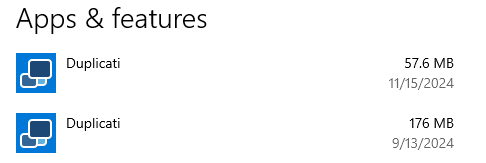
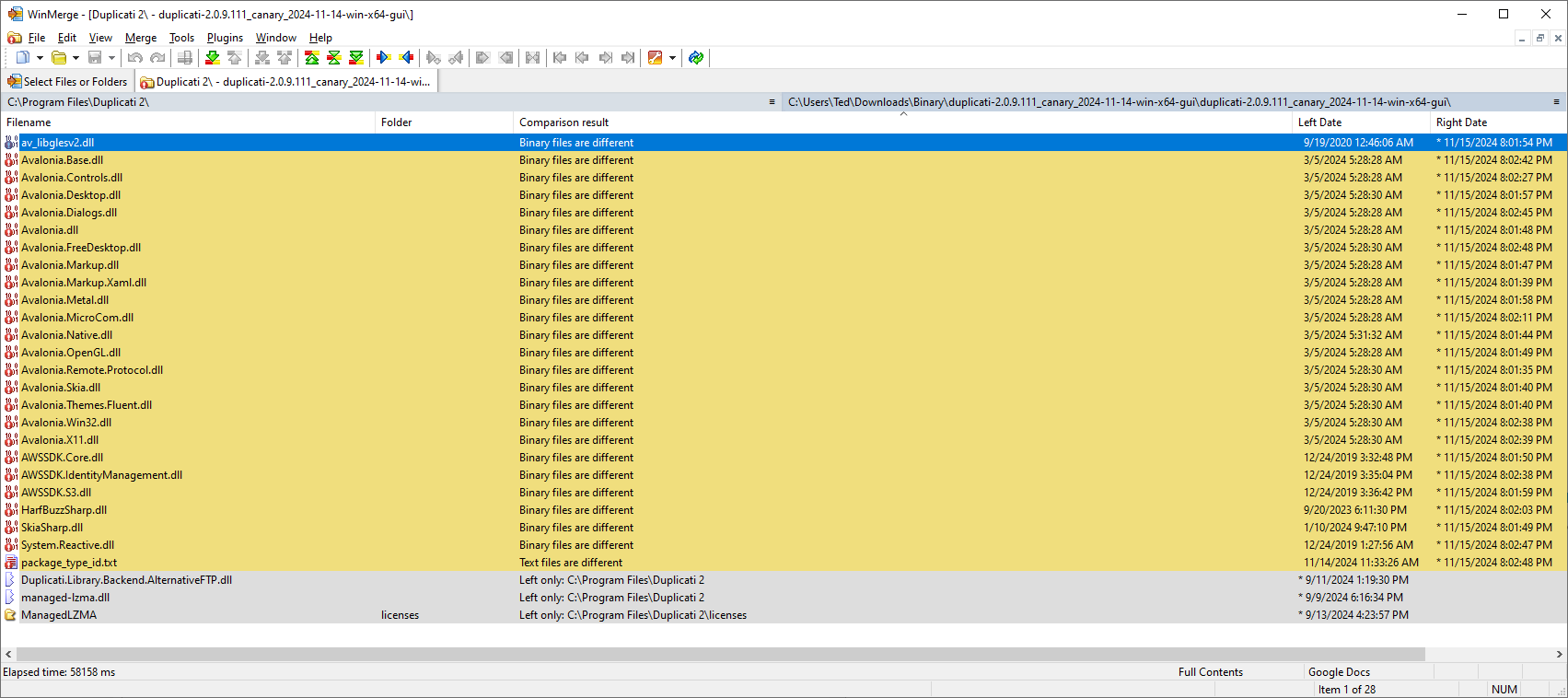
EDIT 1:
From above, you can see that I actually used 2.0.9.111 (per Duplicati offer), but discussion is here.
EDIT 2:
Actual Program Files folder is 182 MB per Explorer, unlike the Apps listing claim of being 57.6 MB.
EDIT 3:
Explorer says mentioned WinMerge difference files are about 13 MB. Not sure where 57.6 is from.
With all the Avalonia differences, I kind of expected a TrayIcon start to complain, and so it did, like:
```plaintext
C:\Program Files\Duplicati 2>Duplicati.GUI.TrayIcon.exe
C:\Program Files\Duplicati 2>No database encryption key was found. The database will be stored unencrypted. Supply an encryption key via the environment variable SETTINGS_ENCRYPTION_KEY or disable database encryption with the option --disable-db-encryption
Server has started and is listening on port 8400
Unexpected error: System.IO.FileNotFoundException: Could not load file or assembly 'Avalonia.Controls, Version=11.2.0.0, Culture=neutral, PublicKeyToken=c8d484a7012f9a8b'. The system cannot find the file specified.
File name: 'Avalonia.Controls, Version=11.2.0.0, Culture=neutral, PublicKeyToken=c8d484a7012f9a8b'
at Duplicati.GUI.TrayIcon.AvaloniaRunner.SetMenu(IEnumerable`1 items)
at Duplicati.GUI.TrayIcon.TrayIconBase.Init(String[] args)
at Duplicati.GUI.TrayIcon.AvaloniaRunner.Init(String[] args)
at Duplicati.GUI.TrayIcon.Program.StartTray(String[] _args, Dictionary`2 options, HostedInstanceKeeper hosted, String password, String acceptedHostCertificate)
An error occurred on server tear down: System.ObjectDisposedException: Cannot access a disposed object.
Object name: 'IServiceProvider'.
at Microsoft.Extensions.DependencyInjection.ServiceLookup.ThrowHelper.ThrowObjectDisposedException()
at Microsoft.Extensions.DependencyInjection.ServiceProvider.GetService(ServiceIdentifier serviceIdentifier, ServiceProviderEngineScope serviceProviderEngineScope)
at Microsoft.Extensions.DependencyInjection.ServiceProvider.GetService(Type serviceType)
at Microsoft.Extensions.DependencyInjection.ServiceProviderServiceExtensions.GetRequiredService(IServiceProvider provider, Type serviceType)
at Microsoft.Extensions.DependencyInjection.ServiceProviderServiceExtensions.GetRequiredService[T](IServiceProvider provider)
at Duplicati.Library.RestAPI.FIXMEGlobal.get_WorkThread()
at Duplicati.Server.Program.<>c.b__60_12()
at Duplicati.Server.Program.Main(String[] _args)
C:\Program Files\Duplicati 2>Duplicati.Server.exe
No database encryption key was found. The database will be stored unencrypted. Supply an encryption key via the environment variable SETTINGS_ENCRYPTION_KEY or disable database encryption with the option --disable-db-encryption
Server has started and is listening on port 8200
(Ctrl-C to stop it)
C:\Program Files\Duplicati 2>Duplicati.GUI.TrayIcon.exe
C:\Program Files\Duplicati 2>No database encryption key was found. The database will be stored unencrypted. Supply an encryption key via the environment variable SETTINGS_ENCRYPTION_KEY or disable database encryption with the option --disable-db-encryption
Server has started and is listening on port 8200
Unexpected error: System.IO.FileNotFoundException: Could not load file or assembly 'Avalonia.Controls, Version=11.2.0.0, Culture=neutral, PublicKeyToken=c8d484a7012f9a8b'. The system cannot find the file specified.
File name: 'Avalonia.Controls, Version=11.2.0.0, Culture=neutral, PublicKeyToken=c8d484a7012f9a8b'
at Duplicati.GUI.TrayIcon.AvaloniaRunner.SetMenu(IEnumerable`1 items)
at Duplicati.GUI.TrayIcon.TrayIconBase.Init(String[] args)
at Duplicati.GUI.TrayIcon.AvaloniaRunner.Init(String[] args)
at Duplicati.GUI.TrayIcon.Program.StartTray(String[] _args, Dictionary`2 options, HostedInstanceKeeper hosted, String password, String acceptedHostCertificate)
```
I’m not sure why the two failures differ in the chosen LISTEN port and the details of the stack trace.
From an Avalonia.Controls view 11.2.0.0. is indeed the latest, but incomplete update has 11.0.10.0.
I haven’t played with variations on test case, but at least it seems like an advance to have anything.
EDIT 4:
[Restart options](https://learn.microsoft.com/en-us/windows-server/administration/windows-commands/msiexec#restart-options) on Microsoft `msiexec` page has a vague notice that-use files might cause a restart.
---
### Author:  [@kenkendk](https://forum.duplicati.com/u/kenkendk)
#### Post date: [November 21, 2024, 8:42pm UTC](https://forum.duplicati.com/t/upgrade-with-msi-causes-duplicated-versions-installed/19542/2 "2024-11-21T20:42:52Z")
> [@ts678](#):
>
> I intentionally tried to upgrade with a 2.0.9.107 Windows service running, and I did it with msiexec.
>
> I’ve seen posts talking about FORSERVICE=true with variations on use of quotes and whitespace.
>
> This just popped up the GUI, and I was expecting a silent install. I added `/quiet` and got a reboot.
I am very happy to hear about a potential way to reproduce!
I have tried the steps outlined here, but everything seems to work as intended.
The only difference that I can think of is that it may be something with Windows versions.
I attempted on Windows 11, but I can try another version as well.
In case there is a minor detail that differs from your setup, I have recorded my experiment, so you can compare:
[Update MSI with service running.mp4](https://www.dropbox.com/scl/fi/yevqn8g1kv5v46hpnp1ar/Update-MSI-with-service-running.mp4?rlkey=c5vacmc8j0lfkn84q4gauu5jr&dl=0)
---
### Author:  [@ts678](https://forum.duplicati.com/u/ts678)
#### Post date: [November 21, 2024, 11:59pm UTC](https://forum.duplicati.com/t/upgrade-with-msi-causes-duplicated-versions-installed/19542/3 "2024-11-21T23:59:03Z")
I probably installed 2.0.9.107 differently, as I don’t usually use msiexec. I’ll try closer to your steps.
Initially though, I’ll report that I have
`msiexec /i "duplicati-2.0.9.111_canary_2024-11-14-win-x64-gui.msi" FORSERVICE=true /quiet /norestart`
sitting idle (after a load of activity and a second msiexec which actually showed my options) while possibly it’s waiting for the Service to stop (as opposed to forcing the issue by rebooting system).
Right now, the double entries are showing, with 2.0.9.111 the small one. Folder superficially looks the same as the previous case with changelog.txt updated but Avalonia still on the March version.
While writing this up, the msiexec process disappeared, otherwise I’d have tried stopping Service.
Application event log has a long line of complaints about files being busy and the need for restart, however none of that seems visible on the terminal or the GUI unless I go dig for it, e.g. in events.
I’ll play with this some more, but at least it stayed reproducible here on Windows 10 Professional, however my steps were not precisely like yours, although they seem really close, so who knows?
EDIT 1:
Still reproducible. I’m now testing a more typical upgrade, upgrading new 2.0.9.110 to 2.0.9.111.
I’m using an msiexec command line install for both, with start of existing Service between them:
```plaintext
msiexec /i duplicati-2.0.9.110_canary_2024-11-09-win-x64-gui.msi /quiet /norestart
sc start duplicati
msiexec /i duplicati-2.0.9.111_canary_2024-11-14-win-x64-gui.msi /quiet /norestart
```
I watch Task Manager processes, and I consider `msiexec` done when CPU usage drops to zero.
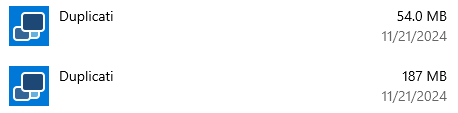
EDIT 2:
Windows 11 does it too. This time I had to install the Service before I ran `sc start duplicati`.
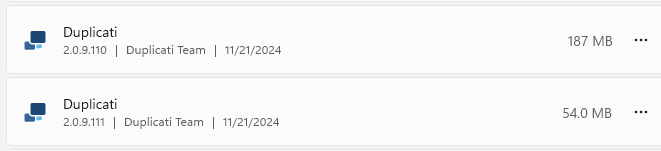
---
### Author:  [@kenkendk](https://forum.duplicati.com/u/kenkendk)
#### Post date: [November 22, 2024, 7:29am UTC](https://forum.duplicati.com/t/upgrade-with-msi-causes-duplicated-versions-installed/19542/4 "2024-11-22T07:29:37Z")
> [@ts678](#):
>
> Still reproducible.
Hmm… I guess if you have the issue on Windows 11, it is not OS-version related.
One thing I notice is different is that I never had the restart you mentioned.
After installing the update (without silent) it would complain that I needed to restart for the install to complete. I tried both with and without restart and never got the double entry.
For completeness, I also tried restarting after installing the older version, and then going through the same steps. I see that I tried on an Arm64 Windows, and you are using an x64 version.
The version that rebooted automatically for you, what version of Windows was that?
I am guessing that this is somehow related to something with locked files.
EDIT: I now managed to reproduce with Windows Server 2022 running x64. Not sure if it is the architecture or the Windows version, but at least I can replicated.
I have tried a few variations to narrow down the issue.
# Running Duplicati as a normal process (i.e., not a service)
If Duplicati is running during the upgrade, there is a dialog like this:
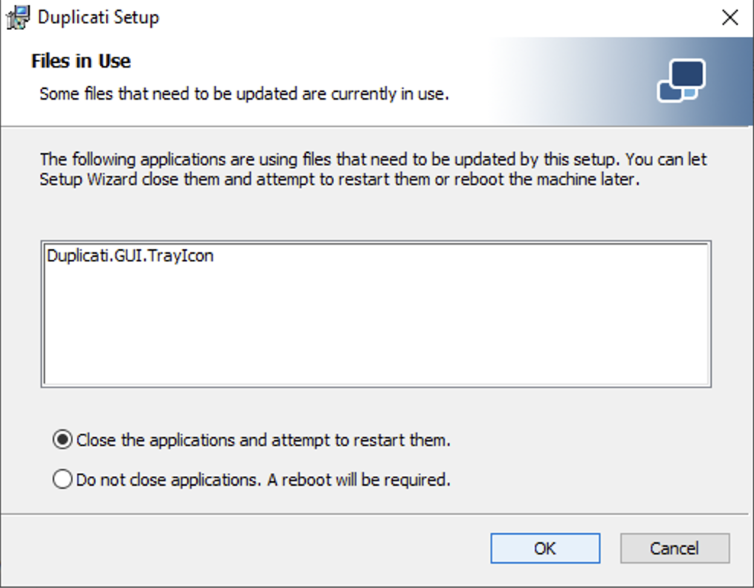
If you choose the option to close, it works as expected.
The “Reboot” option, the new version is installed as expected, but the running instance fails in various ways until it is restarted (fails to load various files).
The view of installed applications shows only the new version, and WinMerge shows it has correctly installed the new version.
# Running Duplicati as a Windows Service
If Duplicati is running as a service during the upgrade, there is a dialog like this:
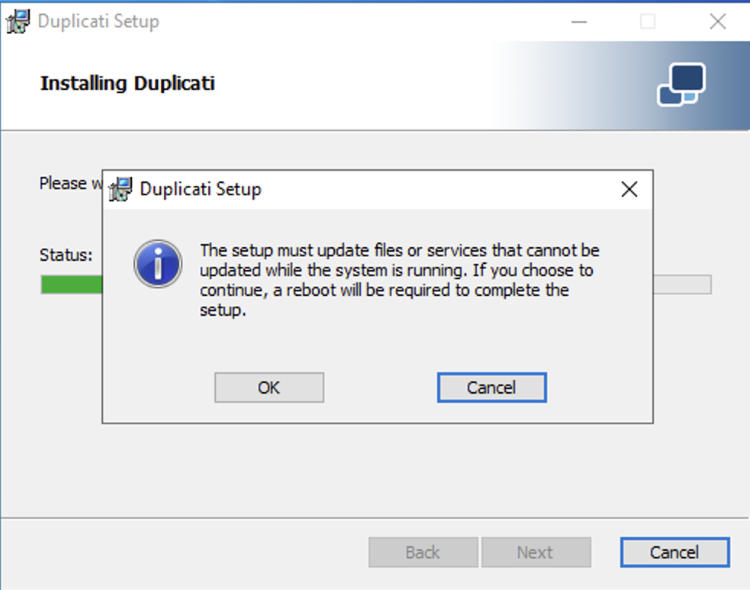
Somehow, this also works, and the files are replaced correctly, despite the running service.
The service is in a broken state until it is restarted (fails to load various files).
The view of installed applications shows only the new version, and WinMerge shows it has correctly installed the new version.
# Running Duplicati as a Windows Service, using `REMOVE=ALL`
In this mode, the installer detects that it cannot remove the current instance. Despite the dialog progressing as if it installs, nothing is changed. After install, the files and installed programs shows the previous version.
The same outcome happens if adding `/quiet`. It will run the install, but nothing is changed.
# Running Duplicati as a Windows Service, using `/quiet`
If Duplicati is running as a Windows Service and the upgrade is executed with the `/quiet` flag, Windows will reboot after the install. Setting `/norestart` prevents the restart, but in either case the install shows two different versions installed, and the contents on disk are mixed.
I will dig some more, but it appears that silent install combined with locked files, produces the wrong state.
---
### Author:  [@kenkendk](https://forum.duplicati.com/u/kenkendk)
#### Post date: [November 22, 2024, 12:32pm UTC](https://forum.duplicati.com/t/upgrade-with-msi-causes-duplicated-versions-installed/19542/5 "2024-11-22T12:32:32Z")
I have now spent more time probing at the problem.
I have managed to get a version built that correctly stops/starts the service (if present), which (almost) fixes the issues with locked files.
But even with this fix, the duplicated versions are still present, if upgrading with `/quiet` 😢
EDIT: It turns out that the running service is not needed. I can now replicate the double entry with these two steps:
- `msiexec /i duplicati-2.0.9.107.msi`
- `msiexec /i duplicati-2.0.9.111.msi /quiet`
EDIT: Finally figure it out 🎉
Turns out the `RemoveExistingProducts` was done before the `FindRelatedProducts` action.
When using the UI, this does not matter as it does `FindRelatedProducts` as part of the UI setup code, so it is always done before. But in `/quiet` mode, the UI part is not run, so it failed.
After fixing this it works both with and without `/quiet`.
I don’t think it is related to the service locking files, but during debugging I got it working with a service restart, so the install will now automatically restart the service (if it exists and is running).