# Unable to restore my data from one drive backup
**URL:** https://forum.duplicati.com/t/unable-to-restore-my-data-from-one-drive-backup/10281
**Category:** Support
**Created:** [July 14, 2020, 11:33am UTC](https://forum.duplicati.com/t/unable-to-restore-my-data-from-one-drive-backup/10281 "2020-07-14T11:33:17Z")
**Posts on this page:** 9
**Page:** 1
### Author:  [@write2keith](https://forum.duplicati.com/u/write2keith)
#### Post date: [July 14, 2020, 11:33am UTC](https://forum.duplicati.com/t/unable-to-restore-my-data-from-one-drive-backup/10281/1 "2020-07-14T11:33:17Z")
Hi all ,
I am new to duplicati started using it last year, this is my first time trying to restore my data.
I had been infected by the crypto virus in march 2020 and had to format my entire pc. I have tried to restore the files from one drive back it took 2 days as my data is about 220 GB on one drive but in the end only folders were created files were not restored
This is the procedure followed
Restore from config files
imported the config file
did a test connection to my one store folder and showed connection worked.
these are the options set
----exclude-files-attributes=hidden,system,temporary
----send-mail-any-operation=true
----snapshot-policy=On
–retention-policy=1W:1D,4W:1W,12M:1M
–dblock-size=50mb
–compression-module=zip
–encryption-module=aes
After selecting connect it shows recreating the database and then shows the backup dates.
Shows about 5 backup dates
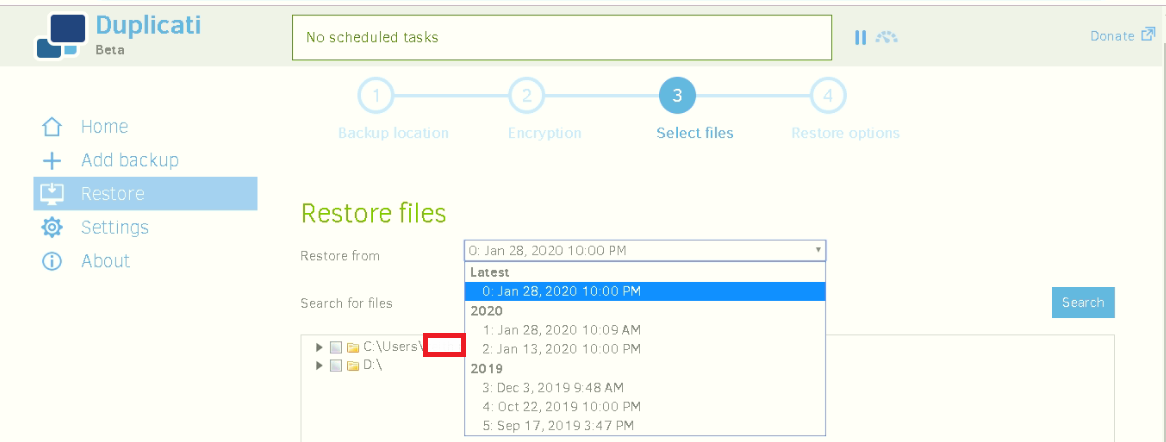
this time i just tried to restore data from 1 pdf file
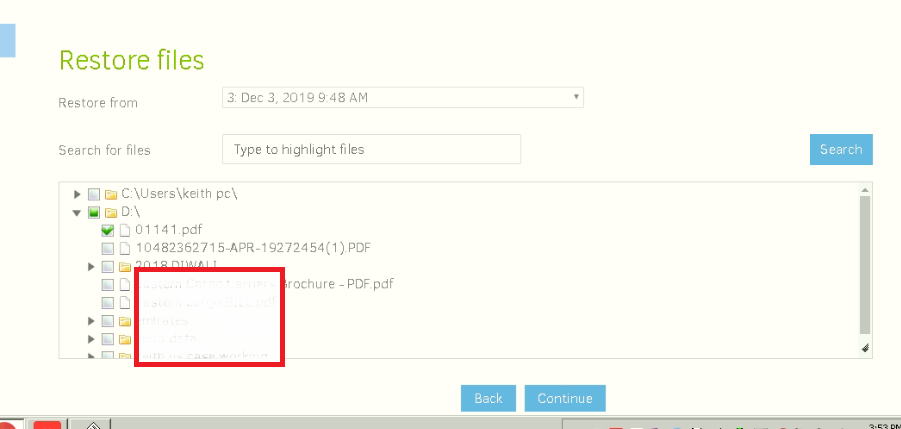
getting this error
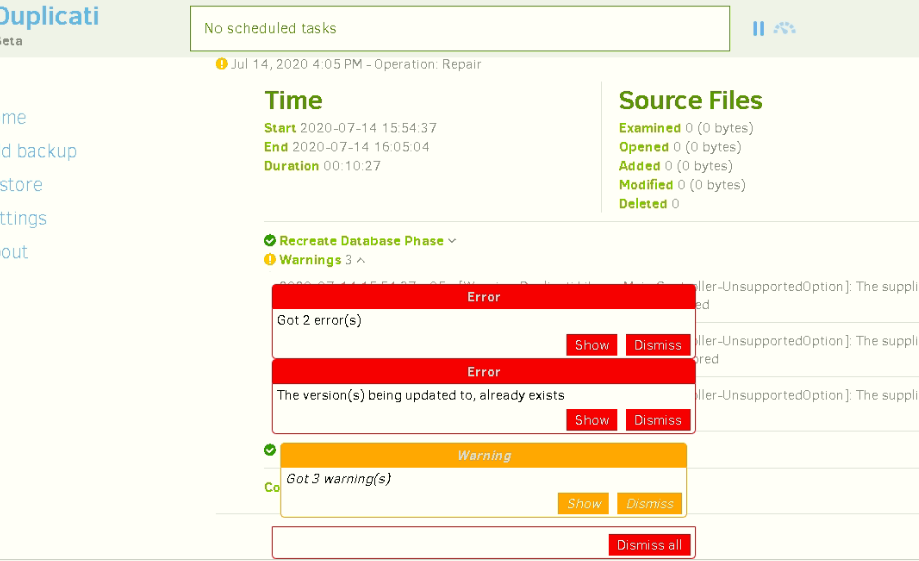
data could not be restored.
---
### Author:  [@ts678](https://forum.duplicati.com/u/ts678)
#### Post date: [July 14, 2020, 4:19pm UTC](https://forum.duplicati.com/t/unable-to-restore-my-data-from-one-drive-backup/10281/2 "2020-07-14T16:19:28Z")
Welcome to the forum @write2keith
> [@write2keith](#):
>
> Restore from config files
If that’s Restore → Restore from configuration, I think there’s a bug where it mishandles options’ dashes.
There are fragments of three option warnings behind your screenshot popups. Maybe that’s the odd three shown on your option listing at the top that appear to have four leading dashes instead of the required two.
If the goal is to get this PC back in business as its former self, the best path is to import the configuration file, then use job’s [Database](https://duplicati.readthedocs.io/en/latest/03-using-the-graphical-user-interface/#database-management) screen `Repair` button to completely rebuild the database back to how it was. Assuming it works, you should be all set to run [Restore](https://duplicati.readthedocs.io/en/latest/03-using-the-graphical-user-interface/#restoring-files-from-a-backup) from the job menu. When all set, resume backup.
[Migration to new PC - faq wanted](https://forum.duplicati.com/t/migration-to-new-pc-faq-wanted/5990/7) has more information, as the totally reformatted PC is effectively “new”.
Before doing that, feel free to see if you can find and post (or record for yourself) any errors and warnings here, e.g. the ones behind the popups, and maybe something in About → Show log → Stored where you can usually click on the error entry to see the details. With what’s posted so far, options is my only guess.
If the goal was to get the restore done ASAP, worrying about backup later, [Restoring files if your Duplicati installation is lost](https://duplicati.readthedocs.io/en/latest/03-using-the-graphical-user-interface/#restoring-files-if-your-duplicati-installation-is-lost) might be a good path, because it uses a partial temporary database, maybe a bit faster built compared to the full all-versions all-files rebuild you’d need to do to get completely back in business.
Two days seems a long time, If you like, you can watch in a tab at About → Show log → Verbose. Ideally there should be a series of dlist files processed, a series of dindex, and zero to a few dblocks (though any damage to the backup might make it keep looking slowly through dblock files in an attempt to locate data).
---
### Author:  [@write2keith](https://forum.duplicati.com/u/write2keith)
#### Post date: [July 15, 2020, 10:30am UTC](https://forum.duplicati.com/t/unable-to-restore-my-data-from-one-drive-backup/10281/3 "2020-07-15T10:30:54Z")
hello ts678,
yes i would like to get back my emails here is log files of the stored log.
Jul 14, 2020 4:19 PM: Failed while executing “RepairUpdate” with id: 776fe166-336e-455b-a680-82d0f677a3c2
Duplicati.Library.Interface.UserInformationException: The version(s) being updated to, already exists
at Duplicati.Library.Main.Operation.RecreateDatabaseHandler.RunUpdate(IFilter filter, NumberedFilterFilelistDelegate filelistfilter, BlockVolumePostProcessor blockprocessor)
at Duplicati.Library.Main.Controller.\<\>c\_\_DisplayClass26\_0.b\_\_0(RecreateDatabaseResults result)
at Duplicati.Library.Main.Controller.RunAction[T](T result, String& paths, IFilter& filter, Action`1 method)
at Duplicati.Library.Main.Controller.UpdateDatabaseWithVersions(IFilter filter)
at Duplicati.Server.Runner.Run(IRunnerData data, Boolean fromQueue)
Regards
Keith
---
### Author:  [@write2keith](https://forum.duplicati.com/u/write2keith)
#### Post date: [July 15, 2020, 11:05am UTC](https://forum.duplicati.com/t/unable-to-restore-my-data-from-one-drive-backup/10281/4 "2020-07-15T11:05:17Z")
tried this option
## Restoring files if your Duplicati installation is lost
get the connection worked when entering my one drive details but i get an error when listing files.
i have pasted the error logs below
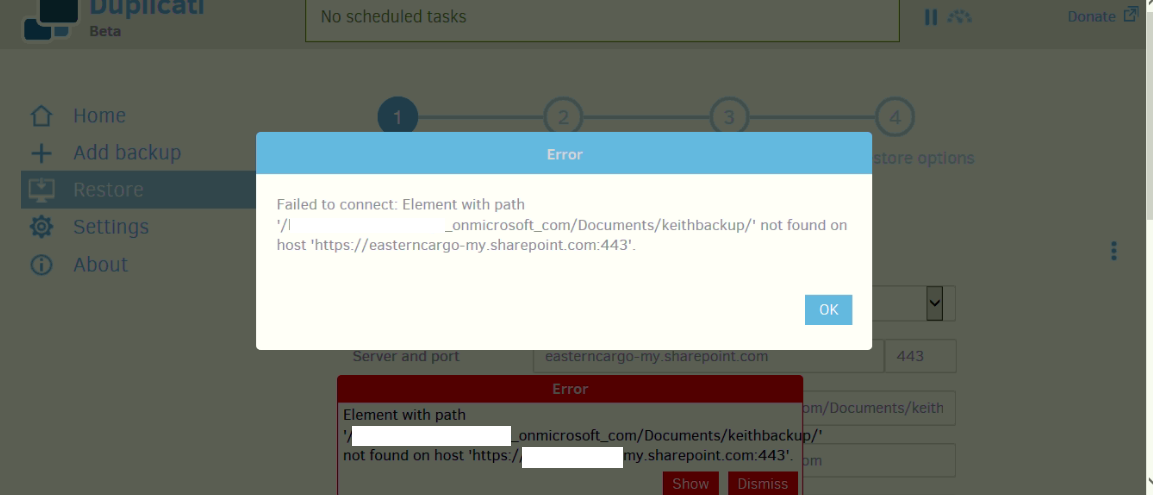
Jul 15, 2020 4:05 PM: The operation List has failed with error: Element with path ‘/write2keith\_onmicrosoft\_com/Documents/keithbackup/’ not found on host ‘https:// [write2keith-my.sharepoint.com:443](http://write2keith-my.sharepoint.com:443)’.
{“ClassName”:“Duplicati.Library.Interface.FolderMissingException”,“Message”:“Element with path ‘/write2keith\_onmicrosoft\_com/Documents/keithbackup/’ not found on host ‘[https://write2keith-my.sharepoint.com:443](https://write2keith-my.sharepoint.com:443)’.”,“Data”:null,“InnerException”:null,“HelpURL”:null,“StackTraceString”:" at Duplicati.Library.Main.BackendManager.List()\r\n at Duplicati.Library.Main.Operation.ListFilesHandler.Run(IEnumerable`1 filterstrings, IFilter compositefilter)\r\n at Duplicati.Library.Main.Controller.RunAction[T](T result, String[]& paths, IFilter& filter, Action`1 method)\r\n at Duplicati.Library.Main.Controller.List(IEnumerable`1 filterstrings, IFilter filter)\r\n at Duplicati.Server.Runner.Run(IRunnerData data, Boolean fromQueue)\r\n at Duplicati.Server.WebServer.RESTMethods.Backup.ListFileSets(IBackup backup, RequestInfo info)\r\n at Duplicati.Server.WebServer.RESTHandler.DoProcess(RequestInfo info, String method, String module, String key)","RemoteStackTraceString":null,"RemoteStackIndex":0,"ExceptionMethod":"8\nList\nDuplicati.Library.Main, Version=2.0.5.1, Culture=neutral, PublicKeyToken=null\nDuplicati.Library.Main.BackendManager\nSystem.Collections.Generic.IList`1[Duplicati.Library.Interface.IFileEntry] List()",“HResult”:-2146233088,“Source”:“Duplicati.Library.Main”,“WatsonBuckets”:null}
see the screenshot

when i click next it shows listing backup dates
then shows this error
Error
Failed to connect: Element with path ‘/write2keith\_onmicrosoft\_com/Documents/keithbackup/’ not found on host ‘https:// [write2keith-my.sharepoint.com:443](http://write2keith-my.sharepoint.com:443)’
---
### Author:  [@ts678](https://forum.duplicati.com/u/ts678)
#### Post date: [July 15, 2020, 11:43am UTC](https://forum.duplicati.com/t/unable-to-restore-my-data-from-one-drive-backup/10281/5 "2020-07-15T11:43:16Z")
> [@write2keith](#):
>
> yes i would like to get back my emails here is log files of the stored log.
Thanks. This makes it a bit more clear that DB recreate was the error spot (which was suspected before).
I think this is reporting that a backup version was trying to be added during Recreate, but it already existed.
At least one person avoided the problem by picking a different version, however I don’t know whether your situation is worse because of what I guess was the option bug **if** you ran `Restore from configuration`.
> [@write2keith](#):
>
> Jul 15, 2020 4:05 PM: The operation List has failed with error: Element with path ‘/write2keith\_onmicrosoft\_com/Documents/keithbackup/’ not found
What exactly is this? It’s not OneDrive Personal. Some sort of paid option, perhaps a Business version?
These are sometimes hard to set up. Do you remember entering odd things like Site ID into your config?
[Failed to connect: No site ID was provided; Sharepoint v2](https://forum.duplicati.com/t/failed-to-connect-no-site-id-was-provided-sharepoint-v2/9582) is one example of one person’s setup method.
If your old config was working, maybe you should `Add Backup --> Import from a file` which will at least let you see if there were any special connection details that you need to get into the Direct restore.
There are some spots on the screens to add options, but it’s not a very fancy UI. Or you can try `Repair` either by pushing the button and waiting for it all to work (and hoping it doesn’t give “already exists” error.
After importing the config into a new backup, it’s possible to manually run [The REPAIR command](https://duplicati.readthedocs.io/en/latest/04-using-duplicati-from-the-command-line/#the-repair-command) using [Commandline](https://duplicati.readthedocs.io/en/latest/03-using-the-graphical-user-interface/#using-the-command-line-tools-from-within-the-graphical-user-interface), and I think you can specify a [–version](https://duplicati.readthedocs.io/en/latest/06-advanced-options/#version) if you like. The blue button would try for all versions.
One other nice thing about Command is it shows you a screen with its options. Maybe one will ring a bell and help understand why `Direct restore` seems to be having trouble finding files. They’re there, right?
If you have enough extra drive space, you can also try downloading with whatever other downloader you like. You can just point at your files with `Local folder or drive`, and it may save time if this becomes several experiments. I assume downloading is part of the time it took, so a local copy should be faster…
[Duplicati.CommandLine.RecoveryTool.exe](https://duplicati.readthedocs.io/en/latest/07-other-command-line-utilities/#duplicaticommandlinerecoverytoolexe) can usually do downloads, using a storage URL as seen at [Export As Command-line](https://duplicati.readthedocs.io/en/latest/03-using-the-graphical-user-interface/#exporting-a-backup-job-configuration) (after importing your old config), but I worry it could have the file-finding issue.
Regardless, if the GUI method gives too many troubles, this tool is not only a downloader, but a restorer.
[Recovering by using the Duplicati Recovery tool](https://duplicati.readthedocs.io/en/latest/08-disaster-recovery/#recovering-by-using-the-duplicati-recovery-tool) has info, but you can download any other way you wish.
---
### Author:  [@write2keith](https://forum.duplicati.com/u/write2keith)
#### Post date: [July 23, 2020, 5:56am UTC](https://forum.duplicati.com/t/unable-to-restore-my-data-from-one-drive-backup/10281/6 "2020-07-23T05:56:01Z")
Dear ts678,
I am currently downloading the 220 GB of backup files but its taking a long time to sync from OneDrive, i still have 95 GB to be downloaded .Since the lockdown i am working from home and do not have access to a high speed net ,also my ISP provider also limits the amount of GB i can downloads for the day after i cross a certain threshold limit and then the internet goes painfully slow.
However I am on a business one drive account , I also noticed that the backup files have a timestamp of 25th march 2020 ,the day i was infected by the virus.
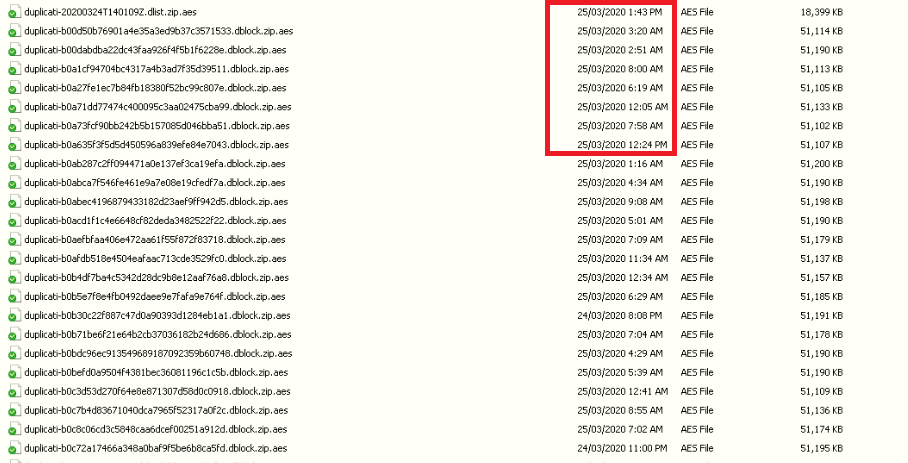
and all the files have the extension of .AES is there a way to decrypt this from command?
I need the backups of Jan 2020 as 25th march is when i was infected with the virus as we were told to leave office and work from home via any desk from the 22nd March 2020 and the infection was on 23 March 2020 i think and Duplicati backed those files on 25th March 2020.
The sync should complete in 4-5days.
ts678 thank you for your support much appreciated.
Regards
Keith
---
### Author:  [@ts678](https://forum.duplicati.com/u/ts678)
#### Post date: [July 23, 2020, 2:39pm UTC](https://forum.duplicati.com/t/unable-to-restore-my-data-from-one-drive-backup/10281/7 "2020-07-23T14:39:27Z")
> [@write2keith](#):
>
> sync from OneDrive
> [@write2keith](#):
>
> is there a way to decrypt this from command?
Seeing “sync” worries me. Was there a two-way sync before, so virus-damaged local files would upload?
That would allow a virus to damage the remote backup. Did this particular virus rename the infected files?
If so, then seeing `.aes` files is good, because that’d be normal for Duplicati. You could decrypt them using Duplicati’s SharpAESCrypt.exe or GUI tool [AES Crypt](https://www.aescrypt.com/) (which sort of proves file data is still there) however what’s inside is a `.zip` file with data blocks from source files. You can’t really reassemble all this by hand.
[Block-based storage engine](https://www.duplicati.com/articles/Storage-Engine/) (less technical)
[How the backup process works](https://duplicati.readthedocs.io/en/latest/appendix-a-how-the-backup-process-works/) (the details)
> [@write2keith](#):
>
> I also noticed that the backup files have a timestamp of 25th march 2020 ,the day i was infected by the virus.
Not all backup files do (even on your screenshot, which is not all files). Having new files is also normal for backup, if there was a backup. The last thing uploaded would be a file with dlist and its UTC date in name.
---
### Author:  [@write2keith](https://forum.duplicati.com/u/write2keith)
#### Post date: [July 23, 2020, 5:45pm UTC](https://forum.duplicati.com/t/unable-to-restore-my-data-from-one-drive-backup/10281/8 "2020-07-23T17:45:10Z")
Dear ts678,
What i meant by sync is that i have downloaded the one drive application to my computer and then started syncing the data of that folder i.e. Keithbackupnew which is stored in the one drive cloud drive since as Duplicati could not download and restore, i thought that i would be easier to download the files to the local drive and then try and restore the files.
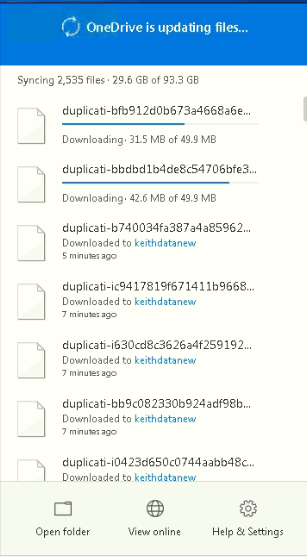
Yes the virus had infected and renamed all my files with the extension .[MerlinWebster@aol.com].com
like this file.

I had come to know about the virus attack after the 25th of March 2020 and Duplicati backup will contain the files with the extension.[MerlinWebster@aol.com].com as the data on One Drive shows the time stamp as 23rd March 2020 (The day when the Duplicati backup schedule ran) and virus infection date is 22nd March 2020.
Thought that i will at least get the data before the virus infection ie 28th Jan 2020(the last backup date) as that’s what date shows when i try to restore from the config file .
so lets say i use Duplicati’s SharpAESCrypt.exe or AES Crypt to decrypt the data from .aes to .zip ,you have said that i cannot reassemble it by hand what should be my next thing i should do.
Can i point the back location to a folder like this and then try to restore the data.
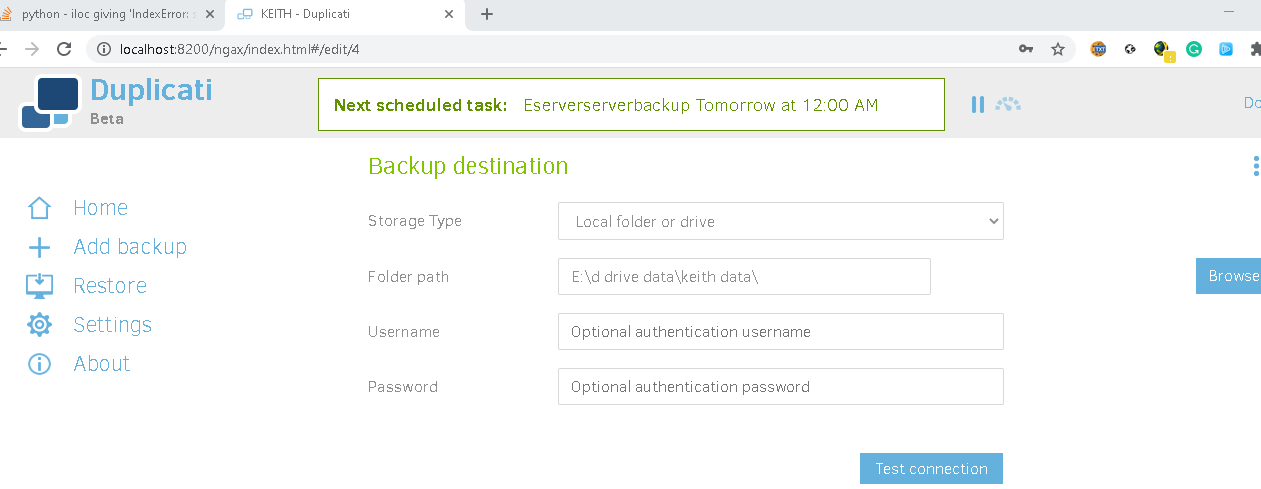
if not what are my options as i just want the files before the files before the backup as there were some Outlook data files of at least 10 years back which now i have lost.
I also do not mind if i loose the folder structure but only get back my old files.
Thanks for your support
Regards
Keith
---
### Author:  [@ts678](https://forum.duplicati.com/u/ts678)
#### Post date: [July 23, 2020, 7:46pm UTC](https://forum.duplicati.com/t/unable-to-restore-my-data-from-one-drive-backup/10281/9 "2020-07-23T19:46:58Z")
> [@write2keith](#):
>
> i thought that i would be easier to download the files to the local drive and then try and restore the files
Probably so, but I’m still not clear on whether you had automatic OneDrive upload from local files before.
> [@write2keith](#):
>
> and Duplicati backup will contain the files with the extension.[MerlinWebster@aol.com].com
Do you mean it backed up damaged source files (which may be easy to ignore), or OneDrive destination has such names? Latter is a problem if the files held data for old backups. I guess you’re wanting Jan 28.
After download is complete (and maybe even before) it should be easy to see dates of the dlist filenames.
There is a Mar 24 on the screenshot, and maybe that ran awhile and explains the Mar 24 and Mar 25 files, however ordinarily you’d see Mar 24 on your Restore dropdown, but the newest actually seen was Jan 28.
This can be looked into more readily after the download of the OneDrive files finishes and access is local.
> [@write2keith](#):
>
> what should be my next thing i should do
Figure out whether you have any virus-damaged files on OneDrive, e.g. by looking for the virus’ extension. Right now we don’t know if we’re facing a virus-damaged backup which may make restores much harder.
Alternatively, you didn’t have the OneDrive client installed before, so virus would have less remote access.