### Author:  [@Beckfield](https://forum.duplicati.com/u/Beckfield)
#### Post date: [December 23, 2024, 3:32am UTC](https://forum.duplicati.com/t/tray-icon-wont-launch-after-update/19756/5 "2024-12-23T03:32:22Z")
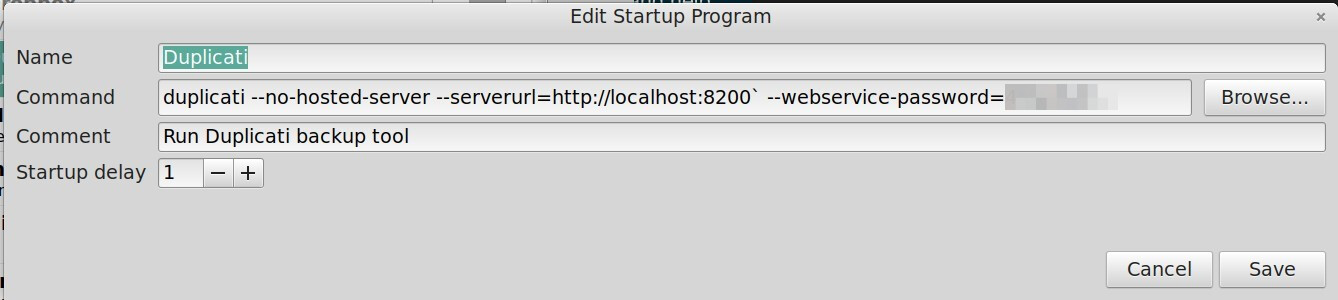
I added the password parameter to the Startup command to launch the Tray Icon, but the Tray Icon won’t launch the UI.
Installing a new version shouldn’t cause things to stop working. If that’s unavoidable, there needs to be ample, _clear_ instructions provided _during the process_ for how to handle it. This is really frustrating.
> [@kenkendk](#):
>
> If the tray icon (aka the `duplicati` command) is running in a different user context than the server, you need to supply the password
What is a “different context?”
---
### Author:  [@ThomasV](https://forum.duplicati.com/u/ThomasV)
#### Post date: [December 23, 2024, 10:31am UTC](https://forum.duplicati.com/t/tray-icon-wont-launch-after-update/19756/6 "2024-12-23T10:31:22Z")
Not sure if I’m having same issue, as header is different to last post. Does tray icon itself not launch or does tray icon not launch the web UI?
In my case it is second. I updated Duplicati from 2.0.8.1\_beta\_2024-05-07 to 2.1.0.2\_beta\_2024-11-29. Stopped windows service and all running processes before. Password is set since first installation. Backups are running fine, from tray icon “Pause/Resume” is working, icon is green while backup is running, just “Open” is not working. After selecting it, windows is complaining about app is not responding anymore. I can just kill Duplicati.GUI.TrayIcon.exe in Task-Manager then.
What I also noticed, but not sure if related:
- There are 2 processes running now, after service is started:
Duplicati.Server (as before) and addtitional Duplicati.WindowsService
- There is a delay after entering password in UI before showing backups on “Home” screen of 1-2 seconds. Did not note it in old version.
---
### Author:  [@kenkendk](https://forum.duplicati.com/u/kenkendk)
#### Post date: [December 23, 2024, 6:49pm UTC](https://forum.duplicati.com/t/tray-icon-wont-launch-after-update/19756/7 "2024-12-23T18:49:47Z")
> [@Beckfield](#):
>
> I added the password parameter to the Startup command to launch the Tray Icon, but the Tray Icon won’t launch the UI.
Do you get any error messages from the TrayIcon at all?
It is still not clear to me what the exact problem is, if it is the connection or the TrayIcon itself.
If it is a problem with authentication, there should be warning messages printed to the console.
If this is a problem with Avalonia failing to show the TrayIcon, we should investigate that part.
You can enable verbose logging with:
```plaintext
DEBUG_AVALONIA=2 duplicati --no-hosted-server --serverurl=http://localhost:8200` --webservice-password=
```
> [@Beckfield](#):
>
> Installing a new version shouldn’t cause things to stop working. If that’s unavoidable, there needs to be ample, _clear_ instructions provided _during the process_ for how to handle it. This is really frustrating.
This is exactly the intention. Unfortunately, the Mono runtime (and the similar Windows .NET 4 runtime) is not being maintained so we had to change many things at the same time for this release. It has been tested, but not seen as wide use the previous version before now.
For _most_ users, the TrayIcon hosts the server and for this setup there should be no change required. For other users the instructions are “supply a password if you are not already using one”.
> [@Beckfield](#):
>
> What is a “different context?”
Essentially a different user running the program. Duplicati uses the environment to figure out what paths to use, so running as a different user will cause it to use different paths on the system.
> [@ThomasV](#):
>
> In my case it is second. I updated Duplicati from 2.0.8.1\_beta\_2024-05-07 to 2.1.0.2\_beta\_2024-11-29. Stopped windows service and all running processes before. Password is set since first installation. Backups are running fine, from tray icon “Pause/Resume” is working, icon is green while backup is running, just “Open” is not working. After selecting it, windows is complaining about app is not responding anymore. I can just kill Duplicati.GUI.TrayIcon.exe in Task-Manager then.
That is a different issue (I think). This has been resolved in the canary build for 2.1.0.101:
> [@Release: 2.1.0.101 (Canary) 2024-12-06](https://forum.duplicati.com/t/release-2-1-0-101-canary-2024-12-06/19616):
>
> [2.1.0.101\_canary\_2024-12-06](https://github.com/duplicati/duplicati/releases/tag/v2.1.0.101_canary_2024-12-06) This release is a canary release intended to be used for testing. Note that this build is using .NET8, unlike the 2.0.8.1 build Breaking change from previous canary The pCloud backend is updated to support subfolders. Paths with / will now be treated as a folder structure on pCloud. Previous version would treat folder/subfolder as a single foldername, this version treats it as folder / subfolder. Detailed list of changes: Fixed a case where the TrayIcon would h…
You can install the 2.1.0.103 version:
> [@Release: 2.1.0.103 (Canary) 2024-12-21](https://forum.duplicati.com/t/release-2-1-0-103-canary-2024-12-21/19765):
>
> [2.1.0.103\_canary\_2024-12-21](https://github.com/duplicati/duplicati/releases/tag/v2.1.0.103_canary_2024-12-21) This release is a canary release intended to be used for testing. Note that this build is using .NET8, unlike the 2.0.8.1 build Note that this build has a redesigned restore flow Should issues arise, the previous restore engine can be enabled with --restore-legacy=true. Detailed list of changes: Updated MacOS LaunchAgents to run as current user Updated preloader logic to search additional paths Fixed a few potential issues in JS Disabled openid probing on the ser…
---
### Author:  [@Beckfield](https://forum.duplicati.com/u/Beckfield)
#### Post date: [December 23, 2024, 6:50pm UTC](https://forum.duplicati.com/t/tray-icon-wont-launch-after-update/19756/8 "2024-12-23T18:50:12Z")
> [@ThomasV](#):
>
> Does tray icon itself not launch or does tray icon not launch the web UI?
Initially the tray icon would not launch. After adding the --webservice-password= parameter, the try icon launches, but the icon will not launch the web UI.
---
### Author:  [@kenkendk](https://forum.duplicati.com/u/kenkendk)
#### Post date: [December 23, 2024, 6:55pm UTC](https://forum.duplicati.com/t/tray-icon-wont-launch-after-update/19756/9 "2024-12-23T18:55:47Z")
> [@Beckfield](#):
>
> Initially the tray icon would not launch. After adding the --webservice-password= parameter, the try icon launches, but the icon will not launch the web UI.
Ok, then it could be the same as @ThomasV suggests. This has been fixed in canary builds, but a new beta release with the fix is not yet released.
---
### Author:  [@Beckfield](https://forum.duplicati.com/u/Beckfield)
#### Post date: [December 23, 2024, 7:20pm UTC](https://forum.duplicati.com/t/tray-icon-wont-launch-after-update/19756/10 "2024-12-23T19:20:11Z")
> [@kenkendk](#):
>
> but a new beta release with the fix is not yet released.
Ok, I’ll watch for that.
---
### Author:  [@ThomasV](https://forum.duplicati.com/u/ThomasV)
#### Post date: [December 25, 2024, 6:13am UTC](https://forum.duplicati.com/t/tray-icon-wont-launch-after-update/19756/11 "2024-12-25T06:13:51Z")
> [@kenkendk](#):
>
> but a new beta release with the fix is not yet released
Thanks! Will wait for the beta, as indicating running backup is most important function of tray icon for me and this is still working. I always have browser open including one tab for Duplicati, so using “Open” very rarely.
---
### Author:  [@ThomasV](https://forum.duplicati.com/u/ThomasV)
#### Post date: [January 24, 2025, 11:18am UTC](https://forum.duplicati.com/t/tray-icon-wont-launch-after-update/19756/12 "2025-01-24T11:18:06Z")
2.1.0.3\_beta\_2025-01-22 did not fix it for me. Same behavior as before.
---
### Author:  [@kenkendk](https://forum.duplicati.com/u/kenkendk)
#### Post date: [January 24, 2025, 2:31pm UTC](https://forum.duplicati.com/t/tray-icon-wont-launch-after-update/19756/13 "2025-01-24T14:31:45Z")
Ok, that suggests you have a different issue then.
Just to clarify, you are running the TrayIcon with `--no-hosted-server` and the symptom is that the TrayIcon starts hanging when clicking the “Open” menu?
Any other symptoms or details that could help to reproduce or track this down?
---
### Author:  [@ThomasV](https://forum.duplicati.com/u/ThomasV)
#### Post date: [January 27, 2025, 11:43am UTC](https://forum.duplicati.com/t/tray-icon-wont-launch-after-update/19756/14 "2025-01-27T11:43:59Z")
Yes, running with --no-hosted-server=true and --webserver-password=\*\*\*\*\*.
No other symptoms, all is working as far I can see. Even what I wrote above, about delay after entering password, is gone with this version.
---
### Author:  [@kenkendk](https://forum.duplicati.com/u/kenkendk)
#### Post date: [January 28, 2025, 8:08pm UTC](https://forum.duplicati.com/t/tray-icon-wont-launch-after-update/19756/15 "2025-01-28T20:08:03Z")
I have registered [an issue for hanging TrayIcon](https://github.com/duplicati/duplicati/issues/5923).
@ThomasV you are using Windows I can guess and I assume you have updated Duplicati so both the TrayIcon and the Server is running 2.1.0.3.
@Beckfield reported using Linux Mint, is it still an issue there?
---
### Author:  [@Beckfield](https://forum.duplicati.com/u/Beckfield)
#### Post date: [January 28, 2025, 10:45pm UTC](https://forum.duplicati.com/t/tray-icon-wont-launch-after-update/19756/16 "2025-01-28T22:45:47Z")
> [@kenkendk](#):
>
> @Beckfield reported using Linux Mint, is it still an issue there?
Yes. Now running Duplicati - 2.1.0.3\_beta\_2025-01-22.
The tray icon is launched on startup, but the ‘Open’ command does not launch the UI. ~~Also, the ‘Quit’ command does not close the tray icon. I presume ‘Pause’ doesn’t work either, but I haven’t tried.~~
Edit: On further testing, ‘Quit’ and ‘Pause’ work if I haven’t first run ‘Open,’ causing it to hang.
---
### Author:  [@ThomasV](https://forum.duplicati.com/u/ThomasV)
#### Post date: [January 31, 2025, 9:57am UTC](https://forum.duplicati.com/t/tray-icon-wont-launch-after-update/19756/17 "2025-01-31T09:57:03Z")
> [@kenkendk](#):
>
> you are using Windows I can guess and I assume you have updated Duplicati so both the TrayIcon and the Server is running 2.1.0.3.
Yes, using windows. Used duplicati-2.1.0.3\_beta\_2025-01-22-win-x64-gui.msi for update, so it should always update both and no older version should be kept somewhere, or? But double checked the exe behind TrayIcon autostart entry now. Is also 2.1.0.3.
Can I help somehow? Maybe for better understanding: “Open” command is just opening browser window/tab with GUI page and entering password, or?
---
### Author:  [@kenkendk](https://forum.duplicati.com/u/kenkendk)
#### Post date: [February 3, 2025, 9:44am UTC](https://forum.duplicati.com/t/tray-icon-wont-launch-after-update/19756/18 "2025-02-03T09:44:29Z")
> [@ThomasV](#):
>
> Can I help somehow? Maybe for better understanding: “Open” command is just opening browser window/tab with GUI page and entering password, or?
There is a related post:
[Windows 11 2024H2 - TrayIcon won’t load when starting Duplicati as a service](https://forum.duplicati.com/t/windows-11-2024h2-trayicon-wont-load-when-starting-duplicati-as-a-service/20022)
The “Open” command tries to first create a sign-in token, which is a special short-lived token that can be used instead of the password. If the sign-in token is generated, it will open the `/signin.html` page with the token, and that will cause the browser to obtain a valid login.
If that fails, it will just open `/index.html` and let the user sign in.
The hang that I previously fixed was caused by a deadlock on the signin page, where the TrayIcon UI thread would be blocked by the call, and the call wanted to return to the UI thread with the result. (For developers: missing `ConfigureAwait(false)` ).
I am guessing that the issue described here is something similar.
---
### Author:  [@Beckfield](https://forum.duplicati.com/u/Beckfield)
#### Post date: [March 12, 2025, 6:26am UTC](https://forum.duplicati.com/t/tray-icon-wont-launch-after-update/19756/19 "2025-03-12T06:26:29Z")
> [@Beckfield](#):
>
> > [@kenkendk](#):
> >
> > @Beckfield reported using Linux Mint, is it still an issue there?
>
> Yes. Now running Duplicati - 2.1.0.3\_beta\_2025-01-22.
@kenkendk I am now running 2.1.0.5\_stable\_2025-03-04, and I still can’t launch the UI from the tray icon. It is still apparently hanging, so that none of the commands on the tray icon (Open, Pause, Quit) will work. This, coupled with new Dashboard not seeing my machine or backups, is pretty frustrating. It doesn’t even seem to know that the Duplicati client is installed.
---
### Author:  [@ts678](https://forum.duplicati.com/u/ts678)
#### Post date: [March 12, 2025, 7:58pm UTC](https://forum.duplicati.com/t/tray-icon-wont-launch-after-update/19756/20 "2025-03-12T19:58:10Z")
> [@Beckfield](#):
>
> I am now running 2.1.0.5\_stable\_2025-03-04, and I still can’t launch the UI from the tray icon.
I just installed this on Linux Mint 21.3 (although it’s the Xfce version) and it mostly works. A Pause changes tray icon to show a pause. An Open opens Firefox and does an automatic JWT login. What wasn’t working was its Quit, although the icon vanishes, `ps` shows `duplicati` still up. A normal `kill` didn’t, but `kill -9` did.
While I was looking into the Quit problem, I ran `less /var/log/syslog` as root, and looked at the bottom (press G). Duplicati did have a couple of things to say.
On second try, it went down, complaining, but it went down. The log message was:
> `Mar 12 15:20:04 LinuxMint21 duplicati: Request error: Thread was interrupted from a waiting state.`
> `Mar 12 15:20:14 LinuxMint21 duplicati: An error occurred on server tear down: System.Threading.ThreadInterruptedException: Thread was interrupted from a waiting state.#012 at System.Threading.Monitor.ObjWait(Int32 millisecondsTimeout, Object obj)#012 at System.Threading.ManualResetEventSlim.Wait(Int32 millisecondsTimeout, CancellationToken cancellationToken)#012 at System.Threading.Tasks.Task.SpinThenBlockingWait(Int32 millisecondsTimeout, CancellationToken cancellationToken)#012 at System.Threading.Tasks.Task.InternalWaitCore(Int32 millisecondsTimeout, CancellationToken cancellationToken)#012 at Duplicati.Server.Program.ShutdownModernWebserver()#012 at Duplicati.Server.Program.<>c.b__60_9()#012 at Duplicati.Server.Program.Main(String[] _args)`
and there was a similar message on the terminal where I started `duplicati`. This seems to be somewhat “normal”. The new Duplicati doesn’t shut down smoothly…
The hang, which I’m not used to seeing, unlike the somewhat slow and noisy Quit:
```plaintext
Mar 12 15:06:23 LinuxMint21 duplicati: Request error: The channel "UI Action" is retired
Mar 12 15:07:05 LinuxMint21 duplicati: Request error: One or more errors occurred. (An error occurred while sending the request.)
Mar 12 15:07:05 LinuxMint21 duplicati: Request error: One or more errors occurred. (Connection refused (localhost:8200))
```
and this duplicati stayed up far longer than usual slow Quit, and didn’t `kill` easily.
You might want to `ps` or `pgrep` for duplicati, and check your logs, and launch from terminal in case some output goes there. Another question is how install was done. Mine was to have Firefox download the `.deb`, bring it up in GUI viewer, and install. This runs `gdebi` and installs dependencies if needed. Running `apt` should as well. Running `dpkg` has always seemed a little iffy to me, even though manual says that.
[Next page](https://forum.duplicati.com/t/tray-icon-wont-launch-after-update/19756.md?page=2)